
PELADN WO4 (Ryzen 5 7640HS)
Published on

The PELADN WO4 with the Ryzen 5 7640HS is a five-inch-square desktop for office work, development and light gaming, built in the same black chassis with an orange stripe as the older Ryzen 5 5600H WO4. Everything inside is a generation newer: six Zen 4 cores, Radeon 760M graphics, DDR5 SO-DIMMs, a PCIe 4.0 boot drive with a second NVMe slot beside it, and a rear USB4 port. The lid lifts off by hand and exposes both memory slots and both M.2 slots. Hubwood saw games stutter after a few minutes with the lid closed, which he traced to heat around the memory, and the 16GB configuration The PC Enthusiast tested arrived with one memory stick, which holds the graphics back.
Pros and Cons
| Pros | Cons |
|---|---|
| Six Zen 4 cores at up to 5.0GHz, about 23,100 on PassMark’s CPU Mark | Hubwood saw games stutter after about five minutes with the lid closed, on two units |
| Magnetic lid gives tool-free access to both memory slots and both M.2 slots | The PC Enthusiast’s 16GB unit shipped with one stick, so the iGPU ran single-channel |
| Rear USB4 port measured above 4 GB/s with an external SSD | Cyberpunk 2077 and Red Dead Redemption 2 ran at 25 and 22 fps in The PC Enthusiast’s tests |
| 2.5GbE plus a gigabit port, both on the rear panel | CPU peaked at 98C under a Cinebench loop |
| Second M.2 slot for an extra NVMe drive; a heatsink comes in the box | Wi-Fi 6E downloads trailed a Wi-Fi 7 desktop on the same network |
| Hubwood measured about 7.5W at idle | No OCuLink port and no SATA support |
Related Videos
PELADN WO4 (Ryzen 5 7640HS) Comparison Chart
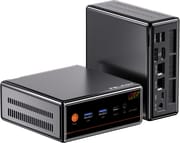 PELADN WO4 (Ryzen 5 7640HS) | PELADN WO4 (Ryzen 5 7640HS) | PELADN WO4 (Ryzen 5 7640HS) | |
| Price | List Price: $419.00 Amazon Prices: | List Price: $489.00 Amazon Prices: Loading prices... | List Price: $599.00 Amazon Prices: |
| Version | 16GB/512GB | 16GB/1TB | 32GB/1TB |
| Performance Rating | 4.7 | 4.7 | 5.2 |
| Operating System | Windows 11 Pro | Windows 11 Pro | Windows 11 Pro |
| Processor | Hexa-core 4.30 Ghz (max 5.00 Ghz) AMD Ryzen 5 7640HS | Hexa-core 4.30 Ghz (max 5.00 Ghz) AMD Ryzen 5 7640HS | Hexa-core 4.30 Ghz (max 5.00 Ghz) AMD Ryzen 5 7640HS |
| GPU | Integrated AMD Radeon 760M | Integrated AMD Radeon 760M | Integrated AMD Radeon 760M |
| RAM | 16 GB DDR5 SO-DIMM, 2-channel (16GB DDR5-5600) | 16 GB DDR5 SO-DIMM, 2-channel (16GB DDR5-5600; reviewed unit had one stick) | 32 GB DDR5 SO-DIMM, 2-channel (32GB DDR5-5600 (2x 16GB)) |
| Internal Storage | 512 GB PCIe 4.0 NVMe SSD | 1 TB PCIe 4.0 NVMe SSD | 1 TB PCIe 4.0 NVMe SSD |
| Dimensions width x length x thickness | 5.04 x 5.04 x 2.05 inches (128.02 x 128.02 x 52.07 mm) | 5.04 x 5.04 x 2.05 inches (128.02 x 128.02 x 52.07 mm) | 5.04 x 5.04 x 2.05 inches (128.02 x 128.02 x 52.07 mm) |
| Weight | 1.21 lbs (0.55 kg) | 1.21 lbs (0.55 kg) | 1.21 lbs (0.55 kg) |
| WiFi | Wi-Fi 6E (802.11ax) | Wi-Fi 6E (802.11ax) | Wi-Fi 6E (802.11ax) |
| Bluetooth | Bluetooth 5.2 | Bluetooth 5.2 | Bluetooth 5.2 |
| Ethernet | 2 Ethernet ports at 2.5 Gbps | 2 Ethernet ports at 2.5 Gbps | 2 Ethernet ports at 2.5 Gbps |
| HDMI | 1 Full-Size HDMI Port | 1 Full-Size HDMI Port | 1 Full-Size HDMI Port |
| DisplayPort | 1 DisplayPort (DP 1.2 (4K@60); DP Alt Mode on both USB-C) | 1 DisplayPort (DP 1.2 (4K@60); DP Alt Mode on both USB-C) | 1 DisplayPort (DP 1.2 (4K@60); DP Alt Mode on both USB-C) |
| VGA | No VGA Ports | No VGA Ports | No VGA Ports |
| USB Ports | 2 USB 2.0, 2 USB 3, 2 USB-C (1 USB4) Rear USB4 (40Gbps, PD in); front USB-C 10Gbps; 2x USB-A 10Gbps; 2x USB 2.0 | 2 USB 2.0, 2 USB 3, 2 USB-C (1 USB4) Rear USB4 (40Gbps, PD in); front USB-C 10Gbps; 2x USB-A 10Gbps; 2x USB 2.0 | 2 USB 2.0, 2 USB 3, 2 USB-C (1 USB4) Rear USB4 (40Gbps, PD in); front USB-C 10Gbps; 2x USB-A 10Gbps; 2x USB 2.0 |
| Thunderbolt Ports | No | No | No |
| OCuLink | No | No | No |
| Internal SATA Ports | No SATA ports | No SATA ports | No SATA ports |
| Card Reader | No Card Reader | No Card Reader | No Card Reader |
| Headphone Jack | combo | combo | combo |
| Fanless | No | No | No |
| VESA Mount | Yes | Yes | Yes |
| In the Box | Mini PC, 120W 19V adapter, HDMI cable, VESA bracket, screws, manual | Mini PC, 120W 19V adapter, HDMI cable, VESA bracket, screws, manual | Mini PC, 120W 19V adapter, HDMI cable, VESA bracket, screws, manual |
| Expandability | Two DDR5 SO-DIMM slots, up to 64GB. Two M.2 2280 NVMe slots (PCIe 4.0 x4 and PCIe 3.0 x4). Magnetic lid, no tools needed. | Two DDR5 SO-DIMM slots, up to 64GB. Two M.2 2280 NVMe slots (PCIe 4.0 x4 and PCIe 3.0 x4). Magnetic lid, no tools needed. | Two DDR5 SO-DIMM slots, up to 64GB. Two M.2 2280 NVMe slots (PCIe 4.0 x4 and PCIe 3.0 x4). Magnetic lid, no tools needed. |
Related Mini PCs
-
 ASUS NUC 13 ProThe ASUS NUC 13 Pro is a 4x4 mini PC sold in Core i5-1340P and Core i7-1360P builds with two DDR4…
 -
 Beelink SER6 MAXThe Beelink SER6 MAX pairs a Ryzen 7 7735HS or Ryzen 9 6900HX with Radeon 680M graphics and up to…
 -
 Dell OptiPlex 7010 MicroDell's OptiPlex 7010 Micro is a 1-liter, 13th-Gen Intel business desktop built for enterprise…
 -
 Dell Pro Micro QCM1250Dell rebrands the long-running OptiPlex Micro line as the Pro Micro and ships the QCM1250 with the…
 -
 GEEKOM A7 (2026 Edition)The GEEKOM A7 2026 Edition keeps the original A7's half-liter aluminum case and ports but swaps the…
 -
 GEEKOM Mini IT13The GEEKOM Mini IT13 is a 13th-gen Intel mini PC (Core i5-13500H up to i9-13900H/HK) with DDR4 to…
Ports, memory and storage

The chassis measures 5.04 inches square and 2.05 inches tall and weighs about 1.2 pounds, and PELADN’s spec sheet lists the shell as black plastic. The front panel carries the orange power button, two USB-A 3.2 Gen 2 ports, a 10Gbps USB-C port with DisplayPort output, a 3.5mm combo jack and a Clear CMOS button. The rear holds the 19V barrel input, the USB4 port, the 2.5GbE and gigabit jacks, HDMI 2.0, DisplayPort 1.2 and two USB 2.0 ports. The USB4 port runs at 40Gbps, carries DisplayPort 1.4, and can power the machine from a USB-C PD adapter. PELADN ships a 120W adapter for the barrel jack.
Memory sits in two DDR5-5600 SO-DIMM slots that take up to 64GB. The Radeon 760M uses system memory, and two sticks give it twice the bandwidth of one. PCWorld’s 32GB unit came with two 16GB modules. The PC Enthusiast’s 16GB unit came with a single 16GB module and an empty second slot, and that review recommends adding a matching stick for gaming. Storage is one PCIe 4.0 x4 M.2 slot holding the boot drive and one PCIe 3.0 x4 M.2 slot that is empty, with a spare M.2 heatsink in the box. Neither slot takes a SATA M.2 drive. PCWorld’s unit had a Crucial P3 that measured 5,200 MB/s read, and The PC Enthusiast’s had a YMTC PC41Q that measured 5,736 MB/s read.
Wireless is Wi-Fi 6E with Bluetooth 5.2, on a MediaTek MT7922 card in The PC Enthusiast’s unit, even though some PELADN materials say Wi-Fi 6. The underside of the lid has a bracket for a 2.5-inch drive, but PELADN’s spec sheet lists no SATA port, and Hubwood found no cable for it in the box.
Zen 4 performance and Radeon 760M graphics

The Ryzen 5 7640HS is a 2023 Zen 4 chip from AMD’s Phoenix family: six cores, twelve threads, a 4.3GHz base clock and a 5.0GHz boost. It scores about 23,100 on PassMark’s CPU Mark, roughly 40 percent above the 5600H in the older WO4. In 2026 it trails newer chips in multi-core work, and PCWorld measured it about 20 percent behind Ryzen AI 9 HX 370 systems in the 3DMark CPU test. Hubwood recorded 12,900 in Cinebench R23 multi-core and 1,733 single-core on a 32GB unit. The PC Enthusiast got 11,327 and 1,722 on its single-stick unit. PCMark 10 overall scores landed between 6,828 and 7,344 across PCWorld, The PC Enthusiast and Hubwood.
PCWorld’s dual-channel unit scored 2,778 in 3DMark Time Spy, while The PC Enthusiast’s single-channel unit scored 1,624. At 1080p on low settings, The PC Enthusiast measured 25 fps in Cyberpunk 2077, 22 fps in Red Dead Redemption 2 and 51 fps in Fortnite, against 118 fps in Hades. Hubwood, on a 32GB unit with the lid open, measured 153 fps in CS2 at 1080p low with FSR and a steady 60 fps in Fallout 4 at 1080p medium. GhostKeyboard Review ran Nintendo Switch emulation at a near-locked 60 fps in Mario Odyssey, and also ran local language models: Mistral 7B at 15.79 tokens per second and a 20-billion-parameter model at about 10.
Noise, heat and stutter with the lid closed
PCWorld describes a two-fan cooler with a second system fan moving air over the RAM and SSD, and found the machine close to inaudible in office work. The PC Enthusiast found it quiet under light loads but clearly audible under heavy CPU work and gaming. In a Cinebench 2024 loop, its CPU peaked at 98C and averaged 58C, with package power peaking at 64W, and HWiNFO reported no thermal throttling. Hubwood measured about 7.5W at idle and about 85W under a gaming load.
In every game Hubwood tried, heavy stuttering began after about five minutes with the lid on, and the frame-time graph became erratic. CPU and GPU temperatures were normal. With the lid off, the stutter faded within 30 to 40 seconds and stayed away. He traced it to heat in the upper chamber that holds the RAM, and a replacement unit from PELADN behaved the same way. PELADN told him future units would fix it, and he said he could not confirm that. He saw no effect in everyday use, video editing or video playback.
Reviewer Insights
PCWorld
Christoph Hoffmann scored the WO4 4 out of 5 in PCWorld’s February 2026 review, and opened with “My first impression of the PELADN WO4 was that it’s cool and high-quality.” His pros were performance from the 7640HS and Radeon 760M, the Crucial SSD, the magnetic cover, quiet cooling under sustained load, and the range of ports. His only con was a scratch-resistant case surface that attracts dust. The magnetic cover got the most attention: “Its (almost) unique selling point is the clever housing concept with a magnetic cover.” His unit had 32GB.
On his dual-channel machine, PCMark 10 returned 7,158 overall, with 10,063 in Essentials, 11,906 in Productivity and 8,309 in Content Creation. 3DMark’s CPU test scored 5,949 multi-thread and 974 single-thread, and Time Spy reached 2,778 with 2,488 graphics points. On noise he concluded that “The FrostCool system works so smoothly that the computer is unlikely to be perceived as disruptive, even in quiet working environments.”
The PC Enthusiast
Peter Paul at The PC Enthusiast recommends the WO4 for everyday work but not for gaming, and also scored it 4 out of 5 after testing the 16GB/1TB configuration in June 2026. He called the plastic build average for the price and praised the magnetic cover, USB4, and dual LAN. His cons were the single 16GB stick, weak AAA gaming, Wi-Fi speeds below his Wi-Fi 7 desktop, networking capped at 2.5GbE, CPU temperatures near 98C, and no OCuLink. On the chip, his verdict was “The Ryzen 5 7640HS remains a strong processor for everyday computing.”
The internal drive reached 5,736 MB/s read and 5,396 MB/s write in his tests, and a Corsair USB4 SSD on the rear port reached 4,054 MB/s read. On games he found that “Gaming is where the WO4 starts to show its limitations,” and concluded “Based on my testing, I would not buy the Peladn WO4 specifically for gaming.” Indie titles such as Hades and Ender Lilies ran above 100 fps, and he suspected a second memory stick would help in heavier games.
Hubwood
Hubwood found the lid-closed stutter described above on a 32GB unit and again on its replacement. Outside games he praised the tool-free lid, the room for a second SSD or an OCuLink adapter card, and the quiet cooling, saying “The mini PC is in fact super silent most of the time, kind of outstanding, really.” Despite the RAM-heat stutter, he called the WO4 “one of the best mini PCs I’ve tested yet” and said “If you’re not gaming though, this could be a no-brainer.” For gaming he recommended running with the case open. He also found a simple BIOS with no performance modes and noted a faint rattle when the machine stood vertically.
GhostKeyboard Review
GhostKeyboard Review judged the WO4 on value and expansion and said that “The key advantage here is value.” On a 32GB unit he ran four 4K video streams, two emulators, and an OBS recording at once without slowdowns. For games he placed the Radeon 760M between the 680M and the 780M, close to the 780M in some AAA titles; Black Myth: Wukong averaged in the low 50s at low settings with FSR 3, and he said “Switch emulation runs very well.” For more graphics power he added an OCuLink adapter under the lid and connected an RTX 4080 Super, which scored 26,000 in Time Spy graphics, about 10 percent below the same card in a desktop. In the BIOS he found an adjustable fan curve and TDP but no option to disable the NPU, and on ports he said “Dual 2.5 gig LAN would have been nice.”
Dave Taylor
Dave Taylor used the WO4 as an everyday Windows desktop. Starting from first boot on a 32GB unit, he ran Netflix, YouTube, Google Docs and Canva, and paired an Android phone through Phone Link. He did not test games. First app launches and the first Windows Update run were slow, and after that he found it responsive and quiet. He summed it up with “This is a fully functional desktop computer that is just ridiculously small and yet it has really excellent specs.”
Customer Reviews
On Amazon, buyers rate the WO4 7640HS 4.3 stars across 20 ratings. Allen365 uses it for browsing, email and documents and plays Diablo 4 at 1280x720, and wrote that “Its a snappy little machine.” Nicolas Jafelle called it “plenty powerful for some light gaming and retro emulation” and recommended buying a second 16GB stick. Christopher W. Curtis praised the magnetic cover and wrote that “You can literally pop off the cover and the RAM and M.2 slots are right there.”
Curtis’s unit shipped with a loose screw under the motherboard and mismatched mounting screws, and he reported that his unit shipped with a Windows 11 installer instead of an installed copy, and Windows showed as not activated after setup. Pablo A. Jimenez F. found that the USB ports stay powered after shutdown, and wrote that “According to the manufacturer/seller there is no way to disable such feature.” Another verified buyer reported a unit that crashed every few minutes out of the box with only Chrome installed.
How it differs from the Ryzen 5 5600H WO4
The two WO4 models share the five-inch chassis, the orange-striped front panel, the magnetic lid, dual Ethernet, and the 2.5GbE plus gigabit split. The 5600H WO4 uses DDR4 memory, one PCIe 3.0 M.2 slot, and a SATA bay in the lid with a ribbon cable, and its Type-C port is limited to 10Gbps. The 7640HS model moves to DDR5, adds a PCIe 4.0 slot plus a second NVMe slot, drops SATA, and adds a 40Gbps USB4 port. Its CPU Mark is about 40 percent higher, and its RDNA 3 Radeon 760M replaces the 5600H’s older Vega 7 graphics.
Our verdict
The WO4 7640HS fits office work, software development, browsing, and video playback. PCWorld found it close to inaudible in office work, Hubwood measured about 7.5W at idle, and its six Zen 4 cores score about 23,100 on PassMark. The tool-free lid makes it easy to add memory or a second NVMe drive. Indie games and Switch emulation run well; buy it with two memory sticks, or add a matching one, so the Radeon 760M runs in dual channel.
Skip it if gaming is the main job. Hubwood’s games stuttered after five minutes with the lid closed, and The PC Enthusiast would not buy it for gaming. For more graphics headroom, the GMKtec Nucbox K8 PLUS pairs a Radeon 780M with an OCuLink port and two 2.5GbE ports. For a 2.5-inch SATA drive, the 5600H WO4 keeps the bay. To compare other boxes, use the Mini PC Comparison Chart.
Upgrades
Accessories that fit the PELADN WO4 (Ryzen 5 7640HS)'s USB4 or Thunderbolt ports.

Core X V2
A Thunderbolt 5 enclosure that Razer lists as working with Thunderbolt 4 and USB4 hosts; it fits a four-slot card and needs an ATX power supply.

DEG2 eGPU Dock
Connects over USB4 or Thunderbolt 5, with an OCuLink input behind a switch, and adds an M.2 slot; it needs an ATX or SFX power supply.

Breakaway Box 850 T5
Has an 850W power supply built in, so only the graphics card is extra, and works with Thunderbolt 4 and USB4 Windows PCs.

TS4 Thunderbolt 4 Dock
An 18-port dock that CalDigit lists for Thunderbolt 4 and USB4 hosts, with 2.5GbE and a DisplayPort 1.4 output.

TBT4-UD5 Thunderbolt 4 Dock
Two HDMI ports drive two 4K60 monitors from one Thunderbolt 4 or USB4 port on a Windows PC.

Revodok Max 208 Thunderbolt 4 Dock
Adds three Thunderbolt 4 ports for dual 4K60 displays plus gigabit Ethernet; it has no HDMI port, so monitors connect over USB-C or an adapter.
Frequently Asked Questions
Does the PELADN WO4 7640HS ship with dual-channel memory?
The 32GB configuration does. The PC Enthusiast’s 16GB unit came with one stick and an empty slot. A second matching DDR5-5600 SO-DIMM drops into the free slot under the magnetic lid, and the board accepts up to 64GB in total.
Can the PELADN WO4 7640HS use an external GPU?
There is no built-in OCuLink port, but GhostKeyboard Review fitted an OCuLink adapter under the lid and ran an RTX 4080 Super that scored about 10 percent below the same card in a desktop. The rear USB4 port is the other route, at 40Gbps. To get a picture while installing GPU drivers, the reviewer connected the monitor to both the mini PC and the graphics card.
Can the PELADN WO4 7640HS run from a USB-C charger?
Yes. PELADN’s spec sheet says the rear USB4 port accepts a USB-C Power Delivery adapter. The box includes a 19V, 6.32A barrel-jack adapter rated at 120W, and Hubwood measured about 85W at the wall under a gaming load, which is more than a 65W laptop charger supplies.
Does the PELADN WO4 7640HS have a 2.5-inch drive bay?
Not one you can use as shipped. The lid has a mount for a 2.5-inch drive, but PELADN’s spec sheet lists no SATA connection and neither M.2 slot accepts SATA drives. Extra storage goes in the second M.2 slot, a PCIe 3.0 x4 NVMe slot that holds an M.2 2280 drive.
What warranty does the PELADN WO4 7640HS carry?
PELADN lists a three-year limited hardware warranty on the WO4 7640HS and a 30-day return window on its own store. On Amazon, warranty claims go through the order page by contacting the seller.