
Acer Chromebook 15 315
Updated on

The Acer Chromebook 15 315 (CB315-3H) is a 15.6-inch Chrome OS laptop built around a Full HD display, a fanless chassis, and a keyboard wide enough for a dedicated number pad. It runs a low-power Intel Celeron N4000 with 4GB of RAM and eMMC storage soldered to the board, so the configuration you buy is the one you keep. Plastic construction and an entry-level processor are what hold the price down.
| Pros | Cons |
|---|---|
| Large 15.6” Full HD display rare at this price point (MergeDroid, NotebookCheck) | Display brightness too low at 229-261 nits for outdoor use (NotebookCheck, Trusted Reviews) |
| Completely silent fanless operation with no moving parts (Lon.TV) | Battery life varies significantly from 12.5-hour claim; testing shows 5.5-8 hours (Trusted Reviews, Lon.TV) |
| Dedicated number pad on keyboard, uncommon feature on Chromebooks (Milo B., MergeDroid) | All-plastic build feels budget-appropriate and base can warp under pressure (NotebookCheck) |
| Long Chrome OS support until June 2029 with regular security updates | Speakers are loud but lack bass and audio fidelity (Lon.TV, T3) |
| Premium appearance that “looks like a laptop three times more expensive” (Trusted Reviews) | Off-center trackpad positioned left may annoy right-handed users (Milo B.) |
| Responsive trackpad with solid feel for an entry-level device (MergeDroid) | No keyboard backlight limits use in dim environments |
Related Videos
Acer Chromebook 15 315 Comparison Chart
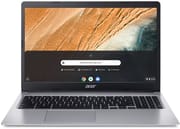 Acer Chromebook 15 315 | Acer Chromebook 15 315 | Acer Chromebook 15 315 | Acer Chromebook 15 315 | |
| Price | List Price: $299.99 Amazon Prices: Loading prices... | List Price: $399.99 Amazon Prices: Loading prices... | List Price: $169.00 Amazon Prices: Loading prices... | List Price: $185.00 Amazon Prices: Loading prices... |
| Model number | CB315-3HT-C296 / NX.HKCAA.003 | CB315-3HT-C3J0 / NX.HKCAA.004 | CB315-3H-C4QE / NX.HKBAA.003 | CB315-3H-C0VT / NX.ATDAA.008 |
| Performance Rating | 2.6 | 3.4 | 2.6 | 2.6 |
| Chromebook Plus | No | No | No | No |
| Processor | Dual-core 1.10 Ghz (max 2.60 Ghz) Intel Celeron N4000 Processor | Quad-core 1.10 Ghz (max 2.60 Ghz) Intel Celeron Processor N4120 | Dual-core 1.10 Ghz (max 2.60 Ghz) Intel Celeron N4000 Processor | Dual-core 1.10 Ghz (max 2.60 Ghz) Intel Celeron N4000 Processor |
| RAM | 4 GB | 4 GB | 4 GB | 4 GB |
| Internal Storage | 32 GB eMMC | 64 GB eMMC | 64 GB eMMC | 128 GB eMMC |
| Screen Size | 15.6" | 15.6" | 15.6" | 15.6" |
| Screen Resolution | 1920x1080 | 1920x1080 | 1366x768 | 1366x768 |
| Screen Type | ComfyView | ComfyView | ComfyView | ComfyView |
| Touch Screen | No | No | No | No |
| Stylus / Pen | No Stylus Support | No Stylus Support | No Stylus Support | No Stylus Support |
| Dimensions width x length x thickness | 14.4 x 9.9 x 0.8 inches (365.76 x 251.46 x 20.32 mm) | 14.4 x 9.9 x 0.8 inches (365.76 x 251.46 x 20.32 mm) | 14.4 x 9.9 x 0.8 inches (365.76 x 251.46 x 20.32 mm) | 14.4 x 9.9 x 0.8 inches (365.76 x 251.46 x 20.32 mm) |
| Weight | 4.19 lbs (1.9 kg) | 4.19 lbs (1.9 kg) | 4.19 lbs (1.9 kg) | 4.19 lbs (1.9 kg) |
| Backlit Keyboard | No | No | No | No |
| Webcam | 1280x720 | 1280x720 | 1280x720 | 1280x720 |
| WiFi | 802.11 a/b/g/n/ac | 802.11 a/b/g/n/ac | 802.11 a/b/g/n/ac | 802.11 a/b/g/n/ac |
| Bluetooth | Bluetooth 5.0 | Bluetooth 5.0 | Bluetooth 5.0 | Bluetooth 5.0 |
| Ethernet | No | No | No | No |
| Cellular Modem | No | No | No | No |
| HDMI | No HDMI | No HDMI | No HDMI | No HDMI |
| USB Ports | 2 USB 3, 2 USB-C (with DisplayPort and charging) | 2 USB 3, 2 USB-C (with DisplayPort and charging) | 2 USB 3, 2 USB-C (with DisplayPort and charging) | 2 USB 3, 2 USB-C (with DisplayPort and charging) |
| Thunderbolt Ports | No | No | No | No |
| Card Reader | microSD Card Reader | microSD Card Reader | microSD Card Reader | microSD Card Reader |
| Battery | 3 cell, Lithium Ion | 3 cell, Lithium Ion | 3 cell, Lithium Ion | 3 cell, Lithium Ion |
| Battery Life | 12.5 hours | 12.5 hours | 12.5 hours | 12.5 hours |
| Fanless | Yes | Yes | Yes | Yes |
| Auto Update Expiration Date | June, 2029 | June, 2029 | June, 2029 | June, 2029 |
Related Chromebooks
-
 Acer Chromebook 315 (CB315-5H/5HT)A budget-friendly 15.6-inch Chromebook with Intel N100 processor, FHD IPS display, WiFi 6E, and…
 -
 Acer Chromebook 715The Acer Chromebook 715 is a fanless 15.6-inch full-HD IPS Chromebook with an aluminum chassis, a…
 -
 HP Chromebook 15a (15a-nb0013dx)The HP Chromebook 15a (15a-nb0013dx) is a fanless 15.6-inch Chromebook with an Intel N200, 8GB of…
 -
 Samsung Chromebook 4+The Samsung Chromebook 4+ is a fanless 15.6-inch FHD Chromebook with an Intel Celeron N4000, dual…
 -
 ASUS Chromebook CX1 (CX1500)The ASUS Chromebook CX1 (CX1500) is a 15.6-inch full HD Chromebook with a number pad, an Intel…
 -
 ASUS Chromebook CX15The ASUS Chromebook CX15 is a 15.6-inch 1920x1080 ChromeOS laptop on an Intel Celeron N4500 with a…
A silent 15.6-inch machine with a number pad and a dim screen

The 15.6-inch display is a Full HD (1920x1080) IPS panel on the CB315-3HT builds, while the C4QE and C0VT CB315-3H builds ship a 1366x768 panel instead. The IPS versions have wide viewing angles and reasonably accurate colors out of the box. NotebookCheck measured color accuracy at ΔE 4.4 and contrast at 1470:1. Measured brightness across reviews lands between 229 and 261 nits, short of the 300+ nits that keeps a screen readable in a well-lit room or near a window. Indoors under controlled lighting that ceiling goes unnoticed.
The chassis is all plastic in a “pure silver” finish, with even panel gaps and no visible cost-cutting in the styling. NotebookCheck found the base can twist and warp under moderate pressure, so it is worth lifting the machine with two hands rather than by one corner. The fanless design means there is nothing to spin up during browsing or video, which suits a library desk or a quiet office. Passive cooling also means the Celeron N4000 throttles under sustained load because heat can only leave through the shell.
The keyboard spans the full width of the chassis, which leaves room for a dedicated number pad on the right side. Key travel is moderate and the layout is non-chiclet, so it takes a day or two to adjust coming from a standard laptop keyboard. The trackpad uses ocean-bound recycled plastic that Acer calls “ocean glass” and tracks gestures reliably. Making room for the number pad pushes it left of center, which puts it under the left palm rather than in the middle of the wrist rest. Ports run to two USB-C with Power Delivery and DisplayPort output, two USB-A 3.1 (usable with a USB ethernet adapter for wired networking), a microSD slot that NotebookCheck clocked at 34 MB/s, and a combo headphone and microphone jack.
Reviewer Insights

MergeDroid: the 8GB refurbished build is the sweet spot
MergeDroid tested a 2023 variant with the Pentium Silver N6000 processor, 8GB RAM, and 128GB storage, purchased as a certified refurbished unit for just £144 (approximately $183). He considers this configuration the “sweet spot” among the various model options, offering enough RAM for comfortable multitasking while keeping costs minimal. “The trackpad feels really nice for an entry level Chromebook; it feels solid, responds well, it’s not too loose or clunky like some can be,” he observed. Performance was described as “nice and snappy” for general tasks including light gaming and web browsing, though he noted that pushing multiple demanding tasks simultaneously causes noticeable slowdowns. The Chromebook 315’s long-term Chrome OS update support received particular praise for value, though note that MergeDroid tested a newer CB315 variant with a later AUE date than the CB315-3H model covered on this page (June 2029).
Lon.TV: check the model number before you buy the panel
Lon.TV reviewed an older AMD-powered variant and emphasized the importance of choosing the right configuration: “Make sure you get the right one because they have some other ones that come in with a similar look and price point but don’t have the nice display.” This warning remains relevant as Acer offers various CB315 models with different screen resolutions. His hands-on testing found the Full HD display to be “a nice display to look at” with the IPS panel delivering good viewing angles. The fanless design earned praise for silent operation, while battery life testing showed 7-8 hours of real-world use versus Acer’s 10-hour claim. He found the speakers “nice and loud” with “good stereo separation” but lacking bass and overall audio fidelity, typical of budget laptops.
NotebookCheck: 80.7 percent, with brightness the main complaint
According to NotebookCheck’s comprehensive review, the Chromebook 315 CB315-3HT earned an 80.7% rating, with the review summing up its strengths as the “FHD, IPS” touchscreen, “silent operation, and very good battery life.” Their testing unit with a Pentium Silver N5030 processor achieved Geekbench 5 scores of 532 (single-core) and 1529 (multi-core). The review praised the IPS touchscreen’s wide viewing angles and reasonably accurate colors but criticized the insufficient brightness at 228.9 nits. The display also exhibits PWM flickering at 250 Hz at brightness levels below 100%, which may cause eye strain for sensitive users during extended sessions. Battery life testing showed over 10 hours in their WiFi web browsing test, aligning with Acer’s claims when used conservatively.
Customer Reviews
Across 811 ratings on Amazon, the Acer Chromebook 15 315 averages 4.4 stars, with 72 percent of reviewers leaving five stars and a smaller 6 percent leaving one. The praise clusters on the large 15.6-inch screen, the value at its price, and the battery life. Verified buyer Apollo wrote that “the 15.6” screen is perfect” and that “the battery life is an impressive 9-10 hours,” while noting the trade-off that “it is heavier than my previous Chromebook.” Verified buyer Juan Ramirez summed up the value plainly: “for ~$330, you really can’t go wrong.” Several owners also single out the full numeric keypad; verified buyer Valerie K. wrote, “This model comes with a 10 key that I use all the time!”
Juan Ramirez cautioned that the machine “doesn’t handle Zoom calls all that well,” and one notable one-star review reflects display confusion rather than a defect: verified buyer Craig Downs bought it expecting a touchscreen and titled his review “Does NOT have TOUCHSCREEN DISPLAY!!!,” blaming the listing for advertising a touch panel this model does not include. (One five-star reviewer, by contrast, describes a touchscreen, so configurations and listings have varied; confirm the exact variant before buying if touch matters to you.)
Read more owner reviews on Amazon.
The screen size and the silence carry it, so pick storage at purchase
Buy this one for the 15.6-inch IPS panel, the fanless chassis, and the number pad. Chrome OS updates run through June 2029, so the software side stays current for years even on the cheapest configuration, and a machine with no fan stays usable in a room where noise matters.
Configuration deserves more thought than usual because the RAM and the eMMC are soldered to the board. Storage runs from 32GB to 128GB depending on the model number, and the microSD slot reads at 34 MB/s, which is fine for photos and documents but slow for anything you want to run from the card. Decide the capacity before you order, because nothing inside changes afterward.
To see how this model stacks up against the broader field, the Chromebook Comparison Chart lets you sort and filter every model by screen size, processor, and price.
Frequently Asked Questions
Can I upgrade the RAM or storage on the Acer Chromebook 15 315?
No. Both the RAM and the eMMC storage are soldered to the motherboard, which is normal for budget Chromebooks. The microSD slot adds room for files, but at the 34 MB/s NotebookCheck measured it is too slow to run apps from. Pick the configuration you want at purchase.
How long will the Acer Chromebook 15 315 receive Chrome OS updates?
The Acer Chromebook 15 315 (CB315-3H) has an Auto Update Expiration (AUE) date of June 2029. This means Google guarantees Chrome OS security updates and new features until that date. After the AUE date, the device continues to function but no longer receives updates, which may affect security and compatibility with newer web services.
Is the Acer Chromebook 15 315 good for students?
For web browsing, Google Docs, research, and streaming, it holds up. The 15.6-inch display gives students room to read and write at the same time, and the number pad helps with spreadsheets. Design, programming, and video production courses are where it runs short: storage tops out at 128GB and the Celeron N4000 throttles under sustained load. The 4GB configurations also slow down with many browser tabs open.
Does the Acer Chromebook 15 315 have a touchscreen?
Some variants do and some don’t: check the model number carefully. The CB315-3HT models (note the “T” suffix) include a 10-point multitouch IPS display, while the CB315-3H models have a non-touch display. The CB315-3HT builds use a 1920x1080 panel, while two CB315-3H configurations ship at 1366x768. The touchscreen versions tend to cost slightly more but don’t support stylus input for drawing or note-taking.
How does the Acer Chromebook 15 315 compare to other 15-inch Chromebooks?
It sits at the budget end of 15-inch Chromebooks, alongside the Lenovo IdeaPad 3i Chromebook and the HP Chromebook 15. Fanless operation and the number pad are the two features to weigh against a 229 to 261 nit panel and a plastic base that flexes. For browsing and document work the performance differences in this class are small, so update runway and screen quality are the more useful things to compare.
Can I connect an external monitor to the Acer Chromebook 15 315?
Yes, both USB-C ports support DisplayPort output for connecting external displays. You can use a USB-C to HDMI adapter or a USB-C monitor directly. The Intel UHD Graphics 600 supports up to 4K@60Hz output on external displays, though performance may vary when driving both the internal and external screens simultaneously.