
Acer Chromebook 311 (AMD)
Updated on

The Acer Chromebook 311 (CB311-10H) delivers a compelling value proposition for students, educators, and anyone seeking a reliable basic computing device. Powered by the AMD A4-9120C dual-core processor with integrated Radeon R4 graphics, this 11.6-inch Chromebook offers up to 10 hours of battery life, solid build quality, and all the Google ecosystem integration that makes Chrome OS appealing. While the 1366x768 display and 4GB of RAM reflect its budget positioning, the Chromebook 311 handles everyday web browsing, document editing, and educational applications with surprising competence. This model receives Chrome OS updates through June 2029 (extended from its original June 2026 date), giving it a comfortable software-support runway.
| Pros | Cons |
|---|---|
| Solid, durable construction described as “bombproof basic” that doesn’t flex | Small 11.6” HD screen limits multitasking and detailed work |
| Up to 10 hours of battery life for all-day use without charging | No touchscreen option on this non-Spin model |
| Affordable pricing frequently found under $200 on sale | 4GB RAM can feel constrained with many browser tabs |
| Lightweight at 2.87 lbs with a compact, portable design | Missing HDMI port limits external display options |
| Two USB-C ports plus two USB 3.0 ports for connectivity | Bluetooth 4.1 is dated compared to newer devices |
| Good WiFi 5 (802.11ac) with 2x2 MU-MIMO for fast connections | Software support ends at the June 2029 Auto Update Expiration |
Acer Chromebook 311 (AMD) Comparison Chart
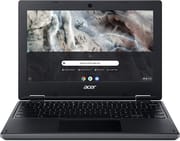 Acer Chromebook 311 (AMD) | |
| Price | List Price: $169.99 Amazon Prices: Loading prices... |
| Model number | CB311-10H-41M9 |
| Performance Rating | 2.3 |
| Chromebook Plus | No |
| Processor | Dual-core 1.60 Ghz (max 2.40 Ghz) AMD A4-9120C APU with Radeon R4 Graphics |
| RAM | 4 GB |
| Internal Storage | 64 GB eMMC |
| Screen Size | 11.6" |
| Screen Resolution | 1366x768 |
| Screen Type | ComfyView |
| Touch Screen | No |
| Stylus / Pen | No Stylus Support |
| Dimensions width x length x thickness | 11.65 x 8.11 x 0.93 inches (295.91 x 205.99 x 23.62 mm) |
| Weight | 3.3 lbs (1.5 kg) |
| Backlit Keyboard | No |
| Webcam | 1280 x 720 |
| WiFi | Wi-Fi 5 (802.11ac) |
| Bluetooth | Bluetooth 4.1 |
| Ethernet | No |
| Cellular Modem | No |
| HDMI | No HDMI |
| USB Ports | 2 USB 3, 2 USB-C |
| Thunderbolt Ports | No |
| Card Reader | microSD Card Reader |
| Battery | 3 cell, 4200 mAh, Li-ion |
| Battery Life | 10.0 hours |
| Fanless | No |
| Auto Update Expiration Date | June, 2029 |
Related Chromebooks
-
 Acer Gateway Chromebook 311Compact, efficient, and budget-friendly, the Acer Gateway Chromebook 311 offers 10-hour battery…
 -
 Acer Chromebook Spin 11 CP311The Acer Chromebook Spin 11 combines functionality and portability with its 11.6-inch touch IPS…
 -
 ASUS Chromebook C203XAThe ASUS Chromebook C203XA shines with military-grade durability, an 11.6-inch anti-glare HD…
 -
 Lenovo Flex 3 ChromebookThe Lenovo Flex 3 Chromebook hits the sweet spot with its 11.6-inch IPS touchscreen, 4GB RAM, and…
 -
 ASUS Chromebook Flip CR1The ASUS Chromebook Flip CR1 (CR1100FKA) is a rugged 11.6-inch education convertible on an Intel…
 -
 Dell Chromebook 3120A rugged and affordable 11.6-inch Chromebook with Intel N100 processor, available in clamshell and…
Detailed Insights into the Acer Chromebook 311

The Acer Chromebook 311 (CB311-10H) represents Acer’s commitment to producing reliable, affordable Chromebooks for the education market and budget-conscious consumers. Measuring 11.65 x 8.11 x 0.93 inches and weighing 2.87 pounds, this Chromebook strikes a balance between portability and usability. The rubberized texture and reinforced corners give it a durable feel that can withstand the daily rigors of student life, while the non-reflective ComfyView display reduces eye strain during extended use. Build quality is notably solid for the price point, with no keyboard deck flex even when typing aggressively or carrying the laptop one-handed while open.
Performance comes from the AMD A4-9120C processor, a dual-core chip that turbos up to 2.4GHz when needed. While this processor isn’t going to win any speed records, it’s perfectly adequate for Chrome OS’s lightweight demands. The integrated Radeon R4 graphics handle basic video playback smoothly, and the 4GB of DDR4 memory is sufficient for typical Chromebook workloads like browsing, Google Workspace applications, and educational apps. The 64GB eMMC storage provides reasonable space for locally stored files and Android apps, supplemented by 100GB of Google Drive cloud storage included with the purchase.
Connectivity options are generous for a budget device, with two USB Type-C ports (supporting DisplayPort output and charging), two USB 3.0 Type-A ports, a microSD card reader for expandable storage, and a combo headphone/microphone jack. The absence of HDMI is notable, though the USB-C ports can drive external displays with the appropriate adapter. Wireless connectivity includes 802.11ac Wi-Fi 5 with 2x2 MU-MIMO technology for fast, stable connections, along with Bluetooth 4.1 for peripherals. The HD webcam features an 88-degree wide-angle lens with HDR support, making it suitable for video calls and virtual classroom sessions.
Reviewer Insights on the Acer Chromebook 311

Phil Viverito’s Perspective (These Old Games)
Phil Viverito’s review provides practical insights from real-world usage. He describes the Chromebook 311 as “rubberized, bombproof basic” and notes that “it doesn’t flex at all.” The build quality impressed him enough to pass what he calls the “one-hand carry test” where it still responds to the keyboard and trackpad while walking around. His testing revealed good WiFi and Bluetooth functionality, and he found the built-in camera and microphone to be functional and adequate for basic video conferencing needs.
Viverito points out that the 11.6-inch screen size “limits usability” for those who need more screen real estate, though he acknowledges this is a reasonable trade-off for portability. He notes that initial speaker quality was poor but improved significantly after system updates. The reviewer appreciated that the Chromebook supports Android apps and Google Drive features, and he even successfully ran Ubuntu 16.04 via Crouton for users who need Linux capabilities. His overall verdict positions this as a solid choice for basic computing tasks at a compelling price point, frequently available around $225 on sale.
Customer Reviews of the Acer Chromebook 311 (AMD)
Across 40 ratings on Amazon, the Acer Chromebook 311 (AMD) averages 4.4 stars, with 74% of buyers leaving five stars and 12% leaving one or two. The positive reviews cluster around three things: ease of setup, light weight, and value at the price. Frank D., a verified buyer on his third Acer Chromebook, wrote that they “are unbelievably easy to use and just synch right in with your google account.” Craz, another verified buyer, bought one for a homeschooled daughter and wrote “Works great for the price. Was definitely impressed with the quality for such a cheap price.” Missy Grey called it “Light weight” and good for travel.
The low reviews name real problems rather than vague gripes. Coco, a verified buyer and repeat Acer owner, gave it one star and reported that “It loses connection constantly with my internet” and that she had “to restart it constantly,” also flagging that the listing did not mention it was a touchscreen. Banker Man left two stars and wrote “This computer is so bad I don’t even use it anymore.” Even one of the five-star reviewers, Lbdobbins, noted a limitation: “There are a few things it won’t let me open in Chrome, so I had to download Firefox.” So the picture is mostly satisfied buyers drawn to the price and simplicity, with a minority reporting Wi-Fi stability issues and the usual ChromeOS app constraints.
Read more owner reviews on Amazon.
Conclusion
The Acer Chromebook 311 (CB311-10H) delivers on its promise of affordable, reliable Chrome OS computing. Its AMD A4-9120C processor, 4GB RAM, and 64GB storage configuration handles everyday tasks competently, while the solid build quality and 10-hour battery life make it suitable for students, light users, and anyone who needs a dependable secondary device. The main considerations are the June 2029 Auto Update Expiration and the budget-oriented specifications that may feel limiting for power users. For its target audience of students and basic users seeking excellent value, the Chromebook 311 remains a sensible choice when found at its typical sale prices under $200.
If you are weighing several options at once, the Chromebook Comparison Chart lets you sort and filter the full catalog side by side.
Frequently Asked Questions
Can the RAM be upgraded on the Acer Chromebook 311?
No, the 4GB of DDR4 RAM in the Acer Chromebook 311 (CB311-10H) is soldered to the motherboard and cannot be upgraded. This is standard for budget Chromebooks in this price range. If you need more RAM for demanding multitasking, consider looking at Chromebook models with 8GB configurations.
How long will the Acer Chromebook 311 receive software updates?
The Acer Chromebook 311 (CB311-10H) has an Auto Update Expiration (AUE) date of June 2029 (extended from its original June 2026 date; extended-support updates may reduce Android app support). Until then it receives Chrome OS updates including security patches. After June 2029, the device will continue to function but will no longer receive updates, and Google recommends upgrading for ongoing security support.
Does the Acer Chromebook 311 have a touchscreen?
No, the Acer Chromebook 311 (CB311-10H) does not have a touchscreen. It features a traditional non-touch 11.6-inch HD display. If you need touch functionality, consider the Acer Chromebook Spin 311, which offers a touchscreen display and 360-degree convertible hinge.
Can I connect an external monitor to the Acer Chromebook 311?
Yes, you can connect an external monitor using either of the two USB Type-C ports, which support DisplayPort over USB-C. You’ll need a USB-C to HDMI or USB-C to DisplayPort adapter to connect to most monitors. Note that there is no built-in HDMI port, so an adapter is required for external display connections.
Is the Acer Chromebook 311 good for online learning and video calls?
Yes, the Acer Chromebook 311 is well-suited for online learning and video calls. It features an HD webcam with 88-degree wide-angle lens and HDR support, plus a built-in microphone. The WiFi 5 (802.11ac) with 2x2 MU-MIMO provides stable internet connectivity, and the 10-hour battery life ensures the device lasts through a full school day of classes.
How does the AMD A4-9120C processor perform compared to Intel Celeron?
The AMD A4-9120C dual-core processor performs similarly to Intel Celeron N4000/N4020 processors commonly found in budget Chromebooks. It offers adequate performance for basic Chrome OS tasks like web browsing, document editing, and streaming. The integrated Radeon R4 graphics provide slightly better graphics capability than Intel UHD 600, which can help with casual gaming and video playback.