
Acer Chromebook Plus 514
Published on

The Acer Chromebook Plus 514 represents exceptional value in the Chromebook Plus category, delivering solid performance and generous storage at an aggressive price point. Powered by the Intel Core i3-N305 processor with 8 cores, this 14-inch clamshell handles productivity tasks, web browsing, and light creative work with ease. The standout feature is the 512GB NVMe SSD storage, which is remarkably generous for a Chromebook in this price range and sets it apart from competitors that typically offer 128GB or 256GB. With Wi-Fi 6E connectivity, a 14-inch FHD touchscreen, and Chromebook Plus certification ensuring access to AI-powered features, this device targets students, remote workers, and everyday users who want capable hardware without breaking the bank.
Pros and Cons of the Acer Chromebook Plus 514
| Pros | Cons |
|---|---|
| Exceptional 512GB NVMe SSD storage for the price | No keyboard backlighting |
| Solid Intel Core i3-N305 performance | No HDMI port (USB-C to DisplayPort only) |
| Wi-Fi 6E for future-proof wireless connectivity | 16:9 aspect ratio instead of 16:10 |
| Bright 300-nit anti-glare touchscreen | Plastic build feels less premium |
| Fast charging (50% in 30 minutes) | Trackpad can feel stiff in upper areas |
| FHD webcam with privacy shutter | Display could be brighter for outdoor use |
Related Videos
Acer Chromebook Plus 514 Comparison Chart
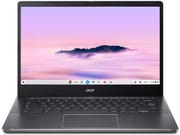 Acer Chromebook Plus 514 | |
| Price | List Price: $399 Amazon Prices: Loading prices... |
| Model number | CB514-4HT-359X |
| Performance Rating | 7.1 |
| Chromebook Plus | Yes |
| Processor | Octa-core 1.80 Ghz (max 3.80 Ghz) Intel Core i3-N305 |
| RAM | 8 GB |
| Internal Storage | 512 GB NVMe SSD |
| Screen Size | 14" |
| Screen Resolution | 1920x1080 |
| Screen Type | IPS |
| Touch Screen | Yes |
| Stylus / Pen | No Stylus Support |
| Dimensions width x length x thickness | 12.9 x 8.9 x 0.81 inches (327.66 x 226.06 x 20.57 mm) |
| Weight | 3.15 lbs (1.43 kg) |
| Backlit Keyboard | No |
| Webcam | 1080p |
| WiFi | Wi-Fi 6E (802.11ax) |
| Bluetooth | Bluetooth 5.1 |
| Ethernet | No |
| Cellular Modem | No |
| HDMI | No HDMI |
| USB Ports | 2 USB 3, 2 USB-C 2x USB-C 3.2 Gen 1 with DisplayPort and Power Delivery, 2x USB-A 3.2 Gen 1 |
| Thunderbolt Ports | No |
| Card Reader | microSD Card Reader |
| Battery | 65W, Li-ion |
| Battery Life | 9.5 hours |
| Fanless | No |
| Auto Update Expiration Date | June, 2033 |
Related Chromebooks
-
 Acer Chromebook Spin 714Master productivity with the Acer Chromebook Spin 714, featuring a 14-inch touchscreen, potent…
 -
 Acer Chromebook Vero 514The Acer Chromebook Vero 514 blends sustainability with performance. Sporting a Full HD IPS…
 -
 Lenovo Chromebook Plus 2-in-1 14The Lenovo Chromebook Plus 2-in-1 14 combines premium aluminum build quality with versatile…
 -
 Lenovo IdeaPad Flex 5i Chromebook PlusThe Lenovo IdeaPad Flex 5i Chromebook Plus combines Chromebook Plus certification, Intel Core…
 -
 HP Chromebook Plus x360 14cThe HP Chromebook Plus x360 14c combines a 12th-gen Intel Core i3-1215U processor with a 16:10…
 -
 Dell Latitude 5430 Chromebook 2-in-1Elevate your productivity with the Dell Latitude 5430 Chromebook, featuring a high-resolution…
Detailed Insights into the Acer Chromebook Plus 514

The Acer Chromebook Plus 514 measures 12.9 x 8.9 x 0.81 inches and weighs 3.15 pounds, making it a portable companion for daily commuting and travel. Despite its all-plastic construction, multiple reviewers note that the build quality feels surprisingly sturdy and doesn’t creak or flex under normal use. The front features a 180-degree hinge that allows the display to lay flat, while the sides provide well-distributed ports including USB-C and USB-A on both left and right edges. The inclusion of a microSD card reader adds flexibility for expandable storage or transferring files from cameras.
At the heart of this Chromebook lies the Intel Core i3-N305 processor featuring 8 cores and 8 threads with boost speeds up to 3.8GHz. This efficient chip handles everyday computing tasks with ease, delivering smooth performance for web browsing with multiple tabs, document editing, video streaming, and even cloud gaming through services like GeForce NOW. The 8GB of LPDDR5X memory provides adequate headroom for multitasking, while the 512GB PCIe NVMe SSD ensures fast boot times and ample space for offline files, Android apps, and Linux applications. Reviewers consistently praise the snappy ChromeOS experience and note minimal lag even under moderate workloads.
Connectivity options are comprehensive for a mid-range Chromebook. The Intel Wi-Fi 6E AX211 wireless delivers tri-band support across 2.4GHz, 5GHz, and the less congested 6GHz spectrum, future-proofing the device for faster home and office networks. Bluetooth 5.1 handles wireless peripherals reliably. The port selection includes two USB-C 3.2 Gen 1 ports supporting DisplayPort output and 65W USB-C charging, plus two USB-A 3.2 Gen 1 ports for legacy accessories. The absence of a dedicated HDMI port means external display connections require the USB-C ports, but both USB-C ports support video output for multi-monitor setups.
Reviewer Insights on the Acer Chromebook Plus 514

Chrome Unboxed
Chrome Unboxed’s detailed review comes after nearly a month of daily use with the Chromebook Plus 514. The reviewer emphasizes that the device punches well above its price point, particularly when found at the common $249 sale price at retailers like Costco. “Price informs opinion… and when a device comes out and is on sale for just $249 most days it affects the way that you look at it,” they note, highlighting that the value proposition dramatically improves at sale pricing. The build quality receives particular praise despite the plastic construction: “The build is all plastic but surprisingly sturdy… it isn’t bending and creaking under its own weight.” The reviewer appreciates the 300-nit anti-glare touchscreen, upward-firing speakers, and the inclusion of Chromebook Plus AI features like background blur and noise cancellation for video calls.
The Tech Nerd
The Tech Nerd’s comprehensive review focuses on two weeks of hands-on testing including battery life analysis and cloud gaming performance. The standout finding is the exceptional battery life: “I was also able to recharge the Chromebook to over 50% in just half an hour.” They praise the smooth OceanGlass touchpad, high-quality FHD webcam with privacy shutter, and long software support life until June 2033. However, they note the display is “lower end on the brightness but fine for indoor use” and recommend seeking out the SSD-equipped models over base eMMC variants for better performance.
Tech Spot
Tech Spot’s technical review provides benchmark data and a critical assessment of the platform. The reviewer tested 4K video playback, noting “The thing I enjoyed the most was the battery life… it lasted for over 7 hours” during continuous 4K YouTube playback. They praise the device as offering “excellent value for the $300 price point” with its sturdy chassis and Wi-Fi 6E connectivity. However, they criticize the keyboard layout, calling it “purely a downgrade from any other mainstream keyboard,” and note frustration with the small touchpad lacking a physical right-click area.
PCWorld
According to PCWorld’s review by Matthew Smith, the Chromebook Plus 514 “is a decent budget Chromebook that beats competitors on RAM and storage.” The review praises the “attractive design for the price” and “enjoyable keyboard” while highlighting the generous 8GB RAM and 512GB storage that outclass similarly-priced competitors. Weaknesses noted include “mediocre processor performance,” a display that “is often too dim,” and “weak speakers, webcam.” The build quality “punches above the price tag” overall.
Across multiple reviews, the consensus points to exceptional storage value and solid everyday performance as primary strengths, while the lack of keyboard backlighting and limited display brightness appear consistently as areas for improvement. Reviewers generally agree this is one of the best values in the Chromebook Plus category, especially at sale prices.
Customer Reviews of the Acer Chromebook Plus 514
Amazon customers have responded positively to the Chromebook Plus 514, praising the fast startup times, smooth ChromeOS experience, and generous storage that eliminates the constant juggling of files typical with smaller-capacity Chromebooks. Many buyers specifically mention upgrading from older Chromebooks and appreciating the noticeable performance improvement from the Intel Core i3-N305 processor.
The most common positive themes include the exceptional value proposition, particularly at sale pricing around $249-299, and the ability to store substantial media libraries, offline documents, and multiple Android apps without running out of space. The touchscreen responsiveness and overall build quality also receive frequent mention, with users noting the device feels more premium than expected.
On the critical side, some users note the display brightness is adequate for indoor environments but struggles in brightly lit rooms or near windows. The lack of keyboard backlighting is a recurring complaint from those who work in dim lighting conditions. A few customers mention the trackpad requires more pressure than expected, particularly for clicks in the upper area.
Conclusion
The Acer Chromebook Plus 514 stands out as an excellent choice for budget-conscious users who need a capable, well-rounded Chromebook without compromising on storage or performance. The Chromebook Plus certification ensures access to Google’s enhanced AI features, while the Intel Core i3-N305 processor and 512GB NVMe SSD deliver smooth, responsive performance for everyday computing tasks. With an Auto Update Expiration date of June 2033, this device offers long-term value and security updates for years to come.
This Chromebook is ideal for students who need reliable performance for research and writing, remote workers seeking an affordable secondary device for video calls and document editing, and anyone who values ample local storage for offline access to files and media. The touchscreen adds versatility for annotation and Android app interaction. Those who require keyboard backlighting, outdoor visibility, or a dedicated HDMI port should consider alternatives like the Acer Chromebook Plus 515 or ASUS Chromebook Plus CX34.
For those comparing options, see our Chromebook Comparison Chart to find the best match for your needs.
Frequently Asked Questions
What processor does the Acer Chromebook Plus 514 use?
The Acer Chromebook Plus 514 is powered by the Intel Core i3-N305 processor, featuring 8 cores and 8 threads with a base clock of 1.8GHz and boost up to 3.8GHz. This efficient processor handles productivity tasks, web browsing, and light creative work smoothly, scoring approximately 9,577 on PassMark’s CPU benchmark.
Can I upgrade the RAM or storage in the Acer Chromebook Plus 514?
No, the Acer Chromebook Plus 514 uses soldered memory and storage that cannot be upgraded after purchase. The device comes with 8GB of LPDDR5X RAM and a 512GB NVMe SSD. However, you can expand storage using the built-in microSD card reader for additional file storage.
What ports does the Acer Chromebook Plus 514 have?
The Acer Chromebook Plus 514 includes two USB-C 3.2 Gen 1 ports with DisplayPort output and power delivery support, two USB-A 3.2 Gen 1 ports, a microSD card reader, and a 3.5mm headphone/microphone combo jack. Note that there is no dedicated HDMI port, but both USB-C ports support video output for external displays.
Does the Acer Chromebook Plus 514 have a backlit keyboard?
No, the Acer Chromebook Plus 514 does not include keyboard backlighting. This is one of the trade-offs made to achieve its competitive price point. Users who frequently work in low-light environments may want to consider alternative models with backlit keyboards.
How long will the Acer Chromebook Plus 514 receive updates?
Google has set the Auto Update Expiration (AUE) date for the Acer Chromebook Plus 514 to June 2033. This means the device will receive ChromeOS updates, security patches, and new features for approximately 9 years from its release, ensuring long-term value and security.
Is the Acer Chromebook Plus 514 good for video calls?
Yes, the Acer Chromebook Plus 514 is well-equipped for video calls with its 1080p Full HD webcam featuring a physical privacy shutter for security. As a Chromebook Plus device, it also includes AI-powered enhancements like background blur and noise cancellation. The built-in microphone provides clear audio pickup, and the upward-firing speakers deliver good volume for hearing call participants.
What is the battery life of the Acer Chromebook Plus 514?
Acer rates the Chromebook Plus 514 at up to 9.5 hours of battery life, with real-world usage typically ranging from 7-10 hours depending on workload. The device supports fast charging via its 65W USB-C adapter, reaching 50% charge in approximately 30 minutes, which is convenient for quick top-ups between classes or meetings.
Does the Acer Chromebook Plus 514 support Android and Linux apps?
Yes, the Acer Chromebook Plus 514 fully supports both Android apps from the Google Play Store and Linux applications through ChromeOS’s built-in Linux development environment (Crostini). The 512GB SSD provides ample space for installing multiple Android apps and Linux tools without storage constraints.