
HP Chromebook x360 11MK G3 (Education Edition)
Updated on

The HP Chromebook x360 11MK G3 Education Edition is the MediaTek MT8183 variant in HP’s purpose-built school fleet, sold mostly through education channels rather than consumer retail. It pairs an 11.6-inch IPS touchscreen, a 360-degree convertible hinge, and a ruggedized chassis with ChromeOS Auto Update support that runs through June 2030. New units are essentially gone from Amazon at the new-condition tier, but the device is far from end-of-life: a 2021 release with another four years of secure updates left is still a meaningful tool for districts that bought into the platform, and a sane second-hand option for families looking for a school-grade convertible without paying laptop prices.
| Pros | Cons |
|---|---|
| Drop-tested to MIL-STD-810H standards (122 cm onto plywood, 76 cm onto concrete) | 1366x768 display is dated and limits content density |
| 360-degree hinge with Gorilla Glass 3 touchscreen | MediaTek MT8183 is slower than current N-series Intel chips |
| Real 13+ hour battery life on the 47 Wh pack | Soldered 4 GB or 8 GB RAM with no upgrade path |
| ChromeOS update support through June 2030 | eMMC storage capped at 32 GB or 64 GB |
| Spill-resistant, full-skirted, pick-resistant keyboard | Single USB-C and a single USB-A 2.0 port |
| Light at roughly 3.19 lb (1.45 kg) for an 11.6-inch convertible | Webcam is 720p with average low-light performance |
Related Videos
HP Chromebook x360 11MK G3 (Education Edition) Comparison Chart
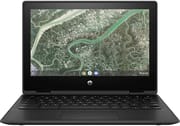 HP Chromebook x360 11MK G3 (Education Edition) | HP Chromebook x360 11MK G3 (Education Edition) | |
| Price | List Price: $379.00 Amazon Prices: | List Price: $279.00 Amazon Prices: |
| Model number | 349Y7UT#ABA | 349Y6UT#ABA |
| Performance Rating | 5.2 | 3.8 |
| Chromebook Plus | No | No |
| Processor | Octa-core 2.00 Ghz (max 2.00 Ghz) MediaTek MT8183 | Octa-core 2.00 Ghz (max 2.00 Ghz) MediaTek MT8183 |
| RAM | 8 GB | 4 GB |
| Internal Storage | 64 GB eMMC | 32 GB eMMC |
| Screen Size | 11.6" | 11.6" |
| Screen Resolution | 1366x768 | 1366x768 |
| Screen Type | IPS | IPS |
| Touch Screen | Yes | Yes |
| Stylus / Pen | No Stylus Support | No Stylus Support |
| Dimensions width x length x thickness | 11.61 x 8.08 x 0.82 inches (294.89 x 205.23 x 20.83 mm) | 11.61 x 8.08 x 0.82 inches (294.89 x 205.23 x 20.83 mm) |
| Weight | 3.19 lbs (1.45 kg) | 3.19 lbs (1.45 kg) |
| Backlit Keyboard | No | No |
| Webcam | 720p HD | 720p HD |
| WiFi | 802.11 a/b/g/n/ac (2x2) | 802.11 a/b/g/n/ac (2x2) |
| Bluetooth | Bluetooth 4.2 | Bluetooth 4.2 |
| Ethernet | No | No |
| Cellular Modem | No | No |
| HDMI | No HDMI | No HDMI |
| USB Ports | 1 USB 2.0, 1 USB-C | 1 USB 2.0, 1 USB-C |
| Thunderbolt Ports | No | No |
| Card Reader | microSD Card Reader | microSD Card Reader |
| Battery | 2 cell, 47 Wh, Li-ion | 2 cell, 47 Wh, Li-ion |
| Battery Life | 13.0 hours | 13.0 hours |
| Fanless | No | No |
| Auto Update Expiration Date | June, 2030 | June, 2030 |
Related Chromebooks
-
 HP Fortis Flip G1m 11 inch ChromebookThe HP Fortis Flip G1m 11 inch Chromebook is a rugged convertible 2-in-1 built for K-12 classrooms,…
 -
 HP Chromebook 11a (ARM)The HP Chromebook 11a offers an 11.6-inch anti-glare display, 720p HD webcam, and up to 15 hours of…
 -
 ASUS Chromebook CX1 (CX1101)The ASUS Chromebook CX1 combines a sleek form factor with practical features: an 11.6” anti-glare…
 -
 Acer Chromebook 311Dive into productivity with the Acer Chromebook 311: an 11.6-inch HD touchscreen laptop packing an…
 -
 Acer Chromebook Spin 311The Acer Chromebook Spin 311 was a popular budget convertible that demonstrated how ARM-based…
 -
 ASUS Chromebook Flip C214The ASUS Chromebook Flip C214 combines versatility with a 360° hinge, 11.6-inch anti-glare…
Why this Chromebook still matters in 2026
The 11MK G3 EE is the kind of device that gets bought in pallets, not single units, and that shapes everything about how to think about it today. HP designed it around a specific brief: survive a classroom for the full ChromeOS support window, get out of the way, and keep working when a 10-year-old drops it lid-first onto a desk. The chassis underwent rigorous MIL-STD-810H testing, validated for drops of up to 122 cm onto plywood and 76 cm onto concrete. The full-skirted, pick-resistant keyboard sits beneath a 350 ml spill-resistant deck so a knocked-over water bottle does not end the device’s life. The touchscreen is protected by Corning Gorilla Glass 3, which holds up to the pokes, prods, and stylus mistakes you would expect from younger users.
Four years into its life, the device’s secure runway is still substantial. June 2030 means another four years of Auto Update Expiration support: security patches, ChromeOS feature drops, and Play Store compatibility all stay current. For a fleet manager weighing a replacement cycle, that runway is more important than any single benchmark number. For an individual buyer looking at a used unit, it means the device is not a paperweight and not a “works for a year” gamble: it is no longer sold new, but it keeps receiving security and feature updates through June 2030, which covers the whole window you would realistically use it.
Hardware and performance
The MediaTek MT8183 inside the x360 11MK G3 is an octa-core ARM SoC with four Cortex-A73 performance cores and four Cortex-A53 efficiency cores, clocked up to 2.0 GHz, paired with an ARM Mali-G72 MP3 GPU. It is not fast by 2026 standards; an Intel N100 or N150 Chromebook will outclass it on any browser benchmark. What the MT8183 does well is sit in a passively cooled, low-power thermal envelope and trade peak speed for hours of battery. Reviewers of the closely related HP Chromebook 11a (a clamshell that shipped on the same MT8183 platform, so workload-for-workload performance is directly comparable) consistently measured 13 hours and more of real-world use, and the HP-stated 13-hour figure for the 11MK G3 lines up with that platform behavior.
In practice the chip is fluent at the things schools actually do on Chromebooks: Google Workspace, Classroom, Meet, Khan Academy, web research, and a handful of Android apps from the Play Store. Where it shows its age is the moment a user opens 15 tabs, runs a heavy WebGL site, or expects PWA performance on par with a recent Intel machine. The 4 GB RAM variant feels the squeeze first; the 8 GB variant has noticeably more headroom and is the one worth seeking out on the second-hand market.
Storage is eMMC, either 32 GB or 64 GB, soldered to the board. eMMC is meaningfully slower than NVMe SSDs found in Chromebook Plus machines, but it is appropriate for the workload: ChromeOS uses local storage primarily as a cache for Drive and a working scratch space for downloaded files, not as a serious data drive. The microSD slot extends capacity for media or offline content, which is a quietly useful feature when classroom WiFi degrades and students fall back on cached Drive folders.
Form factor, hinge, and durability
The 360-degree hinge is the headline feature for the way schools actually use this device. Students can flip it into tablet mode to read or annotate a PDF, prop it tent-style on a desk to watch a video without the keyboard taking up space, or use stand mode to share a screen across a small group. The hinge is metal-reinforced and rated for the open-and-close cycle counts HP specs for its education line, which is much higher than the equivalent consumer model. Combined with the spill-resistant keyboard and Gorilla Glass touchscreen, this is a device explicitly engineered for the daily wear of a backpack, a shared cart, and a stylus held by a third-grader.
Build quality at the chassis level is the kind that does not photograph well in a lifestyle shot but matters every day. The rubber bumpers around the lid edge absorb glancing impacts, the recessed port cutouts protect connectors from snapping if a cable is yanked sideways, and the deck flexes very little for an 11.6-inch device at this price point. Schools that bought these units in 2021 are still running them with original screens and keyboards in 2026; that is the metric this product was built to win.
Ports, connectivity, and security
Connectivity is best described as adequate for the use case rather than generous. There is one USB-C port (charging plus data, no Thunderbolt or USB4 as you would expect at this tier), one USB-A 2.0 port for legacy classroom peripherals and the inevitable USB drive, a microSD card reader, and a 3.5 mm combo audio jack. Wireless is 802.11ac 2x2 MU-MIMO plus Bluetooth 4.2, which is a tier behind the WiFi 6 found on newer education Chromebooks but still keeps up with most school networks because the access points themselves are often a generation behind.
Security is handled by Google’s Titan C chip for verified boot and key protection, and a Kensington Nano Lock slot on the chassis for physical security in shared environments. Fleet managers also typically deploy Chromebook monitoring software on these managed devices, which sits cleanly inside the Chrome Enterprise Upgrade tooling HP designed the device to work with.
Reviewer and owner feedback
Independent third-party review coverage of the MT8183 variant specifically (the 11MK G3 EE, not the Intel-based 11 G3 EE that shares part of the model name) is thin: this device sold through education channels and was rarely sent to consumer review outlets. The most authoritative reference is HP’s own service teardown video for the 11MK G3 EE, which walks through replacing the top cover, touchpad, speakers, battery, motherboard, display assembly, sensor board, and webcam. The teardown documents a design that is genuinely repairable by a fleet IT team: standard P1 Phillips screws, ZIF connectors for the ribbon cables, and labeled mylar over the major connectors. That repair-friendliness is part of what made the device defensible for school IT departments.
For platform-level performance and battery expectations, the closest substitute is the HP Chromebook 11a, a clamshell sibling sold to consumers on the same MediaTek MT8183 + 4 GB / 64 GB eMMC platform. The 11a is not the same product (no convertible hinge, no MIL-STD chassis, different keyboard), but workload behavior on the shared SoC is directly comparable. Beebom’s review of the 11a measured real-world battery life “well over 13 hours” on similar mixed-use workloads, and concluded the chip “can easily handle multitasking” for the online-class and document-editing workloads schools actually run. Treat those numbers as a platform reference, not a review of the 11MK G3 EE itself.
Amazon owner feedback for the 11MK G3 EE was positive overall, with buyers consistently calling out build quality, classroom durability, and battery life as standout traits. The most common complaint was the modest 1366x768 display resolution. Both listings are currently flagged “currently unavailable” on Amazon, which is why this page no longer carries buy links; the variants stay on the page as a spec and ownership reference for the schools and households that still run these units.
Buying one used in 2026
If you are sourcing a used 11MK G3 EE today (eBay, school surplus auctions, or refurb resellers), there are a few specifics worth confirming before you pay. First, verify the model number on the bottom label matches one of the two known SKUs: 349Y7UT#ABA (8 GB / 64 GB) or 349Y6UT#ABA (4 GB / 32 GB). The 8 GB variant is meaningfully more usable in 2026 and worth a premium. Second, log in to ChromeOS and check Settings > About ChromeOS > Additional details, where the AUE date should show June 2030; if it shows an earlier date, the device is either mislabeled or a different generation. Third, cycle the 360-degree hinge slowly through all four positions and watch for play at the pivot points; the hinge is the wear part on this chassis. Finally, plug in a USB-C charger and watch for a full charge cycle, because the 47 Wh battery is the second component most likely to need replacement on a four-year-old fleet unit.
For schools comparing this to a 2026 replacement, the realistic upgrade path is the HP Chromebook x360 11 G4 EE or one of the current Intel N-series education Chromebooks with WiFi 6 and an AUE in the 2032 to 2034 range. But there is no urgency: this device has four years of secure runway left, and a working fleet of 11MK G3 EE units does not need to be replaced this year.
To see how this model stacks up against other Chromebooks side by side, visit our Chromebook Comparison Chart.
Frequently asked questions
When does ChromeOS support end for the HP Chromebook x360 11MK G3 EE?
June 2030, per Google’s Chrome Enterprise Auto Update Expiration list. Until that date the device receives ChromeOS security updates, feature drops, and Play Store compatibility patches.
What is the difference between the 11MK G3 EE and the 11 G3 EE?
The 11MK G3 EE uses a MediaTek MT8183 ARM processor; the 11 G3 EE uses an Intel Celeron N4020 or N4500. They share much of the chassis design but have different performance characteristics, different battery life, and different AUE dates. The MK version is the longer-supported and more power-efficient variant.
Is the HP Chromebook x360 11MK G3 EE good for kids and students in 2026?
Yes, for K-8 classroom and homework workloads. It is built for that use case: MIL-STD-810H durability, a spill-resistant keyboard, Gorilla Glass touchscreen, 13-plus hour battery, and a 360-degree hinge for reading and drawing modes. For high-school-level multitasking with many tabs and heavy web apps, the 8 GB variant is noticeably more comfortable than the 4 GB.
Can the RAM or storage be upgraded on the 11MK G3 EE?
No. RAM (4 GB or 8 GB LPDDR4x) and storage (32 GB or 64 GB eMMC) are both soldered to the motherboard, which is standard for education Chromebooks to deter tampering. A microSD card can extend storage by up to 256 GB for media and offline files.
What is the battery life like on the 11MK G3 EE?
HP rates the 47 Wh, 2-cell battery at 13 hours of typical use, and the underlying MediaTek MT8183 platform consistently delivers 13-plus hours in mixed workloads on related devices like the HP Chromebook 11a. Expect a full school day on a single charge with battery to spare for an evening of homework.
Why are there no Amazon buy links on this page?
The known SKU-level Amazon listings are currently flagged “currently unavailable” on Amazon. We strip ASINs from a page when the linked listings are no longer in new-condition stock so readers are not sent to dead or refurbished pages. The variants and historical prices stay on the page as a spec and ownership reference.