

Three laptops will sit on the same Best Buy shelf this October, all promising long battery life, light weight, and a price somewhere between $300 and $600. One is a premium Chromebook Plus running ChromeOS, a category Starry Hope has covered for a decade. One is Apple’s MacBook Neo, the $599 retail (or $499 education) laptop Apple announced in March. And one is a category nobody knew existed two weeks ago: a sub-$600 Windows-on-ARM laptop powered by Qualcomm’s just-announced Snapdragon C platform, fronted at launch by the Acer Aspire Go 15.
If you have been quietly comparing a $499 Chromebook Plus against a $599 MacBook Neo for a fall purchase, the arrival of Snapdragon C reshapes that comparison in a way that is easy to misread. The marketing copy says “AI-ready Windows laptop for $300 and up,” which sounds like a strict upgrade from a similarly priced Chromebook. The comparison hinges on a single fact most launch coverage will bury under spec-sheet recitation.
The Copilot+ Exclusion Most Buyers Will Miss
Qualcomm confirmed at announcement that Snapdragon C laptops shipping in late 2026 will not qualify for Microsoft’s Copilot+ program. That sentence is the load-bearing fact of this entire purchase decision, and it deserves the same prominence the marketing gives the price.
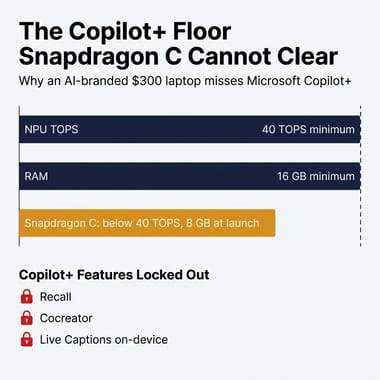
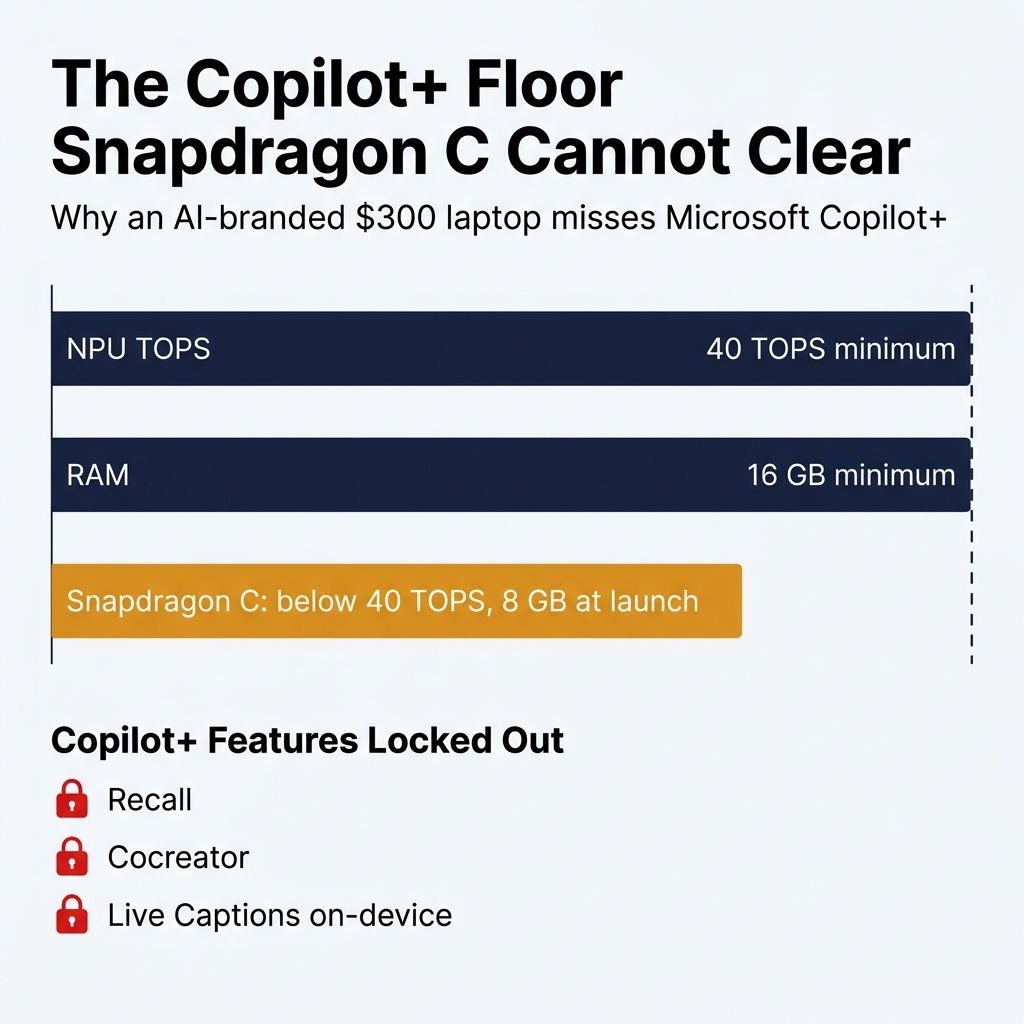
Microsoft’s Copilot+ specification sets a hard floor: a qualifying laptop must ship with an NPU rated at 40+ TOPS, at least 16GB of RAM, at least 256GB of storage, and Windows 11 version 24H2 or newer. Snapdragon C laptops at launch are expected to ship with as little as 8GB of RAM (the Acer Aspire Go 15 confirms an 8GB ceiling on its first SKU), and Qualcomm has not disclosed the NPU TOPS figure but has confirmed Snapdragon C will not qualify for Copilot+, which implies an NPU below the 40 TOPS floor.
Why this matters in plain language: the Copilot+ flag is what unlocks Microsoft’s flagship on-device AI experiences, including Recall, Cocreator, live captions in any app, real-time on-device translation, and automatic super-resolution in Photos. A Snapdragon C laptop will run regular Windows 11 with regular cloud Copilot, but the marquee local-AI features Microsoft has been advertising since 2024 are reserved for laptops with 40 TOPS NPUs and 16GB of RAM. Buying a Snapdragon C laptop because it advertises “AI ready” is the kind of mistake the marketing rewards. Qualcomm has confirmed the platform itself will not qualify for Copilot+, and the Acer Aspire Go 15’s 8GB ceiling falls below the program’s 16GB RAM floor regardless of where the NPU eventually lands on TOPS.
What Qualcomm Announced and Left Out
The Snapdragon C platform was announced on May 28, 2026 ahead of Qualcomm’s Computex keynote. Acer, HP, and Lenovo are confirmed launch partners, with laptops starting at $300 and shipping later in 2026. The first announced device is Acer’s Aspire Go 15, a 15.6-inch Full HD clamshell with up to 8GB of RAM, up to 512GB of SSD storage, a 53Wh battery, Wi-Fi 6E, Bluetooth 5.4, a 1080p webcam, and a dedicated Copilot key on the keyboard. HP and Lenovo SKUs have not been disclosed yet.
A few notes on what Qualcomm did not formally publish at announcement, because the gap matters. The company has not released a Snapdragon C spec sheet covering NPU TOPS, CPU core count, clock speeds, maximum RAM configuration, or storage interface (PCIe Gen 3, Gen 4, or UFS). TweakTown’s briefing notes describe Snapdragon C as using Kryo cores (the same family Qualcomm has shipped in its smartphone chips) on a 6-nanometer process, paired with an Adreno iGPU and a single 32-bit LPDDR5 memory channel; these are not the Oryon cores in the more expensive Snapdragon X series. Downstream coverage of leaked briefing slides has further pegged the CPU at eight cores in a 1+3+4 arrangement with the Adreno clocked around 900 MHz, but TweakTown itself notes that Qualcomm has not confirmed clock speeds, core counts, or memory configuration, so those numbers are reporter notes rather than spec-sheet truth. Phone-grade silicon in a 15-inch laptop is not automatically bad, but it does mean every performance comparison you read between now and the first reviewer benchmarks in late 2026 is informed speculation, not measurement. Qualcomm will reveal more at its keynote; until then, treat every numerical Snapdragon C claim with a hedge attached.
A second clarification, because the early reporting muddied this: the Acer Swift Spin 14 AI that some outlets initially tied to Snapdragon C actually runs on Qualcomm’s Snapdragon X2 series, not Snapdragon C. The Aspire Go 15 is the only confirmed Snapdragon C SKU at this writing.
Comparing $300 to $600 Laptop Categories Side by Side
Here is the practical comparison that matters for someone choosing between these three laptop categories at $300 to $600. The Snapdragon C row uses Acer Aspire Go 15 specs where they exist and clearly marked hedges where they do not.
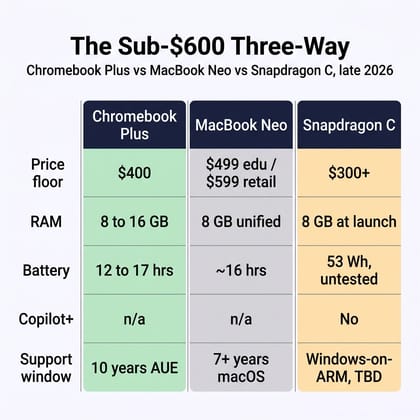
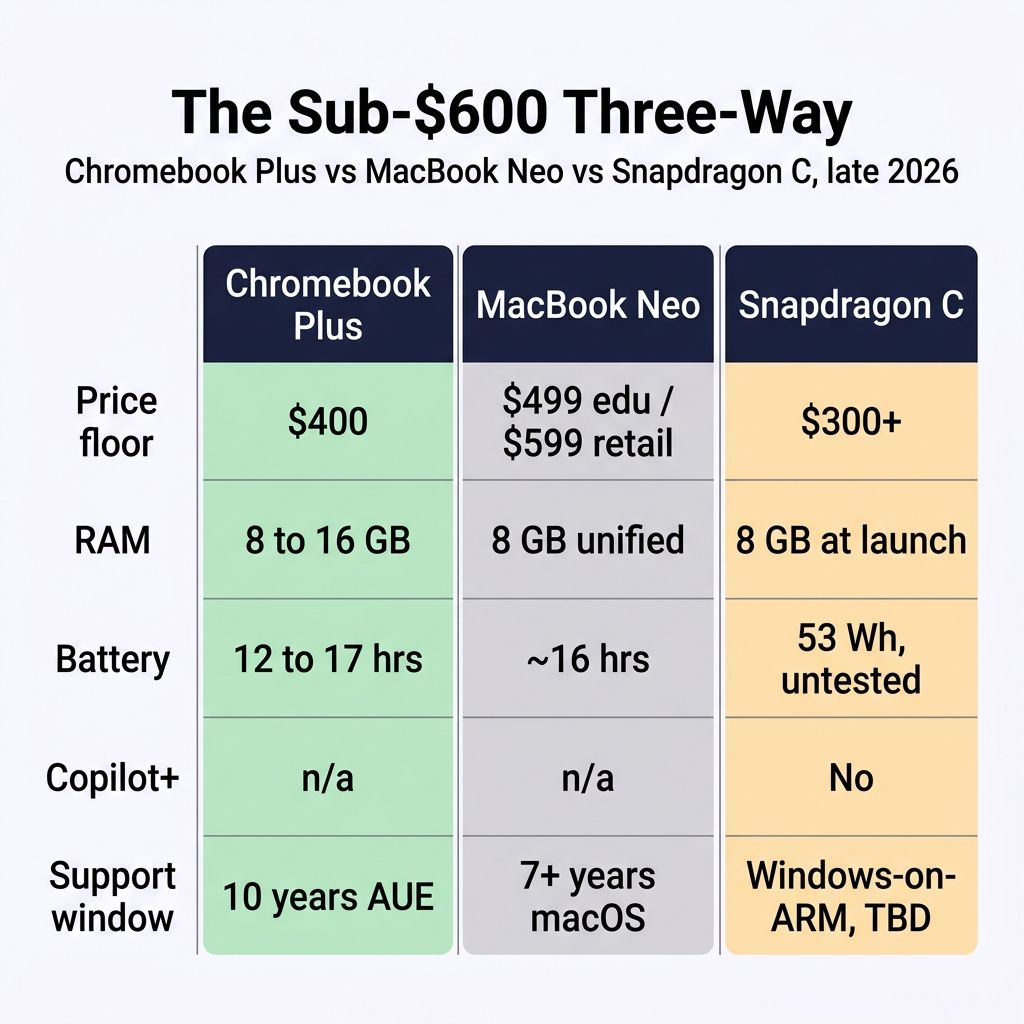
A few things stand out from this side by side that the spec sheets alone do not show.
First, the price-floor advantage of Snapdragon C is real but narrow. A $300 Snapdragon C laptop is cheaper than a $400 Chromebook Plus, and the gap matters for households watching every dollar. But Acer has not announced the Aspire Go 15’s actual retail sticker, only that it lands at the “entry-tier” floor. The category could ship at $349, $399, or $449 once retailers and Q4 promotions do their thing. The “$300” headline is Qualcomm’s platform floor, not a confirmed Acer price.
Second, RAM is the variable that quietly determines how long the device feels usable. An 8GB ARM Windows laptop running Chrome, Slack, Zoom, and a couple of Office windows is going to hit the swap file fast. The MacBook Neo also ships with 8GB of unified memory, but Apple’s macOS memory management on ARM has years of optimization behind it, and the same swap pressure tends to land lighter than it does on a Windows or ChromeOS device of similar spec. Windows-on-ARM does not have that polish yet; an 8GB Snapdragon C laptop will probably feel more constrained than the spec sheet suggests.
Third, the display gap reads differently for different buyers. A 15.6-inch screen sounds bigger and better than a 13-inch MacBook Neo or a 14-inch Chromebook Plus, until you actually carry it. The Aspire Go 15 will weigh more than either of its competitors. For a college student in a backpack, that extra pound and a half shows up after week two. For an at-home buyer who never moves the laptop, screen size wins.
Software Support and the Ten-Year Question
The most underrated dimension of the three-way decision is how long the device stays useful and supported. Chromebooks ship with 10 years of automatic Auto-Update Expiration from the platform’s release date. A 2026 Chromebook Plus typically gets security and feature updates through 2034 or later. The MacBook Neo is effectively the first A-series-powered Mac, so there is no A-series Mac track record to project from; roughly seven years is an estimate extrapolated from how Apple has supported its M-series Apple Silicon Macs to date, not an established support window. Both of those windows are explicit and trackable.
Snapdragon C is a question mark. Windows-on-ARM as a platform first shipped in 2017 (the Snapdragon 835), and the track record since has been uneven. The Surface Pro X spent its early years with significant app compatibility gaps, and Microsoft’s Prism translation layer (the runtime that lets x86 Windows apps execute on ARM silicon) only became usable with the Snapdragon X launch in 2024. A budget Snapdragon C device entering this lineage in late 2026 inherits Microsoft’s commitment to Windows-on-ARM, which is not as old as either ChromeOS or macOS as platforms. Three years from now, a Chromebook Plus owner knows what they have. A MacBook Neo owner knows what they have. A Snapdragon C owner is betting on Microsoft’s continued investment. That predictability is part of a broader pattern; the published reliability data versus Windows laptops favors ChromeOS on failure rates and support transparency alike.
That bet looks better than it did in 2022, before Microsoft put real engineering behind Prism and before Qualcomm committed to a multi-year laptop roadmap. It also looks worse than buying into ChromeOS or macOS, both of which have a published support clock you can read off the box. For a buyer who tends to keep a laptop for five years or more, this is the dimension that should bias the choice away from Snapdragon C until the platform has another year or two on the road.
Apps, Drivers, and the Peripheral Reality Check
ChromeOS, macOS, and Windows-on-ARM all handle the apps question differently, and the differences matter most for the buyer whose workflow already includes specific software or specific hardware they want to keep using.
A Chromebook Plus runs the open web identically to any other device. It runs Android apps natively. It runs Linux applications in a virtual machine (Crostini) for developers. What it does not run is native Windows software or native macOS software. If your job needs the desktop version of Adobe Premiere or QuickBooks Desktop, a Chromebook will not help you. If your job is browser-based, this restriction never comes up.
The MacBook Neo runs full macOS on Apple’s A18 Pro chip. Every app on the Mac App Store, every native macOS development tool, and a meaningful chunk of professional creative software (Logic Pro, Final Cut Pro, the Affinity suite, DaVinci Resolve) runs natively. The trade-off is that Windows-only software does not run at all without a virtual machine.
Snapdragon C runs Windows 11, and most of your Windows software will work, with two caveats. Native ARM Windows apps (an increasingly long list including Office, Edge, VS Code, Spotify, Slack, Zoom, and Photoshop’s ARM build) run at full speed. x86-only software runs through Prism translation with a meaningful performance penalty on budget silicon. Some software, especially anything that relies on kernel-level drivers (parts of the antivirus market, games with aggressive anti-cheat, some older printer drivers, niche USB peripherals) still does not work reliably on Windows-on-ARM. If you have a printer or a webcam or a USB audio interface that worked fine on your 2019 Windows laptop, the answer to “will it work on this Snapdragon C laptop” is “probably, but check before you buy.”
This driver-and-peripheral story is the quiet thing that wrecks individual purchases. A reader who buys a Snapdragon C laptop and then discovers their accountant’s Quicken installer refuses to run, or that their Canon Pixma needs a manually installed ARM driver that Canon never shipped, will return the device. Worth doing the homework on your own peripheral list before you click buy. The MacBook Neo and a Chromebook Plus both have their own driver limitations (the Mac has fewer; the Chromebook has more), but their stories are mature and easy to research. Windows-on-ARM at the budget tier is the one where surprises still happen.
Resale, Household Fit, and What This Replaces
Three years from now, a MacBook Neo will likely hold somewhere around half its retail price on the used market, because Apple laptops always do. A 2026 Chromebook Plus will sell used for $80 to $150 if it sells at all, because Chromebooks depreciate hard against their ten-year update clock. A Snapdragon C laptop has no resale track record yet, but the closest precedents (Snapdragon 7c Chromebooks, the original Surface Pro X) anecdotally do not hold value well either, based on how those secondhand markets shook out. This matters less if you keep the laptop for its full software-support window. It matters a lot if you suspect you might upgrade in two years. For the resale-conscious buyer, MacBook Neo is the structural winner of this comparison, and it is not close.
The household-fit question reframes the price floor entirely. A $300 Snapdragon C laptop probably does not make sense as the only computer in your house. It might make a lot of sense as a second laptop, a kid’s homework machine, or a couch-browsing device that lets you stop hauling the good laptop downstairs every evening. In that role, the Copilot+ exclusion stops mattering (nobody was going to use Recall on a couch laptop) and the spotty peripheral support stops mattering (you plug nothing into it). Reframing the Snapdragon C tier as the new “second laptop” budget bracket is a more useful mental model than treating it as a primary-laptop competitor to a Chromebook Plus, which Qualcomm’s own marketing wants you to do.
It is worth noting that Qualcomm and Microsoft are partly playing for a category that DRAM pricing has nearly killed. Tom’s Hardware has been tracking DDR4 and DDR5 prices climbing through 2026, which is the reason the sub-$300 x86 Windows laptop nearly disappeared from store shelves. Snapdragon C with its tightly bound LPDDR memory subsystem sidesteps that pricing volatility. It is a sensible business move regardless of how the laptops actually perform.
Most Buyers Should Choose a Chromebook Plus or MacBook Neo
For most readers in the sub-$600 long-battery zone, the recommendation in late 2026 is still a Chromebook Plus or a MacBook Neo, not a Snapdragon C laptop at launch.
Pick a Chromebook Plus like the Lenovo IdeaPad Flex 5i Chromebook Plus, the Lenovo Chromebook Plus 14 OLED, or the HP Chromebook Plus x360 14c if your computing life is browser-based, you need a laptop that just works for a decade, and you appreciate fanless silence and 14-plus-hour batteries. Starry Hope’s broader decision guide for sub-$600 laptop buyers in 2026 walks through the five questions that point most adults toward a Chromebook Plus.
Pick the MacBook Neo if you need real creative apps on a budget, you care about resale value, or you want a laptop that will feel polished for the full macOS support window. The Chromebook vs MacBook Neo comparison Starry Hope published in March still applies; Snapdragon C does not change the math for the buyer who actually needs Logic Pro or Final Cut.
Pick a Snapdragon C laptop, once SKUs ship later in 2026, only if your situation fits all of these criteria: you need actual Windows for actual Windows-only software, you cannot stretch to a $700+ Snapdragon X Copilot+ Windows laptop, you do not need Copilot+ features, your peripheral list is light (no specialty printers, scanners, or audio interfaces), and you primarily want the laptop for browsing, Office, and light Windows software. The Acer Aspire Go 15 is the only confirmed model so far; HP and Lenovo SKUs should widen the field by Q4 2026. For the broader Qualcomm vs MediaTek story on the Chromebook side, Starry Hope’s ARM processor wars piece is the deeper context.
What Would Change This Recommendation
A few specific developments would shift the calculus enough that this comparison should be revisited.
If Qualcomm discloses an NPU TOPS figure at or above the Copilot+ floor, the structural argument against Snapdragon C collapses and the comparison becomes pure price-versus-performance. (Unlikely; Tom’s Hardware reports Qualcomm has already confirmed Snapdragon C will not support Copilot+ at the announcement.) If HP or Lenovo ships a 16GB Snapdragon C SKU under $600, the RAM-ceiling concern softens and the device becomes viable for everyday multitasking. (Plausible if the chip supports it; Qualcomm has not confirmed a maximum RAM figure.) If Microsoft drops the Copilot+ floor to a lower TOPS rating or removes the 16GB RAM minimum, Snapdragon C laptops may retroactively qualify. (Possible but not imminent; Microsoft’s Copilot+ marketing depends on the floor staying high.) If reviewer battery tests on retail Snapdragon C units come in above 12 hours, the platform clears the “all-day laptop” bar and becomes a more credible MacBook Neo alternative. (Likely; phone-grade ARM in a 53Wh laptop should produce solid battery numbers.) If a future Snapdragon C SKU lands in a 14-inch chassis at $400 with 16GB of RAM, the price-versus-performance comparison tightens considerably and the recommendation may flip for the second-laptop buyer.
Starry Hope will update this comparison when retail units ship and reviewers publish real benchmarks. Until then: the $300 headline is real, the Copilot+ exclusion is real, and the safest bet for a $400 to $600 long-battery laptop this fall is still the Chromebook Plus or MacBook Neo you were already considering. The new tier is a third option to know about; it is not yet a third option to buy from.


