

The best Chromebook for kids in 2026 is the Lenovo Flex 3i Chromebook 12.2” at around $349. It is a 12.2-inch convertible that sits between small hands and schoolwork screen real estate, with an Intel N100 processor that handles educational apps without stuttering, a 12-hour battery, and AUE through June 2031. The youngest kids (K-2) do better with the smaller, lighter Lenovo Chromebook Duet 11” (2024), a 1.12-pound detachable with AUE all the way out to 2034. For elementary and early middle school where drops are guaranteed, the ASUS Chromebook Flip C214 carries a MIL-STD-810G certification for 4-foot drops and 50,000 hinge cycles, and middle schoolers who need a larger 14-inch Full HD touchscreen for research and creative work want the ASUS Chromebook CM14 Flip with AUE through 2033. Families on a tight budget can drop to the HP Chromebook 14a (Intel N100), which starts at $174.50 and gets updates through 2033. All picks come from 240+ Chromebooks we actively track, filtered to AUE dates at least two years out and Starry Hope editorial ratings of 4.0 stars or higher.
Top Chromebooks for Kids
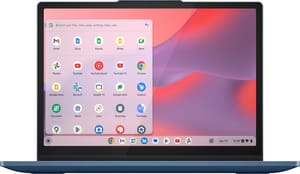
Best Overall for Kids: Lenovo Flex 3i Chromebook 12.2”
Lenovo Flex 3i Chromebook 12.2"
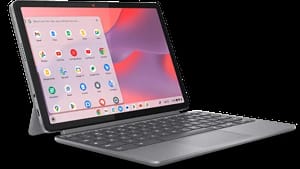
Best for Young Children (K-2): Lenovo Chromebook Duet 11” (2024)
Lenovo Chromebook Duet 11" (2024)
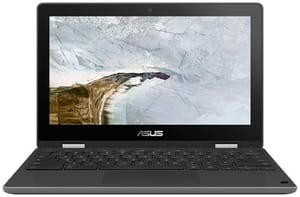
Best for Elementary Students and Most Durable (Grades 3-5): ASUS Chromebook Flip C214
ASUS Chromebook Flip C214
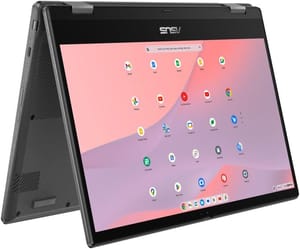
Best for Middle Schoolers (Grades 6-8): ASUS Chromebook CM14 Flip
ASUS Chromebook CM14 Flip
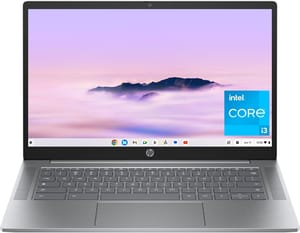
Best Budget Option: HP Chromebook 14a (Intel N100)
HP Chromebook 14a (14a-nf series)
Is a Chromebook Good for Kids?
Chromebooks work well for children of all ages. There is no complex software to install or manage the way there is on a Windows or macOS laptop, so a kid signs in and starts working. Built-in virus protection and automatic security updates keep your child’s device safe without any intervention from parents. Most Chromebooks offer all-day battery life, so kids can use them through school and homework time without hunting for a charger. Chrome OS integrates with Google Family Link, which gives parents controls over their child’s digital experience.
School Apps and Google Classroom Carry Over to the Home Chromebook
Chromebooks run Google Classroom, Google Docs, and thousands of educational apps available on the Google Play Store. Many schools already use Chromebooks, so a child signs into the same account at home with no second system to learn. If you’re debating between a Chromebook and a tablet, our Chromebook vs iPad for school comparison can help, and families on a tighter budget can cross-shop our best Chromebooks under $300 picks.
Prices Land Below Comparable Laptops and Tablets
Quality Chromebooks start under $200 and rarely exceed $500. Chrome OS boots in seconds and presents a clean, straightforward interface, which means less frustration for kids and fewer tech support calls for parents.
Security and Updates Are Automatic
Unlike a Windows or macOS laptop, Chrome OS sandboxes every application and updates itself with security patches automatically. There’s no antivirus software to buy or maintain. Many Chromebooks are designed for education, with spill-resistant keyboards, reinforced corners, and drop protection.
Screen Size, Battery, Durability, and Hinge Design
Screen Size by Age
For younger children (K-2), a smaller 10-11 inch screen is easier to handle and carry. Elementary students (grades 3-5) do well with 11-12 inch displays that balance portability with usability. Middle schoolers benefit from larger 13-14 inch screens that provide more workspace for research and writing assignments.
Ten Hours Covers a School Day and Homework
Look for at least 10 hours of rated battery life. Models like the Lenovo Flex 3i and HP Chromebook 14a consistently deliver 10-12 hours of actual use.
A Durable Chromebook Survives Drops and Spills
Kids can be tough on electronics. Education-focused Chromebooks like the ASUS Chromebook Flip C214 feature spill-resistant keyboards, rubber bumpers, and drop certification tested to MIL-STD-810G.
Convertible vs. Traditional Design
A 2-in-1 convertible with a 360-degree hinge does two jobs. Tablet mode works for watching educational videos, drawing apps, or reading; laptop mode is better for typing. The Lenovo Chromebook Duet takes this further as a true tablet with a detachable keyboard.
Screen Time Limits and App Approvals From Your Phone
Every Chromebook supports Google Family Link, a free app that puts parents in control of their child’s digital experience. Family Link runs from your own phone or computer, and setup takes about 15 minutes.
What Google Family Link Can Do
-
Review and approve or block every app your child wants to download from the Google Play Store. You’ll receive a notification on your phone whenever they request a new app.
-
Set daily screen time limits and schedule device-free periods like bedtime or homework hours. The Chromebook will lock automatically when time runs out.
-
Enable SafeSearch to filter explicit content from Google searches, and restrict access to mature websites through Chrome’s supervised browsing feature.
-
See which apps your child uses most frequently and how much time they spend on each. Weekly activity reports help you understand their digital habits.
-
Check the Chromebook’s location through Family Link if your child takes it outside the home (requires an internet connection).
-
Lock your child’s Chromebook instantly from your phone if needed, whether it’s bedtime or they need to focus on homework.
Setting Up Family Link in Four Steps
- Download the Family Link app on your phone (available for iOS and Android)
- Create a Google account for your child (or connect an existing one)
- Sign into the Chromebook with your child’s Google account
- The Chromebook will automatically recognize it as a supervised account and apply your Family Link settings
Once configured, all your parental controls sync automatically. Changes you make in the Family Link app apply to the Chromebook within minutes.
Auto Update Expiration (AUE) Dates Matter
The Auto Update Expiration (AUE) date is when Google stops providing Chrome OS updates, including security patches. For a device your child will use for years, you want an AUE date as far in the future as possible.
Our recommendations all have AUE dates at least three years out:
- HP Chromebook 14a (Intel N100): June 2033 (7+ years remaining)
- Lenovo Chromebook Duet Gen 9: June 2034 (8+ years remaining)
- ASUS Chromebook CM14 Flip: June 2033 (7+ years remaining)
- Lenovo Flex 3i Chromebook 12.2”: June 2031 (5+ years remaining)
- ASUS Chromebook Flip C214: June 2029 (3+ years remaining)
Frequently Asked Questions
Can I find a good Chromebook for under $200?
Yes. The HP Chromebook 14a (Intel N100) starts at $174.50 for the base model with 4GB RAM and 64GB storage. While it lacks a touchscreen, the keyboard is good, battery life is long, and Chrome OS updates run through 2033. It fits families on a tight budget.
What size Chromebook is best for my child?
For kindergarten through second grade, consider a compact 10-11 inch device like the Lenovo Chromebook Duet that’s easy for small hands to manage. Elementary students do well with 11-12 inch screens that balance portability with usability. Middle schoolers often prefer 13-14 inch displays that provide more workspace for research and writing.
Are touchscreens necessary for kids?
Not strictly, but touchscreens suit younger children who are accustomed to tablets and smartphones. Drawing apps, educational games, and many Android apps work better with touch input. For middle schoolers, touch is less critical but still useful for quick scrolling and annotation.
How durable are rugged Chromebooks?
Education-grade Chromebooks like the ASUS Chromebook Flip C214 undergo testing. The C214 specifically is certified to MIL-STD-810G standards, meaning it has survived drop tests from 4 feet (120cm), 50,000 hinge cycles, pressure tests of 30kg on the top and bottom, and liquid spills of up to 66cc.
How long does a Chromebook battery last?
Ten to 12 hours of real-world use on every model above, which is a school day plus homework.
How does Chrome OS compare to Windows or macOS for kids?
Chrome OS is designed for simplicity and security. It boots in seconds, updates automatically in the background, and sandboxes all applications to prevent malware infections. While a Windows or macOS laptop offers more traditional software options, most educational tools now work through web browsers or Android apps, which Chrome OS supports. For schoolwork, Google Docs, and educational apps, Chrome OS is arguably better suited than more complex operating systems.
Can kids play games on a Chromebook?
Chromebooks support Android games from the Google Play Store, web-based games, and cloud gaming services like NVIDIA GeForce NOW or Xbox Cloud Gaming. They can’t run demanding PC games natively, but most kid-friendly games work well. Minecraft, Roblox, and educational games run on the models above.
What kind of processor should I look for?
A basic Chromebook with an Intel Celeron N4000 or N4020 processor is adequate for web browsing and schoolwork. For better multitasking and smoother performance, look for Intel Processor N100 or MediaTek Kompanio 520/828 chips. These newer processors handle multiple tabs, video streaming, and Android apps much more smoothly. Avoid very old Celeron processors if possible.
Is a Chromebook suitable for a 7-year-old?
A Chromebook works well for a 7-year-old. The simple interface, built-in parental controls through Family Link, and durable education models make Chromebooks a good fit for children just beginning to use technology independently. The Lenovo Chromebook Duet is particularly well-suited for this age group, with its lightweight tablet form factor and touchscreen.
Can Chromebooks be used offline?
Yes. Many Chrome OS apps work offline, including Google Docs, Google Drive, and various Android applications. Your child can write documents, watch downloaded videos, and use many educational apps without an internet connection. When connectivity is restored, any changes sync automatically to the cloud.


