

You are on the checkout page for a mini PC, looking at two otherwise identical listings that differ only in memory. You already know you are going to wipe the preinstalled Windows on day one and put Ubuntu or Mint on it. The obvious question is whether that decision earns you the cheaper SKU, and in August 2026 a very tempting piece of arithmetic arrived that said yes.
Notebookcheck reported on 4 August 2026 that a Linus Tech Tips side-by-side test measured Windows 11 sitting at 9.3GB while doing nothing, against 4.7GB for Linux Mint on the same hardware. Opening a website in Firefox pushed the two to 10.7GB and 5.9GB. Baldur’s Gate 3 with Discord running in the background hit 15GB on Windows and 9GB on Linux. Halve the idle figure, halve the tier, pocket the difference. The arithmetic is clean, and the conclusion it points to is wrong.
A 9.3GB idle figure measures the RAM installed, not the RAM required
The trouble is that neither number is a constant. Both operating systems size their memory behaviour to the capacity they find, so the absolute footprint you read off a system monitor is partly a fact about the machine rather than a requirement of the software. Linux fills otherwise-unused memory with page cache, which is why free memory looks alarmingly scarce on a healthy Linux box and why the kernel hands that memory straight back the moment an application asks for it. Windows runs its own version of the same idea through standby memory and SysMain preloading, holding recently used pages in reserve on the theory that you are about to want them again.
You can watch that scaling happen in Microsoft’s own numbers. Windows Latest, summarising Microsoft’s past statements, puts a Windows 11 machine with 8GB installed at close to 6GB used at idle, and a 16GB machine at above 10GB. Same operating system, same idle desktop, two very different absolute figures, because the number moves with the capacity underneath it. A 9.3GB reading tells you the test box had a lot of memory, not that Windows demands 9.3GB.
Notebookcheck adds the detail that neither system in the Linus Tech Tips run came close to exhausting its memory, and Windows peaked at 15GB during Baldur’s Gate 3, which means the test machine had well more than 16GB installed. Nothing in that test describes what either operating system does when it is squeezed onto an 8GB or 16GB mini PC, which is the situation the person at the checkout page is in. The official documentation is no help either: Microsoft lists 4GB as the Windows 11 minimum, and Canonical lists 6GB of system memory for Ubuntu Desktop. Both are numbers to boot the operating system, not numbers to live with.
The saving is per application, not per machine
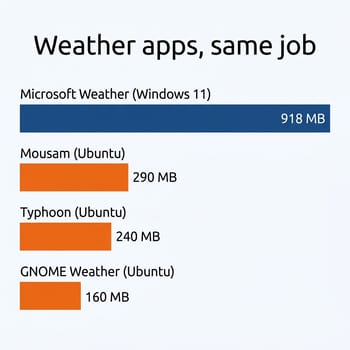
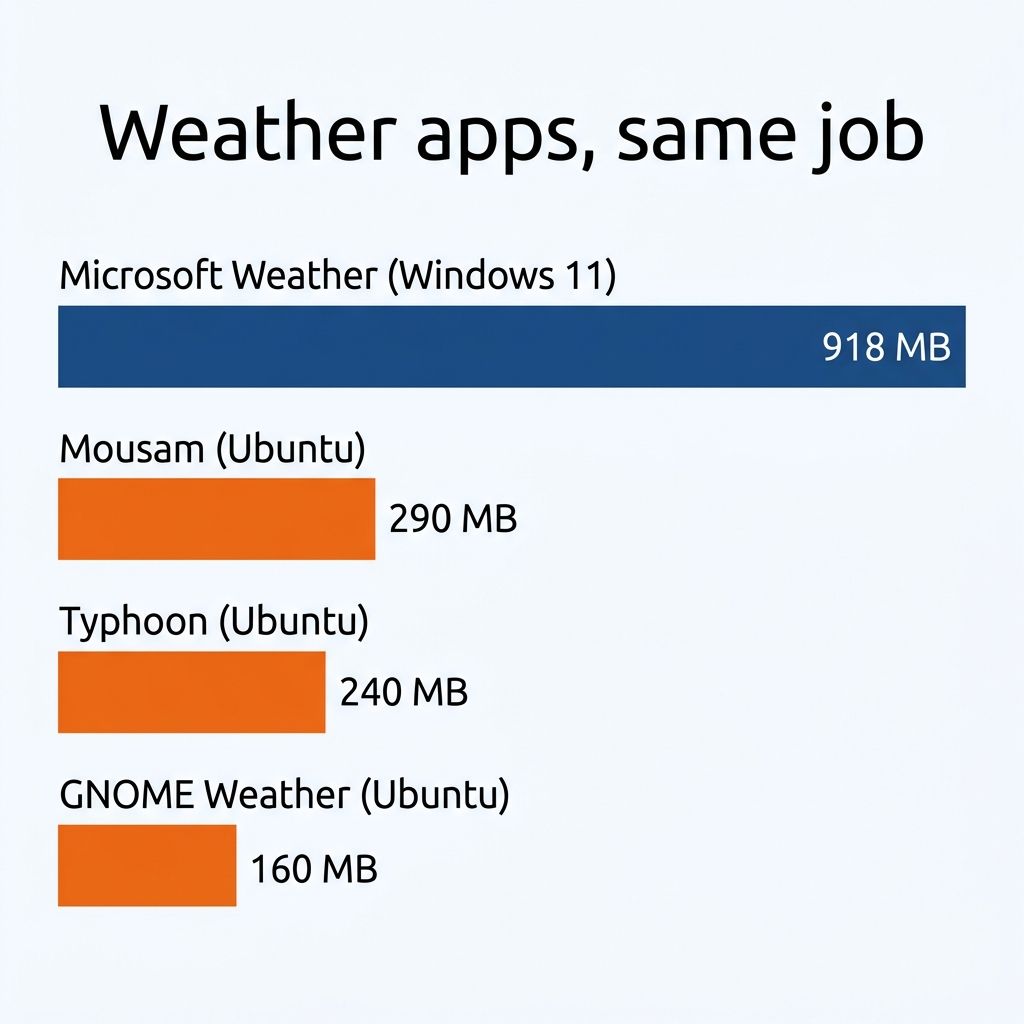
There is a real and repeatable Linux memory advantage, and it shows up one application at a time. Joey Sneddon measured it on 9 August 2026 using the one machine he owns that runs Windows 11, a low-power Intel m3-8100y laptop with 8GB of RAM. Microsoft’s built-in Weather app averaged 918MB. On Ubuntu 26.04 LTS on the same laptop, Mousam took 290MB, Typhoon 240MB, and GNOME Weather 160MB. Sneddon labels the exercise plainly: “This was NOT a scientific test.” It is one app on one machine, and the spread is still hard to ignore.
The cause is architectural rather than accidental. Microsoft builds much of Windows and many of its first-party apps on WebView2, which means each of those little utilities is carrying its own copy of Edge’s Chromium engine. Microsoft does not dispute the diagnosis. In a 31 July 2026 post on the Windows Insider Blog, Windows president Pavan Davuluri described the company “driving efficiencies across Chromium and Webview2 components when they appear in the operating system,” and named “Memory optimization for 8GB and above” as one of four new focus areas through the end of 2026.
So the durable Linux advantage is that you do not pay a browser-engine tax on the operating system’s own furniture. Extrapolating from single-app measurements like Sneddon’s, a normal desktop session gives back something on the order of a couple of gigabytes, which is real memory and nowhere near half the machine. The moment you open Firefox with twenty tabs, or a Slack client, or VS Code, the working set is identical on both systems, because those are the same Chromium and Electron applications running the same code. Linux frees up the memory that Windows spends on itself, and then hands the bill for everything else straight back to you.
The tier that fits your workload
For a desktop machine you sit in front of, 16GB is the comfortable choice, and the reason is not that Linux needs it. The desktop itself is cheap, and a lightweight setup makes the point: Omarchy, DHH’s Arch-based distribution, runs the Hyprland tiling window manager instead of a full desktop environment, and a system built that way stays out of your memory budget almost entirely. An 8GB mini PC runs a setup like that, or a focused GNOME session, perfectly well. What pushes you toward 16GB is the browser, which does not care which kernel it is running on: a video call, a document, and a research tab group open at once will reach into swap on 8GB whichever operating system is underneath.
An always-on server is the one place the Linux saving translates cleanly into a smaller tier, because there is no desktop session and no browser. A box running Docker containers, Home Assistant, and Plex transcoding is comfortable on 16GB, and the OS overhead is a rounding error. Two things change that answer. If you plan to run ZFS, budget 32GB, because the ARC cache is designed to consume every gigabyte you leave lying around and it earns its keep by doing so. If you plan to run virtual machines rather than containers, the RAM you assign to each guest is gone regardless of how thrifty the host is, so size for the guests and add the host on top. Our mini PC as a NAS guide walks through where those workloads land on real hardware.
Local AI deserves its own warning, because it is the workload people most often buy RAM for, and RAM is not what makes it work. Language models want a strong GPU with its own VRAM, or a unified-memory machine where the processor gets one wide, fast pool, the way Apple Silicon and AMD’s Strix Halo boxes do. An ordinary mini PC has neither: its iGPU shares two channels of system memory, and as our Gemma 4 on mini PCs breakdown shows, that caps a budget N150 box at 5 to 10 tokens per second on the small models no matter how much RAM you fit. A Ryzen box with a capable iGPU reaches conversational speed on mid-size models, and the machines that handle big ones are the unified-memory Strix Halo boxes; our Strix Halo local inference guide covers what that costs. System RAM only decides which models fit in memory; the GPU and the bandwidth behind it decide whether they are worth running. If local AI is the goal, buy for the memory architecture, not the gigabytes.
What dropping a tier saves at checkout
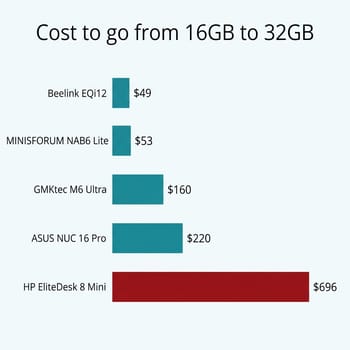
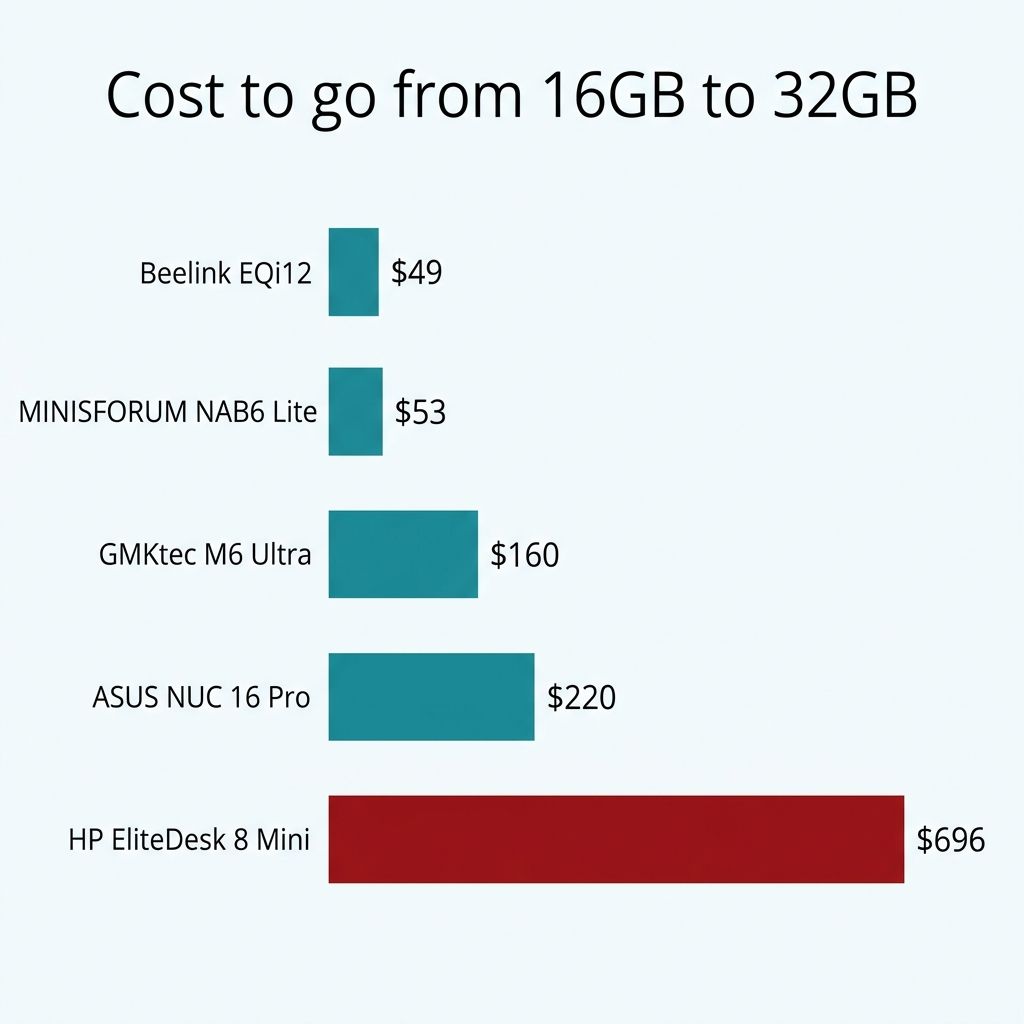
The tier premium is not a flat figure. Comparing configurations of the same machine that differ only in memory, with identical processors and identical storage, the gap between 16GB and 32GB across the mini PCs we track runs from around $49 on a Beelink EQi12 with a Core i5-1235U, to $53 on a MINISFORUM NAB6 Lite, to $64 on a MINISFORUM AI X1-255, to $160 on a GMKtec M6 Ultra. At the business end of the market the same 16GB of memory costs vastly more: about $210 on an HP Elite Mini 800 G9, $220 on an ASUS NUC 16 Pro, and $696 on an HP EliteDesk 8 Mini G1i. Those are list prices rather than what you will pay today, and current prices are on each product page, but the shape of the spread is stable: the premium tracks the price class of the box, not the cost of the chips.
That range is the answer to “how much do I save.” On a $400 machine you are arguing about fifty dollars, which is not enough to accept a permanent capacity ceiling. On a $1,700 workstation-class box it is real money. Both conclusions come from the same data, which is why a single dollar figure was never going to work.
There is also a supply problem with the plan. The 8GB mini PC is quietly leaving the market. Across the 277 mini PCs currently tracked on Starry Hope we have records for 70 different 8GB configurations, but only 18 of them still have a current Amazon listing, against 106 live listings at 16GB. Sixteen gigabytes now outnumbers 8GB roughly six to one among the configurations still on sale, and the DRAM price surge reshaping this market since 2025 is a large part of why: when memory is the expensive component, vendors consolidate around the volume tier and retire the rest.
Socketed RAM changes the answer
Our soldered RAM piece argues that you should buy the tier you will need up front, because on a growing number of premium mini PCs the memory is fixed to the board and the configuration you buy is the configuration you own forever. That advice and this one are the same advice, and the socket is the hinge between them.
On a machine with SO-DIMM slots, the smaller tier is a cheap and reversible bet. The MINISFORUM NAB6 Lite takes two DDR4 SO-DIMMs to a 64GB ceiling behind a tool-less pop-top lid, so guessing wrong costs you one stick and ten minutes with the case open. That is exactly the situation where a Linux user can reasonably start at 16GB, watch what the machine does under a month of real use, and add memory only if the workload asks for it. On a machine with LPDDR5X soldered flat to the board, such as the Beelink SER9 and a growing share of the premium tier, there is no second chance. The Linux headroom is real but it is only a couple of gigabytes, and a couple of gigabytes is not a margin worth betting a permanent ceiling on. Check for slots before you decide which tier to buy, not after.
Where Linux gives back nothing
Games are the clearest case. In the same Linus Tech Tips run that produced the 9.3GB headline, Baldur’s Gate 3 still occupied 9GB under Linux, because a game’s textures, meshes, and audio cost the same to hold in memory whichever kernel is scheduling them, and running through Proton adds a translation layer rather than removing one. Virtual machines behave the same way: memory you assign to a guest is committed regardless of how efficient the host is. ZFS will expand to fill whatever you give it. Language model weights are weights.
The last reason not to buy on the strength of today’s gap is that Microsoft has publicly committed to closing it. Davuluri’s July 2026 post puts “Reducing Windows memory footprint” on the roadmap through the end of 2026, with the work reaching general availability at the tail end of the year. Whatever the Windows-versus-Linux delta is right now, it is a number Microsoft has said out loud that it intends to change, and a mini PC bought in 2026 will still be on your desk well after that work ships. Buy for the workload, not for the comparison. If you are still deciding whether to wipe the preinstalled Windows at all, our guide to keeping or replacing the OEM install covers the licence and driver questions that come before this one.
What to buy
MINISFORUM NAB6 Lite
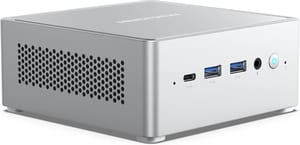
- +Two DDR4 SO-DIMM slots to 64GB
- +tool-less pop-top lid
- +dual 2.5G Ethernet
- +2.5-inch SATA bay
- -12th Gen Core i5-12600H is a few generations old
- -DDR4 rather than DDR5
- -single M.2 slot
ASUS NUC 16 Pro
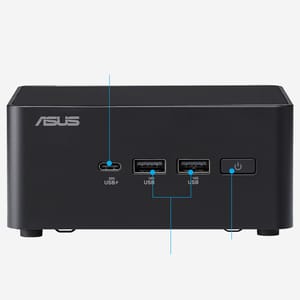
- +Core Ultra 7 356H
- +two CSO-DIMM slots to 128GB
- +PCIe 5.0 and PCIe 4.0 M.2 slots
- +tool-less chassis
- -Priced well above the enthusiast brands
- -and the factory memory upgrade is expensive
Linux does use less memory than Windows 11, and the difference is roughly the size of the operating system’s own applications rather than the size of the machine. That is worth having, but it is not worth buying a smaller mini PC over. Check for SO-DIMM slots before you settle on a tier, because that is the only thing on the spec sheet that lets you change your mind.


