

A mini PC plugged into a TV gives you a full computer on the big screen: a web browser, the Netflix app, your own video library, and games, with no TV maker’s launcher, ads, or viewing tracker in the way. It also works on a TV or monitor that has no smart features at all. The setup has limits: streaming services treat a PC differently from a streaming stick, most PCs cannot talk to the TV’s remote, and the box costs several times what a stick does.
Mini PCs that suit a TV
All three picks below output 4K at 60Hz or better over HDMI, decode the AV1 and 10-bit HEVC video formats in hardware, and stay quiet enough for a living room. Netflix’s 4K requirements for Windows name “an Intel 7th generation Core CPU or newer, or an AMD Ryzen CPU”, so the chip decides whether Netflix promises 4K at all, as the last column shows.
| Model | Chip | Video out | Noise | Fits Netflix’s 4K chip rule |
|---|---|---|---|---|
| Beelink Mini S13 | Intel N150 | 2x HDMI, 4K at 60Hz | Fan, about 31 dBA at idle | No (not a Core chip) |
| MINIX Z300-0dB | Intel Core i3-N300 | 2x HDMI, 4K at 60Hz | Fanless, silent | Yes |
| Beelink SER8 | AMD Ryzen 7 8845HS or 8745HS | HDMI 2.1, DisplayPort 1.4, USB4 | Fan, about 32 dBA under load | Yes |
Skip older budget boxes built on the Intel Celeron N5105 or earlier chips for this job. The Jellyfin hardware acceleration guide notes that those Jasper Lake and Elkhart Lake processors “don’t have AV1 acceleration”. The newer N100, N150, and N300 chips do: Intel’s own media driver documentation groups Alder Lake-N with the platforms that decode AV1 in hardware. Without that, the processor has to decode AV1 video itself, which is slower and hotter.
Budget pick: Beelink Mini S13
The Mini S13 is the plainest route to a TV computer. Intel lists the N150’s display outputs as HDMI 2.1 with a maximum of 4096 x 2160 at 60Hz, which covers any 4K TV at the refresh rate films and shows use. The box has two HDMI ports, 16GB of memory, and Wi-Fi 6. Alun Taylor at IT Pro ran it at full load for twelve hours and reported that the fan stayed almost silent, and he named HTPC use first in his verdict. MiniPC-Review.com reports 31 dBA at idle.
The N150 is sold as “Intel Processor”, not Core, so it falls outside the wording of Netflix’s 4K requirement. Netflix still plays; it simply makes no 4K promise for this chip. If you watch mostly YouTube, a home library, or services that stop at HD on a PC anyway, that gap costs you little.
Beelink Mini S13
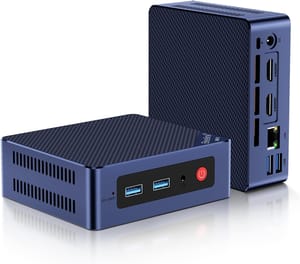
- +Two HDMI outputs at 4K 60Hz
- +hardware AV1 decode
- +fan stayed almost silent in a 12-hour load test
- +16GB of memory
- -N150 is outside Netflix's 4K chip list
- -no USB-C port
- -single Gigabit Ethernet port
Silent pick: MINIX Z300-0dB
The Z300-0dB has no fan, so it makes no sound at all, which matters most when the box sits a few feet from the couch. Its Core i3-N300 is an eight-core chip from the same family as the N150, with the same video engine, and it carries the Core badge on a design newer than 7th generation, so it fits the CPU wording in Netflix’s published 4K requirements. It has two HDMI ports rated for 4K at 60Hz, 2.5Gbps Ethernet, and a VESA mount in the box.
Without a fan, the heat goes into the metal case. Robtech’s video review recorded the processor at 98°C under stress, and one verified Amazon buyer wrote that ten minutes of heavy load made the case “hot enough to burn a human being.” Playing video uses the dedicated decode hardware rather than the processor cores, so film nights do not load the chip the way those tests did. Long Windows updates or games will, so put the box somewhere with open air around it and out of reach of children and pets. Our comparison of fanless and fan-cooled mini PCs covers the trade in more depth.
MINIX Z300-0dB
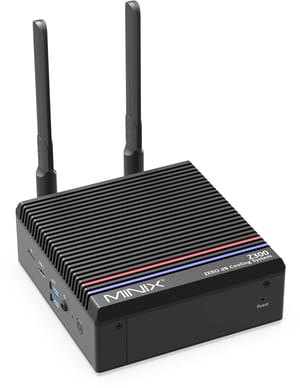
- +No fan and no noise
- +Core i3 chip that fits Netflix's 4K rule
- +two HDMI outputs at 4K 60Hz
- +2.5Gbps Ethernet
- -Case gets very hot under long heavy loads
- -single storage slot
- -USB-C carries data only
Step-up pick: Beelink SER8
The SER8 is the choice if the TV also doubles as a game screen. AMD’s spec page for the Ryzen 7 8845HS lists HDMI 2.1 and hardware support for AV1, HEVC, and VP9 video, and Beelink’s product page lists 4K output at up to 144Hz across its HDMI 2.1, DisplayPort 1.4, and USB4 ports, so a high-refresh TV or monitor can run above 60Hz for games. Its Radeon 780M graphics handle lighter games at 1080p. As a Ryzen machine, it meets Netflix’s 4K rule.
It is also quiet for its class. Sebastian Peak of PC Perspective measured 32 dBA from about 18 inches away under load, and Wendell at Level1Techs called its fan-noise profile the best of any mini PC he had tested. The SER8 costs considerably more than the Mini S13 does, and you only get that value back if you use the extra speed for games or other work.
Beelink SER8
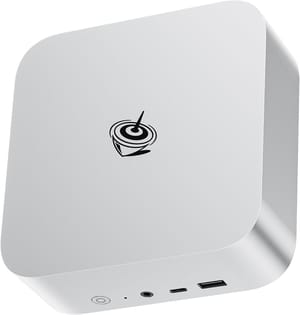
- +HDMI 2.1 plus 4K 144Hz output
- +Ryzen chip meets Netflix's 4K rule
- +Radeon 780M for light gaming
- +about 32 dBA under load
- -Costs well above the budget picks
- -reviewers found its Wi-Fi weak
- -single 2.5GbE port
To compare any other model on HDMI ports, chip, and fan type, use the Mini PC Comparison Chart. Check the maker’s spec page for the HDMI version and maximum refresh rate before you buy; “supports 4K” on a listing can mean 4K at 30Hz. The mini PC deals page lists models priced below the maker’s own store or on sale at Best Buy.
Keep the TV offline and use it as a screen
You do not need to find a TV without smart features. RTINGS reports in its guide to using a smart TV offline that “all TV brands allow you to use it in an offline, or ‘dumb’ mode” if you decline the network connection or the terms of use during setup. Google’s help page for Google TV’s basic TV mode says that mode will “play media from other inputs plugged into the TV.” Google notes that an offline TV “won’t get important security updates,” and on Google TV you cannot switch to basic TV after a full setup, so choose it on the first boot. If the TV is already set up, Google’s page points to a factory reset, which restarts setup and lets you pick basic TV.
Many smart TVs run automatic content recognition (ACR), a feature that identifies what is on screen and reports it back. Consumer Reports describes it as technology that “attempts to identify every show you watch,” including from cable, antenna, streaming, and Blu-ray. A 2024 study by Anselmi and colleagues, which tested Samsung and LG sets in the UK and US, found that “ACR works even when the smart TV is used as a ‘dumb’ external display.” RTINGS reached the same result in its 2026 tracking tests: on an LG G5, ACR traffic grew “more frequent and higher in volume” while a PS5 or a laptop was plugged in. So a mini PC on an internet-connected smart TV still gets its picture fingerprinted. Keep the TV off the network, or at least turn ACR off in its settings.
ACR is also a legal issue now. Texas sued Sony, Samsung, LG, Hisense, and TCL in December 2025, alleging their TVs captured screenshots of viewing without consent. Samsung and LG settled in 2026 and agreed to get consumers’ consent before collecting ACR data, according to the Texas Attorney General’s office. The settlements cover Texas, and the cases against the other three makers were still open as of May 2026.
A mini PC removes the TV maker from the picture, but not the streaming service. Netflix still knows what you watch on Netflix. What you drop is the TV-level tracker that watches every input, plus the ads in the TV’s own launcher.
What streaming services allow on a PC
Services decide picture quality by device and app, and computers get lower limits than TV devices.
| Service | Windows 11 | Linux |
|---|---|---|
| Netflix | 4K with HDR in the Netflix app or Edge; 4K without HDR in Chrome; 1080p in Firefox | Up to 1080p |
| Prime Video | Up to HD in browsers and the Windows app; stereo sound only | Standard definition |
| Disney+ | No 4K in computer browsers | Not listed as supported |
| HBO Max | No computers on its 4K device list | Not listed |
The Netflix rows come from its Windows help page and its browser requirements, which say Linux browsers top out at 1080p and that Netflix “can’t guarantee Netflix will work” on Linux at all. Netflix 4K also needs the Premium plan, an HDCP 2.2 connection to a 4K 60Hz display, and on some Windows 11 machines the paid HEVC Video Extension from the Microsoft Store. It also needs a steady connection of at least 15 Mbps and playback quality set to Auto or High, and if more than one display is connected, every active display must meet the same requirements, so unplug or turn off a second monitor. Prime Video’s help page caps both browsers and its Windows app at HD, lists their sound as stereo only (so a soundbar gets no surround from Prime Video on a PC), and says that on any operating system other than Windows or macOS, “playback is restricted to standard definition.” Disney+ states that “4K streaming is not available on computer browsers,” and HBO Max lists TVs, streaming players, consoles, and cable boxes as 4K devices, but no computers.
That table is why Windows 11 is the operating system to run for a streaming-first setup. Linux makes sense if the box mostly plays your own files through Kodi or a Jellyfin or Plex server, where the service caps do not apply. Kodi add-ons do not get around the caps either: the unofficial Netflix add-on for Kodi says its development “has been suspended” and playback “is limited to SD quality.” If you are deciding whether to keep Windows on the box you buy, our guide on keeping, wiping, or replacing a mini PC’s Windows install walks through the choice.
Windows brings its own clutter. Windows 11 shows suggestions in the Start menu and on the lock screen, and Microsoft collects diagnostic data. You can switch most suggestions off under Settings, then Personalization. Windows also has no couch-friendly home screen, so plan to pin the Netflix app and a browser to the taskbar, or run a full-screen front end such as Kodi for a local library or Steam Big Picture for games. Turn on “Use HDR” under Settings, then Display, when the TV supports it.
Mini PC or streaming box
If 4K HDR from every major service is the main goal, a streaming box on an offline TV does that job better and for less money. Streaming services build their top tiers for TV devices, as the HBO Max device list shows. A 4K streaming stick such as the Fire TV Stick 4K Select or the Roku Streaming Stick 4K costs a fraction of even the budget pick. The Google TV Streamer and the Apple TV 4K cost more than a stick but still less than the Mini S13.
A box is not free of tracking, though. RTINGS notes that moving to an external streaming device “may simply move” platform-level viewing data collection “from the TV manufacturer to another company,” and Consumer Reports says Fire TV devices collect information on programs you watch through streaming apps such as Netflix.
The mini PC wins when you want things a streaming box does not do well: a full web browser for sites without a TV app, a local media library without a server elsewhere in the house, retro or PC games, video calls, and no account tied to a TV platform. You can also keep both on an offline TV: a streaming box for Prime Video and Disney+ in 4K, and a mini PC for everything else.
Controlling it from the couch
A mouse on a sofa cushion gets old fast. The simplest fix is a wireless keyboard with a built-in touchpad. Logitech sells the K400 Plus for exactly this, describing it as “relaxed wireless control of your PC connected TV,” with a 33-foot range.
If you would rather use a normal TV remote, the Flirc USB receiver plugs into the mini PC and maps buttons on any infrared remote to keyboard keys, so the arrow pad and play button drive Kodi or a media player. You pair buttons once with Flirc’s software, and after that the receiver needs no software on the PC. The Logitech Harmony universal remotes that many older guides recommend are no longer made; Logitech discontinued them in 2021.
Most PCs do not support HDMI-CEC
HDMI-CEC is the feature that lets a streaming stick turn the TV on, switch inputs, and pass volume and play commands over the HDMI cable. Pulse-Eight, which sells an add-on adapter, states that “almost all graphics cards do not support CEC in any form.” None of the three picks list CEC support.
The Pulse-Eight USB-CEC adapter sits between the mini PC and the TV and lets Kodi turn the TV and attached equipment on and off and adjust the volume. Pulse-Eight says it does not pass signals above 4K at 60Hz with 4:2:0 8-bit color, which rules out 4K HDR through it. The workaround Pulse-Eight gives is to run the PC’s HDMI cable straight to one TV input and connect the adapter to a second HDMI input, where it only carries CEC commands. Some Intel NUC models also have a CEC controller on board, per Intel’s support list. For most setups the easier route is to leave the TV on the mini PC’s input, set the PC to sleep rather than shut down, and use the TV remote only for power and volume.
Adding up the cost
A mini PC is the more expensive path to streaming. Even the budget pick costs several times the price of a basic 4K stick, and the SER8 costs more than an Apple TV 4K.
The mini PC earns its price if you use it as a computer. It runs a browser, a media library, games, and whatever else you install, and its updates come from Microsoft or a Linux distribution rather than the TV maker, so the TV’s own update schedule stops mattering. A budget N150 box also draws little power; our 24/7 power cost breakdown puts numbers on that. If you are new to these machines, the five questions to answer before buying a first mini PC cover memory, storage, and ports in more detail.


