
Beelink SER10 MAX
Published on

The Beelink SER10 MAX is a quiet, aluminum-clad desktop for people who want a 12-core AMD chip and a 10GbE port in a box about 5 inches square. It runs the Ryzen AI 9 HX 470, a light refresh of the HX 370 in the Beelink SER9, and reviewers measured only single-digit gains over that chip. Memory now sits in two SO-DIMM slots instead of being soldered, the network port moves from 2.5GbE to 10GbE, and the warranty runs three years. The tradeoff is memory speed, because DDR5-5600 sticks feed the Radeon 890M graphics more slowly than the soldered LPDDR5X in the SER9.
| Pros | Cons |
|---|---|
| Stays quiet under load in Robtech’s and Tom’s Hardware’s testing | Single-digit CPU and graphics gains over the HX 370 |
| Socketed DDR5 memory and two PCIe 4.0 M.2 slots | DDR5-5600 is slower for the iGPU than the SER9’s soldered LPDDR5X |
| 10GbE port, plus USB4 with display output and power | Wi-Fi 6 only, and Robtech found Bluetooth range weak |
| HDMI 2.1, DisplayPort 1.4, and USB4 drive three 4K screens | No VESA mount, and glued rubber feet cover the screws |
| Three-year warranty | 89.6 GB/s memory bandwidth limits local AI models |
Related Videos
Beelink SER10 MAX Comparison Chart
4 configurations
| Configuration | RAM | OS | Performance | List price | Amazon price | Compare |
|---|---|---|---|---|---|---|
| 32GB/1TB/Ryzen AI 9 HX 470 (Silver, Windows 11 Pro) | 32 GB | Windows 11 Pro | 6.4 | $1,399.00 | Loading... | Details
|
| 64GB/1TB/Ryzen AI 9 HX 470 (Silver, Windows 11 Pro) | 64 GB | Windows 11 Pro | 6.6 | $1,699.00 | Loading... | Details
|
| 32GB/1TB/Ryzen AI 9 HX 470 (OpenClaw, Ubuntu) | 32 GB | Linux | 6.4 | $1,339.00 | Loading... | Details
|
| 64GB/1TB/Ryzen AI 9 HX 470 (OpenClaw, Ubuntu) | 64 GB | Linux | 6.6 | $1,599.00 | Details
|
Specs shared by every configuration
| Processor | Twelve-core 2.00 Ghz (max 5.20 Ghz) AMD Ryzen AI 9 HX 470 |
|---|---|
| GPU | Integrated AMD Radeon 890M |
| Internal Storage | 1 TB NVMe SSD |
| Dimensions width x length x thickness | 5.31 x 5.31 x 1.76 inches (134.87 x 134.87 x 44.7 mm) |
| Weight | unknown |
| WiFi | Wi-Fi 6 (802.11ax) |
| Bluetooth | Bluetooth 5.2 |
| Ethernet | 1 Ethernet port at 10 Gbps |
| HDMI | 1 Full-Size HDMI Port |
| DisplayPort | 1 DisplayPort (DP 1.4, 4K at 240Hz) |
| VGA | No VGA Ports |
| USB Ports | 2 USB 2.0, 2 USB 3, 2 USB-C (1 USB4) Front: USB-C 10Gbps (data), USB-A 10Gbps. Rear: USB4, USB-A 10Gbps, 2x USB 2.0 |
| Thunderbolt Ports | No |
| OCuLink | No |
| Internal SATA Ports | No SATA ports |
| Card Reader | No Card Reader |
| Headphone Jack | 2x 3.5mm (front and rear) |
| Fanless | No |
| VESA Mount | No |
| In the Box | Mini PC, 120W power adapter, HDMI cable, user manual |
| Expandability | 2x DDR5 SO-DIMM slots, 2x M.2 2280 PCIe 4.0 x4 (8TB total), replaceable M.2 Wi-Fi card |
Related Mini PCs
-
 Beelink SER9The Beelink SER9 runs AMD's 12-core Ryzen AI 9 HX 370 (Strix Point) with Radeon 890M graphics, 32GB…
 -
 Beelink GTR9 ProA high-performance AI Mini PC featuring the AMD Ryzen AI Max+ 395 processor with 126 AI TOPS, 128GB…
 -
 ASUS Ascent QN10The ASUS Ascent QN10 is a 0.7-liter Windows on Arm desktop built on the 18-core Snapdragon X2…
 -
 MINISFORUM MS-02 UltraThe MINISFORUM MS-02 Ultra is a 4.8-liter box sold with an Intel Core Ultra 9 285HX or 275HX (or a…
 -
 BOSGAME VTA-439The BOSGAME VTA-439 pairs AMD's Ryzen AI 9 HX 470 (Gorgon Point) with Radeon 890M graphics in a…
 -
 TOPGRO T1-ProA slim vertical tower built from gaming-laptop parts: a 13th-gen Core i9 with a 70W RTX 4060 Laptop…
Ports and networking

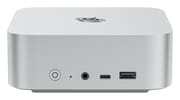
The chassis measures about 5.3 by 5.3 by 1.8 inches, the same case as the SER9, with an aluminum shell over a plastic base. The front holds the power button, a clear-CMOS pinhole, a 3.5mm audio jack, a 10Gbps USB-C port that carries data only, and a 10Gbps USB-A port. The back carries the barrel power input, a 40Gbps USB4 port with display output and power delivery, HDMI 2.1, DisplayPort 1.4, a second 3.5mm jack, a 10GbE port, one more 10Gbps USB-A port, and two USB 2.0 ports. Beelink rates both HDMI and DisplayPort for 4K at 240Hz, and HDMI, DisplayPort, and USB4 can run three 4K displays together.
Robtech identified the network chip as a Marvell 10GbE controller, a large step from the 2.5GbE port on the SER9. Wireless comes from an Intel AX200 card with Wi-Fi 6 and Bluetooth 5.2, which sits in its own M.2 2230 slot and can be replaced. Robtech saw no dropouts on Wi-Fi at 39 feet from the router, but found the Bluetooth range worse than the SER9’s. Beelink lists Wake-on-LAN and automatic power-on, and Tom’s Hardware pointed to the auto power-on feature as useful for a box that runs as a networked compute unit. There is no OCuLink port and only one Ethernet port, so an external GPU has to go through USB4 at its 40Gbps limit.
Performance, memory, and cooling

The HX 470 pairs four Zen 5 cores that boost to 5.2GHz with eight Zen 5c cores, for 12 cores and 24 threads, and its Radeon 890M has 16 compute units clocked up to 3.1GHz. ETA PRIME saw the chip hold 54 to 55W after a two-minute boost to 64W. Against an HX 370 at the same 54W, he measured about 6 percent more single-core and 7.4 percent more multi-core in Geekbench 6, roughly 5 percent more in Cinebench R24, and a 3DMark Time Spy score of 4,221, about 7.5 percent higher. Robtech measured a smaller gap in Cinebench R23 multi-core, about 1 percent over the SER9’s best score. The chip is a clock bump on the same core count and the same iGPU.
Two SO-DIMM slots hold DDR5-5600, so you can add or replace RAM, but the sticks are slower than the SER9’s soldered LPDDR5X, which Robtech noted ran at 7,500 MT/s, and the difference shows up in graphics work. ETA PRIME’s results from Beelink’s earlier HX 370 machine with faster soldered memory were almost 11 percent higher in Time Spy despite the lower GPU clock. Robtech tried raising the memory to 6,000 MT/s in the BIOS; it booted but scored worse in 3DMark, and 6,400 MT/s crashed. The default graphics memory allocation is 4GB, which both Robtech and Tom’s Hardware saw, and it can be raised in the BIOS or AMD’s driver software.
Beelink cools the chip with what it calls MSC 2.0, a vapor chamber with a single fan that draws air in through a dust filter on the bottom and exhausts it out the back. Robtech measured 8W at idle, the same as the SER9, and found the BIOS performance mode drew up to 17W more for little benefit. Storage runs through two M.2 2280 PCIe 4.0 x4 slots under a shared heatsink, each taking up to 4TB. Getting inside means prying off four glued rubber feet to reach the screws, then removing the base plate and a two-screw dust screen.
Reviewer Insights
Tom’s Hardware
Sayem Ahmed at Tom’s Hardware tested the red OpenClaw edition with 64GB of RAM and two 1TB drives, one holding Windows 11 Pro and the other Ubuntu. Its productivity results landed mid-pack among the mini PCs the outlet has tested, and it placed second in the multi-threaded results. He wrote, “In everyday use, I was not wanting for any more power than what was already on offer here,” and said the fan reached full speed only once, during a synthetic workload. In games, Cyberpunk 2077 averaged 51 FPS on its Steam Deck preset at 1080p and 30 FPS on High with no upscaling, Shadow of the Tomb Raider averaged 52 FPS, and Hollow Knight: Silksong reached about 100 FPS at 4K.
The preinstalled 9-billion-parameter Qwen model ran at 11.4 tokens per second, and Tom’s Hardware traced the limit to the HX 470’s 89.6 GB/s memory bandwidth. The verdict called the SER10 MAX “a solid entrant into the mini PC Space” with dual boot out of the box, and said “the reality of the ‘OpenClaw’ edition system highlights the limitations of the silicon within.” Dual booting also means switching boot drives in the BIOS, and Ubuntu did not recognize the network chip until Windows had been set up first. The Windows install shipped free of bloatware.
ETA PRIME
ETA PRIME tested a 32GB unit with 12GB set aside for graphics. Red Dead Redemption 2 at 1080p medium with FSR Quality averaged in the mid-60s, Ratchet and Clank: Rift Apart averaged about 82 FPS at 1080p medium, and Spider-Man 2 still dipped under 60 FPS with frame generation on. He called it “a really quiet and cool machine” at the stock power limit. His reservation was the memory: “Really do wish we had LPDDR5X because right now, upgrading the RAM on this is still going to cost a lot.”
Robtech
Robtech ran the SER10 MAX against the SER9 in both BIOS power modes. He found it quieter than the SER9 and warmer as a result, saying “Beelink has chosen to make this one even quieter than the Ser 9, which increases the temp.” The HX 470 was the fastest AMD chip on his Geekbench multi-core chart, but gains over the HX 370 stayed in the low single digits, and the bundled Crucial PCIe 4.0 SSD did not reach the middle of his storage chart. He summed up the performance mode as “Up to 17 W extra for little performance gain. Very inefficient.” His other complaints were the large 19V power brick in place of a compact GaN adapter, the Wi-Fi 6 radio, the lack of a VESA mount, and the glued rubber feet. He installed the latest Ubuntu without problems and noted the switch to a three-year warranty.
Who should buy it
The SER10 MAX fits someone who wants a small, quiet desktop for office work, code, and light video editing, with 10GbE for a NAS and memory that can grow later. It plays indie, esports, and older games well; Red Dead Redemption 2 averaged in the mid-60s at 1080p medium with FSR in ETA PRIME’s testing. Newer releases struggle. Robtech called Doom: The Dark Ages “unplayable for such a fast-paced title” at 1080p low, and Spider-Man 2 dipped under 60 FPS even with frame generation. The OpenClaw edition adds an Ubuntu install set up for local agents, and at 11.4 tokens per second from its 9-billion-parameter model it suits small models and agent experiments.
Skip it if you already own a SER9, because the CPU and graphics gains are small, or if graphics speed matters more than upgradeable memory, since soldered LPDDR5X runs the same Radeon 890M faster. For larger local AI models, the Beelink GTR9 Pro and its Ryzen AI Max+ 395 offer far more memory bandwidth. The GEEKOM A9 Max and MINISFORUM AI X1 Pro-470 use the same HX 470 chip. To line them up against other models, use Starry Hope’s Mini PC Comparison Chart.
Frequently Asked Questions
Can you upgrade the RAM in the Beelink SER10 MAX?
Yes. It has two DDR5 SO-DIMM slots and ships with DDR5-5600 in 32GB or 64GB kits. Both slots sit under the base plate and a dust screen, and you need to remove four glued rubber feet to reach the screws first.
How much faster is the SER10 MAX than the SER9?
Only slightly. ETA PRIME measured about 5 to 7 percent more CPU performance for the HX 470 over the HX 370 at the same power. The SER9’s soldered LPDDR5X runs at 7,500 MT/s against DDR5-5600 here, and the faster memory helps the Radeon 890M.
Is the Beelink SER10 MAX good for running local AI models?
Only small ones. Its DDR5-5600 memory gives 89.6 GB/s of bandwidth, and Tom’s Hardware measured 11.4 tokens per second from the preinstalled 9-billion-parameter Qwen model. Machines built on the Ryzen AI Max+ 395 have far more memory bandwidth for larger models.
What is the OpenClaw edition of the SER10 MAX?
It is the same hardware in an orange-red finish, sold with Ubuntu and the OpenClaw agent software preinstalled along with a local language model. Beelink also sells it with both Ubuntu and Windows. The standard edition is silver and ships with Windows 11 Pro.
Can the Beelink SER10 MAX use an external GPU?
Through its USB4 port, yes. Robtech noted an eGPU will add detail and frame rate at a performance cost from the 40Gbps link. There is no OCuLink port.
Can you mount the SER10 MAX behind a monitor?
No. Robtech found it has no VESA mounting support, and no bracket comes in the box.