
GMKtec EVO-X5 Pro
Published on

The GMKtec EVO-X5 Pro is a local AI workstation for people whose models no longer fit on a 128GB Strix Halo box. It can assign up to 160GB of its 192GB to the integrated GPU, against a 96GB limit on the EVO-X2 and EVO-X3. On models both generations can load, the newer chip is only a few percent faster, but ETA PRIME said it can run a 320-billion-parameter model, which the older machines cannot hold. Out-of-band remote management also aims it at offices and labs as much as at home users.
Pros and Cons
| Pros | Cons |
|---|---|
| 192GB of unified memory, with up to 160GB assignable to the iGPU | Memory is soldered, so the 192GB you buy is permanent |
| Loads models too large for the 96GB VRAM limit of 128GB machines | On models that fit in 128GB, measured gains over the Ryzen AI Max+ 395 were about 5 to 7 percent |
| Two 10GbE ports, one with AMD DASH out-of-band management | Priced far above 128GB Strix Halo machines |
| Four USB4 ports, two of them USB4 v2 at 80Gbps | Third M.2 slot runs at PCIe 4.0 x1 |
| Holds a sustained 120W with a 140W boost and stays cool | No DisplayPort, OCuLink, or card reader |
| Discrete TPM 2.0 and a match-on-chip fingerprint reader | SteamOS cannot change the power limit from its own menus |
Related Videos
GMKtec EVO-X5 Pro Comparison Chart
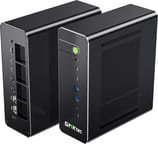 GMKtec EVO-X5 Pro | GMKtec EVO-X5 Pro | |
| Price | List Price: $6,799.00 Amazon Prices: Loading prices... | List Price: $7,099.00 Amazon Prices: |
| Version | 192GB / 2TB | 192GB / 4TB |
| Performance Rating | 8.4 | 8.4 |
| Operating System | Windows 11 Pro | Windows 11 Pro |
| Processor | Sixteen-core 3.10 Ghz (max 5.20 Ghz) AMD Ryzen AI Max+ PRO 495 | Sixteen-core 3.10 Ghz (max 5.20 Ghz) AMD Ryzen AI Max+ PRO 495 |
| GPU | Integrated AMD Radeon 8065S | Integrated AMD Radeon 8065S |
| RAM | 192 GB LPDDR5X (192GB LPDDR5X-8533 unified, soldered) | 192 GB LPDDR5X (192GB LPDDR5X-8533 unified, soldered) |
| Internal Storage | 2 TB NVMe SSD | 2 TB NVMe SSD |
| Dimensions width x length x thickness | 8.7 x 7.68 x 3.15 inches (220.98 x 195.07 x 80.01 mm) | 8.7 x 7.68 x 3.15 inches (220.98 x 195.07 x 80.01 mm) |
| Weight | 5.51 lbs (2.5 kg) | 5.51 lbs (2.5 kg) |
| WiFi | Wi-Fi 7 (802.11be) | Wi-Fi 7 (802.11be) |
| Bluetooth | Bluetooth 5.4 | Bluetooth 5.4 |
| Ethernet | 2 Ethernet ports at 10 Gbps | 2 Ethernet ports at 10 Gbps |
| HDMI | 1 Full-Size HDMI Port | 1 Full-Size HDMI Port |
| DisplayPort | No native DisplayPort; video out via HDMI 2.1 and USB4 | No native DisplayPort; video out via HDMI 2.1 and USB4 |
| VGA | No VGA Ports | No VGA Ports |
| USB Ports | 2 USB 2.0, 2 USB 3, 4 USB-C (4 USB4) 2x USB4 v2 (80Gbps) rear, 2x USB4 (40Gbps) front | 2 USB 2.0, 2 USB 3, 4 USB-C (4 USB4) 2x USB4 v2 (80Gbps) rear, 2x USB4 (40Gbps) front |
| Thunderbolt Ports | No | No |
| OCuLink | No | No |
| Internal SATA Ports | No SATA ports | No SATA ports |
| Card Reader | No Card Reader | No Card Reader |
| Headphone Jack | combo | combo |
| Fanless | No | No |
| VESA Mount | No | No |
| In the Box | Mini PC, 330W power adapter, HDMI cable, manual, warranty card | Mini PC, 330W power adapter, HDMI cable, manual, warranty card |
| Expandability | 192GB LPDDR5X soldered (not upgradeable). 3x M.2 2280 NVMe (two x4, one x1), 24TB max; no SATA. | 192GB LPDDR5X soldered (not upgradeable). 3x M.2 2280 NVMe (two x4, one x1), 24TB max; no SATA. |
Related Mini PCs
-
 GMKtec EVO-X2The GMKtec EVO-X2 is a 3.6-pound upright mini PC built on the AMD Ryzen AI Max+ 395 with Radeon…
 -
 GMKtec EVO-X1 ProThe GMKtec EVO-X1 Pro moves the compact EVO-X1 chassis to AMD's Ryzen AI 9 HX 470, with 64GB of…
 -
 BOSGAME M5The BOSGAME M5 puts the 16-core AMD Ryzen AI Max+ 395 and its Radeon 8060S graphics in a metal…
 -
 Mac Studio (2026)Apple's 7.7-inch square pro desktop with memory fixed at purchase. The M5 Max model covers photo,…
 -
 NIMO Mini PC AMD Ryzen AI Max+ 395The NIMO Mini PC packs the flagship AMD Ryzen AI Max+ 395 with 16 Zen 5 cores and Radeon 8060S…
 -
 ACEMAGIC M1A Pro+Cube-shaped Strix Halo mini PC with the AMD Ryzen AI Max+ 395, Radeon 8060S, and 128GB of soldered…
Upright metal-framed chassis with dual 10GbE and soldered memory

The EVO-X5 Pro stands about 8.7 inches tall, 3.1 inches wide, and 7.7 inches deep, and GMKtec lists it at roughly 5.5 pounds. GMKtec builds it on a metal middle frame with coated plastic top and bottom covers and internal metal reinforcement, and the feet let it run upright or lying on its side. Cooling is a vapor chamber with two 8030 fans and one 8015 system fan, and a P-MODE button on the front cycles between Silent (54W), Balanced (85W), and Performance (120W sustained). Power comes from a 330W external adapter through a barrel connector; the USB-C ports do not accept power input.
The front panel carries two USB4 ports at 40Gbps, two USB-A 3.2 Gen 2 ports, a 3.5mm headset jack, the power button with its fingerprint reader, and a clear-CMOS pinhole. The back adds a second 3.5mm audio output, HDMI 2.1 rated for 8K at 60Hz, two USB4 v2 ports at 80Gbps, two USB 2.0 ports, two 10GbE RJ45 jacks on Realtek RTL8127 controllers, and a Kensington lock slot. GMKtec rates the machine for up to four displays at once across HDMI and USB4. Wireless is Wi-Fi 7 on a MediaTek MT7925 card with Bluetooth 5.4. There is no DisplayPort, no OCuLink, and no card reader, so an external GPU has to go through a USB4 enclosure.
The 10GbE port next to the DC input supports AMD DASH, which lets an administrator power-cycle the machine, update its BIOS, and monitor it over the network even when the operating system is down. GMKtec also fits a discrete TPM 2.0 chip and a match-on-chip fingerprint reader. The company also markets clustering several EVO-X5 Pro units to pool memory for larger models.
Memory is eight 24GB LPDDR5X-8533 packages soldered to the board, so there is no upgrade path. On a 256-bit bus that works out to about 273 GB/s of bandwidth, up from 256 GB/s on the Ryzen AI Max+ 395, and memory bandwidth is what sets token generation speed on this class of chip. Storage is more flexible: three M.2 2280 slots, two at PCIe 4.0 x4 and one at PCIe 4.0 x1, take up to 8TB each for 24TB in total, though SATA drives are not supported and the BIOS boots from the first slot. The two configurations differ only in the pre-installed drive, 2TB or 4TB.
The Ryzen AI Max+ PRO 495 is a Gorgon Halo part from AMD’s Ryzen AI Max PRO 400 series. It keeps the 16 Zen 5 cores and 32 threads of the 395, with a 3.1GHz base and 5.2GHz boost, and its Radeon 8065S keeps the 40 RDNA 3.5 compute units of the 8060S while clocking to 3.0GHz instead of 2.9GHz. The NPU is rated at 55 TOPS. The chip scored 58,689 on PassMark’s CPU Mark, against 55,005 for the 395. Starry Hope’s read on the family is that Gorgon Halo is mostly a rename of Strix Halo, with the 192GB ceiling as the main change.
Reviewer Insights

ETA PRIME
ETA PRIME ran the EVO-X5 Pro in Windows 11 Pro against GMKtec’s EVO-X2 on the Ryzen AI Max+ 395, with both machines at 120W. He opened with “This mini PC is absolutely bananas with 192 GB of unified memory and AMD’s brand new Ryzen AI Max Plus Pro 495.” In performance mode he watched the package hit 143W before settling at a sustained 120W, and he found the cooler kept up: “through my testing so far, this thing does stay pretty cool under an extreme load, even up to 140 W TDP.” He also noted a UART header and a spare USB header inside, and an extra fan at the back over the M.2 drives.
His benchmark gains over the 395 were modest. Geekbench single-core came in 9.3 percent higher at 2,617 against 2,395, and multi-core 12.1 percent higher. Cinebench R24 returned 113 single-core and 1,940 multi-core. On the iGPU, OpenCL rose only 3.1 percent, while 3DMark Steel Nomad scored 2,211 against 2,035 and Time Spy reached 11,743 overall, 11.8 percent ahead, with a graphics score of 12,033 against 10,809. Language models that fit on both machines ran about 5 to 7 percent faster: a 109-billion-parameter model went from 19.2 to 20.1 tokens per second, and a 122-billion-parameter model from 19.5 to 20.8.
With 160GB assigned as VRAM he ran Qwen 3.8 Flash Next at 44 tokens per second and GLM 5.3 Flash at 21, and pointed out that “given that the 395 maxes out at 96 gigs of VRAM or 128 in total, we just can’t run those models on that setup.” Gaming at 1440p held up: Cyberpunk 2077 averaged around 69 FPS at the ultra preset with FSR, Red Dead Redemption 2 around 87 FPS on a high and ultra mix with no upscaling, and Crimson Desert needed FSR frame generation to reach the mid 90s. On whether it is a gaming purchase, he said “I’m not sure how many people are going to buy this for gaming, but yeah, it can definitely game.” He added that he had pushed it to 160W sustained after changing the fan curve.
In a follow-up with SteamOS installed, he flashed official SteamOS from a USB drive and reported working Wi-Fi and Bluetooth, and the front power-mode button still worked because it is tied to the BIOS. He could not change the TDP from inside SteamOS, so he set performance mode in the BIOS before testing. Spider-Man 2 ran at 1440p very high with no FSR, Hogwarts Legacy needed FSR at quality to stay above 60 at 1440p ultra, and Red Dead Redemption 2 at all-ultra settings with no upscaling dropped to averages of 42 to 43 FPS. He closed on cost: “The price on these things is absolutely outrageous due to the amount of RAM they add to these units.”
Should you buy it?
The EVO-X5 Pro suits someone running local models too large for 128GB who wants them on one desktop box, or an IT team that wants DASH, a discrete TPM, and fingerprint login on its AI workstations. With 160GB available as VRAM it loaded models ETA PRIME said the 395 cannot run, and its two 10GbE ports and four USB4 ports give it more I/O than most Strix Halo designs.
If your models already fit in 128GB, the measured gain over the Ryzen AI Max+ 395 is small, and the EVO-X3, the EVO-X2, and the Minisforum MS-S1 MAX do the same work for far less. For gaming alone the price is hard to justify, a point ETA PRIME made about the cost of the 192GB of RAM. Anyone who wants OCuLink for an external GPU will find it on the EVO-X3. Starry Hope’s guide to local LLM inference on Strix Halo explains where memory bandwidth limits these chips, and the Mini PC comparison chart lists every machine in the catalog side by side.
Frequently Asked Questions
How is the EVO-X5 Pro different from the EVO-X2 and EVO-X3?
The EVO-X2 and EVO-X3 use the Ryzen AI Max+ 395 with up to 128GB of LPDDR5X-8000 and a 96GB VRAM limit. The EVO-X5 Pro uses the Ryzen AI Max+ PRO 495 with 192GB of LPDDR5X-8533 and up to 160GB assignable to the GPU. It also adds two 10GbE ports with AMD DASH, four USB4 ports, a third M.2 slot, a discrete TPM, and a fingerprint reader. The EVO-X3 keeps an OCuLink port, which the EVO-X5 Pro does not have.
Can I upgrade the RAM in the GMKtec EVO-X5 Pro?
No. The memory is soldered, so the machine keeps the 192GB it ships with, and the 2TB and 4TB configurations both include the full amount. Storage is the upgradeable part, with the boot drive in the first M.2 slot and two more slots free for NVMe drives.
How much memory can the EVO-X5 Pro give to the GPU?
GMKtec lists up to 160GB of the 192GB pool as assignable to the Radeon 8065S. ETA PRIME ran with 160GB assigned as VRAM and 32GB left for the system, enough to load models he said the 395 cannot run with its 96GB VRAM ceiling.
What is AMD DASH on the EVO-X5 Pro?
DASH is the out-of-band management standard AMD supports on its PRO processors, covering the job Intel vPro does on Intel machines. Only one of the two 10GbE ports carries it, the one beside the DC input, so that is the port to cable to a management network. The second 10GbE port works as an ordinary network connection.
Does the EVO-X5 Pro run Linux or SteamOS?
Windows 11 Pro comes pre-installed, and GMKtec lists Linux and Ubuntu as supported. SteamOS also works. ETA PRIME flashed it from a USB stick and played at 1440p, with power modes set in the BIOS or with the front button because he could not get TDP adjustment working inside SteamOS.
How many displays can the EVO-X5 Pro drive?
Four at once. One can run from the HDMI 2.1 port at up to 8K 60Hz, and the others connect to the USB4 ports with USB-C monitors or USB-C to DisplayPort or HDMI cables, since the machine has no DisplayPort connector.