
GMKtec Nucbox K2
Updated on

The GMKtec Nucbox K2 is a compact AMD mini PC built around the Ryzen 7 7735HS (8 cores, 16 threads) with integrated Radeon 680M graphics. It takes DDR5 to 64GB across two SO-DIMM slots and ships with a 1TB M.2 NVMe SSD, with a single Gen 4 slot you can swap up to 2TB. It runs Windows 11 Pro (Linux works too) and drives up to three displays through its dual HDMI 2.0 ports and a USB-C output. Networking is 2.5GbE, Wi-Fi 6, and Bluetooth 5.2. Early units shipped single-channel memory, which holds the 680M back a bit; later units moved to dual-channel.
Strengths and drawbacks
| Pros | Cons |
|---|---|
| 8-core Ryzen 7 7735HS with Radeon 680M | Single M.2 slot; no extra storage bay |
| USB4, dual HDMI 2.0, 2.5GbE, Wi-Fi 6 | Early units shipped single-channel, slowing the 680M |
| DDR5 to 64GB over two SO-DIMM slots | No M.2 heatsink; the SSD can run warm under load |
| Up to three displays (dual HDMI plus USB-C) | No BIOS memory overclocking |
| Easy to open; VESA mount in the box | Fan gets audible at higher power modes |
| Strong 1080p gaming and emulation for the size | Bundled SSD is a slower Gen 3 drive |
Related Videos
GMKtec Nucbox K2 Comparison Chart
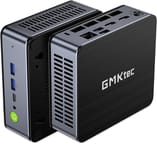 GMKtec Nucbox K2 | |
| Price | List Price: $579.99 Amazon Prices: |
| Version | 32GB/1T/Ryzen 7 7735HS |
| Performance Rating | 8.5 |
| Operating System | Windows 11 Pro |
| Processor | Octa-core 3.20 Ghz (max 4.75 Ghz) AMD Ryzen 7 7735HS |
| GPU | Integrated AMD Radeon 680M |
| RAM | 32 GB |
| Internal Storage | 1 TB |
| Dimensions width x length x thickness | 4.41 x 4.84 x 1.7 inches (112.01 x 122.94 x 43.18 mm) |
| Weight | 0.93 lbs (0.42 kg) |
| WiFi | Wi-Fi 6 (802.11ax) |
| Bluetooth | Bluetooth 5.2 |
| Ethernet | 1 Ethernet port at 2.5 Gbps |
| HDMI | 2 Full-Size HDMI Ports |
| DisplayPort | No DisplayPort |
| VGA | No VGA Ports |
| USB Ports | 4 USB 3, 1 USB-C (1 USB4) USB-C supports power delivery and DisplayPort |
| Thunderbolt Ports | No |
| OCuLink | No |
| Internal SATA Ports | No SATA ports |
| Card Reader | No Card Reader |
| Headphone Jack | combo |
| Fanless | No |
| VESA Mount | Yes |
| In the Box | Mini PC, power adapter, VESA mount with screws, HDMI cable, user manual |
| Expandability | RAM and SSD can be upgraded, supports up to 64GB RAM and 2TB PCIe 4.0 M.2 NVMe SSD, No additional storage expansion |
Related Mini PCs
-
 GMKtec NucBox K16The GMKtec NucBox K16 is a CNC-aluminium mini PC on the AMD Ryzen 7 7735HS with Radeon 680M…
 -
 GMKtec NucBox K3 ProThe GMKtec NucBox K3 Pro pairs a 10-core Intel Core i7-12650H with 24GB of soldered LPDDR5 and a…
 -
 Beelink EQR7The Beelink EQR7 pairs an AMD Ryzen 7 7735U with a built-in power supply, dual Gigabit Ethernet,…
 -
 Beelink SER5 MAX (Ryzen 7 7735HS)The Beelink SER5 MAX pairs an 8-core Ryzen 7 7735HS and Radeon 680M graphics with 24GB of LPDDR5,…
 -
 BOSGAME M4The BOSGAME M4 pairs an AMD Ryzen 7 8745HS with 32GB of DDR5, an OCuLink port for an external GPU,…
 -
 BOSGAME P3 LiteThe BOSGAME P3 Lite pairs an AMD Ryzen 7 6800H and Radeon 680M graphics with dual 2.5G Ethernet,…
Two SO-DIMM slots and a single Gen 4 M.2 slot
The Ryzen 7 7735HS is an 8-core, 16-thread chip on a 6nm process, and its Radeon 680M graphics are strong for an integrated GPU, handling 1080p gaming and emulation that lower-end discrete cards used to be needed for. DDR5 memory goes to 64GB, and the shipped 1TB NVMe drive can be swapped for one up to 2TB. The M.2 drive has no heatsink, so it can run warm under sustained load.
For ports the K2 has one USB4 Type-C port, four USB 3.2 (10Gbps), dual HDMI 2.0, a 2.5GbE jack, and a combo audio jack, with Wi-Fi 6 and Bluetooth 5.2. Between the two HDMI and the USB-C it drives up to three displays. It is easy to open for the RAM and SSD upgrades, and a VESA mount is in the box.
Reviewer Insights
Robtech
Robtech called the 7735HS and Radeon 680M “some of the fastest you’ll find” for mini PCs and liked how it opens up: “Opening it is surprisingly nice and easy.” His test unit was single-channel, and he credited GMKtec for moving to dual sticks of DDR5 in later units to lift the graphics. He found multicore performance slightly behind some rivals but the graphics consistent with no throttling, and recommended the default 35W mode to keep heat and fan noise down. His verdict: “the best choice I’ve reviewed so far” for a lower-priced 680M mini PC.
Madlittlepixel
Madlittlepixel called it a “speedy little beast” and “very snappy.” His unit was a 32GB (dual-channel, two 16GB sticks) / 1TB configuration, which he liked for the port selection and wireless. On emulation it ran PlayStation 2 and Wii U well but struggled with Xbox and Xbox 360. He concluded it performs above expectations for its size and intended use.
Worth it for the 680M if you find a dual-channel unit
A 7735HS box this size covers productivity, media, multi-monitor work, and 1080p gaming or emulation, and the 680M carries that load without a discrete card. RAM and SSD upgrades take a few minutes behind an easy-open lid, and the VESA mount puts the box behind a display.
A later dual-channel unit performs noticeably better on graphics than an early single-channel one. The single drive slot and the un-cooled M.2 are the main hardware limits, and high-end gaming still wants an external GPU or a dedicated card. For a newer option in the same line, the Nucbox K6 steps up to a Ryzen 7 7840HS with Radeon 780M graphics. To compare it with other models, use Starry Hope’s Mini PC Comparison Chart.
Frequently Asked Questions
Can I upgrade the RAM and storage on the GMKtec Nucbox K2?
Yes. Two SO-DIMM slots take up to 64GB of DDR5, and the M.2 NVMe SSD can be swapped for one up to 2TB. The BIOS has no memory overclocking.
Does the Nucbox K2 come with a pre-installed operating system?
It comes with Windows 11 Pro pre-installed, and Linux runs on it if you prefer another operating system.
What kind of graphics performance can I expect from the Nucbox K2?
The integrated AMD Radeon 680M handles 1080p gaming and emulation, along with general multimedia work. It does not match a high-end gaming desktop.
How many displays can the Nucbox K2 support?
Three, using the two HDMI 2.0 ports and the USB-C port, which carries DisplayPort 1.4.
What are the connectivity options available on the Nucbox K2?
Bluetooth 5.2, Wi-Fi 6, a 2.5Gbps Ethernet port, four USB 3.2 ports, and one USB4 Type-C port that supports power delivery and DisplayPort.
Is the Nucbox K2 fanless?
No. A cooling fan manages temperature, and it becomes audible at the higher power modes.
Can I mount the Nucbox K2 behind a monitor?
Yes. A VESA mount and screws are in the box, so it can hang off the back of a monitor.
Are there any concerns about the M.2 drive’s cooling?
The M.2 drive ships without a heatsink, so it can reach high temperatures under sustained load.
Is the Nucbox K2 suitable for gaming?
It handles many modern games at 1080p, and indie and less demanding titles run comfortably. More graphically intensive games need lowered settings.
Does the Nucbox K2 have any bloatware or unnecessary apps?
It ships with a clean Windows 11 Pro install, without extra bundled apps.