
GMKtec NucBox K7 Plus
Updated on

The GMKtec NucBox K7 Plus puts an Intel Core i7-13620H into a case a little over 5 inches square. The chip has 10 cores and 16 threads for multitasking and sustained CPU work, while its integrated Intel UHD Graphics covers multimedia and everyday display duty well short of serious gaming. Both listed builds carry 32GB of DDR5 memory, with 1TB or 2TB of NVMe storage across two M.2 slots. Connectivity runs to USB 4, dual 2.5 gigabit LAN, and Wi-Fi 6, and Windows 11 Pro is pre-installed.
| Pros | Cons |
|---|---|
| 10-core Intel Core i7-13620H | All-plastic shell with a top lid that creaks |
| Dual M.2 Gen 4 NVMe slots | Higher noise levels in performance mode |
| 32GB DDR5 with up to 2TB of NVMe storage | Secure Boot and TPM 2.0 issues with some games |
| USB 4, DisplayPort, HDMI, and dual 2.5GbE | Included drive is Gen 3, not Gen 4 NVMe |
| Supports Wi-Fi 6 and Bluetooth 5.2 | |
| Pre-installed Windows 11 Pro | |
| Expandable with eGPU via USB 4 port |
Related Videos
GMKtec NucBox K7 Plus Comparison Chart
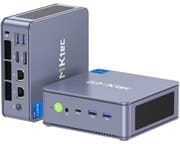 GMKtec NucBox K7 Plus | GMKtec NucBox K7 Plus | |
| Price | List Price: $679.99 Amazon Prices: | List Price: $629.98 Amazon Prices: |
| Version | 32GB/2TB/Intel i7-13620H | 32GB/1TB/Intel i7-13620H |
| Performance Rating | 8.6 | 8.6 |
| Operating System | Windows 11 Pro | Windows 11 Pro |
| Processor | Deca-core 3.60 Ghz (max 4.90 Ghz) Intel Core i7-13620H | Deca-core 3.60 Ghz (max 4.90 Ghz) Intel Core i7-13620H |
| GPU | Integrated Intel UHD Graphics | Integrated Intel UHD Graphics |
| RAM | 32 GB | 32 GB |
| Internal Storage | 2 TB | 1 TB |
| Dimensions width x length x thickness | 5.03 x 5 x 1.9 inches (127.76 x 127 x 48.26 mm) | 5.03 x 5 x 1.9 inches (127.76 x 127 x 48.26 mm) |
| Weight | 1.14 lbs (0.52 kg) | 1.14 lbs (0.52 kg) |
| WiFi | Wi-Fi 6 (802.11ax) | Wi-Fi 6 (802.11ax) |
| Bluetooth | Bluetooth 5.2 | Bluetooth 5.2 |
| Ethernet | 2 Ethernet ports at 2.5 Gbps | 2 Ethernet ports at 2.5 Gbps |
| HDMI | 1 Full-Size HDMI Port | 1 Full-Size HDMI Port |
| DisplayPort | 1 DisplayPort | 1 DisplayPort |
| VGA | No VGA Ports | No VGA Ports |
| USB Ports | 4 USB 3, 1 USB-C (1 USB4) (USB-C 4 provides DisplayPort) | 4 USB 3, 1 USB-C (1 USB4) (USB-C 4 provides DisplayPort) |
| Thunderbolt Ports | No | No |
| OCuLink | No | No |
| Internal SATA Ports | No SATA ports | No SATA ports |
| Card Reader | No Card Reader | No Card Reader |
| Headphone Jack | combo | combo |
| Fanless | No | No |
| VESA Mount | Yes | Yes |
| In the Box | GMKtec NucBox K7 Plus, Power Supply & Cable, HDMI Cable, VESA Mount with Screws, User Manual | GMKtec NucBox K7 Plus, Power Supply & Cable, HDMI Cable, VESA Mount with Screws, User Manual |
| Expandability | Two M.2 Gen 4 NVMe slots, USB 4 port for eGPU | Two M.2 Gen 4 NVMe slots, USB 4 port for eGPU |
Related Mini PCs
-
 GMKtec NucBox K16The GMKtec NucBox K16 is a CNC-aluminium mini PC on the AMD Ryzen 7 7735HS with Radeon 680M…
 -
 GMKtec Nucbox K2The GMKtec Nucbox K2 is a compact AMD Ryzen 7 7735HS mini PC with Radeon 680M graphics, DDR5 to…
 -
 Beelink EQR7The Beelink EQR7 pairs an AMD Ryzen 7 7735U with a built-in power supply, dual Gigabit Ethernet,…
 -
 Beelink SER5 MAX (Ryzen 7 7735HS)The Beelink SER5 MAX pairs an 8-core Ryzen 7 7735HS and Radeon 680M graphics with 24GB of LPDDR5,…
 -
 BOSGAME M4The BOSGAME M4 pairs an AMD Ryzen 7 8745HS with 32GB of DDR5, an OCuLink port for an external GPU,…
 -
 BOSGAME P3 LiteThe BOSGAME P3 Lite pairs an AMD Ryzen 7 6800H and Radeon 680M graphics with dual 2.5G Ethernet,…
A spare NVMe slot and DDR5 SO-DIMMs under an easy lid
The box ships with a power supply, an HDMI cable, a VESA mount, and the tools needed to open it and upgrade it. Inside are two M.2 Gen 4 NVMe slots, one of them with a heatsink already fitted, so adding a second drive is the obvious upgrade. Memory is DDR5 SO-DIMM.
Cooling comes from a fan plus a heatsink over the NVMe drive. That keeps components cool under load, and it also raises noise, most of all in performance mode. The quieter BIOS power modes give up some sustained speed in exchange. Buyers weighing silence against sustained performance will find a useful framework in Starry Hope’s fanless vs active cooling guide.
At 5.03 inches wide, 5 inches deep, and 1.9 inches thick, it weighs just over a pound and fits where a tower will not, such as a small home office or a living room shelf. The included VESA mount puts it behind a monitor and off the desk entirely. The port count holds up at that size: four USB 3 ports, a USB 4 Type-C, HDMI, DisplayPort, and two 2.5GbE jacks.
Reviewer Insights
The line ships with two different Raptor Lake chips. The base NucBox K7 uses the Intel Core i5-13500H (4 performance cores plus 8 efficiency cores, 12 cores and 16 threads); the K7 Plus that this page tracks uses the Intel Core i7-13620H (6 performance cores plus 4 efficiency cores, 10 cores and 16 threads, up to 4.9 GHz). The one substantial independent review of the line is Robtech’s, and it tested the i5-13500H on the same chassis the Plus uses, so its build, port, cooling, and acoustic findings carry over while its CPU and graphics numbers belong to the i5. The i7-13620H Plus has drawn only manufacturer marketing and short spec-announcement write-ups, plus one public benchmark submission; no outlet has published independent power, thermal, or acoustic measurements of the i7 configuration.
Robtech: solid plastic build, noise on the higher side
Robtech reviewed the i5-13500H version of the K7 and preferred the “space blue” color of the three on offer. He flagged the move to an all-plastic shell as a step down from the metal midsection of the GMKtec M3, though he judged the plastic itself solid apart from a removable top lid that creaks. He liked that the box ships with a VESA mount, a screwdriver, and a plastic prying tool, calling it “one of the few minis including the tools to actually open it up,” and walked the port layout: a front USB4 40Gbps port and dual 10Gbps USB 3 alongside more USB 3, DisplayPort 1.4, HDMI 2.0, and dual Intel 2.5GbE on the back, with Wi-Fi 6 and Bluetooth handled by an Intel AX201 module. The review unit carried 32GB of DDR5-4800 and a 1TB drive with a heatsink, and he noted the two M.2 slots are Gen4 but the included drive is only Gen3.
He framed his benchmark commentary as a generational delta against the previous i5-12500H mini. Single-core was flat (“not even a 1% increase over the previous gen”), while multi-core rose about 21 percent in the default Balance mode and close to 28 percent in Performance mode; video encoding gained 16 to 17 percent, and the Iris Xe graphics picked up about 15 percent in DX11 and 14 percent in DX12. He recommended Intel minis like this one over AMD for video work specifically, crediting Quick Sync hardware decoding for responsive 4K timeline scrubbing. On the i5’s Iris Xe at 1080p he measured League of Legends over 200 FPS, Counter-Strike 2 in an 80 to 100 FPS range on low, and Dota 2 mostly above 120, while Forza Horizon 5 “doesn’t hold up too well” and Breath of the Wild via Wii U emulation ran close to 60 FPS. Valorant would not launch because of its Secure Boot and TPM 2.0 requirement, an issue he raised with GMKtec during the review and reported was being fixed in a BIOS update. He also demonstrated the USB4 port driving an RTX 3070 eGPU for 4K gaming.
Robtech gave relative impressions for power, heat, and noise instead of wattage or decibel readings. Idle power “came back with the same result as the previous generation mini,” peak draw was in the same ballpark (slightly higher in Performance mode), CPU temperature sat “around the middle” for a mid-range mini with “performance mode only added an extra degree,” and the NVMe heatsink plus fan kept the drive cool. His main reservation was acoustic: “noise levels are on the higher side,” and Performance mode pushes them higher still. His verdict on the i5 was that it is “one of the highest mid-tier minis,” with the headline that “the i5-13500H manages to beat the i7s from the previous generation in most metrics.”
One public Geekbench 6 run covers the i7-13620H
Independent reviewers have not benchmarked the i7-13620H Plus. A public Geekbench 6 result for a “GMKtec NucBox K7 PLUS” is the one verifiable data point for the exact chip this page covers. Uploaded in June 2024 on the Balanced power plan with 32GB of DDR5-4788, the run records a 2,560 single-core and 11,531 multi-core score, with the i7-13620H boosting to about 4.69 GHz and Geekbench confirming the 6-plus-4 core layout and Raptor Lake codename. That single submission comes from one user’s machine outside any controlled review bench, so treat it as indicative. It lines up with the i7-13620H landing modestly ahead of the i5-13500H on lightly threaded work, thanks to its two extra performance cores and higher clocks.
UHD Graphics is the ceiling on a chip that still handles productivity
The Core i7-13620H is a 2023-era Raptor Lake-H mobile chip with a PassMark multi-thread score around 24,800, which still covers multi-monitor office work, 4K playback, and compiling code in 2026. Its Intel UHD Graphics sits a step below the Iris Xe in the i5-13500H that Robtech tested, and well behind the Radeon 780M and newer Arc and Ryzen AI iGPUs, so esports and anything more demanding want the eGPU route over USB4. Buyers cross-shopping current silicon should know that newer Core Ultra and Ryzen AI 300 chips pull ahead on graphics and on-chip AI acceleration, which this generation lacks. The K7 Plus is a productivity box with two NVMe slots and easy access for upgrades.
Customer Reviews
Across 65 ratings on Amazon, the GMKtec NucBox K7 Plus averages 4.8 stars, with 84 percent of reviewers leaving five stars and no one-star or two-star ratings. Edward J. Janeczek, a verified buyer, installed a second 1TB SSD himself and wrote that “The build quality is good, noting that even the case screws had threadlocker applied.” Another verified owner, VINBERDON, who runs an office that needs dual LAN, said it handles “3 different browsers each with 20 or so tabs open, web development, graphic editing, etc. It takes it all and never chokes.”
A recurring thread in the reviews is GMKtec’s support after something went wrong. A verified buyer named Glen titled his review “Excellent computer. Excellent service. Worth ten stars!” after a Windows failure roughly 14 months in, and credited the company for sending “a COMPLETE response with instructions and links for reinstalling the original OS.” Owners named Ann and others describe similar back-and-forth that ended in a replacement or a fix. Fan noise is the clearest negative note. Verified reviewer Volkan Toz, running it as a home server, titled his review “Fan sesi yüksek” (Turkish for “fan noise is high”) and built a vented enclosure for it. Read more owner reviews on Amazon.
A productivity box that needs an eGPU for games
The Core i7-13620H, 32GB of DDR5, two Gen 4 M.2 slots, and USB 4 add up to a capable desk machine that weighs just over a pound, and Quick Sync makes it a comfortable place to cut video. A box this capable also makes a solid base for an offline AI survival computer.
The integrated UHD graphics handle only the lightest esports and older titles, so more demanding games need an external GPU over the USB 4 port. Performance mode is audible, which rules the K7 Plus out for a silence-first desk, and the all-plastic case will disappoint anyone who wants metal. Buyers with lighter workloads or a tighter budget have cheaper options.
Starry Hope’s Mini PC Comparison Chart puts these specs beside the rest of the catalog.
Frequently Asked Questions
Can the GMKtec NucBox K7 Plus support an external GPU (eGPU)?
Yes. The USB 4 port takes an eGPU, which is the practical route past the integrated UHD Graphics; Robtech drove an RTX 3070 through it for 4K gaming.
What type of RAM does the NucBox K7 Plus use?
DDR5 SO-DIMM. Both listed builds ship with 32GB.
Does the NucBox K7 Plus come with Wi-Fi and Bluetooth capabilities?
Wi-Fi 6 and Bluetooth 5.2, handled by an Intel AX201 module.
How many storage options are available in the NucBox K7 Plus?
Two M.2 2280 NVMe slots, both Gen 4, though the bundled drive is a Gen 3 model.
Is the operating system pre-installed on the NucBox K7 Plus?
Windows 11 Pro comes pre-installed on both the 1TB and 2TB configurations.
What are the dimensions and weight of the NucBox K7 Plus?
It measures 5.03 inches wide, 5 inches deep, and 1.9 inches thick, and weighs about 1.14 pounds.
Does the NucBox K7 Plus have a fanless design?
No. A fan and heatsink cool the CPU and the NVMe drive, and the fan gets louder in performance mode.
Can I mount the NucBox K7 Plus behind a monitor?
Yes. A VESA mount and screws are in the box, so it can sit behind a monitor.
What kind of power supply does the NucBox K7 Plus use?
It ships with a 120-watt power supply.
Is the case of the NucBox K7 Plus made of metal or plastic?
Plastic. Robtech called it a step down from the metal middle section of the previous GMKtec M3, while judging the plastic itself solid apart from a top lid that creaks.