
Acer Chromebook 511 C737 and C737T
Published on

The Acer Chromebook 511 C737 is a small school laptop built to survive a backpack, and the C737T is the same machine with a touchscreen. It suits younger students and school fleets more than a home buyer choosing one laptop for themselves. Screen choice decides most of the purchase, because the common builds pair the 11.6-inch panel with a 1366x768 resolution, and only some step up to Full HD or add touch. Acer’s US models have an Intel N150 and 64GB of eMMC storage, and the line gets ChromeOS updates through June 2035.
Pros and Cons
| Pros | Cons |
|---|---|
| MIL-STD 810H certified, with a shock-absorbent bumper and spill-resistant keyboard | 1366x768 resolution on most builds |
| Replaceable keyboard and a serviceable USB-C charging port | 64GB of eMMC storage, with no card reader to add more |
| Automatic updates through June 2035 | Memory is soldered, so a 4GB unit stays at 4GB |
| Wi-Fi 7, HDMI, and four USB ports on most builds | No keyboard backlight |
| Acer now rates it for up to 22 hours of web browsing; its launch specs said 10 | 2.87 pounds is heavy for an 11.6-inch laptop |
| Fast charging to 50% in 30 minutes, per Acer | Not Chromebook Plus certified, so it misses Google’s Plus-only features |
Acer Chromebook 511 C737 and C737T Comparison Chart
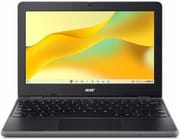
8 configurations
| Configuration | RAM | Screen | Performance | List price | Amazon price | Compare |
|---|---|---|---|---|---|---|
| C737-C0QCNA | 8 GB | 1366x768 | 2.8 | $480.00 | Loading... | Details
|
| C737-C6XP | 8 GB | 1366x768 | 2.8 | $579.99 | Details
| |
| C737-C7E2 | 8 GB | 1920x1080 | 2.8 | $599.99 | Loading... | Details
|
| C737T-C1C1 | 8 GB | 1366x768 touch | 2.8 | $599.99 | Loading... | Details
|
| C737T-C8WD | 8 GB | 1920x1080 touch | 2.8 | $629.99 | Details
| |
| C737T-C8S6 | 8 GB | 1920x1080 touch | 2.8 | $779.99 | Details
| |
| C737-C9SS | 4 GB | 1366x768 | 1.7 | $499.99 | Details
| |
| C737LT-C5Q1 | 8 GB | 1366x768 touch | 2.8 | $999.99 | Details
|
Specs shared by every configuration
| Chromebook Plus | No |
|---|---|
| Processor | Quad-core 3.60 Ghz Intel Processor N150 |
| Internal Storage | 64 GB eMMC |
| Screen Size | 11.6" |
| Screen Type | IPS |
| Stylus / Pen | No Stylus Support |
| Dimensions width x length x thickness | 11.5 x 8.1 x 0.82 inches (292.1 x 205.74 x 20.83 mm) |
| Weight | 2.87 lbs (1.3 kg) |
| Backlit Keyboard | No |
| WiFi | Wi-Fi 7 (802.11be) |
| Bluetooth | Bluetooth 5.3 |
| Ethernet | No |
| HDMI | HDMI |
| Thunderbolt Ports | No |
| Card Reader | No Card Reader |
| Battery | 3 cell, 53Wh, Li-ion |
| Battery Life | 22 hours |
| Fanless | No |
| Auto Update Expiration Date | June, 2035 |
Related Chromebooks
-
 Acer Chromebook 311 C723The Acer Chromebook 311 C723 is an 11.6-inch education Chromebook built to MIL-STD-810H durability,…
-
 Acer Chromebook 311 C725An 11.6-inch rugged classroom Chromebook with MIL-STD 810H testing, a replaceable keyboard and…
-
 ASUS Chromebook C203XAThe ASUS Chromebook C203XA is a rugged 11.6-inch education laptop with a MediaTek MT8173C, an…
-
 ASUS Chromebook CR11 (CR1104C)The ASUS Chromebook CR11 (CR1104C) is a ruggedized 11.6-inch Chromebook built for students and…
-
 Dell Chromebook 11 (3100)The Dell Chromebook 11 (3100) is a ruggedized 11.6-inch education Chromebook with rubber bumpers, a…
-
 Dell Chromebook 11 CC11260The Dell Chromebook 11 CC11260 is a fanless 11.6-inch school laptop with an Intel N150, sold as a…
Durability and repair design
Acer certifies the C737 family to MIL-STD 810H and backs that with a shock-absorbent bumper, reinforced brackets, and mechanically anchored keys. The keyboard is spill-resistant with drainage, and two rubber bars on the base plus a textured surface give small hands something to grip.
The USB-C charging port is serviceable and the keyboard is replaceable, so a school that fixes its own fleet of devices can replace those parts instead of sending the laptop out. At 11.5 x 8.1 x 0.82 inches and 2.87 pounds, the chassis is compact but thick and heavy for its screen size. A Kensington Nano lock slot and a Google H1 security chip are standard, and a camera shutter covers the webcam.
Screen options across the lineup
Most C737 builds use a 1366x768 IPS panel rated at 250 nits and about 50% NTSC color. That resolution has about half the pixels of 1920x1080 and looks soft next to the 1920x1200 panels on 14-inch models. The non-touch HD builds have a matte finish, which holds up better under classroom lighting than the glossy alternatives.
The C737-C7E2 moves to 1920x1080 with a glossy finish, 300 nits, and 52% NTSC. That is 40% more pixels across, so text looks sharper on a screen this small. The C737T-C1C1 keeps the 1366x768 resolution and adds a touchscreen with a glossy finish, while the C737T-C8S6 and the older C737T-C8WD pair touch with 1920x1080 at 250 nits. The C737T is a standard clamshell and does not fold into a tablet. HD builds have a 720p webcam, and Full HD builds have a 1080p webcam.
Performance and storage

The Intel Processor N150 is a four-core, four-thread chip from Intel’s Twin Lake generation with a 3.6 GHz boost and a PassMark score of about 5,343. It reached the market in 2025, so it is current for this class of machine, and it fits ChromeOS, Google Docs, Classroom, and video calls. It is an entry-level part, and a Core-based Chromebook is a better fit for heavy tab loads or Linux development.
Memory is 8GB of LPDDR5X on most builds, with 4GB builds such as the C737-C9SS. Both are soldered, and 8GB is the configuration to buy for anything beyond a managed classroom role, since 4GB leaves little room for a browser plus Android apps. Storage on Acer’s US models is 64GB of eMMC, which is slower than the UFS drives in pricier Chromebooks and leaves limited room for offline files. Acer’s January 2025 announcement also listed an Intel N250 and up to 128GB of UFS or eMMC, while its US lineup lists only the N150 and 64GB of eMMC. Students who keep work in Google Drive will notice the 64GB limit less. There is no card slot, so a USB drive is the only way to add local space.
Ports, wireless, and battery

The laptop has two USB-C 3.2 Gen 1 ports with DisplayPort Alt Mode and Power Delivery, two USB-A 3.2 Gen 1 ports, HDMI, and a headphone and microphone combo jack. HDMI on the chassis lets a teacher or student connect a projector without a dongle. Acer also sells C737LT builds such as the C737LT-C5Q1, with touch and 4G LTE, which give up one USB-A port; C737 and C737T builds are Wi-Fi only.
Acer’s US models have Wi-Fi 7 (802.11be, 2x2) and Bluetooth 5.3, though its launch specs also allowed Wi-Fi 6E. Acer now rates the 53Wh battery for up to 22 hours of web browsing and up to 17 hours of video playback. Its January 2025 launch announcement listed up to 10 hours for the Full HD model. The included 65W USB-C adapter charges to 50% in 30 minutes and 80% in an hour by Acer’s figures.
Our verdict
The C737 fits a school buying a fleet, or a family buying a durable laptop for a younger child who will drop it and spill on it. Repairs to the keyboard and charging port do not require replacing the machine. Among the builds, the 8GB Full HD C737-C7E2 has the best screen, and the 4GB builds are the ones to avoid unless a school’s managed apps are known to fit.
Skip it if you are an adult or older student buying one Chromebook for yourself. The HP Chromebook x360 14 (N150) has the same chip with a 14-inch 1920x1200 screen and a convertible hinge, while the Lenovo Chromebook Plus 2-in-1 14 adds UFS storage, a backlit keyboard, and Chromebook Plus features. A school that wants the same chip and a rugged build on a bigger screen can look at the HP Fortis G1i 14, which has reinforced corners and a 14-inch display. Parents weighing other options for a younger child can start with our guide to Chromebooks for kids or the Chromebook Comparison Chart.
Frequently Asked Questions
How long will the Acer Chromebook 511 C737 get updates?
Google lists an Auto Update Expiration date of June 2035 for the C737, C737T, C737L, and C737LT, and the model is still supported.
Does the C737 use an Intel N150 or an N100?
Acer’s US models use the Intel Processor N150, not the N100.
Is the storage eMMC or UFS?
It has 64GB of eMMC, not UFS, with no way to swap the drive, so extra space comes from a USB drive or cloud storage.
Can I upgrade the RAM?
No. The memory is soldered to the board, so the amount you order is the amount the laptop keeps for its whole service life.
What ports does it have?
It has two USB-C ports, HDMI, an audio jack, and two USB-A ports, or one USB-A port on LTE builds. There is no Ethernet port and no card reader.
Is the C737T a 2-in-1?
No. Its touchscreen sits on a clamshell hinge. The older Acer Chromebook Spin 511 is the convertible model in Acer’s 511 family and is a different product.
Is it a Chromebook Plus?
Acer sells it as a standard Chromebook, and its 64GB of storage falls short of the Chromebook Plus baseline. It still runs Android apps and the built-in Linux environment.