
Acer Chromebook Spin 512 R857T
Published on

The Acer Chromebook Spin 512 R857T is a 12.2-inch convertible built for school use, and it suits a student or a classroom fleet that needs a machine made for rough handling. Acer designs it to MIL-STD 810H testing standards, rates it for 48-inch drops, and lets a technician swap the keyboard and the USB-C charging port. ChromeOS updates run through June 2035. Its limits are 64GB of storage and a quad-core Intel N150, and Acer lists no upgrade for either, so check that both cover the work before buying.
Acer announced the R857T in January 2025 alongside the Chromebook 511 C737, with Intel N150 or N250 options and either Wi-Fi 7 or Wi-Fi 6E. The R857T-C54W is the N150 build with 8GB of LPDDR5X memory, 64GB of eMMC storage, and Wi-Fi 7.
Pros and Cons
| Pros | Cons |
|---|---|
| ChromeOS updates through June 2035 | 64GB of eMMC storage and no memory card slot |
| 1920x1200 16:10 IPS touchscreen with Corning Gorilla Glass | 250 nits and about 50% color gamut coverage |
| Acer rates it for 48-inch drops and 11-ounce water spills | 3.31 pounds is heavy for a 12.2-inch screen |
| Two USB-C, two USB-A, and HDMI ports | No keyboard backlight |
| Wi-Fi 7 and Bluetooth 5.3 | Entry-level Intel N150, about 5,300 on CPU Mark |
| Keyboard comes out after removing two screws | 8GB of memory is soldered |
| 1080p webcam with a physical shutter | No stylus or world-facing camera on this build |
Acer Chromebook Spin 512 R857T Comparison Chart
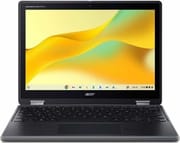 Acer Chromebook Spin 512 R857T | |
| Price | List Price: $679.99 Amazon Prices: Loading prices... Best Buy: Loading price... |
| Model number | R857T-C54W |
| Performance Rating | 2.8 |
| Chromebook Plus | No |
| Processor | Quad-core 3.60 Ghz Intel Processor N150 |
| RAM | 8 GB |
| Internal Storage | 64 GB eMMC |
| Screen Size | 12.2" |
| Screen Resolution | 1920x1200 |
| Screen Type | IPS, 250 nits |
| Touch Screen | Yes |
| Stylus / Pen | No Stylus Support |
| Dimensions width x length x thickness | 11.6 x 8.5 x 0.81 inches (294.64 x 215.9 x 20.57 mm) |
| Weight | 3.31 lbs (1.5 kg) |
| Backlit Keyboard | No |
| Webcam | 1080p with privacy shutter |
| WiFi | Wi-Fi 7 (802.11be) |
| Bluetooth | Bluetooth 5.3 |
| Ethernet | No |
| Cellular Modem | No |
| HDMI | Full-Size HDMI |
| USB Ports | 2 USB 3, 2 USB-C 2x USB-C 3.2 Gen 1 (charging, DisplayPort), 2x USB-A 3.2 Gen 1 |
| Thunderbolt Ports | No |
| Card Reader | No Card Reader |
| Battery | 3 cell, 53Wh, Li-ion |
| Battery Life | 10 hours |
| Fanless | No |
| Auto Update Expiration Date | June, 2035 |
Related Chromebooks
-
 Acer Chromebook Spin 312The Acer Chromebook Spin 312 is a compact 12.2-inch convertible Chromebook with a 360-degree hinge,…
-
 Acer Chromebook 311An 11.6-inch Chromebook with an Intel Celeron N4000, 4GB of RAM, a fanless chassis, and up to 10…
-
 Samsung Galaxy Chromebook 2 360A budget convertible with a sharp 2560x1600 display well above its price class, paired with…
-
 Samsung Chromebook Plus v2The Samsung Chromebook Plus v2 is a fanless 12.2-inch convertible Chromebook with an Intel Celeron…
-
 Lenovo 500e Yoga Chromebook (Gen 4)The Lenovo 500e Yoga Chromebook Gen 4 offers a versatile 12.2'' touch IPS display and a garaged USI…
-
 Lenovo Flex 3i Chromebook 12.2"The Lenovo Flex 3i Chromebook 12.2 is a fanless 2-in-1 with a 12.2-inch 1920x1200 IPS touchscreen,…
Drop, spill, and repair design
The chassis has a rubber bumper, reinforced ports and corners, reinforced screen brackets, a moisture-resistant touchpad, and reinforced 360-degree hinges. Besides the drop rating, Acer rates the keyboard for water spills of up to 11 ounces.
A school IT team can remove and replace the keyboard after taking out two screws, and the keys are mechanically anchored so that students have a hard time pulling them off. Acer also calls the USB-C charging port serviceable, which makes a worn charging port a smaller repair than on a machine with the port fixed to the main board. Security hardware includes a discrete H1 Trusted Platform Module, a camera shutter, and a Nano-type Kensington lock slot.
At about 11.6 by 8.5 by 0.8 inches and 3.31 pounds, this Spin 512 weighs the same as the 14-inch Lenovo Chromebook Plus 2-in-1 14 and more than the 14-inch HP Chromebook x360 14 (N150) at 3.04 pounds.
Two USB-C ports, two USB-A ports, and HDMI

Both USB-C ports run at USB 3.2 Gen 1 and support charging and DisplayPort output, so either one can take the charger or an external display. The two USB-A ports are also USB 3.2 Gen 1, and HDMI 1.4 connects to a classroom projector or a TV without an adapter. There is a headphone and microphone combo jack and no Ethernet port.
Wireless is Wi-Fi 7 (802.11be) with the 6GHz band and Bluetooth 5.3. Other R857T builds ship with Wi-Fi 6E or 4G LTE instead, and Acer says LTE models keep only one USB-A port.
Intel N150 and 8GB of memory for browser work and light apps

The Intel N150 is a four-core, four-thread chip that reaches 3.6 GHz and scores about 5,300 on PassMark’s CPU Mark. It is a current entry-level part, and that score fits browser work, Google Docs, Google Meet, HD streaming, and light Android apps. Students who need video editing or software development should look at a faster chip.
The 8GB of LPDDR5X memory is soldered. The 64GB of eMMC storage is the tighter limit, because ChromeOS, Android apps, and any Linux environment all share it and there is no memory card slot. Files that do not fit need Google Drive or a USB drive.
12.2-inch 16:10 touchscreen and 1080p webcam
The 12.2-inch IPS touchscreen runs at 1920x1200 and 60Hz in a 16:10 shape, which gives more vertical room for documents than a 16:9 panel of the same width. Acer uses antimicrobial Corning Gorilla Glass and a TÜV-certified low blue light panel. The panel is rated at 250 nits with about 50 percent color gamut coverage, which is fine for classroom reading and too limited for color work or a bright room. The 360-degree hinge folds it into tent or tablet position.
The webcam is 1080p with a physical shutter and temporal noise reduction. Acer offers an 8-megapixel world-facing camera and a garaged USI 2.0 stylus on some builds of this model, but the R857T-C54W has only the front camera and no stylus.
Acer gives two battery ratings, 10 and 20 hours
The battery is a 53Wh, three-cell pack. Acer gave up to 10 hours for the 1920x1200 model at launch, and its spec page for the R857T-C54W now lists a 20-hour maximum. Acer says fast charging reaches 50 percent in 30 minutes and 80 percent in an hour, and the laptop ships with a 65-watt power supply.
Who it’s for
This Spin 512 fits a student who carries a laptop between classes and uses it for documents, video calls, and web apps, and a school that wants hardware its IT staff can repair in house. A machine bought in late 2026 gets about eight and a half more years of updates. HDMI lets a student plug into a classroom projector directly, and the touchscreen and 360-degree hinge allow tablet use.
Skip it if you want a light machine, a stylus in the box, or more than 64GB of storage. The Lenovo Chromebook Plus 2-in-1 14 is available with a faster Core 3 N355 and has at least 128GB of storage on a larger screen, and the HP Chromebook x360 14 (N150) uses the same chip in a lighter 14-inch body with a 300-nit panel. The older Acer Chromebook Spin 512 (R853TA) is an earlier generation, with updates ending in June 2031. To see these side by side, use the Chromebook comparison chart.
Frequently Asked Questions
When does the Acer Chromebook Spin 512 R857T stop getting ChromeOS updates?
Google lists June 2035 as the end date for the R857T, so the model is still supported. After that date it keeps working but stops receiving new ChromeOS versions and security patches.
Is the Spin 512 R857T a Chromebook Plus?
No. Acer sells it as a standard Chromebook for education, and it has no Chromebook Plus branding.
Can I upgrade the memory or storage?
No. The memory is soldered, and Acer lists no storage upgrade for this model.
How long does the battery last?
Plan on 10 hours or less, the lower of Acer’s two ratings.
What comes in the box?
The Chromebook, a power adapter, and a power cord.
Does it run Android and Linux apps?
Yes. ChromeOS supports the Google Play Store and the Linux development environment on this machine.