
Raven runs Windows programs on Linux without Wine and without a virtual machine. You install a program with its own installer, the same one a Windows user runs, and Raven answers the program’s calls to Windows itself. It comes from Mirko Brombin, who started Bottles in 2017, and it has no release yet: every copy today is built from source.
In the video above, we built Raven on Ubuntu 26.04 at commit 7c9bc5f (October 31, 2026) and ran Windows programs through their own installers. Notepad++ installed through its setup wizard, saved a file that Ubuntu’s Text Editor opened, and came off again with a prefix snapshot. The six other programs we tried did not get far enough to use. The build needed three small fixes, all below.
Raven’s code changes every day, with about 200 commits in the three days up to October 31. The fixes below may already be upstream by the time you read this, and a newer commit may need fixes of its own.
Where Raven comes from
Brombin is an Italian developer. He started Bottles, which runs Windows software through Wine, and founded Vanilla OS, an immutable Linux distribution. He has said on X that Bottles will keep using Wine, maybe with Raven as an option later.
Raven’s first commits date from September 2025, when the project was a RISC-V emulator written in Go. Within a week it had become a runner for Windows programs, under the name Raven. Work on a new runtime in C++ began in July 2026, and the Go code was removed on October 25, 2026.
Brombin announced Raven on October 23, 2026, with the post Introducing Raven, and the GitHub repository went public on October 24. He writes that he doesn’t “even feel like calling it an alpha”. Many commits carry an Assisted-by: line that discloses AI help, and in an It’s FOSS interview he says he reviews every line of code an AI writes. The Linux runtime is licensed GPL-3.0-or-later.
How Raven differs from Wine and a virtual machine
A virtual machine runs a full copy of Windows on top of Linux, with its own disk and memory. Our guide to Omarchy’s Windows VM shows that route. Wine, in development since 1993, loads its own Windows DLLs into the program’s process, and those DLLs talk to Linux directly.
Raven also runs the program’s own code directly on your CPU, with Windows DLLs inside its process. The program’s system calls go to Raven’s runtime, not to Linux. Raven’s documentation says it loads the program into a supervised guest process that “cannot freely issue Linux system calls”. Requests that need the system’s services cross over to Raven’s runtime outside the guest, which plays the part of the Windows kernel: threads, files, the registry, and the windows on screen. Brombin compares the design to gVisor, Google’s sandbox that answers a program’s system calls itself. Graphics go to Wayland and Vulkan, with DXVK and vkd3d-proton for Direct3D, as in Valve’s Proton. An experimental X11 mode arrived on October 26.
Raven needs no Windows license and no Windows partition. It also keeps clear of Wine: a test script in the repo fails if any Wine process or file shows up while Raven runs. A few parts still come from ReactOS, an open-source operating system built to run Windows software. The Windows Installer engine is one of them, and ReactOS shares code with Wine, so a little code that started in Wine is still part of Raven. Wine does not need to be installed.
The speed numbers so far are the author’s own. In his tests, Raven opens the Notepad++ window in 0.73 seconds and Wine 11.0 in 0.94 seconds. He ran them on one machine, an Intel Core i7-13700H, with software Vulkan (Mesa’s lavapipe), and he writes that they don’t describe performance with a hardware GPU. One outside tester, in issue #3, found Raven slower than Wine on a Direct3D 11 frame test.
Windows programs can read and change your Linux files
The supervised guest limits which system calls a program makes, not which files it can open. A Windows program sees its own C: drive in the prefix, as with a Wine prefix. It also sees drive Z:, which Raven maps to /, the whole Linux file system.
We checked this with Raven’s own cmd.exe. It printed a file from ~/Documents and the hidden ~/.bashrc, and it created a new file on the Linux desktop. Reading Z:\etc\shadow gave “Access is denied.”, because that file is closed to a normal user on Linux too. So any Windows program you run with Raven can read and change your files with your normal user rights, the same as any program you start yourself. Run only programs you trust, and do not read the word “sandbox” in Raven’s README as file isolation.
What you need
Raven runs on 64-bit Intel and AMD Linux and needs a Wayland session for its windows (or the experimental X11 mode). We used Ubuntu 26.04.1 in a VMware virtual machine with 8 virtual cores and 12 GB of RAM, on the GNOME desktop, with Mesa’s software Vulkan driver, since the VM has no GPU. The full build took about 50 minutes there.
There is no package to install. No release, tag, Flatpak, or AppImage exists yet; the Flatpak and AppImage builds are open requests in the repo. The package named raven in the Arch User Repository is a different project, a checker for R code.
Have an AI coding agent read the code and the build steps before you build, and ask for a fresh read before you build a newer commit. Raven’s scripts download pinned ReactOS sources, DXVK, vkd3d-proton, libpng, Microsoft’s root certificates, and test programs, and check the sha256 of each download. You fetch Skia yourself, at a pinned commit, in the steps below.
We kept everything under ~/raven-test, so cleanup is one rm -rf, and set two shell variables that the build steps use. They last only in this terminal, so run the whole build in one terminal. In a new terminal, run these lines again, plus the export PATH line from Fix 2 below:
[ -d ~/raven-test ] || mkdir ~/raven-test
export T=$HOME/raven-test
export RAVEN_COMPONENTS_DIR=$T/components
Install the build packages
All of these come from Ubuntu’s own archive. The last line checks that no Wine package is installed.
sudo apt-get update
sudo apt-get install -y --no-install-recommends \
  build-essential git cmake ninja-build python3 python3-venv clang lld pkg-config \
  mingw-w64 mingw-w64-tools bison patch zstd xz-utils curl ca-certificates \
  libwayland-dev wayland-protocols libxkbcommon-dev libpixman-1-dev libfreetype-dev \
  libvulkan-dev vulkan-tools mesa-vulkan-drivers libssl-dev libpulse-dev \
  fonts-liberation2 msitools libxcb1-dev libxcb-xkb-dev libxcb-xfixes0-dev \
  libxcb-xinput-dev libxkbcommon-x11-dev
dpkg -l | grep -i wine || echo "no wine package installed"
Clone Raven at the commit we built
cd $T
git clone https://github.com/mirkobrombin/raven.git
cd raven
git checkout 7c9bc5f
To try the newest code instead, skip the git checkout line. Then the fixes below may not be needed, or may not apply.
Build the basic runtime
cd $T/raven
cmake -S . -B build -DCMAKE_BUILD_TYPE=RelWithDebInfo
Fix 1: build the Vulkan test fixtures one at a time. In a parallel build, several fixture targets write the same vulkan-fixtures/vulkan.a and vulkan32.a files at once, and the build fails. Build those four targets with -j1 first, then run the full build:
for t in vulkan_extensions64_fixture vulkan_foreign32_fixture \
         vulkan_descriptor32_fixture vulkan_extensions32_fixture; do
  cmake --build build -j1 --target $t
done
cmake --build build -j6
ls -la build/native/raven
If the parallel build still stops, run cmake --build build -j6 again, or finish it with -j1.
Build the guest components
Installers and most desktop programs need the common controls, the shell dialogs, and the installer services. Raven builds them from its own sources and, for the installer services, from pinned ReactOS sources.
Fix 2: put widl on your PATH. The scripts call widl, the Wine IDL compiler, but Ubuntu installs it only under target-prefixed names such as x86_64-w64-mingw32-widl. A link in ~/.local/bin fixes it; this does not install Wine.
[ -d ~/.local/bin ] || mkdir -p ~/.local/bin
command -v widl || ln -sf /usr/bin/x86_64-w64-mingw32-widl ~/.local/bin/widl
export PATH="$HOME/.local/bin:$PATH"
widl -V | head -1
Fix 3: let widl find the generated type library. At this commit, line 506 of scripts/provision-installer.py builds tom_library.tlb without the -L generated option, so widl finds stdole2.tlb only when Wine is installed. This sed adds it:
cd $T/raven
sed -i '506s/run(\[\*widl, "-t"/run([*widl, "-L", generated, "-t"/' scripts/provision-installer.py
git diff scripts/provision-installer.py
The diff should show one changed line that now starts with run([*widl, "-L", generated, "-t", "-T". Then build the components:
C=$RAVEN_COMPONENTS_DIR
python3 scripts/provision-rtl.py --output $C/rtl
python3 scripts/provision-controls.py --output $C/controls
python3 scripts/provision-controls.py --arch x86 --output $C/controls32
python3 scripts/provision-installer.py --output $C/installer
python3 scripts/provision-installer.py --arch x86 --output $C/installer32
python3 scripts/provision-graphics.py --destination $C/graphics
python3 scripts/provision-roots.py --output $C/roots
du -sh $C/*
Build libpng and Skia
Raven’s CMake looks for libpng 1.6.59 or newer, and its script builds that exact release as a static library:
cd $T/raven
python3 scripts/provision-libpng.py --output $T/libpng
At the end of its run, provision-libpng.py prints two PNG_ options; the configure command below uses those same paths.
Raven draws text with a CPU-only build of Skia, and no script builds it yet. Raven’s Skia notes call for a custom-empty font manager and system FreeType, with GPU, fontconfig, HarfBuzz, and ICU off. We pinned the Skia revision a21aae8 (October 13, 2026) and turned the codecs off too, since Raven links Skia with only FreeType. On our VM, Skia took about 2 minutes.
cd $T
git init skia && cd skia
git remote add origin https://github.com/google/skia.git
git fetch --depth 1 origin a21aae83d6e4e3da284100a30f0a5eafc443b60f
git checkout FETCH_HEAD
python3 bin/fetch-gn
bin/gn gen out/cpu --args='is_official_build=true is_debug=false cc="clang" cxx="clang++"
  skia_use_gl=false skia_use_vulkan=false skia_enable_ganesh=false skia_enable_graphite=false
  skia_use_fontconfig=false skia_use_harfbuzz=false skia_use_icu=false skia_use_client_icu=false
  skia_enable_skunicode=false skia_enable_fontmgr_custom_empty=true
  skia_use_freetype=true skia_use_system_freetype2=true
  skia_use_expat=false skia_use_zlib=false skia_enable_pdf=false skia_use_xps=false skia_use_piex=false
  skia_use_libjpeg_turbo_decode=false skia_use_libjpeg_turbo_encode=false skia_use_no_jpeg_encode=true
  skia_use_libpng_decode=false skia_use_libpng_encode=false skia_use_no_png_encode=true
  skia_use_libwebp_decode=false skia_use_libwebp_encode=false skia_use_no_webp_encode=true
  skia_use_wuffs=false skia_use_x11=false skia_use_perfetto=false skia_use_partition_alloc=false
  skia_enable_skottie=false skia_enable_svg=false skia_enable_tools=false'
ninja -C out/cpu -j6 skia
ls -la out/cpu/libskia.a
If gn gen or ninja reports a missing folder under third_party/externals, run python3 tools/git-sync-deps (a large download) and repeat the last two commands.
Configure and build the full runtime
The full configure points Raven at the components, libpng, Skia, and the Liberation fonts. CMake checks the three font files against pinned hashes. Ubuntu’s fonts-liberation2 matched them on our build, so the FONT_HASHES line below only passes the same values; on another distribution with other font builds, it is the override that lets the configure pass.
cd $T/raven
C=$RAVEN_COMPONENTS_DIR
F=$(dirname "$(fc-list | grep -m1 'LiberationSans-Regular.ttf' | cut -d: -f1)")
H="$(cd "$F" && sha256sum LiberationSans-Regular.ttf LiberationMono-Regular.ttf \
  LiberationSerif-Regular.ttf | awk '{print $1}' | paste -sd';')"
cmake -S . -B build -DCMAKE_BUILD_TYPE=RelWithDebInfo \
  -DPNG_LIBRARY_RELEASE=$T/libpng/install/lib/libpng16.a \
  -DPNG_PNG_INCLUDE_DIR=$T/libpng/install/include \
  -DRAVEN_RTL_COMPONENT_PATH=$C/rtl/raven-rtl.dll \
  -DRAVEN_CONTROLS_COMPONENT_DIR=$C/controls -DRAVEN_CONTROLS32_COMPONENT_DIR=$C/controls32 \
  -DRAVEN_INSTALLER_COMPONENT_DIR=$C/installer -DRAVEN_INSTALLER32_COMPONENT_DIR=$C/installer32 \
  -DRAVEN_DXVK_PE64_DIR=$C/graphics/dxvk/pe64 -DRAVEN_DXVK_PE32_DIR=$C/graphics/dxvk/pe32 \
  -DRAVEN_VKD3D_PE64_DIR=$C/graphics/vkd3d-proton/pe64 \
  -DRAVEN_ROOT_CERTIFICATE_DIRECTORY=$C/roots \
  -DRAVEN_SKIA_SOURCE=$T/skia -DRAVEN_SKIA_LIBRARY=$T/skia/out/cpu/libskia.a \
  -DRAVEN_FONT_DIRECTORY="$F" -DFONT_HASHES="$H"
for t in vulkan_extensions64_fixture vulkan_foreign32_fixture \
         vulkan_descriptor32_fixture vulkan_extensions32_fixture; do
  cmake --build build -j1 --target $t
done
cmake --build build -j6
A short smoke test checks the build before you try an installer. All four of these passed on ours:
ctest --test-dir build -R 'native_message_cli|native_keyboard_layouts|native_d3d11_triangle$|native_png_codec_contract' --output-on-failure -j1Save the run command as an alias
Raven’s run command is long, so we saved it as two aliases: raven for the binary itself, which the snapshot commands use, and winrun for running a Windows program. Run this in a terminal inside your desktop session, not over plain SSH, so Raven can open windows. Add the line to ~/.bashrc to keep it.
alias raven=~/raven-test/raven/build/native/raven winrun='raven --run-process --execution=native --timeout-ms=86400000 --desktop=wayland'Without --timeout-ms, Raven stops a program after 5 seconds; 86400000 is 24 hours. On an X11 session, --desktop=x11 takes the place of --desktop=wayland.
Each program gets its own prefix, a folder that holds its C: drive and registry, as Raven’s docs suggest. The RAVEN_PREFIX variable picks it:
export RAVEN_PREFIX=~/.local/share/raven/notepadInstall Notepad++ with its own installer
Notepad++, the free code editor, has no Linux version from its developer. It was also the first windowed program Brombin worked on in Raven, and it is the one app in his compatibility table that passes every stage. We used version 8.7.1, the one he tested:
cd ~/Downloads
curl -LO https://github.com/notepad-plus-plus/notepad-plus-plus/releases/download/v8.7.1/npp.8.7.1.Installer.x64.exe
winrun ~/Downloads/npp.8.7.1.Installer.x64.exe
The Installer Language dialog opened after 5 to 25 seconds in our runs. Press enter for English. Raven does not draw the whole wizard yet:
- The welcome page shows only its Next and Cancel buttons. Press enter , then wait. The License Agreement page took about 35 seconds to appear every time.
- On the License, Install Location, and Choose Components pages, press enter for I Agree, Next, and Next, the same pages as on Windows.
- On the last components page, with “Create Shortcut on Desktop”, either press enter without clicking anything, or click Install with the mouse. After a click on the checkbox, enter did nothing in our test.
- The install took about a minute. The finish page is blank apart from its buttons; press enter for Close.
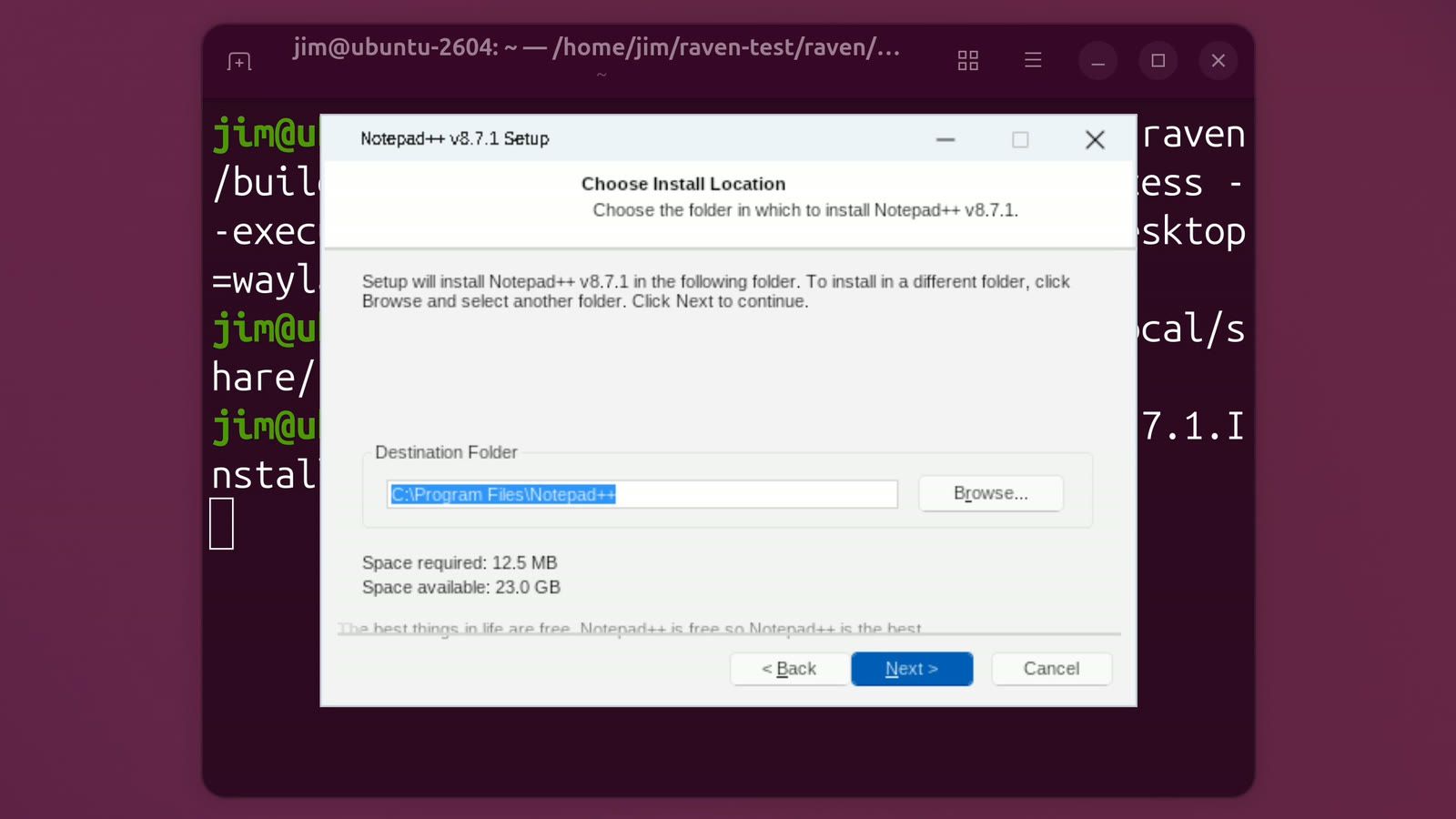
The terminal then prints Could not load C:\Program Files\Notepad++\contextMenu\NppShell.dll. (the Windows Explorer menu extension, which has nothing to load into here) and Native process exited with status 0.
Start Notepad++ and save a file to your Linux folders
Raven adds nothing to the app menu yet, and a double-click on an .exe in Files does nothing useful. Start Notepad++ by its path inside the prefix:
winrun "$RAVEN_PREFIX/drive_c/Program Files/Notepad++/notepad++.exe"The window opened in about 4 seconds. Raven draws it itself, with Windows-style buttons in the title bar, and the dock shows a generic gear icon instead of the Notepad++ logo. Text looks a little softer than in GNOME’s own apps, because GNOME scales up Raven’s window.
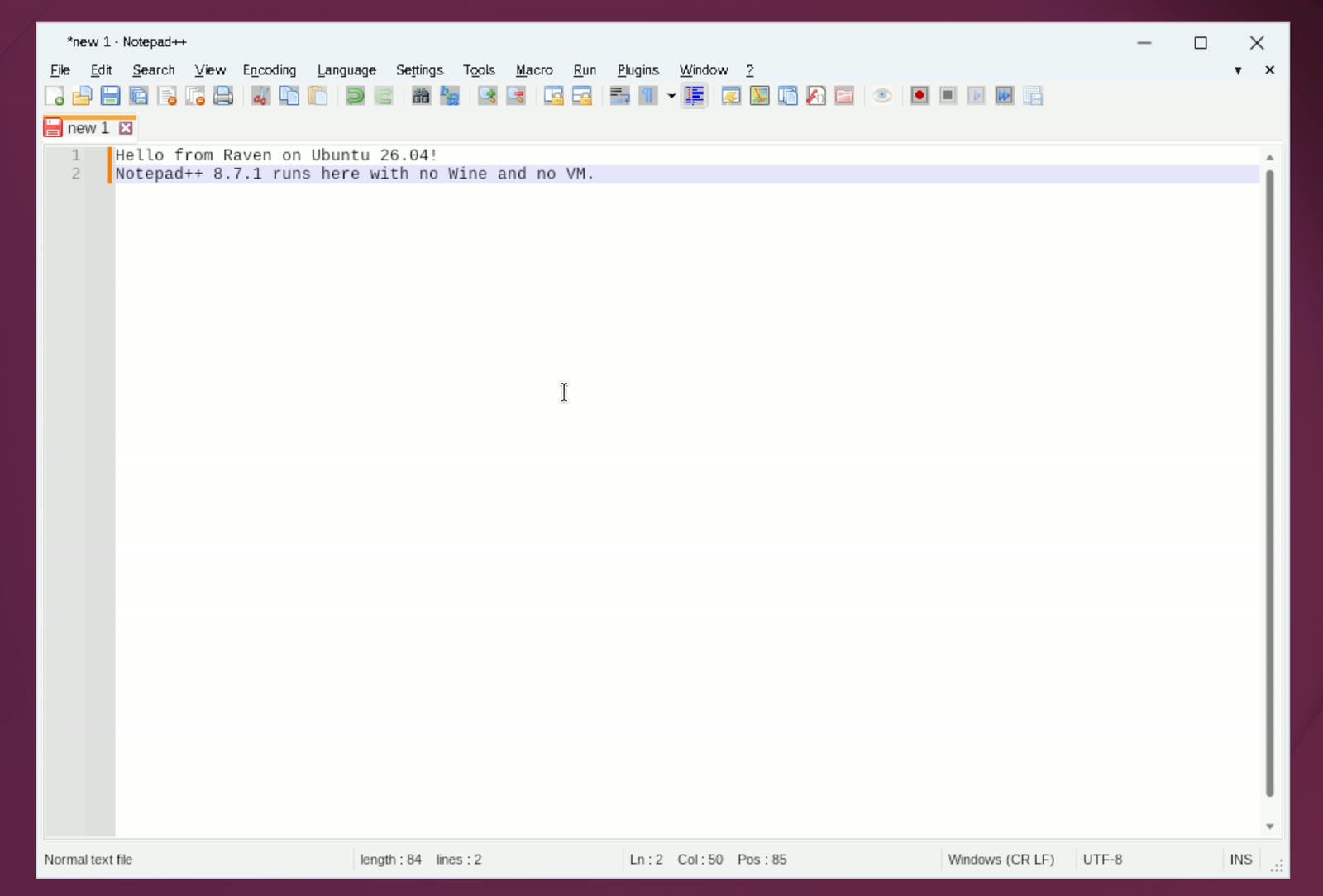
Press ctrl s to save. Raven opens its own Save As dialog. There, Local Disk (C:) is the prefix and Local Disk (Z:) is the Linux file system. The Documents entry under Quick access is the prefix’s own C:\Users\<you>\Documents, not your Linux Documents folder. To save into ~/Documents, open Z:, then home, your user name, and Documents, type a file name, and press enter .
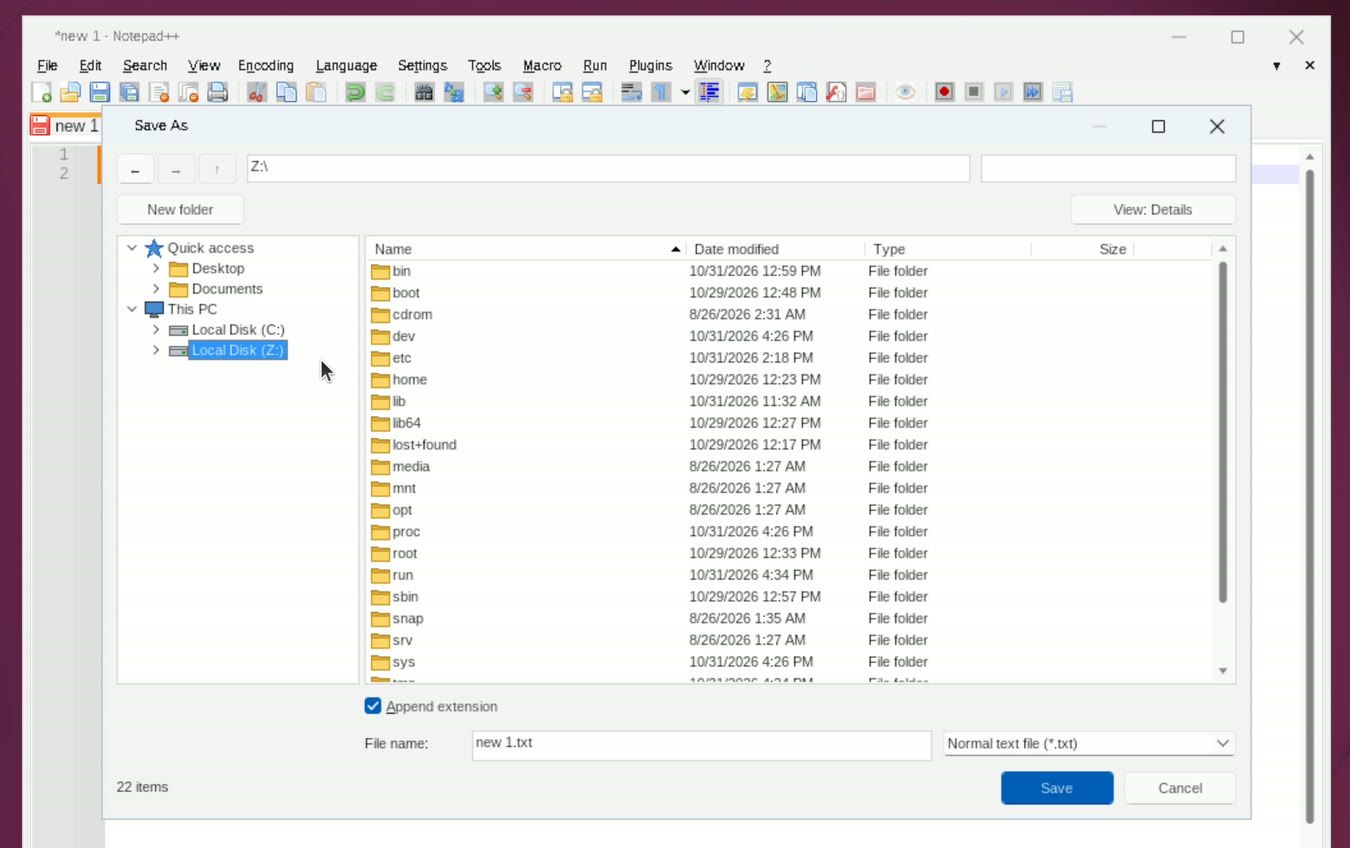
After Save As closes, click in the editor before you type again, or the first keys are lost. In Files, the new file shows up in Documents, and Text Editor opens it with both lines, Windows line endings and all.
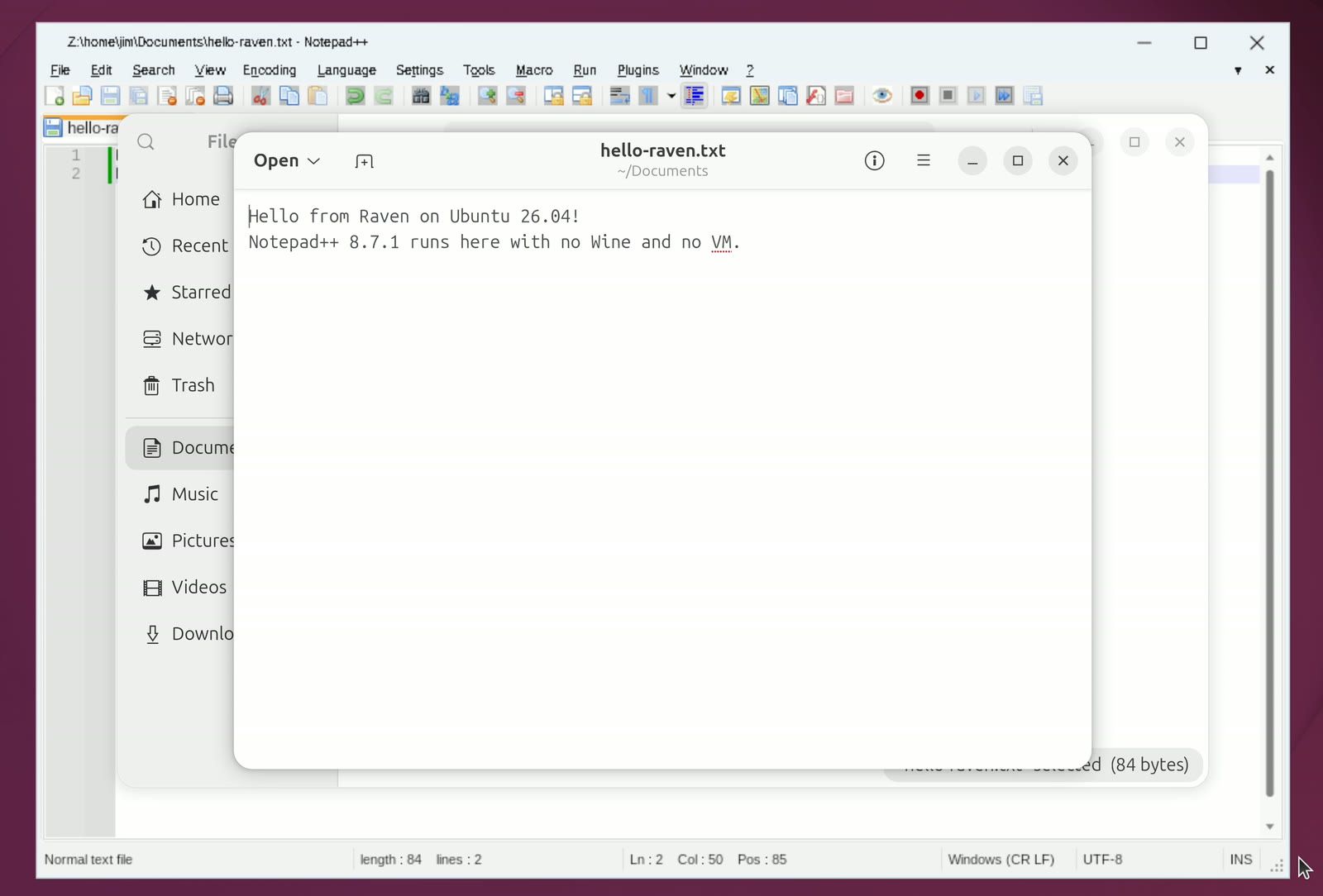
Avoid the menus on GNOME. In our tests, opening any Notepad++ menu, by a click or with alt f , closed the app at once (5 of 5 tries); a click printed raven: Wayland popup configuration failed in the terminal. ctrl o closed it too. To reopen a file, start Notepad++ again: it restores the tabs it had open, unsaved edits included. Close it with the X in its title bar.
Undo an install with a prefix snapshot
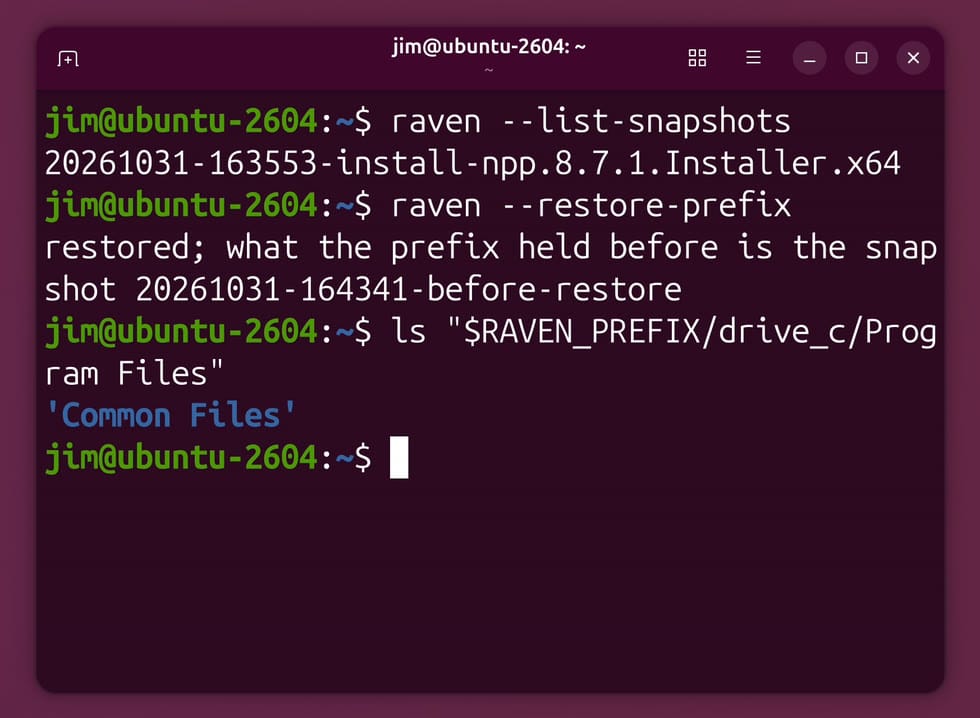
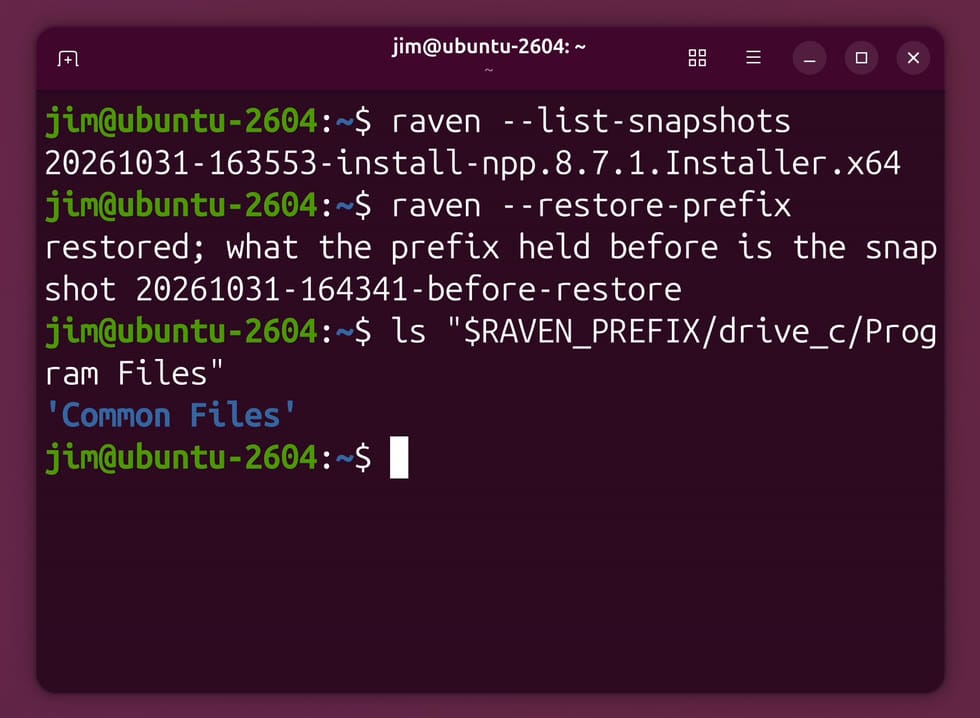
Raven takes a snapshot of the prefix before every installer runs. With RAVEN_PREFIX still pointing at the Notepad++ prefix, list them and restore the newest:
raven --list-snapshots
raven --restore-prefix
ls "$RAVEN_PREFIX/drive_c/Program Files"
The list showed one snapshot, named for the time the installer started (20261031-163553-install-npp.8.7.1.Installer.x64 on ours). The restore took about a second and printed restored; what the prefix held before is the snapshot 20261031-164341-before-restore. Program Files then held only Common Files: Notepad++ was gone from the prefix. The file in ~/Documents stayed, because it lives outside the prefix.
The restore saves a snapshot of what it replaced, so a second restore by name puts Notepad++ back. Use the name your own restore printed:
raven --restore-prefix 20261031-164341-before-restoreEach restore makes another before-restore snapshot, so you can go back and forth.
Notepad++ was the only one of seven Windows programs that worked
We tried seven programs on the build above, plus the .NET Framework that MusicBee needs, each in its own prefix, driving the wizards by hand. Notepad++, Mp3tag (which also has a Mac version), and MusicBee (Windows only) have no Linux version from their developers.
| Program | Result | Where it stopped |
|---|---|---|
| Notepad++ 8.7.1 | Works | Installs through its wizard (some pages blank), edits and saves; menus and Open crash it on GNOME |
| .NET Framework 4.8, normal setup | Fails | Hangs after it unpacks; GNOME reports it as not responding |
| .NET Framework 4.8, Raven’s three-step route | Installs | About 32 minutes; one warning that httpapi.dll is missing |
| Mp3tag 3.36.1 | Fails | Standard installer stops at a check for administrator rights (CheckElevationEnabled); the portable version installs, but its window flashes up half drawn and closes |
| MusicBee 3.7 | Fails | Installs through its own wizard (needs .NET 4.8); no window opens, then raven: native guest fault signal 11 |
| KeePass 2.57 | Fails | Portable: CreateHalftonePalette not implemented; silent install exits with code 1 |
| foobar2000 2.26.2 | Fails | 64-bit: the program file has no relocation table for the address Raven asked for; 32-bit standard: the administrator-rights check; 32-bit portable: the wizard stalls; a silent install (/S) copies files, but the app needs a missing ucrtbase math function |
| Paint.NET 5.1.12 | Fails | The installer exits with code 1 within seconds, with no window |
| LTspice (MSI) | Fails | LockServiceDatabase not implemented; the installer ends with error 1603 |
Brombin’s own table runs each installer silently, without the wizard pages we stepped through, and records no Raven version; he calls its results provisional.
For .NET programs such as MusicBee, the route that worked is the one in Raven’s test script, scripts/native-dotnet.py. It unpacks Microsoft’s .NET Framework 4.8 offline installer, ndp48-x86-x64-allos-enu.exe, then installs the framework and the 4.8 patch with the msiexec.exe that Raven builds:
cd ~/Downloads
curl -LO https://download.visualstudio.microsoft.com/download/pr/2d6bb6b2-226a-4baa-bdec-798822606ff1/8494001c276a4b96804cde7829c04d7f/ndp48-x86-x64-allos-enu.exe
export RAVEN_PREFIX=~/.local/share/raven/musicbee
winrun ~/Downloads/ndp48-x86-x64-allos-enu.exe -- '/x:C:\ndp' /q
winrun ~/raven-test/raven/build/native/msiexec.exe -- /i 'C:\ndp\netfx_Full_x64.msi' /qn
winrun ~/raven-test/raven/build/native/msiexec.exe -- /p 'C:\ndp\netfx_Patch_x64.msp' /qn EXTUI=1
Raven reads the words after the program path as more files to load; -- ends that list, and everything after it goes to the Windows program as its arguments. The curl line fetches the build our run used. The download on Microsoft’s page today is a later build named NDP48-x86-x64-AllOS-ENU.exe, so change the file name in the first winrun line if you use it.
Troubleshooting
A program dies as its window appears. If the terminal prints raven: keyboard entered an unknown native surface, run the same command again. Notepad++ hit this once in four launches on our 4K display. With GNOME’s new-window focus set to strict (gsettings set org.gnome.desktop.wm.preferences focus-new-windows strict), the portable Mp3tag window stayed open in our test, but every Raven window then opened behind the terminal and needed a click before it took keys. gsettings reset org.gnome.desktop.wm.preferences focus-new-windows puts the default back.
Nothing opens, or the program closes after a few seconds. Check that the command has --timeout-ms with a long value (the alias above sets 24 hours) and that you are in a terminal inside the desktop session, where WAYLAND_DISPLAY is set.
Clicks are ignored in a wizard. Mouse clicks on a new Raven window were sometimes lost in our tests, while enter always worked. Use the keyboard for the default button.
The terminal names an unimplemented API. A line such as raven: unimplemented native API WinHelpW names the Windows function the program needed and Raven does not have yet. That is where the program stops today; search the issue list for the name, or report it with your commit hash.
Other ways to run Windows programs today
For a Windows program you need today, a Windows VM or Wine-based tools such as Bottles are the established routes; our guide to moving from Windows 10 to Linux covers the wider choice. For Raven, the first thing to watch for is a release, with a Flatpak or AppImage. Tests on a real graphics card matter too, because the author’s speed numbers come from software Vulkan.


