
TRIGKEY Key i13
Updated on

Inside the TRIGKEY Key i13’s 5-inch square chassis sits an Intel Core i9-13900HK processor, the same 14-core, 20-thread chip found in high-end gaming laptops, paired with 32GB of DDR5 memory and a 1TB PCIe 4.0 SSD. The machine targets creative professionals and power users who need desktop-class performance without sacrificing desk space, and it carries Thunderbolt 4 connectivity at a price that undercuts Apple’s Mac Mini.
Desktop cores in a five-inch box, with laptop graphics
| Pros | Cons |
|---|---|
| Desktop-class i9-13900HK processor with 14 cores and 20 threads | Integrated Intel Iris Xe graphics limit gaming to casual titles |
| Dual-fan cooling measured at 32 dB idle and 37 dB under load | Fan becomes audible during sustained heavy workloads |
| Thunderbolt 4 port enables high-speed peripherals and 8K display output | Higher price point than budget N100-based mini PCs |
| Two M.2 2280 slots and two DDR5 SO-DIMM slots, expandable to 96GB | Both storage slots are M.2; there is no 2.5-inch SATA bay |
| 2.5 Gigabit Ethernet for faster network transfers | No SD card reader for content creators |
| Triple display support via HDMI 2.1, DisplayPort 1.4, and Thunderbolt 4 | Wireless stops at Wi-Fi 6 and Bluetooth 5.2 |
Related Videos
TRIGKEY Key i13 Comparison Chart
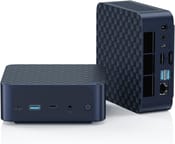 TRIGKEY Key i13 | |
| Price | List Price: $479.99 Amazon Prices: |
| Version | 32GB/1TB/Intel i9-13900HK |
| Performance Rating | 5.7 |
| Operating System | Windows 11 Pro |
| Processor | Fourteen-core 2.60 Ghz (max 5.40 Ghz) Intel Core i9-13900HK |
| GPU | Integrated Intel Iris Xe Graphics |
| RAM | 32 GB DDR5 SO-DIMM |
| Internal Storage | 1 TB |
| Dimensions width x length x thickness | 4.96 x 4.96 x 1.97 inches (125.98 x 125.98 x 50.04 mm) |
| Weight | unknown |
| WiFi | Wi-Fi 6 (802.11ax) |
| Bluetooth | Bluetooth 5.2 |
| Ethernet | 1 Ethernet port at 2 Gbps |
| HDMI | 1 Full-Size HDMI Port |
| DisplayPort | 1 DisplayPort (DP 1.4 supports 4K@144Hz) |
| VGA | No VGA Ports |
| USB Ports | 3 USB 3, 2 USB-C Front: 1x USB-A 3.2 10Gbps, 1x USB-C 3.2 10Gbps; Rear: 3x USB-A 3.2 10Gbps, 1x Thunderbolt 4 (40Gbps, supports 8K@60Hz) |
| Thunderbolt Ports | 1 |
| OCuLink | No |
| Internal SATA Ports | No SATA ports |
| Card Reader | No Card Reader |
| Headphone Jack | combo |
| Fanless | No |
| VESA Mount | Yes |
| In the Box | Power adapter, VESA mount bracket, HDMI cable, user manual |
| Expandability | 2x SO-DIMM DDR5-5200 slots (max 96GB with 2x48GB modules), 2x M.2 2280 PCIe 4.0 slots (supports up to 8TB total storage) |
Related Mini PCs
-
 Beelink EQR7The Beelink EQR7 pairs an AMD Ryzen 7 7735U with a built-in power supply, dual Gigabit Ethernet,…
 -
 Beelink SER5 MAX (Ryzen 7 7735HS)The Beelink SER5 MAX pairs an 8-core Ryzen 7 7735HS and Radeon 680M graphics with 24GB of LPDDR5,…
 -
 BOSGAME M4The BOSGAME M4 pairs an AMD Ryzen 7 8745HS with 32GB of DDR5, an OCuLink port for an external GPU,…
 -
 BOSGAME P3 LiteThe BOSGAME P3 Lite pairs an AMD Ryzen 7 6800H and Radeon 680M graphics with dual 2.5G Ethernet,…
 -
 GMKtec NucBox K16The GMKtec NucBox K16 is a CNC-aluminium mini PC on the AMD Ryzen 7 7735HS with Radeon 680M…
 -
 GMKtec Nucbox K2The GMKtec Nucbox K2 is a compact AMD Ryzen 7 7735HS mini PC with Radeon 680M graphics, DDR5 to…
A five-inch aluminum shell with two fans inside

The chassis measures 4.96 x 4.96 x 1.97 inches, roughly the footprint of a stack of CD cases. The compact aluminum shell houses a dual-fan cooling system that AlHuTV showed during his teardown review, with the main CPU cooler joined by a second small fan on the underside that helps exhaust warm air. justaschmidt measured fan noise at just 32 dB at idle (at 30cm), rising to a still-manageable 37 dB under full load. For buyers weighing active cooling against a fanless design, the noise and throttle tradeoffs between the two approaches are laid out in that guide.
The i9-13900HK combines 6 performance cores and 8 efficiency cores for a total of 14 cores and 20 threads. That hybrid layout lets the machine chew through multi-threaded workloads and drop back to the efficiency cores during lighter tasks. Sean Aslam compared it directly against Apple’s base M4 Mac Mini and found it delivered competitive performance in productivity benchmarks, particularly excelling in applications that can use all those cores. The 32GB of DDR5 memory runs at 5200MHz in dual-channel configuration, providing ample headroom for video editing, 3D rendering, or running multiple virtual machines simultaneously.
The rear panel offers three USB-A 3.2 ports running at 10Gbps, a full-size HDMI 2.1 port for 4K displays, DisplayPort 1.4 capable of 4K at 144Hz for high-refresh monitors, and a Thunderbolt 4 port that supports 8K output and 40Gbps data transfer speeds. The front panel adds another USB-A port, a USB-C port, and a combination headphone jack. For networking, the 2.5 Gigabit Ethernet port doubles the speed of standard gigabit connections, complemented by Intel AX200 WiFi 6 and Bluetooth 5.2 for wireless connectivity.
Reviewer Insights

AlHuTV’s Perspective
AlHuTV’s comprehensive German-language review includes a detailed teardown. He opened up the chassis to show the cooling arrangement, with the main CPU cooler joined by a second small fan on the underside to exhaust warm air. Translated from the German, he described it as a cooling system that is extremely quiet in normal operation. The review confirmed headline specs including the PCIe 4.0 SSD and the USB4 port’s capability to drive 8K displays at 60Hz.
Sean Aslam’s Perspective
Sean Aslam’s review compares the Key i13 directly against Apple’s base M4 Mac Mini. His thermal testing showed the system handles sustained workloads effectively, and his CrystalDiskMark run measured the SSD at around 5,185 MB/s read, confirming the PCIe 4.0 performance claims. He concluded that “this PC is a productivity powerhouse at first and casual gaming second,” acknowledging the Intel Iris Xe graphics limitations while praising the CPU’s raw power for creative work.
justaschmidt’s Perspective
justaschmidt’s German-language review puts the machine through production work. He edited his entire 4K review video directly on the mini PC using Filmora, proving it can handle real content creation workflows. He measured fan noise at about 32 dB at idle at 30cm, rising to 37 dB under load.
All three praised the performance-to-size ratio and the quiet operation of the dual-fan cooling system. Their shared reservation was the integrated graphics, which limits the machine to casual gaming and basic GPU-accelerated tasks rather than serious gaming or heavy 3D rendering that would benefit from a discrete GPU.
Customer Reviews
Across 16 ratings on Amazon, the Key i13 averages 4.4 stars, and the breakdown is split: 81 percent are 5-star, 10 percent sit at 3 stars, and 9 percent at 1 star. The positive reviews cluster on three points: a quiet fan, easy internal upgrades, and strong performance for the price. Verified buyer david m teiman called it the “Best mini PC I’ve ever owned” and pushed back on a noise complaint he had seen elsewhere, writing that “this thing is not loud.” Verified buyer Ahmed Kamni described upgrading the storage and memory himself: “I upgraded it to 64GB and added extra NVMe, fan not too noisy and barely noticeable heat.” Verified buyer Frederick C. Johnson reported “No heat problems” and credited the vendor’s “great customer support.”
One of the lower ratings contradicts that support praise. Verified buyer Ted Chew left a 3-star review and returned his unit, noting that “there’s no guide or warranty info, etc. in the box” and that he found no direct way to reach the seller. Verified buyer Anik Nohan gave it 1 star over a hardware fault, reporting that “After updating windows, Ethernet stopped working with code 43” and concluding it was a BIOS problem. With only a handful of written reviews so far, the picture is mostly favorable but not unanimous, and the documentation and post-Windows-update networking complaints are specific enough to weigh.
Read more owner reviews on Amazon.
Built for multi-core work, capped by Iris Xe graphics
The Intel Core i9-13900HK delivers desktop-class performance for multi-threaded productivity tasks, video editing, and software development, all within a footprint that can hide behind a monitor or fit on the smallest desk. Thunderbolt 4, 2.5G Ethernet, and triple display support cover the rest of a working desk setup.
The buyer here is someone working with 4K video, running multiple virtual machines, or maintaining complex development environments who does not want a tower on the desk. A quiet home-office machine or media server is the other good fit. Gamers should look elsewhere, since the Intel Iris Xe graphics limit you to older titles and esports games at modest settings. Similarly, buyers on a tight budget would be better served by an N100-based mini PC like the Beelink MINI S12 Pro if their needs are primarily web browsing and office work.
At $479.99 for the 32GB/1TB configuration, the Key i13 competes with similarly-specced laptops or the Mac Mini, and the dual M.2 slots plus RAM expandable to 96GB extend how long that price holds up. Starry Hope’s Mini PC Comparison Chart lines it up against other models.
Frequently Asked Questions
Can the TRIGKEY Key i13 handle 4K video editing?
Yes. Reviewer justaschmidt edited his entire 4K review video directly on the unit using Filmora. Between the i9-13900HK, 32GB of DDR5, and the PCIe 4.0 SSD, timeline scrubbing stays smooth and export times are reasonable in most editing software.
How loud is the TRIGKEY Key i13 during normal use?
justaschmidt measured 32 dB at idle from 30cm, barely audible in a quiet room, rising to about 37 dB under full load. That upper figure sits around the level of a quiet conversation.
What monitors can I connect to the TRIGKEY Key i13?
Three at once, in any combination. HDMI 2.1 handles 4K at 60Hz, DisplayPort 1.4 supports 4K at 144Hz for high-refresh monitors, and Thunderbolt 4 can drive up to 8K at 60Hz.
Can I upgrade the RAM and storage in the TRIGKEY Key i13?
Yes. Two SO-DIMM slots take DDR5-5200 memory up to 96GB total (using 2x48GB modules), and two M.2 2280 PCIe 4.0 slots take up to 4TB each for a maximum of 8TB. AlHuTV’s teardown confirmed easy access to these components.
Is the TRIGKEY Key i13 good for gaming?
Casual gaming only. Intel Iris Xe integrated graphics handle older games, esports titles, and indie games at 1080p with medium settings. AAA gaming at high settings needs an external GPU over Thunderbolt 4 or a different system with dedicated graphics.
How does the TRIGKEY Key i13 compare to the Mac Mini?
Sean Aslam compared the Key i13 directly to the base M4 Mac Mini and found competitive CPU performance for productivity tasks. The Key i13 offers advantages in expandability (user-upgradeable RAM and storage) and runs Windows for broader software compatibility. The Mac Mini has better efficiency and GPU performance for certain creative tasks.
Does the TRIGKEY Key i13 include a VESA mount?
Yes. The box holds a VESA mount bracket alongside the power adapter, an HDMI cable, and the user manual, so the machine can hang off the back of a VESA-compatible monitor.
What is the network speed on the TRIGKEY Key i13?
Wired networking runs at 2.5 Gigabit Ethernet, 2.5 times the speed of standard gigabit, which helps with large file transfers, NAS access, and local network streaming. Wireless is Intel AX200 WiFi 6, rated up to 2.4 Gbps under ideal conditions.