
Acer Chromebook 11 N7
Updated on

Note: The Acer Chromebook 11 N7 reached its Auto Update Expiration (AUE) date in June 2022 and no longer receives Chrome OS updates. This product is no longer available for purchase new from major retailers. This page is kept online as a historical reference for owners of the device.
The Acer Chromebook 11 N7 was designed as a rugged, education-focused Chromebook built to survive the demanding environment of classrooms and student backpacks. With military-grade MIL-STD 810G certification, a spill-resistant keyboard capable of handling up to 11 ounces of liquid, and the ability to withstand drops from 48 inches, this 11.6-inch device prioritized durability over raw performance. Powered by an Intel Celeron N3060 processor with 4GB of RAM, it delivered reliable performance for basic web browsing, Google Docs, and Android apps while offering battery life that reviewers consistently praised.
Acer Chromebook 11 N7 Comparison Chart
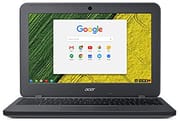 Acer Chromebook 11 N7 | |
| Price | List Price: $229.99 Amazon Prices: |
| Model number | C731-C8VE / NX.GM8AA.001 |
| Performance Rating | 2.0 |
| Chromebook Plus | No |
| Processor | Dual-core 1.60 Ghz (max 2.48 Ghz) Intel Celeron Processor N3060 |
| RAM | 4 GB |
| Internal Storage | 16 GB eMMC |
| Screen Size | 11.6" |
| Screen Resolution | 1366x768 |
| Screen Type | ComfyView |
| Touch Screen | No |
| Stylus / Pen | No Stylus Support |
| Dimensions width x length x thickness | 11.7 x 8.3 x 0.9 inches (297.18 x 210.82 x 22.86 mm) |
| Weight | 2.98 lbs (1.35 kg) |
| Backlit Keyboard | No |
| Webcam | HD |
| WiFi | 802.11 a/b/g/n/ac |
| Bluetooth | Bluetooth 4.0 |
| Ethernet | No |
| Cellular Modem | No |
| HDMI | Full-Size HDMI |
| USB Ports | 2 USB 3 |
| Thunderbolt Ports | No |
| Card Reader | SD/SDXC |
| Battery | 3 cell, 3980 mAh, Lithium Polymer |
| Battery Life | 13.0 hours |
| Fanless | Yes |
| Auto Update Expiration Date | June, 2022 |
Related Chromebooks
-
 Acer Chromebook 311 (AMD)The Acer Chromebook 311 (CB311-10H) is an 11.6-inch ChromeOS laptop on an AMD A4-9120C with 4GB of…
 -
 Acer Chromebook Spin 11 CP311The Acer Chromebook Spin 11 combines functionality and portability with its 11.6-inch touch IPS…
 -
 Samsung Chromebook 4The Samsung Chromebook 4 is an 11.6-inch Celeron N4000 or N4020 Chromebook with 4GB of RAM, a…
 -
 ASUS Chromebook C203XAThe ASUS Chromebook C203XA is a rugged 11.6-inch education laptop with a MediaTek MT8173C, an…
 -
 Dell Chromebook 11 (3100)The Dell Chromebook 11 (3100) is a ruggedized 11.6-inch education Chromebook with rubber bumpers, a…
 -
 ASUS Chromebook CX1 (CX1101)The ASUS Chromebook CX1 (CX1101) is an 11.6-inch budget Chromebook with an Intel Celeron N4020, an…
Detailed Insights into the Acer Chromebook 11 N7
The Acer Chromebook 11 N7 exemplified what an education-focused Chromebook should be: affordable, durable, and practical. The rugged plastic chassis featured reinforced corners and a textured finish that provided grip while hiding minor scuffs and scratches that accumulate with daily student use. At just 2.98 pounds and 0.9 inches thick, it remained portable enough for younger students to carry between classes, though the build quality never felt cheap or flimsy. The fanless design meant silent operation in quiet classroom settings, and the device ran cool during normal usage, though Laptop Mag noted the underside could reach 103 degrees Fahrenheit during extended video playback.
Performance with the Intel Celeron N3060 processor was adequate for its intended purpose but showed clear limitations. Chrome OS booted in one to two seconds, and the device handled moderate web browsing with multiple tabs, Google Workspace applications, and Android apps from the Play Store without significant issues. However, reviewers from 9to5Google and Pocket-lint noted that media-heavy web pages could cause lag, and rapid typing occasionally outpaced the processor’s ability to keep up. For students primarily working with documents, email, and educational web applications, the performance proved sufficient for the budget price point.
The 11.6-inch display presented one of the device’s clearer weaknesses. The 1366x768 resolution delivered acceptable clarity for text and basic tasks, but the TN panel in most configurations offered limited viewing angles and undersaturated colors. Laptop Mag measured brightness at just 235 nits, below the 250-nit average they expect from budget laptops, making outdoor use challenging. The matte finish did help reduce glare in bright classroom environments, and a touchscreen variant (Acer Chromebook 11 N7 CB311-7HT) was available for schools wanting more interactive capabilities.
Connectivity options were solid for the era, with two USB 3.0 ports, a full-size HDMI output, an SD card reader supporting up to 128GB expansion cards, and a 3.5mm headphone jack. The notable absence of USB-C ports and reliance on a proprietary charger showed the device’s 2016 roots, though at the time these limitations were common in budget Chromebooks. WiFi 802.11ac and Bluetooth 4.0 handled wireless connectivity reliably.
Place in Acer’s Rugged Education Line
By the time the N7 launched in October 2016, Acer had already spent several years iterating on the rugged-education formula. The C720 and CB3-111 had proved that schools wanted cheap, silent, plastic Chromebooks; what they did not yet do well was survive a classroom full of seven-year-olds. The N7 was Acer’s answer to that gap. The reinforced corner bumpers, the recessed hinges, the keyboard tray drainage channels, and the rugged reinforced lid all came directly out of feedback from school IT directors who had been replacing display assemblies and palm rests by the gross. For background on why this category exists in the first place, see what an education Chromebook actually is.
The N7 sat between two design philosophies inside Acer’s own catalog. Below it was the standard CB3 line, optimized for the lowest possible price. Above it was the convertible Acer Chromebook Spin 11 R751T, aimed at districts that wanted a tablet mode and an EMR stylus for younger grades. The N7 occupied the workhorse middle: a clamshell built to be issued to a student in third grade and still be on the cart in fifth grade. That positioning is the reason the page is still useful in 2026: thousands of these devices were bought in fleet quantities, and the people researching them today are usually owners or IT staff trying to decide whether to keep one alive, not shoppers.
What followed it in the lineup tells the same story. The CB311-7H and CB311-7HT shared the N7 chassis and most of its internals; the later C732 and C733 carried the rugged formula into the USB-C era with brighter panels and the option of a world-facing camera for younger students. The repair-friendly chassis ideas pioneered here eventually became standard across the segment, and that lineage is covered in the CRU-design history for education Chromebooks.
Reviewer Insights on the Acer Chromebook 11 N7
Battery life emerged as the consistent highlight across every professional review. Laptop Mag measured 10 hours and 35 minutes on their battery test, calling it “fantastic battery life” that earned high marks alongside the durable frame. The magazine gave the device 3.5 out of 5 stars, praising its MIL-SPEC-810 tested chassis and spill-resistant keyboard, though they criticized the dim display and lack of USB-C connectivity.
9to5Google’s review found even better battery results, reporting “a terrific ten to twelve hours per charge” as the highest point of the user experience. Reviewer Hayato noted the comfortable keyboard was well-suited for extended typing sessions, though bottom-mounted speakers were easily muffled and the display washed out in direct sunlight. The weak speakers also mean this isn’t a candidate for music production without external audio gear. The review positioned the device as excellent for budget-conscious students comfortable working within Google’s ecosystem.
Pocket-lint delivered particularly strong praise for the typing experience, calling it “one of the best typing experiences you can have in a £200-odd ultraportable” and declaring the N7 “one of the sturdiest laptops in the world at this price.” Their 4 out of 5 star review highlighted the keyboard as the device’s best feature, with ultra-rigid construction creating a stable typing platform. However, reviewer Andrew Williams found battery life fell short of the advertised 13 hours, measuring closer to 8.5 hours in real-world use.
EdTech Magazine specifically evaluated the device for higher education environments, praising its ability to support “a full day of classes without requiring the AC adapter.” The review highlighted the instant-on nature of Chrome OS and the practical 128GB SD card expansion for students needing additional storage beyond the 16GB or 32GB internal options.
Pros and Cons
| Pros | Cons |
|---|---|
| MIL-STD 810G rugged chassis survives 48-inch drops | TN display with poor viewing angles and 235-nit brightness |
| Spill-resistant keyboard rated for 11 ounces of liquid | No USB-C, no Thunderbolt, proprietary barrel charger |
| Real-world battery life of 8.5 to 12 hours per charge | Intel Celeron N3060 struggles with media-heavy pages |
| Silent fanless operation suits quiet classrooms | 16GB eMMC fills quickly with Android apps |
| Reinforced corner bumpers reduce edge damage | Bottom-firing speakers are easily muffled |
| Comfortable keyboard praised by Pocket-lint and 9to5Google | AUE reached June 2022; no further Chrome OS updates |
| 128GB SD card expansion eases the small internal storage | No keyboard backlight for dim-room typing |
Owning an Acer Chromebook 11 N7 After AUE
Reaching the Auto Update Expiration date in June 2022 did not turn the N7 into a brick. The hardware still works, Chrome OS still boots, and locally-installed Android apps still launch. What the device lost on that date was the steady drip of security patches and the assurance that newer web standards would keep rendering correctly. For anyone still using one in 2026, that changes the math in a few specific ways.
First, the device is no longer a sensible primary machine for accounts that touch money. The browser does not get the latest TLS hardening, certificate authority updates only arrive as a side effect of root store rollups, and any zero-day in Blink or Skia will sit unpatched. School districts running fleets of these typically retire them from student use and either pool them as loaner machines for one-off tasks (kiosk screens, printer queues, signage) or hand them to families as donation hardware with the caveat that they should not be used for primary email or banking. The general advice for evaluating a post-AUE device in 2026 lives in the used Chromebook worksheet.
Second, the existing battery on a 2016-vintage N7 has almost certainly degraded. A 3,980 mAh lithium polymer cell that originally pushed past ten hours will commonly deliver three to five hours at this age, and the unit will often refuse to hold a charge above 80%. Replacement batteries are still available from third parties for around US$25 to US$40, and the spillproof tray makes the swap accessible to a school IT tech with a small Phillips driver. The general decision tree for whether replacement is worth it versus buying new is in battery replace vs buy new.
Third, there is a viable second life as a Linux laptop. With Developer Mode enabled and the firmware unlocked, the N7 will run a lightweight Linux distribution acceptably for a writing or browsing machine; the Celeron N3060 is anaemic by 2026 standards but the 4GB of RAM and the silent fanless chassis make it a workable terminal for a home lab or a kid’s first Linux machine. For the general approach, old Chromebooks as home servers covers the trade-offs, and the ChromeOS Flex revival guide walks through the easier non-flash path that keeps the device in the ChromeOS world but with a more current Flex release where the hardware is supported. ChromeOS Flex support for very old Intel SoCs is not guaranteed; check the certified-models list before committing.
The N7’s value as a learning machine is the part that has aged well. The chassis tolerates a beginner’s mistakes, the keyboard is pleasant for an 11-inch class device, and the screen is good enough for text. For a child learning to type or a household member who needs a dedicated machine for one specific task, an N7 that already exists in the house is hard to argue with on cost. For background on this kind of placement, see best Chromebook for kids and the wider context in the ewaste and planned obsolescence piece.
If you are weighing this device against current options, the Chromebook Comparison Chart lets you filter and sort by specs side by side.
Frequently Asked Questions
Is the Acer Chromebook 11 N7 still safe to use in 2026? The N7 reached its Auto Update Expiration in June 2022, so it no longer receives Chrome OS security patches. It will still boot and run, but it should not be used for primary email, banking, or any account that handles sensitive data. It is acceptable for tightly scoped tasks such as a kiosk, a kitchen recipe browser, or an offline typing machine, and it can be repurposed with a lightweight Linux install.
What processor and RAM does the Acer Chromebook 11 N7 use? The N7 uses an Intel Celeron N3060 (Braswell, dual-core, 1.6 GHz base / 2.48 GHz burst) with 4GB of LPDDR3 RAM and 16GB or 32GB of eMMC storage. The RAM is soldered and not user-upgradable.
How rugged is the Acer Chromebook 11 N7? Acer rated the N7 to MIL-STD 810G, with a 48-inch (4-foot) drop spec and a spill-resistant keyboard rated for up to 11 ounces of liquid. Laptop Mag’s review highlighted the MIL-SPEC-810 tested chassis and the spill-resistant keyboard among the device’s strengths.
What was the original price of the Acer Chromebook 11 N7? The C731-C8VE (4GB RAM, 16GB eMMC) launched at a US list price of $229.99. The touchscreen C731T variants and 32GB SKUs ranged up to roughly $279. Most fleet sales were through education channel pricing and ran below the consumer list price.
Can I install Linux on an Acer Chromebook 11 N7? Yes. With Developer Mode enabled and the firmware write-protect removed, the N7 can boot a lightweight Linux distribution from internal storage. The Celeron N3060 is slow by 2026 standards but the device works adequately for browsing, writing, and as a home-lab terminal. ChromeOS Flex is an easier path when the hardware is on Google’s certified list; check before committing.
How is the Acer Chromebook 11 N7 different from the CB311-7HT? The CB311-7HT is the touchscreen sibling of the N7 and shares the same chassis, processor, and most ports. The HT in the model number indicates the touch panel option; it ran a slightly higher list price and was the configuration most often picked by elementary-school districts wanting a stylus-friendly device.
Conclusion
The Acer Chromebook 11 N7 served its intended purpose as a rugged, affordable education Chromebook admirably during its supported lifetime. Its long battery life, military-grade durability, and practical keyboard made it a sensible choice for schools and budget-conscious students who prioritized reliability over performance or display quality. While the dim screen, modest processor, and lack of USB-C connectivity showed its age even at launch, the device cost $229 to $279. Now that it has passed its June 2022 Auto Update Expiration date, however, security vulnerabilities make it unsuitable for continued use with sensitive data or accounts, and buyers should consider newer Chromebooks with longer support windows instead.