

“Mini PC” stopped describing one thing some time ago. The category now spans a fanless slab you could lose in a drawer and a machine that takes up as much desk as a shoebox, and both get sold under the same two words with the same promise about saving space. Shop by the label alone and you can end up ordering something four times the volume you pictured.
So we measured. Every mini PC page on this site carries the manufacturer’s width, length, and thickness, and multiplying those out and converting to liters gives one comparable number per box. Of the 302 mini PCs we cover, 299 had usable dimensions and 3 did not, and the counts below cover the 286 still current as of September 2026. That is the catalog we track, not every mini PC sold.
The catalog clusters just under a liter


The densest band runs from half a liter to one liter and holds 174 of the 286 current boxes. Below it, 50 machines come in under half a liter. Above it, 40 sit between one and two liters, 17 between two and four, and just 5 clear four liters. Add the first two bands together and 224 machines, a little over 78 percent of the catalog, fit under a liter, with a median of 0.705 liters.
Only 22 current boxes, 7.7 percent of the catalog, are two liters or larger. Availability thins out at the top as well: of the five current boxes over four liters, exactly one has a live Amazon listing we can point you at.
Chip tier moves the floor


Group the same machines by the processor family inside them and the median volume climbs with every step up: 0.51 liters for Intel’s N-series, 0.85 liters for Core Ultra, 0.98 liters for AMD’s Ryzen AI 9 HX parts, and 2.91 liters for the Ryzen AI Max chips. None of the eight Ryzen AI Max boxes we cover comes in under 2.5 liters.
A chassis of a given size can shed a certain number of watts continuously before the chip inside slows down, and that ceiling scales with surface area, heatsink mass, and how big a fan will fit. AMD rates the Ryzen AI Max+ 395 at a 55 W default TDP with a configurable range of 45 to 120 W, and every box in our catalog built around that chip is 2.5 liters or larger. Intel’s N150, at the other end, carries a 6 W processor base power, a heat load a passive heatsink can absorb without any fan at all.
The floor is moving, though. Intel’s Panther Lake chips run lower base power than the Arrow Lake generation they replace, with the Core Ultra 9 386H rated at 25 W base and 80 W maximum turbo against the 45 W base and 115 W turbo of the Core Ultra 9 285H. The ASUS NUC 16 Pro built on that platform lands at 0.707 liters, so expect the Core Ultra median to fall as more of those boxes arrive. Our look at the Panther Lake NUCs and their Arc B390 graphics covers what the generation changes.
Under half a liter, low-power chips do the work
Fifty current machines live here, mostly running Intel N-series and older Celeron-class parts, and this is where fanless designs concentrate: 8 of the 12 fanless boxes we cover are under half a liter, and there are none at all above two liters. If the job is digital signage, a media player behind a television, a light office desktop, or a machine that must never make a sound, this band is where you should be shopping.
ACEMAGIC Vista V1

- +0.324 liters
- +dual 4K output
- +an M.2 slot that takes a drive up to 2TB
- +16GB of RAM and 512GB of storage in the N150 build
- -Intel UHD graphics and an N-series chip cap it at web
- -office
- -and media work
- -and it is sold in several confusingly similar N95
- -N97
- -and N150 configurations
What you give up is sustained power. Notebookcheck’s Sebastian Bade, reviewing the 0.5 liter Geekom A8, wrote: “The Geekom A8 is an extremely compact mini-PC, which means that only a very small cooling unit can be accommodated in the device.” That box pairs a 45 W-class Ryzen 9 with a half-liter chassis, and Bade found the chip settling at 35 watts sustained while the small fan reached “just over 49 dB(A)” at its peak.
Ian W Morrison’s Liliputing review of the GMKtec NucBox K8 runs into the same limit in a plastic case measuring 123 by 112 by 43 mm. Under stress the box averaged only 24.8 watts, and “the CPU temperature hit Tjmax or 90°C immediately, where it stayed for the duration of the test”, dropping the clock to just over 4000 MHz. Morrison still noted the fan averaged 47.7 dBA and “did not sound annoyingly loud”. The throttle only matters if you run all-core loads for minutes at a time.
For the fanless N150 boxes that dominate this band, the case rests on the 6 W base power rather than on a lab measurement.
The half to one liter band carries the catalog
A box in this band has room for a full-size heatsink and a fan large enough to move air slowly, which produces broadband air noise instead of a high-pitched whine. There is also room for two memory slots, a second M.2 drive, and a full port cluster. Our catalog dimensions put the Beelink SER8 at 0.91 liters, and it carries a vapor chamber, dual Gen 4 M.2 slots, USB4, and DDR5 expandable to 64GB.
Serve The Home’s John Lee found the SER8 held its power where most of the class does not: “Under load, the package used around 54-58W but it did not throttle. Most mini PCs we test will get 15-60 seconds of burst performance, then hit a lower state. That was not true here.” Lee closed with: “Slightly larger systems that are quiet are more than welcome here.” AMD rates the Ryzen 7 8845HS at a 45 W default with a 35 to 54 W configurable range, so Beelink runs that chip at the top of its window and gets away with it on cooling design.
Beelink SER8
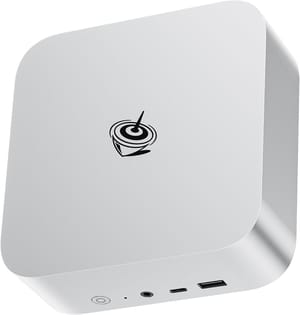
- +Holds 54 to 58 W under sustained load without throttling per Serve The Home
- +vapor-chamber cooling
- +dual Gen 4 M.2 slots
- +USB4
- +DDR5 to 64GB
- -The Ryzen 7 8845HS is a 2024 platform competing with newer silicon
- -and its acoustic and power measurements were taken in 2024
Volume alone does not decide the outcome inside a band. Notebookcheck measured the Beelink SER9 and the Geekom A9 Max, two boxes running the same Ryzen AI 9 HX 370 at nearly identical volume, roughly 16 decibels apart under load, and our survey of quiet mini PCs under load works through that pair in detail.
The configured power limit is usually the deciding factor. Mark Tyson’s Tom’s Hardware review of the Geekom IT13 Max 2026 describes a 0.97 liter single-fan chassis shipped with a 45 W base power and a 70 W turbo ceiling. He wrote: “My meter showed 29.8 dB when idling, which is good, but the noise level ramped to a more than noticeable 52.3 dB when the system was under a sustained load.” His review of the MSI Cubi NUC AI+ 3MG, a smaller box measuring 119.60 by 115.20 by 37.50 mm, reports 30.8 dB at idle and 37.3 dB at maximum fan, and Tyson attributes the difference to configuration rather than cooling: “We are certain this is due to MSI’s default configuration maxing out at around 55W.”
The ASUS NUC 15 Pro sells under one name in two sizes. The slim barebones kit works out to 0.486 liters and the tall kit to 0.710 liters, so check which one a listing is selling before you order. Both ship as kits: two DDR5 SO-DIMM slots take up to 96GB, and you supply the memory and the storage yourself.
Above two liters the box buys sustained watts
Every figure in the table below belongs to a named reviewer, because Starry Hope does not own a sound meter and does not test hardware. The table also carries one sub-liter box, the ASRock, as the comparison point for the large ones. Read down within an outlet and never across, since Notebookcheck measures at 15 cm against a room in the low twenties dB(A) while Serve The Home measures in a 34 dBA studio, usually without a stated distance.
| System | Volume as published | Idle | Under load | Outlet, reviewer |
|---|---|---|---|---|
| ASRock Industrial NUC BOX-358H | 117.5 x 110 x 49 mm | around 35 dBA | around 41 dBA | Serve The Home, Ryan Smith |
| HP Z2 Mini G1a | 85.5 x 168 x 200 mm | 32.1 to 32.6 dB(A) | 41.1 / 67.3 dB(A), 70 in the game test | Notebookcheck, Sebastian Bade |
| Minisforum MS-S1 Max | 222.1 x 206.3 x 77.1 mm | above the lab floor | up to 43 dBA at 1 m | Serve The Home, Ryan Smith |
| Beelink GTR9 Pro | not published | 36 to 37 dBA | 39 to 41 dBA | Serve The Home, Patrick Kennedy |
| Framework Desktop | 96.8 x 226.1 x 205.5 mm | 23.4 dB(A) | 36.6 / 40.1 dB(A) | Notebookcheck, Allen Ngo |
Sebastian Bade’s Notebookcheck review of the HP Z2 Mini G1a recorded the highest load figure here. “With a volume of up to 70 dB(A) (Witcher 3 game test), we measured the loudest value we have ever achieved with Mini PCs”, he wrote of that workstation, and the chip still shed power on long runs, dropping “to about 120 watts during longer load due to the temperature” after starting at up to 160 watts.
Most of these boxes ship with selectable TDP modes. Ryan Smith’s Serve The Home review of the Minisforum MS-S1 Max notes that for its desktop modes the machine offers “Performance, Balanced, and Quiet, each with progressively lower TDPs and fan speed limits”, and measured it “upwards of 43dBA at 1 meter from the system” in performance mode. Bade found the same lever on the HP, where “In quiet mode, the noise level drops to a more bearable 47 dB(A).” Review numbers usually come from the loudest mode, so treat them as a ceiling rather than as what you have to live with.
Allen Ngo’s Notebookcheck review of the Framework Desktop is the counterexample. That machine recorded 23.4 dB(A) at idle and a 36.6 dB(A) load average, and held cores between 50 and 65 degrees under stress. Ngo also notes in the same review that it is “larger and heavier than other PCs with the exact same processor including the GMK EVO-X2, BOSGAME M5, or Beelink GTR9 Pro.”
MINISFORUM MS-S1 MAX
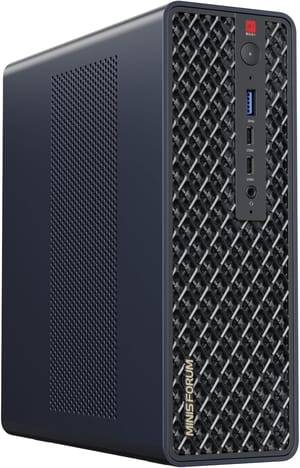
- +Ryzen AI Max+ 395 with 128GB of unified memory
- +dual 10GbE
- +four USB4 ports
- +a full-length PCIe x16 slot
- +and an internal power supply that removes the external brick
- -Memory is soldered and cannot be upgraded
- -and Serve The Home measured it upwards of 43 dBA at a meter in performance mode
Ryan Smith put the tradeoff this way in his review of the ASRock Industrial NUC BOX-358H: “The load noise results are admittedly not the most impressive results we have ever seen, but to some degree, this is the tradeoff of building such a small system. It does not allow for much room for larger, slower fans.” That box drew about 69 watts sustained and landed near 41 dBA, within about 2 dBA of the far larger and far thirstier MS-S1 Max at about 43 dBA.
Fitting the box into the space you have
Liters will not tell you whether a box fits a gap. Measure the three dimensions in inches against the space. Behind a monitor, depth and height are what bite, and the VESA bracket has to clear the stand. In a cabinet, clearance for airflow matters as much as the footprint, and a box that recirculates its own hot air will run its fan harder than any review predicted. Then add the power brick. An external supply is part of the installation even when it is not part of the spec sheet, and the Minisforum MS-S1 Max and MS-02 Ultra both spend some of their volume on moving that supply inside the chassis.
Shape matters more than volume, too. The Beelink ME mini works out to 0.965 liters, which sounds like a behind-the-monitor box. Its dimensions are 3.9 by 3.9 by 3.87 inches, so it is a small tower.
On r/MiniPCs, a parent buying for a family setup wrote that they “attached mine to the monitor’s VESA mount using the bracket so it takes literally zero desk space”, and the poster who started that thread said the small form factor “was incredibly helpful because I wouldnt have to rearrange my entire desk.”
What stays serviceable as volume rises
Upgrade paths track size for the same reason cooling does, since slots and bays need physical room. Under half a liter you typically get one M.2 slot and often memory soldered to the board. The half to one liter band is where two memory slots and a second M.2 become normal, and where a 2.5 inch bay sometimes appears. Above two liters you start seeing expansion slots, with the MS-S1 Max carrying a full-length PCIe x16 slot wired electrically at x4.
The largest, most expensive machines in the catalog, the ones built on AMD’s Ryzen AI Max chips, have soldered memory that cannot be upgraded at all, because the memory sits in the processor package. So the three-liter workstation ships with memory you cannot touch, while the one-liter box beside it takes a bigger pair of DDR5 sticks whenever you want. If long-term memory upgrades matter more to you than peak throughput, the middle of the range is the better buy, and our comparison of mini PCs against traditional desktops covers where that logic runs out entirely.
Choosing a size
Pick the size from the workload. If the machine will run browsers, office documents, video playback, or signage, a box under half a liter is the right size, and fanless is an option there. If it will compile, transcode, host containers, or load all the cores for more than a minute at a time, the half to one liter band gives the cooling system enough room to hold its power without the fan noise the smaller boxes make. Go past two liters only when you need the memory capacity, the networking, or the expansion slot that only the big boxes have.
Everything here is a snapshot taken in September 2026, and it will drift as Panther Lake boxes arrive at lower base power. If you are earlier in the process than this, the five questions to answer before your first mini PC sets up the decision, and the fanless versus active cooling comparison covers the choice the smallest band forces on you. Before you order anything, put a tape measure on the space it is going to live in.


