
ASUS NUC 14 Pro AI
Published on

The ASUS NUC 14 Pro AI is a palm-sized Copilot+ PC for a home or office desk that wants a quiet Windows machine from a large brand. It uses Intel’s Lunar Lake chips, which keep the memory inside the processor package, so the amount you buy is all the machine will ever have. Reviewers found it cool, quiet, and quick in daily use, but its multi-core speed falls well behind AMD’s Ryzen AI 9 HX 370 mini PCs, and they found it priced above rivals such as the Beelink SER9. It is a different machine from the ASUS NUC 14 Pro, which uses Meteor Lake chips and socketed memory.
Pros and cons
| Pros | Cons |
|---|---|
| Two Thunderbolt 4 ports with DisplayPort 2.1, one front and one rear | Memory sits on the chip package and cannot be upgraded |
| Wi-Fi 7, Bluetooth 5.4, and 2.5GbE Ethernet | Only one M.2 slot for storage |
| Quiet in its default fan mode, with low power draw under load | Multi-core speed well below Ryzen AI 9 HX 370 mini PCs |
| Arc 140V graphics run many games at 1080p medium with upscaling | Large 120W power brick |
| Fingerprint reader on the lid and a tool-free bottom cover | No SD card reader, and the shell is mostly plastic |
Related Videos
ASUS NUC 14 Pro AI Comparison Chart
5 configurations
| Configuration | Processor | RAM | Storage | OS | List price | Amazon price | Compare |
|---|---|---|---|---|---|---|---|
| 32GB/1TB/Core Ultra 7 258V/Windows 11 Pro | Core Ultra 7 258VCPU Mark 18,888 | 32 GB | 1 TB SSD | Windows 11 Pro | $1,819.00 | Loading... | Details
|
| 32GB/1TB/Core Ultra 7 258V/Windows 11 Home | Core Ultra 7 258VCPU Mark 18,888 | 32 GB | 1 TB SSD | Windows 11 Home | $1,699.00 | Loading... | Details
|
| 32GB/1TB/Core Ultra 9 288V/Windows 11 Pro | Core Ultra 9 288VCPU Mark 19,741 | 32 GB | 1 TB SSD | Windows 11 Pro | $2,019.00 | Loading... | Details
|
| 16GB/512GB/Core Ultra 5 226V/Windows 11 Pro | Core Ultra 5 226VCPU Mark 17,961 | 16 GB | 512 GB SSD | Windows 11 Pro | $1,299.00 | Loading... | Details
|
| 16GB/512GB/Core Ultra 5 226V/Windows 11 Home | Core Ultra 5 226VCPU Mark 17,961 | 16 GB | 512 GB SSD | Windows 11 Home | $1,179.00 | Loading... | Details
|
Specs shared by every configuration
| Dimensions width x length x thickness | 5.12 x 5.12 x 1.34 inches (130.05 x 130.05 x 34.04 mm) |
|---|---|
| Weight | 1.28 lbs (0.58 kg) |
| WiFi | Wi-Fi 7 (802.11be) |
| Bluetooth | Bluetooth 5.4 |
| Ethernet | 1 Ethernet port at 2.5 Gbps |
| HDMI | 1 Full-Size HDMI Port |
| DisplayPort | DisplayPort 2.1 via both Thunderbolt 4 ports |
| VGA | No VGA Ports |
| USB Ports | 4 USB 3, 2 USB-C 2x USB-A 5Gbps front, 2x USB-A 10Gbps rear |
| Thunderbolt Ports | 2 |
| OCuLink | No |
| Internal SATA Ports | No SATA ports |
| Card Reader | No Card Reader |
| Headphone Jack | front |
| Fanless | No |
| VESA Mount | Yes |
| In the Box | Mini PC, 120W power adapter, power cord, VESA bracket, screws |
| Expandability | Memory on the CPU package, not upgradeable. One M.2 2280 PCIe 4.0 SSD slot; the Wi-Fi card is replaceable. |
See every Intel Core Ultra 7 258V configuration in the chartSee every Intel Core Ultra 5 226V configuration in the chart
Related Mini PCs
-
 Acer Veriton NUC VN1502G (Lunar Lake)A small Acer business desktop for offices that want a Copilot+ PC with Windows 11 Pro; its Lunar…
-
 MSI Cubi NUC AI+ 2MGThe MSI Cubi NUC AI+ 2MG puts a Lunar Lake Core Ultra 7 258V, 32GB of on-package LPDDR5X, dual…
-
 GMKtec NucBox K17Quiet 0.7-litre Lunar Lake mini PC with the Core Ultra 5 226V, Arc 130V graphics, a spare PCIe Gen5…
-
 Lenovo IdeaCentre Mini x Gen 10 SnapdragonLenovo's 1-liter Windows on Arm desktop pairs a Snapdragon X or X Plus chip with 32GB of soldered…
-
 Bmax B9 PlusThe Bmax B9 Plus is a compact mini PC with a 12-core Intel Core i5-1250P, 24GB of LPDDR5 memory, a…
-
 GEEKOM Mini IT11The GEEKOM Mini IT11 is a compact Tiger Lake mini PC (Intel Core i7-11390H or i5-1155G7, Iris Xe…
Ports, networking, and the chassis

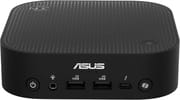
The chassis measures about 5.1 by 5.1 by 1.3 inches and weighs about 1.3 pounds. The front holds the power button, a headset jack, two USB-A ports at 5Gbps, one Thunderbolt 4 port, and a Copilot button. The back holds a second Thunderbolt 4 port, two USB-A ports at 10Gbps, an HDMI 2.1 (TMDS) output, a 2.5GbE Ethernet jack, and the power input. Both Thunderbolt ports carry DisplayPort 2.1, so the HDMI port and the two Thunderbolt ports can run three displays. A fingerprint reader sits on the lid for Windows Hello sign-in, and a lock slot is on the side.
Wireless is Intel Wi-Fi 7 with Bluetooth 5.4. ASUS ships a VESA bracket and a 120W power adapter in the box. The bottom cover comes off without tools, and inside are the single M.2 2280 slot (PCIe 4.0 x4) and the M.2 Wi-Fi card. ASUS lists SSDs up to 4TB on its spec page, while its technical product specification lists up to 2TB. There is no 2.5-inch drive bay and no card reader.
Lunar Lake chips and fixed memory

All three chips have eight cores (four performance and four efficient cores) and eight threads, with no Hyper-Threading. The Core Ultra 9 288V boosts to 5.1GHz, has Arc 140V graphics, and a 48 TOPS NPU; its PassMark CPU Mark is about 19,700. The Core Ultra 7 258V boosts to 4.8GHz with the same Arc 140V graphics and a 47 TOPS NPU, and scores about 18,900. The Core Ultra 5 226V steps down to Arc 130V graphics and a 40 TOPS NPU, with a score of about 18,000. ASUS lists the chips at a 30W configurable power level.
The memory is LPDDR5X-8533 inside the chip package: 16GB on the Core Ultra 5 builds and 32GB on the Core Ultra 7 and Core Ultra 9 builds. That memory is fast, which helps the integrated graphics, but it cannot be expanded. For office work, web browsing, 4K video playback, and light photo and video editing, the machine is quick. It plays many games at 1080p medium settings with upscaling. AI tasks built on Intel’s OpenVINO framework can run on the NPU.
Heavy rendering and CPU video encoding run much slower than on an H-series or Ryzen AI 9 HX 370 machine such as the Beelink SER9. It is also a poor choice for low-latency audio production: one review saw it fail an audio latency test under load. Lunar Lake dates from late 2024. Intel’s newer chips now ship in machines such as the ASUS NUC 16 Pro, and the ASUS NUC 15 Pro offers an H-series Core Ultra 7 255H with memory you can upgrade.
Reviewer Insights
Each review below covers the Core Ultra 9 288V build.
GSMArena
GSMArena compared the NUC with Apple’s M4 Mac mini and found it cool and quiet in its Standard mode: “Thanks to the relatively low-power nature of the chip and ample cooling, the device never thermal throttles.” It called single-core speed good but multi-core speed unimpressive, and the Mac mini beat it in every benchmark. GSMArena found the Arc graphics surprisingly capable for the size, though Counter-Strike 2 stuttered badly. It also said “the NUC 14 Pro AI is nowhere near as attractive or well-built as the Mac mini.” The review ended on price, saying “So while it was fun to test this machine, unless Asus comes up with a sensible pricing for it in the future, it’s not worth considering for the average home user.”
Digital Citizen
Digital Citizen gave it 4 out of 5 and wrote, “My real-life experience with the ASUS NUC 14 Pro AI was, simply put, excellent.” The reviewer measured low power use: “The ASUS NUC 14 Pro AI is quite efficient in terms of power consumption, consuming only 57 Watts, almost 61% less power than the ASUS NUC 14 Pro+ (146 watts) under load.” Its listed cons were premium pricing compared to some competing mini PCs and fan noise under demanding work, and in the text it reported trouble with the Copilot button. It wrote, “The only downside I found was the fan noise when the processor works really hard,” and “There’s one thing however, that I had trouble with, and that was getting the dedicated Copilot button on the front of the mini PC to work.”
Profesional Review
In a Spanish-language review, Profesional Review gave the NUC 90% and praised the compact design, the two Thunderbolt 4 ports, Wi-Fi 7, the fingerprint reader, and the quiet, efficient running. Its cons were multi-core performance below the older Meteor Lake chips and the single M.2 slot, and it missed an SD card reader for content creators.
Digital Reg
Opening the bottom cover let Digital Reg confirm the memory type before it gave the machine a 9.0: “RAM is soldered on as I’ve found out after opening the unit’s bottom cover.” In its OpenVINO AI test, “the NPU of the NUC 14 Pro AI’s Core Ultra 9 288V soundly beats the even improved ARC 140V iGPU.” It noted the shell is mostly plastic, recorded a peak of 77 to 78 degrees C while benchmarking, and found the Copilot button may not work on accounts set up by skipping the Windows setup screens. It still preferred an upgradeable design, writing “But I would still look for an upgradable option still.”
One More Game
One More Game liked the small footprint and the port count, and found the 288V capable for everyday work and lighter games at lower settings. It disliked the matte plastic that holds fingerprints, the single M.2 slot, and the fixed memory: “Still, it’s sad that you can’t upgrade the memory at all, unlike the SSD, and the ability to boost it to 64GB would have been fantastic.” On games: “Gaming is not a strength of the ASUS NUC 14 Pro AI, but if you were looking for a gaming PC, this would not have been your first choice anyway.”
Hostbor
On value, Hostbor scored the NUC 3.5 out of 10. Its benchmark charts credit Robtech data for the comparison with a Ryzen AI 9 HX 370 machine. Its verdict: “The device fails to justify its premium price tag through performance, with the AMD-powered Beelink SER9 HX370 consistently outperforming it in most meaningful metrics.”
ETA PRIME
On Windows 11, ETA PRIME ran web browsing, 4K playback, photo and video editing, Intel’s AI Playground, and games at 1080p. He found the BIOS offers three cooling modes and said “It’s not a loud system at all.” Black Myth: Wukong’s benchmark averaged 71 FPS at 1080p with XeSS upscaling, and Marvel Rivals averaged about 82 FPS at 1080p medium without frame generation. He noted ASUS does not recommend the machine for gaming. He named storage as the weak point: “I’d say the only downside about this mini PC right now is the fact that it only supports a single M.2 SSD, 2280 up to 4 TB.”
WASD Benchmark
WASD Benchmark ran its tests in the BIOS performance mode, where the chip boosts to 35W with spikes to 40W. In an hour-long Cinebench 2024 loop, the NUC averaged around 75 degrees C and peaked at 80. For daily work he said “Once you’re in Windows 11, everything just feels fast,” and in Intel’s AI Playground a DeepSeek model answered in under five seconds. He put the Arc 140V graphics roughly on par with a GTX 1650 or RX 6400. On storage he said “There’s no second drive slot, and that’s probably my only real complaint at this point.” He also missed an SD card reader, and the NUC refused to connect to his Elgato capture card.
Robtech
Robtech’s benchmarks set the NUC against the Core Ultra 9 185H in the NUC 14 Pro+ and AMD’s Ryzen AI 9 HX 370. Single-core speed matched the HX 370, but “Multi-core takes a big hit due to the lack of P-cores and hyper-threading.” The Arc graphics improved on the previous generation but still trailed the Radeon 890M in many games. He praised the looks (“Overall, it’s one of the best looking minis released in recent memory and looks even nicer in person than in stock photos.”), the Bluetooth range, the low power draw, and the quiet default fan profile, and Ubuntu 24.04.2 ran fine. On the down side, USB-C power delivery did not work over the Thunderbolt ports, the machine failed a LatencyMon audio latency test with Cinebench running, the SSD controller ran hot in a 30-minute test, and the 120W brick is large. His summary: “This mini best suits those not fussed about multi-core performance and won’t need more than one storage drive or 32 GB of RAM.”
Who it’s for
ASUS backs the NUC 14 Pro AI with a three-year warranty, and it fits a desk that needs a quiet Windows PC with two Thunderbolt 4 ports, Wi-Fi 7, and a fingerprint reader for office work, 4K video, light editing, and casual 1080p gaming. The Core Ultra 7 258V builds score within about 5% of the Core Ultra 9 288V in PassMark, so the 288V adds little for that work. The memory cannot change later, so pick a 32GB build if you edit photos or video; the 16GB Core Ultra 5 builds cover office work.
Skip it if you render, encode video on the CPU, or run many virtual machines, if you want a second SSD, or if you may need more memory later. The Beelink SER9 has much stronger multi-core performance and faster Radeon 890M graphics. The MSI Cubi NUC AI+ 2MG and the GMKtec NucBox K13 use the same Lunar Lake family, and the ASUS NUC 15 Pro trades the fixed memory for upgradeable slots and an H-series chip. To compare more models, see the Mini PC Comparison Chart.
Frequently Asked Questions
Can I upgrade the RAM in the ASUS NUC 14 Pro AI?
No. The LPDDR5X memory is inside the Lunar Lake processor package, so the Core Ultra 5 builds stay at 16GB and the Core Ultra 7 and Core Ultra 9 builds stay at 32GB. Only the M.2 SSD and the Wi-Fi card can be replaced.
How is the NUC 14 Pro AI different from the NUC 14 Pro?
The NUC 14 Pro AI uses Lunar Lake Core Ultra 200V chips with on-package memory, Wi-Fi 7, and an NPU strong enough for Copilot+ PC features. The NUC 14 Pro uses Meteor Lake chips such as the Core Ultra 7 155H with socketed DDR5 memory you can upgrade. Some Meteor Lake NUC 14 Pro models are sold under titles that include “Pro AI”, so check the processor before buying.
Is the ASUS NUC 14 Pro AI a Copilot+ PC?
Yes. ASUS sells it as a Copilot+ PC. The NPU is rated at 40 TOPS on the Core Ultra 5 226V, 47 TOPS on the Core Ultra 7 258V, and 48 TOPS on the Core Ultra 9 288V, all at or above Microsoft’s 40 TOPS minimum. It has a Copilot button on the front, though one reviewer could not get it to work, and another found it may not work on accounts set up by skipping the Windows setup screens.
How many monitors can the ASUS NUC 14 Pro AI drive?
Three: one on the HDMI 2.1 (TMDS) port and one on each of the two Thunderbolt 4 ports, which carry DisplayPort 2.1.
Can I add a second SSD to the ASUS NUC 14 Pro AI?
No. There is one M.2 2280 slot (PCIe 4.0 x4) and no 2.5-inch bay. The other M.2 slot holds the Wi-Fi card. For more storage, use a larger SSD or an external drive on a Thunderbolt 4 port.