
PELADN HO5
Published on

The PELADN HO5 is a five-inch-square desktop built around AMD’s Ryzen AI 9 HX 370, the 12-core Strix Point chip that anchors the upper end of the integrated-graphics mini PC tier. The memory is soldered LPDDR5X-7500 rather than SO-DIMMs, which Robtech notes is the maximum speed the platform officially supports, and which is permanently fixed at whatever capacity you buy. There is also an OCuLink port on the side, a direct PCIe link for an external GPU that TechPowerUp describes as still rare on mini PCs. TechPowerUp gave the machine its Recommended award and placed the HO5 near the top of its integrated-graphics leaderboard; NotebookCheck scored it 81 percent. The recurring complaints are a fan that becomes clearly audible once the workload is sustained, and, from two of the reviewers, a plastic chassis that feels cheap for the price.
Pros and Cons
| Pros | Cons |
|---|---|
| OCuLink port gives an external GPU a direct PCIe x4 link | Memory is soldered LPDDR5X and stops at 32GB |
| 12 Zen 5 cores and 24 threads, around 35,500 on PassMark’s CPU Mark | Fan noise is clearly audible under sustained load (TechPowerUp, TechRadar, Robtech) |
| LPDDR5X-7500 is the fastest memory the platform officially supports (Robtech) | Plastic chassis feels cheap for the price (TechRadar, Mr. Sujano) |
| Two M.2 2280 PCIe 4.0 slots, up to 8TB total | Robtech reported CPU temperatures high enough to throttle under load |
| Dual 2.5GbE, WiFi 7 and Bluetooth 5.4 | Display outputs stop at HDMI 2.0 and DisplayPort 1.2, both 4K at 60Hz |
| NotebookCheck logged 4.6W typical idle and called efficiency “outstanding” | Robtech could not get an external GPU running over the USB4 port |
| Top-panel lighting is controlled by touch, with no software to install | TechPowerUp reached the SSD only by removing the motherboard, though three other reviewers got to a drive under the top lid |
Related Videos
PELADN HO5 Comparison Chart
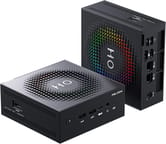 PELADN HO5 | PELADN HO5 | |
| Price | List Price: $1,199.99 Amazon Prices: Loading prices... | List Price: $1,299.99 Amazon Prices: Loading prices... |
| Version | 24GB/1TB | 32GB/1TB |
| Performance Rating | 6.2 | 6.3 |
| Operating System | Windows 11 Pro | Windows 11 Pro |
| Processor | Twelve-core 2.00 Ghz (max 5.10 Ghz) AMD Ryzen AI 9 HX 370 | Twelve-core 2.00 Ghz (max 5.10 Ghz) AMD Ryzen AI 9 HX 370 |
| GPU | Integrated AMD Radeon 890M | Integrated AMD Radeon 890M |
| RAM | 24 GB LPDDR5X, 4-channel (LPDDR5X-7500, soldered) | 32 GB LPDDR5X, 4-channel (LPDDR5X-7500, soldered) |
| Internal Storage | 1 TB PCIe 4.0 NVMe SSD | 1 TB PCIe 4.0 NVMe SSD |
| Dimensions width x length x thickness | 5.08 x 5.08 x 2.13 inches (129.03 x 129.03 x 54.1 mm) | 5.08 x 5.08 x 2.13 inches (129.03 x 129.03 x 54.1 mm) |
| Weight | 1.27 lbs (0.58 kg) | 1.27 lbs (0.58 kg) |
| WiFi | Wi-Fi 7 (802.11be) | Wi-Fi 7 (802.11be) |
| Bluetooth | Bluetooth 5.4 | Bluetooth 5.4 |
| Ethernet | 2 Ethernet ports at 2.5 Gbps | 2 Ethernet ports at 2.5 Gbps |
| HDMI | 1 Full-Size HDMI Port | 1 Full-Size HDMI Port |
| DisplayPort | 1 DisplayPort (DP 1.2 (4K@60); DP Alt Mode via USB4) | 1 DisplayPort (DP 1.2 (4K@60); DP Alt Mode via USB4) |
| VGA | No VGA Ports | No VGA Ports |
| USB Ports | 2 USB 2.0, 2 USB 3, 1 USB-C (1 USB4) 1x USB4 Type-C, 2x USB-A 3.2 Gen 2, 2x USB-A 2.0 | 2 USB 2.0, 2 USB 3, 1 USB-C (1 USB4) 1x USB4 Type-C, 2x USB-A 3.2 Gen 2, 2x USB-A 2.0 |
| Thunderbolt Ports | No | No |
| OCuLink | PCIe x4 for eGPU | PCIe x4 for eGPU |
| Internal SATA Ports | No SATA ports | No SATA ports |
| Card Reader | No Card Reader | No Card Reader |
| Headphone Jack | combo | combo |
| Fanless | No | No |
| VESA Mount | Yes | Yes |
| In the Box | Mini PC, 120W power adapter, HDMI cable, VESA mount, manual | Mini PC, 120W power adapter, HDMI cable, VESA mount, manual |
| Expandability | RAM is soldered LPDDR5X and caps at 32GB. 2x M.2 2280 PCIe 4.0 x4, up to 8TB. OCuLink for an external GPU. External 120W adapter. | RAM is soldered LPDDR5X and caps at 32GB. 2x M.2 2280 PCIe 4.0 x4, up to 8TB. OCuLink for an external GPU. External 120W adapter. |
Related Mini PCs
-
 GMKtec EVO-X1The GMKtec EVO-X1 is a Ryzen AI 9 HX-370 mini PC with Radeon 890M graphics, 32GB of soldered…
 -
 ACEMAGIC F2AA 5-inch-square ACEMAGIC mini PC sold with either Intel's Core Ultra X7 358H and Arc B390 graphics…
 -
 MINISFORUM M2 ProFor buyers who want strong integrated graphics and 10GbE in one box and can live with a fixed 32GB…
 -
 MSI Cubi NUC AI+ 3MGThe MSI Cubi NUC AI+ 3MG is a 0.51-liter business mini PC with Intel Panther Lake chips up to the…
 -
 Reatan X8The Reatan X8 puts a 12-core AMD Ryzen AI 9 HX 470 with Radeon 890M graphics, 48GB of DDR5,…
 -
 PELADN WO4 (Ryzen 5 7640HS)The Ryzen 5 7640HS version of the PELADN WO4 moves the five-inch box to Zen 4, DDR5 and PCIe 4.0,…
An OCuLink port and memory soldered at 32GB

The chassis is plastic. NotebookCheck describes a simple plastic housing built to be as light as possible, and measured the unit at about 5.1 inches square, 2.1 inches tall, and 1.3 pounds; TechPowerUp’s spec table lists a slightly larger footprint and a 2.2-pound bare unit. The top panel carries a dense square-pixel grid surrounding the HO5 wordmark, backlit in RGB, with the O in that logo acting as a touch sensor that cycles the lighting modes. NotebookCheck lists that as a pro because the lighting can be controlled by touch without software, and TechPowerUp said the textured light ring gives the machine a look that sets it apart from the many plain mini PCs it has tested. TechRadar’s Alastair Jennings was less charmed: “With a premium price and premium internals, it feels like a relatively cheap exterior compared to those in our best mini PC guide.”
Inside is the Ryzen AI 9 HX 370, AMD’s Strix Point design: four full Zen 5 cores to 5.1GHz plus eight Zen 5c cores to 3.3GHz, 24 threads total, Radeon 890M graphics with 16 RDNA 3.5 compute units, and an XDNA 2 NPU that PELADN’s listing rates at 50 TOPS within an 80 TOPS platform figure. Those TOPS numbers are the vendor’s, not a measured result. PassMark puts the chip around 35,500 on CPU Mark. This is 2024 silicon in a 2026 box, which matters mostly because AMD has since shipped the Ryzen AI 9 HX 470, a modest clock-speed refresh of the same 12-core Zen 5 design; our BOSGAME VTA-439 page collects the measured gap between the two. If the NPU is not the reason you are shopping, our look at whether the AI tax is worth paying covers the same tradeoff across the category.
The HO5 uses soldered LPDDR5X-7500 running quad-channel, which TechPowerUp calls out as a benefit to both CPU-heavy tasks and integrated graphics, and which NotebookCheck credits for the machine’s strong AIDA64 memory results. Robtech put the same point plainly, saying the machine gets the maximum officially supported speed thanks to the fast LPDDR5X memory. 32GB is the ceiling, there is no SO-DIMM slot, and no upgrade path. That is the exact tradeoff we unpack in the soldered-RAM trap, and it is the one thing to settle before buying, because it cannot be revisited later. Storage is not fixed the same way. Two M.2 2280 slots run on PCIe 4.0 x4 and support up to 8TB in total. The bundled drive is a Crucial P3 Plus, which TechPowerUp measured at just under 4,900 MB/s read and around 4,500 MB/s write, ordinary for a mainstream Gen 4 SSD rather than fast for one.
Ports split across the front and rear panels, with the OCuLink connector on the side. The front face carries a 3.5mm combo jack, two USB-A 3.2 Gen 2 ports, a USB4 Type-C port, the power button, and a CMOS reset pinhole. The rear holds HDMI 2.0 and DisplayPort 1.2, both capped at 4K60, two USB-A 2.0 ports, two 2.5GbE jacks on a Realtek RTL8125 controller, and the barrel power input. Networking comes from a MediaTek MT7925 WiFi 7 module with Bluetooth 5.4. The USB4 port’s bandwidth is reported differently depending on where you look: PELADN’s own listing and TechPowerUp’s spec table both say 20 Gbps, while NotebookCheck’s system inventory recorded a 40 Gbps USB4 controller and Robtech’s port rundown also calls it 40 gigabit. TechPowerUp spells out what the side-mounted OCuLink port buys: “OCuLink provides a direct PCIe connection, which means higher bandwidth, lower latency and far better performance with a discrete graphics card.” Its spec table lists that port as PCIe 3.0 x4, while EVO Tech describes the link he tested as four PCIe lanes of Gen 4, so confirm the generation with PELADN if the bandwidth ceiling matters to your build. Our eGPU connector comparison shows how much each interface gives back.
NotebookCheck measured 29.8 to 29.9 dB(A) at idle against a 24.9 dB(A) room floor, rising to 39.3 and 39.5 dB(A) under full load, judged that comparatively quiet against the machines it has tested, and listed it among the pros; its objection was to the shape of the curve, noting that the fan reacts quite spontaneously to load changes and revs up quickly, which makes the noise clearly audible at times. TechPowerUp put the load peak at around 41 dB with a mild high-pitched tone that is most noticeable in a quiet room. Temperatures stay reasonable in NotebookCheck’s chamber, with a 74.8C maximum in the stress test and just under 84C briefly during a Cinebench R15 multi-loop, and a 33.6C surface maximum. On power draw, NotebookCheck logged 3.2 to 6.9W at idle and 57.3 to 73.8W under load, listing “outstanding efficiency” among its pros, while TechPowerUp’s 24-hour idle monitoring with the display off averaged 10W, which it called in line with a modern mini PC rather than class-leading. The 120W adapter has headroom either way.
Reviewer Insights

TechPowerUp
TechPowerUp ran the machine through its full Mini PC suite and gave it a Recommended award. It opens with “This may end up being the best mid-range iGPU gaming Mini-PC we have tested to date.” The conclusion backs that up on the graphics side, reporting that “The H05 currently sits near the top of our iGPU leaderboard, matching or edging out other 890M systems.” Its benchmark run lands at 1124 multicore and 118 single-core in Cinebench 2024, 7,636 in PCMark 10, 114.68 FPS in HandBrake, and Blender scores of 129.76 on Monster, 68.63 on Classroom and 92.14 on Junkshop. On gaming, it found Dota 2 and Counter-Strike 2 comfortable at 1080p, with Baldur’s Gate 3 and Cyberpunk 2077 playable at medium settings.
Its cons list runs to soldered non-upgradeable memory, fan noise during extended workloads, an internal design that makes accessing certain components difficult, and a machine best suited to lighter AI workloads. On the internal design, reaching the SSD requires removing the motherboard, working carefully around the wireless antenna cable and the loose power button during reassembly. TechPowerUp also frames the OCuLink port as the HO5’s structural advantage over the size class as a whole, writing that “OCuLink provides a much more direct and predictable path to higher bandwidth external hardware than what most Mini-PCs in this size class offer.” Separately, in its pricing section, it positions the HO5 against the GEEKOM A9 Max, which runs the same chip with upgradeable DDR5 and no OCuLink.
NotebookCheck
NotebookCheck scored the HO5 at 81 percent after a full lab pass. It concluded that “The Peladn HO5 presents itself in the test as a powerful mini PC that convincingly utilizes the potential of the Strix Point platform.” On graphics it adds that “The integrated Radeon 890M also delivers strong iGPU performance, enabling even moderate gaming in customized settings,” and places the 890M on a par with Intel’s Arc Graphics 140T. Cinebench R23 came in at 1998 single-core and 20354 multi-core.
The pros list credits the sturdy housing and low weight, the HX 370 running without loss of performance, the LPDDR5X at 7,500 MT/s, the magnetic lid, the “outstanding efficiency”, touch-controlled lighting, the USB4 plus OCuLink pairing, and the machine being comparatively quiet under load. On serviceability it is the mirror image of TechPowerUp: NotebookCheck opens the magnetic lid by hand and notes the HO5 takes a second M.2 drive. The cons list names somewhat high DPC latencies (it measured a 1296 microsecond maximum), RAM that is not expandable, and a fan curve that seems a little too finely graduated. On the brand it closed with “Peladn doesn’t make any major mistakes with the HO5, making the mini PC a serious alternative to well-known brands such as Minisforum or Geekom.”
TechRadar
TechRadar had Alastair Jennings use the machine as a working creative desktop, running Microsoft Office, Lightroom Classic and Premiere Pro. Jennings noted that during a five-minute Premiere Pro edit with effects and grading the fans kicked in and were audibly louder than he would usually expect for a machine this size, though unlike some machines that produce a high-pitched whine, the tone stayed consistent and more tolerable. He also wanted a second USB4 port for a machine at this level.
His performance read was positive from the first boot: “Once registered and activated, the speed at which the machine boots provides insight into its true processing power.” He recorded a Windows Experience score of 8.3 and reported no trouble moving between Word, Excel, PowerPoint, Photoshop and a browser. He did credit the design for access, calling the magnetic top plate easily removed and the internal SSD quick and easy to replace. On the eGPU option he wrote, “The OCuLink enables you to connect to an eGPU and offers superior performance options compared to HDMI or DisplayPort when feeding an eGPU.”
Robtech
Robtech put the HO5 through his standard mini PC checklist and landed mixed. On the memory he said, “It’s super easy to open, and you’re getting the maximum official supported speed thanks to the fast LPDDR5X RAM. But unfortunately, it’s not upgradeable or replaceable.” He summed up the thermals and acoustics as “CPU temp is pretty high under load, which does result in thermal throttling. And fan noise, while not terrible, is above average under load.” Closing out, he said “Overall performance is good, but I’m not too impressed by the CPU cooling,” gave the SSD and RAM cooling a pass, and called the loud fan noise not great.
On the eGPU path he reported, “While it does have a USB 4 port, I couldn’t get it working with my eGPU. This isn’t the first time. Still, if you’re buying this, you should be using OcuLink.” On support, he received a BIOS update directly from PELADN and observed that “these aren’t easily accessible on a download page, so I wouldn’t expect any others,” and could not find a driver page either. He also reported that PELADN includes a standard 1-year warranty, or two years in the EU. The Amazon listing advertises a 3-year term, so check which one applies where you are. His parting judgment on the cooling was that the high fan noise for the temperature is not what he has come to expect from the vast majority of mini PCs he looks at.
Mr. Sujano
Mr. Sujano focused on gaming and emulation and came away positive on the silicon. Running PUBG at 1080p with most settings on medium, a couple on low and textures on high, he held above 70 FPS and concluded “Overall, this integrated GPU is doing pretty good.” He also reported a stable 60 FPS at the medium preset in Fatal Fury: City of the Wolves with no tweaking, and the same 60 FPS in Street Fighter 6.
On the chassis he said, “I’m not the biggest fan of the case. At this price point, I would kind of would have expected a metal case overall.” On the fan, he found it quieter than some other mini PCs but disliked the character of the sound, describing “a very high-pitched whine that I do not like at all when I’ve got the mini PC sitting like this on my desk,” and worked around it by tilting the unit up to improve airflow. His unit’s WiFi was not recognized during Windows out-of-box setup, and he reported “I could not get into Windows unless I brought up the command prompt and typed in bypass NRO,” pointing out that an average buyer might reasonably conclude the machine was broken and return it.
EVO Tech
EVO Tech tested the HO5 specifically as an OCuLink host, pairing it with a desktop graphics card and benchmarking at 1440p. He framed the CPU as the headline: “This is the most powerful CPU that we’ve ever tested in OcuLink setup with. That’s going to be a 12-core 24-thread part paired with 32 GB of LPDDR5X memory.” The advantage he isolated was in shader compilation, where core count does the work: “This thing finishes doing that significantly faster than any of the other mini PCs because of the fact that it has so many cores and so many threads.”
He is candid that this does not make the machine a value pick. He described the OCuLink link as four lanes of PCIe Gen 4, a bandwidth ceiling for a high-end card, and concluded that the shader-compile advantage is a quality-of-life improvement rather than a reason to pay the premium unless you are compiling shaders constantly. He extended that to the tier as a whole, saying that as you go up the product stack you pay a premium for more performance, and you do not get twice the performance of a mini PC at half the price.
Fan noise, chassis and drive access divide the reviews
TechPowerUp, NotebookCheck, TechRadar and Robtech all rate the CPU and integrated graphics highly for this class, and all four flag the soldered memory. Fan noise is the first place they part company. TechPowerUp, TechRadar and Robtech each list it as a real cost, while NotebookCheck’s chamber put full-load noise just under 40 dB(A), called that comparatively quiet for the category, and reserved its objection for how abruptly the fan curve ramps. NotebookCheck’s idle figures also read far lower than TechPowerUp’s 24-hour average, because the two are measuring different things.
The chassis divides them next. TechPowerUp says the all-black enclosure feels solid and holds together well, and NotebookCheck lists the sturdy housing among its pros, while TechRadar and Mr. Sujano both read the plastic as below the price bracket. Drive access is worth settling before you plan an upgrade. TechPowerUp reached the SSD it tested only by removing the motherboard, while NotebookCheck, TechRadar and Robtech all describe a magnetic top lid that lifts off by hand for drive access. None of the six disputes the OCuLink port’s value, and the one reviewer who tried the USB4 port as an eGPU link could not get it working.
A fast 12-core desktop for buyers settled on 32GB
The HO5 suits a buyer who wants a 12-core desktop in five inches square, knows 32GB will be enough, and wants the option to bolt on a discrete graphics card later without buying a new machine. The LPDDR5X-7500 memory runs at the fastest speed this platform officially supports, the two Gen 4 M.2 slots leave storage wide open, and the dual 2.5GbE gives it a second life as a home-lab or routing box.
Other buyers should look elsewhere. If you expect to add memory in two years, the ceiling is fixed at purchase, and the GEEKOM A9 Max runs the same chip with upgradeable DDR5 (without the OCuLink port). If your desk needs to be quiet during long renders, three reviewers flagged the fan under load and two singled out its pitch, though NotebookCheck’s measurements put it on the quiet side of the class. If you want a metal chassis at this price, this is plastic. Buyers who want the newer silicon rather than 2024’s should compare against the Ryzen AI 9 HX 470 machines, starting with the BOSGAME VTA-439. To line the HO5 up against the rest of the catalog, use the Mini PC Comparison Chart.
Frequently Asked Questions
What processor does the PELADN HO5 use?
The AMD Ryzen AI 9 HX 370, a 12-core, 24-thread Strix Point processor with four Zen 5 cores boosting to 5.1GHz and eight Zen 5c cores to 3.3GHz. Graphics come from the integrated Radeon 890M with 16 RDNA 3.5 compute units, and the chip scores around 35,500 on PassMark’s CPU Mark.
Can I upgrade the RAM in the PELADN HO5?
No. The HO5 uses soldered LPDDR5X-7500 memory with no SO-DIMM slot, and 32GB is the maximum configuration PELADN sells. Choose between the 24GB and 32GB versions at purchase, because the capacity cannot be changed afterward. The upside of the soldered design is speed: Robtech notes the HO5 runs at the maximum memory speed the platform officially supports, and TechPowerUp credits the fast LPDDR5X as a benefit to both CPU-heavy tasks and integrated graphics.
What is the OCuLink port on the PELADN HO5 for?
OCuLink carries PCIe lanes directly to an external graphics card enclosure, which preserves more bandwidth than a USB4 or Thunderbolt connection. TechPowerUp lists the HO5’s port as PCIe 3.0 x4, while EVO Tech describes the link he tested as PCIe Gen 4 x4, so verify the generation with PELADN if the ceiling matters. Robtech was unable to get an external GPU working over the USB4 port and recommended using OCuLink instead.
How many displays can the PELADN HO5 drive?
Three, using the HDMI 2.0 port, the DisplayPort 1.2 output and DisplayPort Alt Mode over the front USB4 Type-C port. Both rear video outputs top out at 4K at 60Hz, so this is not the machine for a high-refresh 4K panel or an 8K display.
How much storage can the PELADN HO5 hold?
The HO5 has two M.2 2280 slots on PCIe 4.0 x4, supporting up to 8TB in total. Both configurations ship with a 1TB drive installed, leaving the second slot free. TechPowerUp measured the bundled Crucial P3 Plus at just under 4,900 MB/s read and around 4,500 MB/s write, which is typical for a mainstream Gen 4 SSD. Reviewers describe the swap differently: NotebookCheck, TechRadar and Robtech lift the magnetic top lid by hand, while TechPowerUp had to remove the motherboard.
Is the PELADN HO5 loud?
It is quiet at idle and clearly audible under sustained load, and the reviewers weigh that differently. NotebookCheck measured 29.8 to 29.9 dB(A) at idle and 39.3 to 39.5 dB(A) at full load, which it called comparatively quiet for the category, and TechPowerUp put the load peak around 41 dB with a mild high-pitched tone. TechRadar reported the fans becoming audibly louder than expected during Premiere Pro renders, Robtech judged the noise above average for a mini PC, and Mr. Sujano singled out the pitch of the fan as his main complaint about living with the machine on a desk.
What comes in the box with the PELADN HO5?
The mini PC, a 120W power adapter (19V, 6.3A), an HDMI cable, a VESA mounting bracket and a user manual. Windows 11 Pro is preinstalled. Robtech reported a standard 1-year warranty outside the EU, or two years inside it. The Amazon listing advertises a 3-year term, so check the terms that apply to your region before buying.