
KAMRUI Hyper H1 (Ryzen 7 7735HS)
Updated on

The KAMRUI Hyper H1 is a compact mini PC built around the AMD Ryzen 7 7735HS, an 8-core, 16-thread Zen 3+ chip that carries Radeon 680M graphics with it. KAMRUI pairs that silicon with soldered LPDDR5-5500 memory, two M.2 2280 slots, a 2.5GbE port, and enough display output to drive three 4K screens at once. It shares its name with KAMRUI’s earlier Ryzen 7 6800H model, but this is a different board: the SO-DIMM slots are gone, the second Ethernet jack is gone, and the memory ceiling is fixed at whatever configuration you order.
Pros and Cons
| Pros | Cons |
|---|---|
| Radeon 680M (12 RDNA 2 cores at 2200MHz) outran every Intel integrated GPU reviewers benchmarked it against | Memory is soldered LPDDR5 with no SO-DIMM slots, so the capacity you buy is permanent |
| Triple 4K60 output via HDMI 2.0, DisplayPort 1.4, and USB-C DisplayPort Alt Mode | KAMRUI’s BIOS runs the chip at a 28W sustained limit rather than AMD’s 35W to 54W range |
| Seven USB ports, with the two 10Gbps Type-A ports placed on the front | LPDDR5 is clocked at 5500 MT/s even though the parts are rated for 6400 MT/s |
| Two M.2 2280 NVMe slots (PCIe 3.0/4.0) expandable to 4TB | Wireless is plain Wi-Fi 6 with no 6GHz band, on a Realtek RTL8852BE card |
| 2.5GbE wired networking on a Realtek RTL8125 controller | The bundled NVMe drive comes from a little-known SSD maker with no published endurance rating |
| Measured 8.2W at idle with a fan that stays quiet under sustained load | Zen 3+ silicon dating to 2022, rebadged into the 7000 series for 2023 |
Related Videos
KAMRUI Hyper H1 (Ryzen 7 7735HS) Comparison Chart
 KAMRUI Hyper H1 (Ryzen 7 7735HS) | KAMRUI Hyper H1 (Ryzen 7 7735HS) | |
| Price | List Price: $559.00 Amazon Prices: | List Price: $509.99 Amazon Prices: Loading prices... |
| Version | 24GB/512GB | 24GB/1TB |
| Performance Rating | 5.2 | 5.2 |
| Operating System | Windows 11 Pro | Windows 11 Pro |
| Processor | Octa-core 3.20 Ghz (max 4.75 Ghz) AMD Ryzen 7 7735HS | Octa-core 3.20 Ghz (max 4.75 Ghz) AMD Ryzen 7 7735HS |
| GPU | Integrated AMD Radeon 680M | Integrated AMD Radeon 680M |
| RAM | 24 GB LPDDR5 (24GB (12GB x2) LPDDR5-5500, soldered) | 24 GB LPDDR5 (24GB (12GB x2) LPDDR5-5500, soldered) |
| Internal Storage | 512 GB NVMe SSD | 1 TB NVMe SSD |
| Dimensions width x length x thickness | 5.08 x 5.08 x 2.01 inches (129.03 x 129.03 x 51.05 mm) | 5.08 x 5.08 x 2.01 inches (129.03 x 129.03 x 51.05 mm) |
| Weight | unknown | unknown |
| WiFi | Wi-Fi 6 (802.11ax) | Wi-Fi 6 (802.11ax) |
| Bluetooth | Bluetooth 5.2 | Bluetooth 5.2 |
| Ethernet | 1 Ethernet port at 2.5 Gbps | 1 Ethernet port at 2.5 Gbps |
| HDMI | 1 Full-Size HDMI Port | 1 Full-Size HDMI Port |
| DisplayPort | 1 DisplayPort (DP 1.4, 4K@60Hz) | 1 DisplayPort (DP 1.4, 4K@60Hz) |
| VGA | No VGA Ports | No VGA Ports |
| USB Ports | 6 USB 3, 1 USB-C 2x USB-A 10Gbps (front), 4x USB-A 5Gbps (rear), USB-C 10Gbps with DP 1.4 | 6 USB 3, 1 USB-C 2x USB-A 10Gbps (front), 4x USB-A 5Gbps (rear), USB-C 10Gbps with DP 1.4 |
| Thunderbolt Ports | No | No |
| OCuLink | No | No |
| Internal SATA Ports | No SATA ports | No SATA ports |
| Card Reader | No Card Reader | No Card Reader |
| Headphone Jack | combo | combo |
| Fanless | No | No |
| VESA Mount | Yes | Yes |
| In the Box | Mini PC, 65W power adapter, HDMI cable, VESA mount with screws, manual | Mini PC, 65W power adapter, HDMI cable, VESA mount with screws, manual |
| Expandability | Storage to 4TB via two M.2 2280 slots; RAM is soldered and cannot be changed | Storage to 4TB via two M.2 2280 slots; RAM is soldered and cannot be changed |
Related Mini PCs
-
 KAMRUI AM21The KAMRUI AM21 is a 0.5-liter mini PC with an AMD Ryzen 7 8745HS, Radeon 780M graphics, 16GB or…
 -
 KAMRUI Hyper H2The KAMRUI Hyper H2 pairs an 8-core Intel Core i9-11900H with 32GB of DDR4, a 1TB NVMe SSD, two M.2…
 -
 ACEMAGIC M1 (Ryzen 7 7735HS)The 7735HS refresh of the ACEMAGIC M1 puts eight Zen 3+ cores, Radeon 680M graphics, and 24GB of…
 -
 ACEMAGIC M1The ACEMAGIC M1 is a 5-inch square Windows 11 Pro box sold in two very different Intel builds: a…
 -
 ACEMAGICIAN W1The ACEMAGICIAN W1 is a 5-inch mini PC built on the AMD Ryzen 7 H 255 with Radeon 780M graphics,…
 -
 Beelink SER9 MaxThe Beelink SER9 Max puts an AMD Ryzen 7 H 255 with Radeon 780M graphics, or a Zen 5 Ryzen AI 7 H…
Generous Ports and Storage Around Memory You Cannot Change

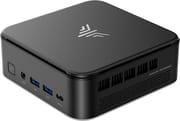
The chassis is roughly 5.08 inches square and just over two inches tall, 129 x 129 x 51mm, on the standard NUC footprint with a little extra height for airflow. The front face carries the power button, a 3.5mm combo jack, two USB-A 3.2 Gen 2 ports at 10Gbps, and a USB-C 3.2 Gen 2 port that also does DisplayPort 1.4 Alt Mode. The rear holds four USB-A 3.2 Gen 1 ports at 5Gbps, HDMI 2.0, DisplayPort 1.4, the 2.5GbE RJ45 jack, and the barrel connector for the 19V power brick. Seven USB ports is generous for a box this size, and splitting them by speed with the fast pair up front suits external drives. A VESA bracket ships in the box, so the whole thing can disappear behind a monitor.
The Ryzen 7 7735HS is AMD’s Rembrandt-R part: 8 cores, 16 threads, a 3.2GHz base and 4.75GHz boost, 16MB of L3, and Radeon 680M graphics with 12 RDNA 2 compute units clocked to 2200MHz. It is the 2022 Ryzen 6000 mobile silicon rebadged for 2023. Michael’s Tinkerings read the BIOS string and found a 28W sustained limit, well under the 35W to 54W envelope AMD specifies for the chip, and measured the consequences: 1966 in Geekbench 6 single-core against 8755 multi-core, with the wall meter showing 8.2W at idle and 55.2W under a sustained load.
The RAM is LPDDR5-5500 soldered to the board in a 24GB configuration, with no SO-DIMM slots to fall back on. KAMRUI’s own spec sheet lists it as on-board, and the reviewers who opened the chassis found the same thing. Michael’s Tinkerings measured 35.7 GB/s of bandwidth and 124ns of latency, noting the parts are rated for 6400 MT/s but clocked at 5500. Storage stays open: two M.2 2280 slots taking PCIe 3.0 or 4.0 NVMe drives up to 4TB combined, with SATA M.2 drives explicitly unsupported. If you are weighing this class of machine, our guide to the soldered-RAM tradeoff in mini PCs covers how to size the purchase, and the triple-monitor setup guide explains how the three display outputs behave together.
Reviewer Insights

Michael’s Tinkerings on the 28W limit
Michael’s Tinkerings published detailed bench numbers for this machine in April 2026, working from a review unit KAMRUI supplied. On memory, the review is blunt: “There are no SO-DIMM slots. 24 GB is what you have, forever.” Geekbench 6 OpenCL came in at 26009 and Unigine Heaven at the Basic preset averaged 100.5 FPS, both well clear of the Intel integrated graphics in the other mini PCs in the same review set, and Blender’s Classroom scene rendered faster on the 680M than on the CPU. As the review puts it, “This is the first mini PC in the review set where rendering on the iGPU is meaningfully faster than the CPU.”
The review tied the 1966 Geekbench 6 single-core result directly to the 28W configuration, calling it “the review’s most uncomfortable number” and observing that the 7430U in the same set landed at 1953. The same power choice pays off thermally. The review reports a peak Tctl of 85.3 °C during its disk benchmark and describes the machine as effectively inaudible at idle, holding a quiet, stable baseline under sustained work with no fan-ramp cycling. Storage measured 3365 MB/s sequential read and 2254 MB/s sequential write via diskspd, which the review characterizes as PCIe Gen 3 class, and it flags the drive as an undocumented SKU with no advertised TBW figure. Our note on SSD endurance ratings explains why that gap is worth a second thought before you load a machine like this with sustained writes.
The teardown at Retro Handhelds
Ban at Retro Handhelds reviewed the H1 in April 2026 and describes where KAMRUI spent the power budget: “rather than put a lot of the performance into the CPU like most i9 mini PC’s, the power for the H1 was put into the GPU.” On the CPU side, the review places the H1 toward the lower end of the pack against the other machines tested, with single-core and multicore scores both beaten by most of the comparison set. On graphics: “The Radeon 680M graphics are still super performant in 2026 and clear everything else in both Geekbench GPU and my 3DMark tests.”
The review calls opening the case straightforward (flip it, pull the feet, remove the screws, pry past the clips), but inside, “the Kamrui H1 only has the SSD slots,” where older KAMRUI systems offered two SSD slots and two RAM slots. The review scores repairability as a “meh” and closes with a narrow recommendation: “If all you care about is a good deal on GPU performance, get the H1.”
NerdTechy’s desktop-replacement run
NerdTechy ran a 24GB unit as a desktop replacement in April 2026, also on a sample KAMRUI provided. The review is enthusiastic about the footprint (“I went from a full ATX tower footprint to something I can slide behind a monitor and barely notice”) and about the graphics, calling the 680M “the best integrated graphics chip available at this price point and size, full stop.” It describes the chassis as aluminum with a matte finish that does not attract fingerprints, and notes that the dual-fan cooling stays inaudible over ambient room noise during everyday work while ramping up under long gaming or encoding sessions.
On the processor: “Compared to more recent mini PCs running newer Intel or AMD chips, single-core and multi-core scores land on the lower end of the competitive field.” On memory, the review is equally direct that the RAM is soldered and cannot be upgraded later, advising readers to buy the higher-capacity configuration up front if they expect to need it. It also passes along that some longer-term owners have reported reboot errors and kernel problems after several months, describing it as not a widespread pattern but worth knowing.
Carey Holzman’s teardown and bench run
Carey Holzman opened the chassis on camera, working from a unit KAMRUI supplied, and settled the memory question by looking at the board: “Obviously, you don’t see any because it’s soldered onto the board.” KAMRUI’s own product page still advertises easy memory upgrades, which he flagged as a copy-and-paste error carried over from the older H1: “Easy to upgrade, but you cannot upgrade the memory.” Holzman does not treat soldered memory as a defect, arguing that “everybody who thinks soldered on RAM is bad are living in the past,” but he is pointed about the shared model name, saying manufacturers like this one “will recycle the same model name even though they’ve changed all of the specifications” and that “if you go looking for this online, you’ll probably find there’s about five or six different versions over the last two years.” Two smaller complaints came out of his setup pass: the preinstalled Windows 11 Pro image was a full year behind the current release, and the out-of-box setup never presented the privacy questions.
Holzman’s second part is the bench run. Cinebench R23 multi-core landed at 9,997 with the BIOS in performance mode, 9,835 in balanced, and 7,523 in silent, with a peak of about 85.1 °C in balanced and the same peak in performance, which is why he left it in performance mode: “If it’s not getting any hotter, then it’s not really degrading anything.” A viewer pointed out that the 7735HS should score closer to 12,000, and Holzman agreed, while putting the difference in perspective: “the score is a little low and Andy is correct, but I don’t believe it really makes that much of a difference except to people who care that much.” Raising the SMU power limit to 54W in the BIOS stopped the machine posting, and because the chassis has no CMOS reset pinhole he had to open it and unplug the BIOS battery to recover it. On storage he clocked the bundled drive at about 3,200 MB/s read with writes at roughly half the figure he expected, then ran a Samsung Gen 4 drive in each of the two slots and saw over 7,000 MB/s read from both, which points at the drive rather than the board: “The drive that’s included runs perfectly fine on the read speeds. Something’s wrong on the write speeds.”
Buy It for the 680M, and Size the Memory Up Front
An 8.2W idle draw, a fan that stays out of the way, 2.5GbE, and a second M.2 slot add up to a capable home server, media machine, or light content-creation desktop, and the 680M gives it headroom for emulation, older titles, and GPU-accelerated rendering that Intel integrated graphics in the same bracket cannot match. Windows 11 Pro ships preinstalled, and the triple 4K60 output makes it a workable multi-monitor productivity desktop.
If you expect to need more than 24GB of memory at any point in this machine’s life, the soldered LPDDR5 rules it out, because there is no slot to add to. If your workload is single-thread bound (interactive development, heavy spreadsheets, application cold starts), the 28W configuration blunts exactly the part of the chip you would be paying for, and a machine with more thermal budget will feel quicker. Current-generation silicon is off the table here too; the 7735HS is a 2022 architecture carrying a 2023 model number. Comparing it side by side in Starry Hope’s Mini PC Comparison Chart is the fastest way to see where it sits.
Frequently Asked Questions
Can I upgrade the RAM in the KAMRUI Hyper H1?
No. The Hyper H1 uses LPDDR5-5500 soldered directly to the motherboard, and there are no SO-DIMM slots inside the chassis. The 24GB it ships with is the capacity the machine keeps for its whole life. Reviewers who opened the case, including Retro Handhelds and Michael’s Tinkerings, confirmed the same finding.
How is the KAMRUI Hyper H1 different from the Hyper H1 11 Pro?
They share a family name but not a board. The Hyper H1 11 Pro runs a Ryzen 7 6800H with two DDR5 SO-DIMM slots that accept up to 64GB, two Ethernet jacks (1GbE plus 2.5GbE), and DisplayPort 2.0. This 7735HS model moves to soldered LPDDR5, a single 2.5GbE port, and DisplayPort 1.4. The CPU generation, the memory design, and the port layout all differ.
Can the Hyper H1 drive three 4K monitors?
Yes. HDMI 2.0, DisplayPort 1.4, and the front USB-C port each carry one display at 4K and 60Hz, for three simultaneous 4K60 outputs. KAMRUI’s spec sheet lists all three at 4K@60Hz, and NerdTechy ran three panels and reported the setup working without a dedicated graphics card. The USB-C port handles its display through DisplayPort Alt Mode while still moving data at 10Gbps.
What storage can the Hyper H1 take?
The board has two M.2 2280 slots that take PCIe 3.0 or 4.0 NVMe drives, up to 4TB combined. KAMRUI states that M.2 SATA drives are not supported, so any drive you add needs to be NVMe. The bundled SSD performs at PCIe Gen 3 speeds; Michael’s Tinkerings measured 3365 MB/s sequential read and 2254 MB/s sequential write with diskspd. Carey Holzman’s unit read at about 3,200 MB/s but wrote at roughly half the speed he expected, and a Gen 4 drive he fitted ran at over 7,000 MB/s in both slots.
Is the Ryzen 7 7735HS still worth buying in 2026?
It depends on what you want from it. The 7735HS is Zen 3+ silicon from 2022 that AMD rebadged into the 7000 series for 2023, and it sits below current-generation parts on raw CPU work. The Radeon 680M holds up better: reviewers in 2026 still measured it ahead of the integrated graphics in more expensive Intel mini PCs.
How loud is the Hyper H1?
Quiet. With a 28W sustained limit there is comparatively little heat to move, so the fan rarely has to work hard. Michael’s Tinkerings described the unit as effectively inaudible at idle with a quiet, stable baseline under sustained load, and NerdTechy reported not being able to hear it over ambient room noise during everyday tasks, with a noticeable ramp only during long gaming or encoding sessions.
What wireless does the Hyper H1 use?
Wi-Fi 6 and Bluetooth 5.2, on a Realtek RTL8852BE module in an M.2 2230 slot. That is dual-band 2.4GHz and 5GHz only; there is no 6GHz band, so this is Wi-Fi 6 rather than 6E or Wi-Fi 7. Because the card sits in a standard M.2 2230 slot, it can be swapped for a newer module if you are willing to open the chassis. Wired networking runs through a Realtek RTL8125 2.5GbE controller.
What comes in the box?
The mini PC, a 65W power adapter (19V at 3.42A with a 5.5 x 2.1mm barrel plug), an HDMI cable, a VESA mounting bracket with screws, and a user manual. Windows 11 Pro comes preinstalled and activated on every configuration except the barebone version.