

A DAS (direct attached storage) is a box of drive bays with no computer inside. It plugs into one computer over USB or Thunderbolt, and that computer sees each drive as if it were a local disk. A NAS (network attached storage) is a complete small server with its own processor, operating system, and network port. Put a DAS next to a mini PC and the pair does the job of a NAS: the mini PC runs the software and serves the files, and the enclosure holds the drives.
The pairing suits someone who already has a mini PC running Jellyfin or Plex, Home Assistant, or a Proxmox host, and whose internal NVMe slot is full. A NAS would mean a second computer to update and a second operating system to learn. A DAS adds the bays and nothing else. We have not tested these enclosures ourselves, so every behavior described here comes from the maker’s documentation or from owners, with the date of the source.
When a DAS on a mini PC beats a NAS
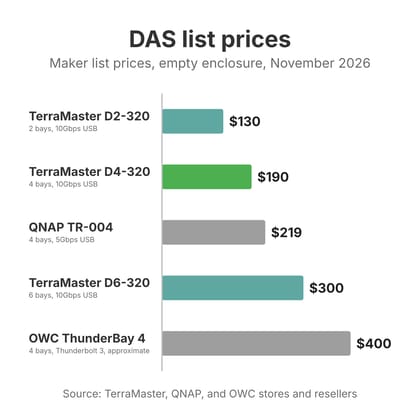
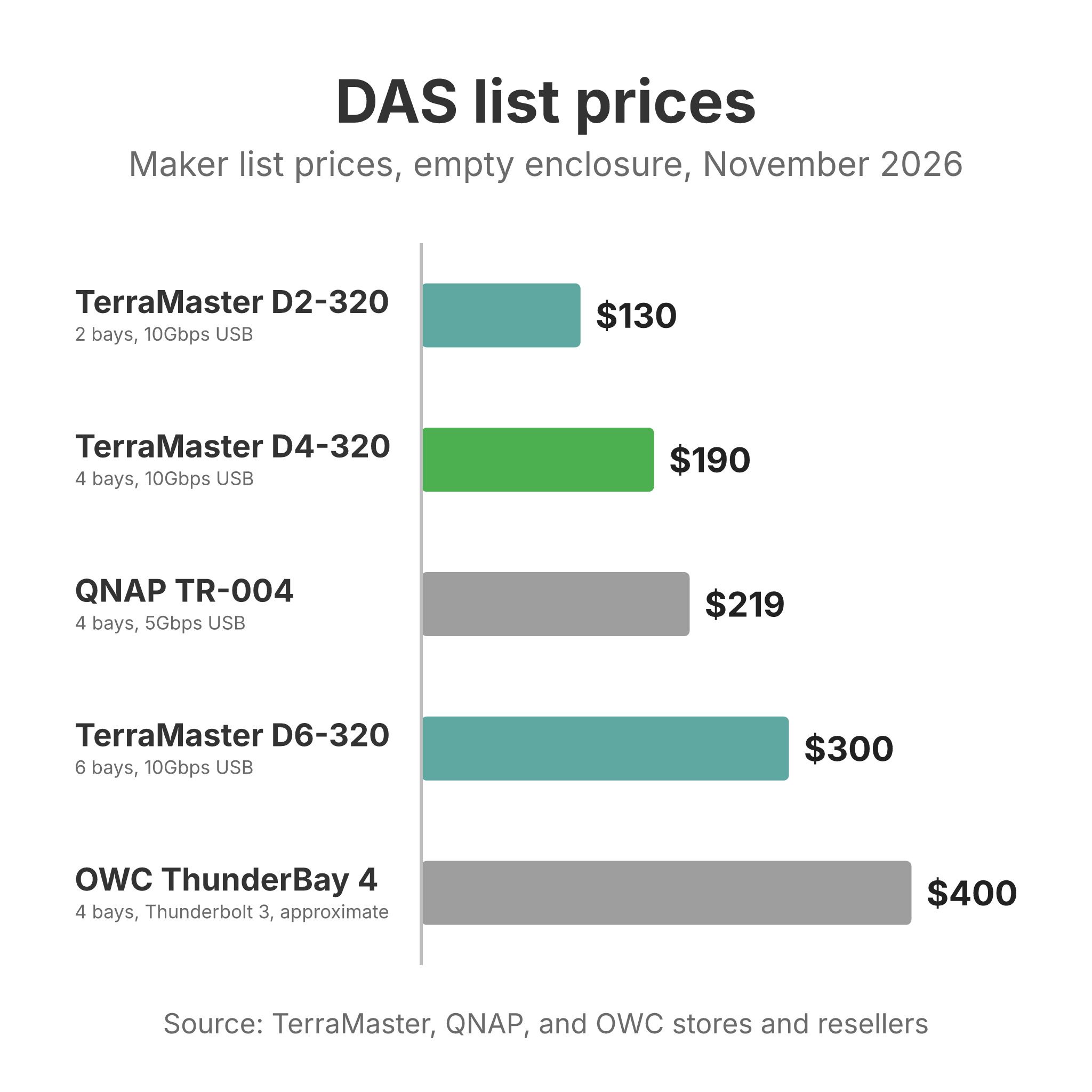
TerraMaster lists the four-bay D4-320 at $189.99. The four-bay boxes in our NAS comparison chart list from $379 for the AOOSTAR WTR Pro to $700 for the Synology DS925+, with most between $549 and $660. If the mini PC already exists, the enclosure is the whole bill. That chart lists NAS boxes only, not DAS enclosures.
The mini PC is often the faster computer, too. Budget NAS boxes run low-power chips (Synology’s $520 four-bay still ships with a 2019 Celeron, as our guide to running a mini PC as a NAS notes), while a recent Intel mini PC brings Quick Sync hardware transcoding for Jellyfin and Plex. You also keep your choice of operating system. A DAS shows up as plain disks, so Proxmox, TrueNAS SCALE, Unraid, Debian with ZFS, or plain mdadm all work, and you are not tied to a NAS maker’s software. A DAS can also be the simpler choice for someone who never used the network side. Photographer @shoheikatsuki wrote on X in November 2026 that he sold his NAS because troubleshooting it when the network acted up was a chore and he rarely opened it from his phone; he now uses a D4-320.
A NAS wins when the storage has to keep working while you tinker. Our home server vs NAS guide makes the case for keeping storage and apps on separate boxes, and that argument gets stronger with a DAS: reboot the mini PC for a kernel update and every drive in the enclosure goes offline with it. A NAS also connects its drives over SATA inside the case, emails you when a drive starts to fail, and lets you swap a disk from a web page. On a mini PC with a DAS you set up SMART monitoring yourself, and the USB link between the two boxes is a part that can drop out. The TrueNAS forum’s 2024 guide to USB pool disks lists the reasons, starting with “the connector is not latched, which may lead to inadvertent dis-connects.”
Our mini PC as a NAS guide works through the software side of that trade, price tier by price tier. If the mini PC stays the server, the enclosure is the next decision.
The five enclosures side by side
All five enclosures were on sale new at Amazon in November 2026, and TerraMaster also sells its three on its own US store. Prices are list prices from the maker’s store unless noted.
| Enclosure | Bays | Link to the mini PC | Drive modes | List price |
|---|---|---|---|---|
| TerraMaster D2-320 | 2 | USB 3.2 Gen 2 (10Gbps), USB-C | Single disk, JBOD, RAID 0, RAID 1 (hardware) | $129.99 |
| TerraMaster D4-320 | 4 | USB 3.2 Gen 2 (10Gbps), USB-C | Single disk only | $189.99 |
| TerraMaster D6-320 | 6 | USB 3.2 Gen 2 (10Gbps), USB-C | Single disk only | $299.99 |
| QNAP TR-004 | 4 | USB 3.2 Gen 1 (5Gbps), USB-C | Individual, JBOD, RAID 0, 1, 5, 10 (hardware) | $219 |
| OWC ThunderBay 4 (Thunderbolt 3) | 4 | Thunderbolt 3 (40Gbps), two ports | Each drive separate; RAID through software | About $400 (reseller price) |
The D4-320 and D6-320 share one design: a USB-to-SATA bridge chip behind each bay, a smart fan, and drives that show up to the host one by one. The D2-320 adds hardware RAID modes on top. The QNAP is built around a RAID controller instead, and the OWC connects over Thunderbolt rather than USB. Those differences matter more on Linux than the bay count does.
TerraMaster D4-320 with four bays
The D4-320 holds four 3.5-inch or 2.5-inch SATA drives up to 32TB each, connects over a 10Gbps USB-C port, and has a 120mm fan. TerraMaster rates it at up to 1,016 MB/s with four SSDs, and it draws 40.8 watts in use and 3.7 watts with the drives asleep. It has no RAID function: each bay appears to the computer as its own disk. That is what ZFS, Unraid, and mdadm want, because they need to see each drive’s real identity and health data. It carries a two-year warranty.
D4-320 at the TerraMaster store D4-320 on AmazonOwners have written about it on Linux for more than a year. On the TrueNAS forum in May 2025, user StuPo described a RAIDZ1 pool of four WD Reds on TrueNAS SCALE 25.04: “It has been totally reliable,” with clean scrubs. In October 2025 another member of that TrueNAS forum thread reported that smartctl (with the -d sat device type) showed full SMART data and a unique serial number for each drive, though the TrueNAS web interface showed none of it.
Other owners have had USB disconnects, collected in a TerraMaster forum thread that runs from November 2024 to November 2025. An Ubuntu 22.04 owner had drives drop out during ZFS scrubs, even with drive spindown and USB autosuspend turned off, and moved the drives to a plain two-bay dock to get stable scrubs. A Proxmox 8.3.3 owner reported the same USB disconnects in February 2025. In November 2025 the owner of a D2-320 with the same problem fixed it by switching the enclosure from the faster uas driver to the older usb-storage driver, which they said cut throughput by about 10 times but made ZFS behave. TerraMaster’s reply in that thread suggested checking the cable, the port, and the power adapter. Two D4-320 owners and one D2-320 owner in one thread is not a failure rate, but their fixes are the ones to try first if a pool starts throwing errors.
The D4-320 should start again by itself when power returns. A TerraMaster support account wrote in a May 2026 forum thread that it “will auto power on once you plug power cable in,” though a D4-320 owner in the thread replied that his did not and that he had to press the power button.
TerraMaster D2-320 with two bays and hardware RAID
The D2-320 is the two-bay version, with a smaller 80mm fan and a 40-watt power supply, and it is the only TerraMaster here with hardware RAID. TerraMaster lists single disk, JBOD, RAID 0, and RAID 1 modes. For a mini PC running ZFS or Btrfs, use single disk mode and let the operating system build the mirror; in a hardware RAID mode the host sees one virtual disk and loses direct access to each drive.
D2-320 at the TerraMaster store D2-320 on AmazonOn Linux it reports itself under a vendor ID that smartctl does not recognize. A June 2025 post on the TerraMaster forum shows Ubuntu Server 24 loading the uas driver at 10Gbps, smartctl answering “Unknown USB bridge [0x5432:0x1352 (0x100)]”, and smartctl -a -d sat reading the values once the device type was given. That owner’s monitoring script could not pass the -d sat option, so plan on configuring the device type by hand in whatever tool you use. TerraMaster does not publish which bridge chip the D2-320 uses.
For power cuts, a TerraMaster staff member wrote in a January 2025 forum reply that the D2-320 “features a power-on memory restoration function”: after a clean shutdown it stays off when power returns, and after an unexpected outage it starts up again on its own. The same reply notes that it has no scheduled power on or off.
TerraMaster D6-320 with six bays
The D6-320 takes six drives, up to 192TB raw, behind the same 10Gbps USB-C link, with two 80mm fans and a 120-watt power supply. Like the D4-320 it runs single disk mode only. Six hard drives reading at once can exceed what one 10Gbps link carries, which is fine for a media library and a bottleneck only during a full scrub or rebuild.
D6-320 at the TerraMaster store D6-320 on AmazonComputingForGeeks, which updated its Linux DAS buyer’s guide on October 19, 2026, says the D6-320 uses the same platform as the D4-320 and that Unraid needs its SMART controller type set to SAT before the drives report health data. In the TrueNAS forum thread above, an owner wrote in October 2025 that they had “Written 100tb non stop and not a single hitch” on a D6-320.
Both the D4-320 and D6-320 shipped with a firmware bug on early units that could give drives duplicate serial numbers, which confuses ZFS and Unraid because they track disks by serial. TerraMaster posted a firmware fix for both models on December 31, 2024. The flashing tool runs only on Windows, so a Linux-only household needs to borrow a Windows machine if a unit arrives with old firmware. Check with ls /dev/disk/by-id/ after the first boot: four or six distinct serials means you are fine.
QNAP TR-004 for hardware RAID on Windows and Mac
The TR-004 puts its four bays behind a hardware RAID controller, set with switches on the back to Individual, JBOD, RAID 0, 1, 5, or 10, or to a software control mode for QNAP’s own NAS and desktop utility. QNAP lists Windows, macOS, and Ubuntu as supported. The link is 5Gbps USB 3.2 Gen 1 and the bays run at SATA 3Gb/s, half the speed the TerraMaster bays run. It uses a 120mm fan and an external adapter (QNAP specifies 60 watts minimum), and QNAP’s store lists it at $219.
TR-004 on AmazonFor a Linux server that wants raw disks, the RAID controller gets in the way. A January 2021 review on gz.ro ran it in Individual mode on Linux and found the drives listed as “TR-004 DISK00” through “DISK03” instead of their real model names, plain smartctl failing with an unknown bridge, and SMART readable only through a patched build of smartmontools. The same reviewer found that adding or removing a disk reset the whole USB connection, which takes every drive offline at once. QNAP’s product page confirms the limit: “Drive hot-swap is not supported in the Individual Mode for the TR-004.” Those Linux findings date from 2021, so later firmware may behave differently, and QNAP’s documentation says nothing about what the TR-004 does after a power cut.
The TR-004 fits a buyer who wants a hardware RAID 5 volume that a Windows PC or a Mac can mount with no extra software. On a mini PC running ZFS, Unraid, or Proxmox, one of the TerraMaster units is the better match.
OWC ThunderBay 4 over Thunderbolt
The ThunderBay 4 connects over Thunderbolt 3 rather than USB, which puts its drives on the computer’s PCIe bus instead of behind a USB bridge. OWC rates the enclosure at up to 1,527 MB/s with SSDs in RAID 0, the fastest here, and it has a built-in power supply, two Thunderbolt 3 ports for daisy-chaining, and a DisplayPort output. Each drive appears separately; RAID comes from OWC’s bundled SoftRAID on Mac and Windows or from your own software. OWC does not list a price for the enclosure-only version; resellers had it at about $400 in November 2026, more than twice the D4-320.
ThunderBay 4 (Thunderbolt 3) on AmazonOWC does not support Linux. The ThunderBay 4 manual from January 2020 lists macOS and Windows 10 only, and OWC does not name the SATA controller inside. One owner on the Unraid forum wrote in September 2024 that with two IronWolf Pro drives in a ThunderBay 4, “I can see the smart reports from the command line but not from unraid.” He was running Unraid as a virtual machine under Proxmox, and later got the reports into Unraid by passing the disks through as SATA devices.
The manual also says the enclosure “requires an active data signal for powered operation.” It turns on when the computer does and turns off when the computer sleeps, shuts down, or is unplugged, as long as its rear switch is left on. For an always-on server that is the behavior you want after a power cut, since the drives come back with the host. The mini PC needs a Thunderbolt port or a USB4 port that supports Thunderbolt 3 devices; our list of mini PCs with a Thunderbolt port covers both kinds. Thunderbolt 3 support is optional in the USB4 standard, so check the maker’s spec sheet for an AMD mini PC. The Unraid forum owner above ran his ThunderBay 4 from the USB4 port of an AMD Minisforum EM680. OWC also sells a newer Thunderbolt 5 version of the ThunderBay 4 directly, with a 200-watt internal power supply.
What each enclosure does on Linux
This table collects the Linux behavior buyers ask about, with the date of each source. Where nothing is documented, it says so.
| Bridge or controller | UAS driver | SMART on Linux | Real serial per bay | After a power cut | |
|---|---|---|---|---|---|
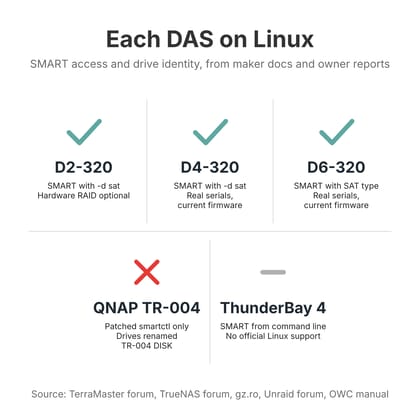
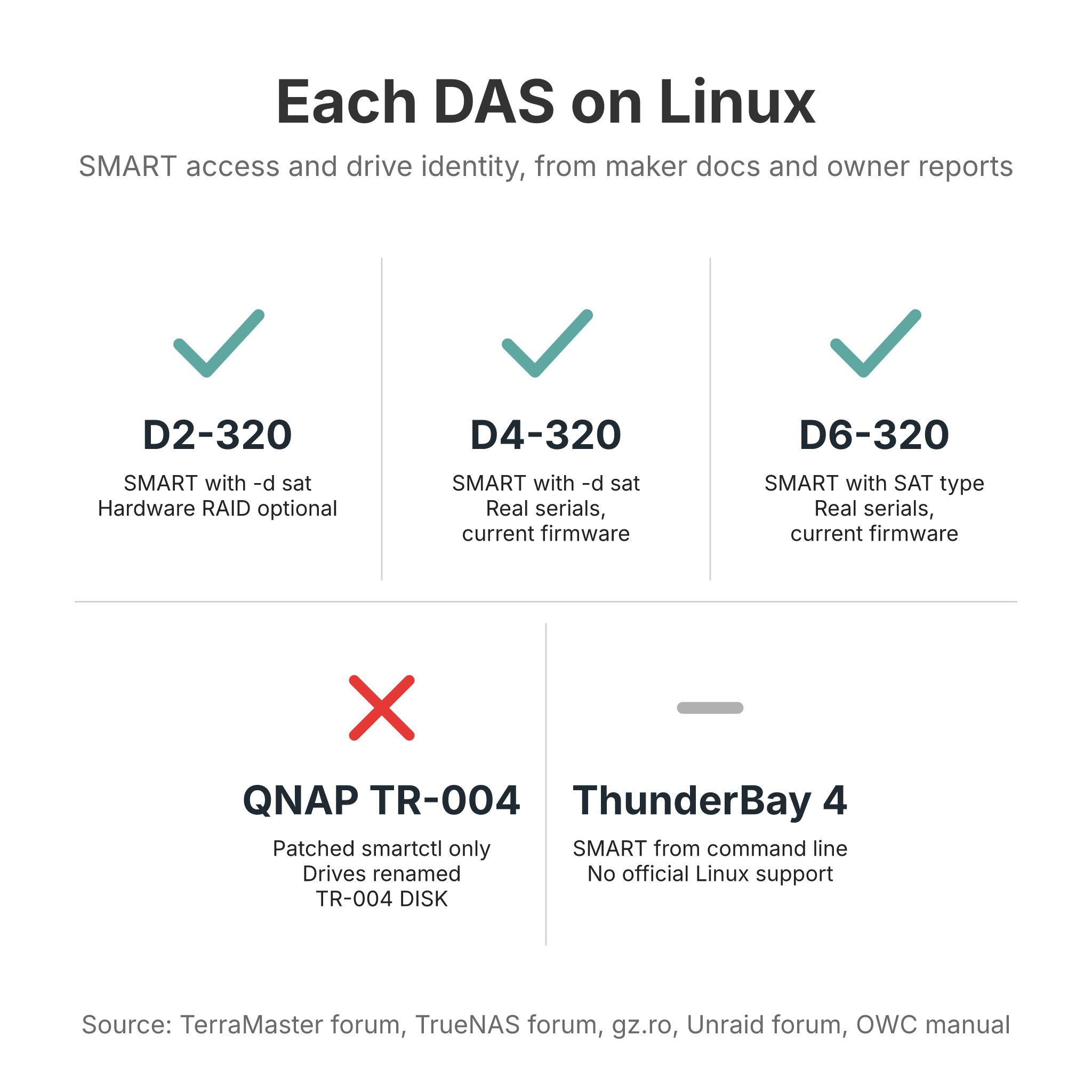
| D2-320 | Not published (one owner’s smartctl showed USB ID 0x5432:0x1352) | Yes, June 2025 report; one owner fell back to usb-storage, Nov 2025 | With -d sat, June 2025 report | Not documented | Restarts on its own after an outage, TerraMaster staff, Jan 2025 |
| D4-320 | ASMedia ASM235CM, one per bay (TrueNAS forum, Oct 2025) | Yes; two owners reported USB disconnects, 2024 to 2025 | With -d sat, Oct 2025 | Yes on current firmware; fix posted Dec 2024 | Powers on when power returns, TerraMaster support, May 2026; one owner had to press the button |
| D6-320 | Same platform as D4-320 (ComputingForGeeks, Oct 2026) | Not documented separately | With SAT type in Unraid, Oct 2026 | Yes on current firmware; fix posted Dec 2024 | Not documented |
| TR-004 | QNAP RAID controller | Not documented | Only with a patched smartmontools, Jan 2021 | Not documented; drive models show as TR-004 DISK00 to 03, Jan 2021 | Not documented |
| ThunderBay 4 | Thunderbolt 3 to SATA; controller not named by OWC | Not USB | From the command line, Sept 2024 report (Unraid in a VM) | Not documented | Powers on and off with the host, OWC manual, Jan 2020 |
The bridge chip is the part that translates USB to SATA, and its firmware decides whether SMART health data and real serial numbers reach the computer. UAS (USB Attached SCSI) is the faster Linux driver for USB storage; the older usb-storage driver is slower but sometimes more stable with a bridge that misbehaves. SMART passthrough means smartctl can read each drive’s health counters; the -d sat option tells it to send those commands through the bridge. A unique serial per bay matters because ZFS, Unraid, and mdadm identify disks by serial, and two drives reporting the same one can break a pool import.
Running ZFS, TrueNAS, or Unraid over USB
The TrueNAS forum’s 2024 guide lists the risks of pool disks on USB: unlatched connectors, bridges that hide drive identity, and enclosures “not intended for continuous or extended use.” The ComputingForGeeks guide adds that a drive dropping out after a few minutes is often the enclosure or the host putting it to sleep, which ZFS reads as a failed device, so turn off USB autosuspend and drive spindown for pool members. TerraMaster’s own pages for the D2-320, D4-320, and D6-320 advertise that the drives sleep along with the computer, which is useful on a desktop and something to disable on a server that never sleeps.
Plug the enclosure straight into a 10Gbps USB-C or USB4 port on the back of the mini PC, not through a hub or a front-panel port that shares bandwidth. Use the cable that came in the box. Run a scrub in the first week, while the return window is open, and watch dmesg for USB resets during it. If you see them, try another port and then the usb-storage fallback before you trust the pool with data that has no other copy. A DAS, like a NAS, is not a backup; the TrueNAS forum advice and our home server vs NAS guide both assume a second copy somewhere else.
For TrueNAS and Unraid in particular, expect the web interface to show less than the command line. A D4-320 owner on TrueNAS reported SMART data in a terminal that the web interface did not display, so set up smartd or a script to send alerts. Our guide to choosing a mini PC for a home server covers which mini PCs have the ports and the processor for this job.
Which enclosure fits which server
For a mini PC running Jellyfin, Proxmox, TrueNAS, or Unraid, the D4-320 is our pick. It has more than a year of Linux owner reports behind it, each bay shows up as its own disk with SMART and a real serial on current firmware, and it costs less than half of what most four-bay NAS boxes list for. The D6-320 is the same idea with two more bays and a bigger power supply, worth it if you already know four drives will not be enough. The D2-320 suits a two-drive mirror, and TerraMaster staff have said it restarts by itself after a power cut.
Skip the QNAP TR-004 for a Linux server unless you want its hardware RAID 5 for a Windows PC or a Mac, and consider the ThunderBay 4 only if the mini PC has Thunderbolt or a USB4 port that supports it and you accept running it without OWC’s Linux support. If none of this sounds like work you want to do, a NAS is the better purchase, and the NAS comparison chart has the models.


