
Acer Chromebook 11 (C732)
Published on

Note: Acer no longer produces any C732 configuration; the units still sold as new come from third-party sellers. Google’s device list still shows ChromeOS auto updates for the Chromebook 11 (C732, C732T, C732L, C732LT) family through June 2027. This page is a reference for people who own one or are looking at a secondhand unit.
The Acer Chromebook 11 C732 launched at the Bett education show in January 2018 as the follow-up to the Chromebook 11 N7 C731. It kept the rugged formula Acer had built for school districts and moved it onto USB-C. Acer’s announcement describes a chassis “compliant with stringent U.S. Military Standard (MIL-STD 810G)” that is “IP41-rated and drop tested to 122 cm (48 inches), spill-resistant keyboard up to 330ml”, with a “fan-less design” for “quiet operation for classrooms, libraries, lab time”. Inside is an Intel Celeron N3350 or, on some SKUs, a quad-core Celeron N3450, paired with 4GB or 8GB of soldered LPDDR4 and 16GB, 32GB, or 64GB of eMMC storage.
Acer Chromebook 11 (C732) Comparison Chart
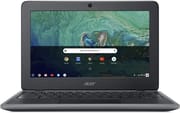 Acer Chromebook 11 (C732) | Acer Chromebook 11 (C732) | |
| Price | List Price: $279.99 Amazon Prices: | List Price: $299.99 Amazon Prices: |
| Model number | C732-C6WU / NX.GUKAA.001 | C732T-C8VY / NX.GULAA.001 |
| Performance Rating | 2.3 | 2.3 |
| Chromebook Plus | No | No |
| Processor | Dual-core 1.10 Ghz (max 2.40 Ghz) Intel Celeron N3350 | Dual-core 1.10 Ghz (max 2.40 Ghz) Intel Celeron N3350 |
| RAM | 4 GB | 4 GB |
| Internal Storage | 32 GB eMMC | 32 GB eMMC |
| Screen Size | 11.6" | 11.6" |
| Screen Resolution | 1366x768 | 1366x768 |
| Screen Type | ComfyView TN or IPS | CineCrystal IPS multi-touch |
| Touch Screen | No | Yes |
| Stylus / Pen | No Stylus Support | No Stylus Support |
| Dimensions width x length x thickness | 11.89 x 8.23 x 0.84 inches (302.01 x 209.04 x 21.34 mm) | 11.89 x 8.23 x 0.84 inches (302.01 x 209.04 x 21.34 mm) |
| Weight | 2.78 lbs (1.26 kg) | 2.78 lbs (1.26 kg) |
| Backlit Keyboard | No | No |
| Webcam | 720p HD | 720p HD |
| WiFi | 802.11ac 2x2 MIMO | 802.11ac 2x2 MIMO |
| Bluetooth | Bluetooth 4.2 | Bluetooth 4.2 |
| Ethernet | No | No |
| Cellular Modem | No | No |
| HDMI | No HDMI | No HDMI |
| USB Ports | 2 USB 3, 2 USB-C 2x USB-C 3.1 Gen 1 (DisplayPort, charging) | 2 USB 3, 2 USB-C 2x USB-C 3.1 Gen 1 (DisplayPort, charging) |
| Thunderbolt Ports | No | No |
| Card Reader | microSD Card Reader | microSD Card Reader |
| Battery | 3 cell, 3920 mAh, Lithium-ion | 3 cell, 3920 mAh, Lithium-ion |
| Battery Life | 12.0 hours | 12.0 hours |
| Fanless | Yes | Yes |
| Auto Update Expiration Date | June, 2027 | June, 2027 |
Related Chromebooks
-
 Acer Chromebook 311 (AMD)The Acer Chromebook 311 (CB311-10H) is an 11.6-inch ChromeOS laptop on an AMD A4-9120C with 4GB of…
 -
 Acer Chromebook Spin 11 CP311The Acer Chromebook Spin 11 combines functionality and portability with its 11.6-inch touch IPS…
 -
 Samsung Chromebook 4The Samsung Chromebook 4 is an 11.6-inch Celeron N4000 or N4020 Chromebook with 4GB of RAM, a…
 -
 ASUS Chromebook C203XAThe ASUS Chromebook C203XA is a rugged 11.6-inch education laptop with a MediaTek MT8173C, an…
 -
 ASUS Chromebook Flip CR1The ASUS Chromebook Flip CR1 (CR1100FKA) is a rugged 11.6-inch education convertible on an Intel…
 -
 Lenovo Flex 3 ChromebookThe Lenovo Flex 3 Chromebook is a fanless 11.6-inch convertible with an IPS touchscreen, a MediaTek…
Processor, Memory, Ports, and Chassis
The Celeron N3350 is a 2016 Apollo Lake part with two cores, two threads, a 1.1 GHz base clock, a 2.4 GHz burst clock, and Intel HD Graphics 500. Its PassMark CPU Mark of 1,112 puts it far below anything currently sold: a 2024 Chromebook on an Intel N100 scores several times higher, and even the Celeron N4000 in the later Acer Chromebook 311 is a step up. In practice that means a handful of tabs, Google Docs, and Classroom work, with visible slowdown once a heavy site or a second Android app joins them. Acer sold some C732 SKUs with the quad-core N3450 instead, which helps with parallel work but shares the same graphics and the same 2016 silicon generation.
Storage and memory are both fixed at purchase. The LPDDR4 is soldered to the board and the eMMC module is not a serviceable drive, so a 4GB/16GB unit stays a 4GB/16GB unit for its whole life. The microSD slot is the only expansion, and it matters most on the 16GB configurations, where ChromeOS plus a few Android apps leaves very little room. Acer’s product sheet lists the 16GB option only for the non-touch C732 and the LTE C732L, with the touch models starting at 32GB.
Port selection is the clearest improvement over the C731. There are two USB-C 3.1 Gen 1 ports rated at 5Gbps that handle charging and DisplayPort output, two USB 3.0 Type-A ports, a microSD reader, and a headset jack. The charger is a standard USB Type-C 45W Google PD adapter rather than the proprietary barrel plug the previous generation used, which means a replacement charger in 2026 costs a few dollars and is easy to find. There is no HDMI port, so an external display goes through USB-C. Wireless is Intel 802.11ac 2x2 with Bluetooth 4.2, both a generation behind what a 2026 network expects but adequate on a normal home router.
The keyboard sits inside a rubber bumper and drains spills of up to 330ml out through two holes in the bottom of the chassis, and the keys are recessed so they resist being picked off. Acer had the chassis tested to MIL-STD 810G for high and low temperature, humidity, rain, vibration, and a 122 cm transit drop. The IP41 rating means no opening larger than 1mm, which is Acer’s answer to paperclips and pencil leads going into vents. For the wider story of how education Chromebooks got built this way, see our piece on repair-friendly education Chromebook design.
Battery hardware is a 45Wh, 3,920 mAh, three-cell lithium-ion pack. Acer rated the C732 and C732T at up to 12 hours and the LTE C732L and C732LT at up to 11 hours. Any of these packs is now seven or eight years old, so treat the rated figure as a description of what the machine did when new, not what a secondhand one will do today.
The Four Models in the C732 Family
The four models differ in display and radio, not in chassis, and Google lists them as one platform. The C732 is the non-touch clamshell, sold with either a high-brightness ComfyView TN panel or an IPS panel at the same 1366x768 resolution. The C732T swaps in a CineCrystal IPS multi-touch panel. The C732L and C732LT are the LTE versions of those two, adding a micro SIM slot and a Cat 9 modem rated for 450 Mbps down on LTE FDD, and they trade about an hour of battery life for it. Acer also used different colors for the two groups: black with steel grey for the C732 and C732T, plain black for the LTE pair.
Because the panel option was a per-SKU choice rather than a model-name difference, two non-touch C732 units can have noticeably different screens. Expert Reviews tested a TN unit and measured poor color accuracy on it. An IPS C732 is a better buy secondhand for the same money, and the fastest way to tell them apart without a model number is to tilt the lid and watch for the color shift that gives a TN panel away.
Reviewer Insights
Expert Reviews published a full hands-on review of this machine. Their verdict was mixed: “This isn’t an awful Chromebook, then, but if you buy it you’ll wish it was faster and had a better screen.” On the chassis they wrote that “it certainly feels solid, with the matte black chassis surrounded by a tough, rubberised grey strip for added shockproofing and should withstand a few years of life in the classroom or out on the road.”
Battery life was the strongest result in their testing. They reported: “Yet battery life is phenomenal: we managed 11hrs 38mins of video playback before the Chromebook 11 gave up the ghost.” That measured figure sits close to Acer’s 12-hour claim.
Their criticisms were the processor and the panel. Expert Reviews found that two cores and two threads do not cut it once more than a few tabs are open, and on the TN screen they measured an average Delta E of 8.52 and described images as overexposed and lacking contrast. They also noted that the 4GB of RAM was at least usable, writing that “manufacturers have finally stopped putting 2GB of RAM in their budget models, and the Acer has a usable 4GB.”
Pros and Cons
| Pros | Cons |
|---|---|
| MIL-STD 810G chassis with a 122 cm drop test | Celeron N3350 stalls past a few tabs |
| Keyboard drains spills of up to 330ml | TN panel on many SKUs measured Delta E 8.52 |
| Two USB-C ports for charging and DisplayPort | 1366x768 resolution on all models |
| Standard USB-C 45W PD charger, easy to replace | RAM and eMMC are soldered, no upgrade path |
| Measured 11hrs 38mins of video playback when new | No HDMI port |
| Fanless, so it runs silent | 802.11ac and Bluetooth 4.2 are dated |
| microSD expansion for the small eMMC | ChromeOS updates stop in June 2027 |
Buying One Used With Updates Ending June 2027
Google’s device list gives the whole C732 family an Auto Update Expiration date of June 2027, and it carries the asterisk Google uses to mark devices whose original date was extended. Google’s own caveat on extended devices is that some features and services might not be fully supported, so the date guarantees security and stability updates rather than every new ChromeOS feature. A used buyer in September 2026 gets under a year of update coverage, after which the browser stops receiving patches and the device should come off any account that matters. Our used Chromebook worksheet walks through that calculation for any model.
The battery is the other number to check. The pack is a 45Wh, 3,920 mAh, three-cell lithium-ion unit, and a lithium-ion cell built in 2018 has lost a substantial share of its original capacity, so expect well short of the 11hrs 38mins Expert Reviews measured on a new unit. Third parties sell replacement packs for this chassis. Replace versus buy new covers when that spend makes sense.
After June 2027 the hardware still runs. A C732 makes a reasonable single-task machine on a home network: a kitchen browser, a label printer terminal, a typing machine for a child. There is no fan vent to clog and spills drain out the bottom, which suits a machine that lives somewhere messy, and best Chromebook for kids covers where a device like this fits. Developer Mode plus a lightweight Linux distribution is the other path, though the N3350 limits that to browsing and writing. For the general case, see old Chromebooks as home servers and our look at Chromebook ewaste and planned obsolescence.
If you are comparing this against other 11-inch Acer models, the Chromebook Comparison Chart puts the C732 next to the C720, the CB3-132, and the newer Chromebook 311 on the same spec rows. Students shopping for a machine that still has years of updates left should start from best Chromebook for college students instead.
Frequently Asked Questions
When do ChromeOS updates end on the Acer Chromebook 11 C732? Google lists the Chromebook 11 (C732, C732T, C732L, C732LT) family with an Auto Update Expiration date of June 2027. That date carries Google’s extension marker, and Google notes that some features and services might not be fully supported on extended devices. After June 2027 the machine keeps working but stops receiving security patches.
What is the difference between the C732, C732T, C732L, and C732LT? All four share the same chassis and internals. The C732 is the non-touch clamshell with either a ComfyView TN or an IPS panel. The C732T has a CineCrystal IPS multi-touch panel. The C732L and C732LT are the LTE versions of those two, adding a micro SIM slot and a Cat 9 modem, rated at up to 11 hours of battery life instead of 12.
Can you upgrade the RAM or storage in an Acer Chromebook 11 C732? No. The LPDDR4 memory is soldered to the board and the eMMC storage is not a removable drive. Acer sold the line with 4GB or 8GB of RAM and 16GB, 32GB, or 64GB of eMMC, and the configuration you buy is permanent. The microSD slot is the only expansion.
How rugged is the Acer Chromebook 11 C732? Acer’s launch announcement describes a chassis compliant with MIL-STD 810G, IP41-rated and drop tested to 122 cm, with a spill-resistant keyboard rated to 330ml. Acer’s product sheet lists MIL-STD 810G testing for high temperature, low temperature, rain, humidity, vibration, and a 122 cm transit drop.
What did the Acer Chromebook 11 C732 cost at launch? Acer announced availability to education and commercial customers in North America in March 2018, with prices starting at US$279.99 for non-touch models and US$299.99 for touch models, and in EMEA in April starting at 329 euros.
Does the Acer Chromebook 11 C732 have a fan? No. Acer’s launch announcement describes a fan-less design intended for quiet operation in classrooms, libraries, and lab time. There is no fan noise and no vent for dust or pencil debris to enter.