

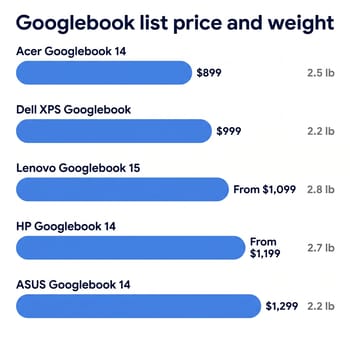
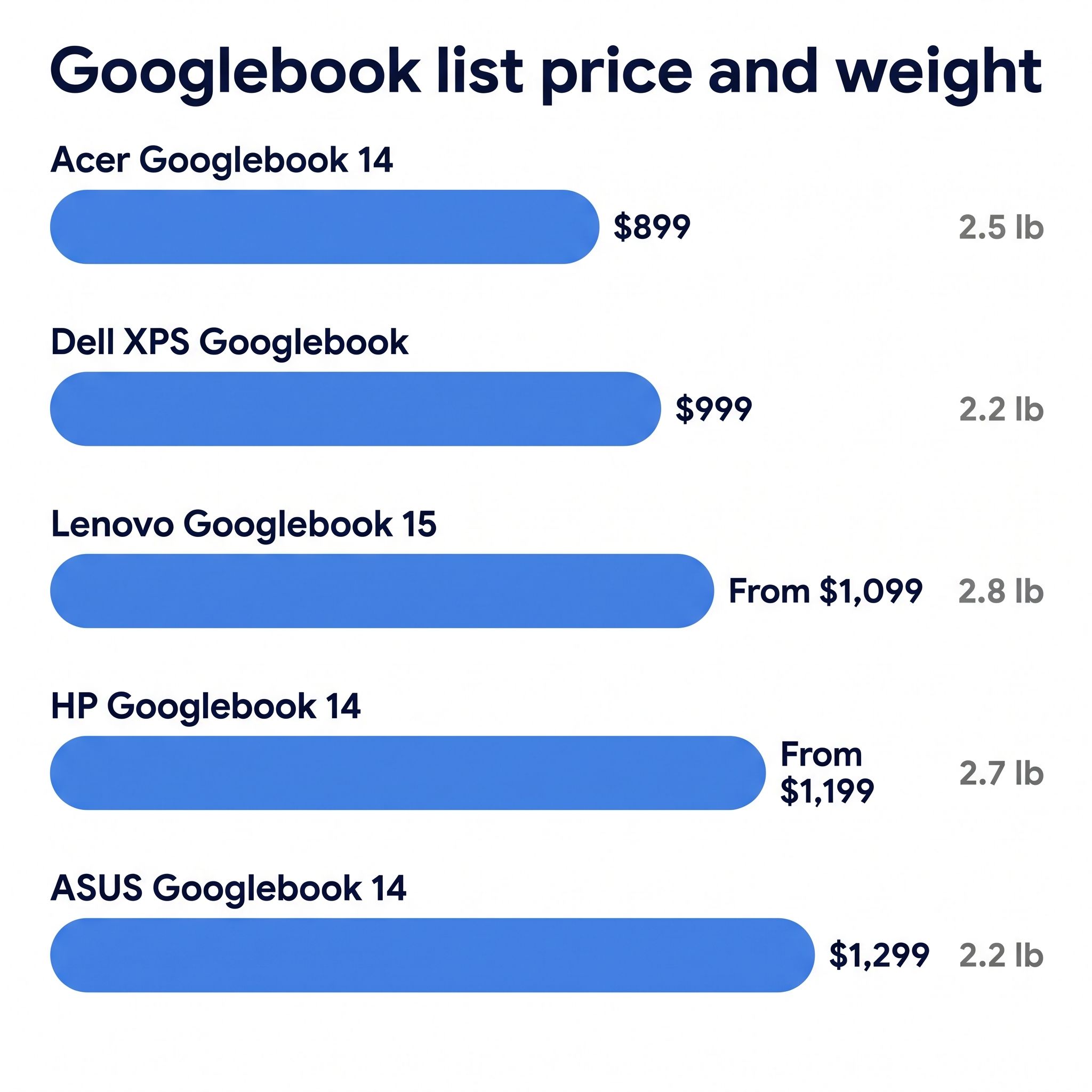
A Googlebook makes sense if you carry a recent Android phone and your apps run in Chrome or on Android. If you do, price and size decide which Googlebook to buy, because the five launch models share one operating system and two chips. The $899 Acer Googlebook 14 is the cheapest and the only 2-in-1, so look at it first. The HP and ASUS list $300 to $400 above it: the HP lasted longest in a battery test, and the ASUS is the lightest 14-inch model and has the most ports.
The five Googlebooks by price and size
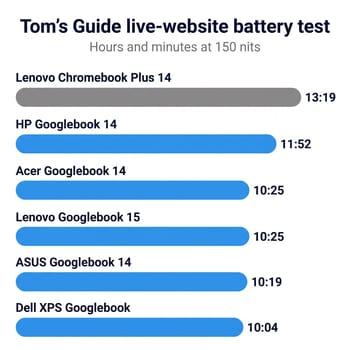
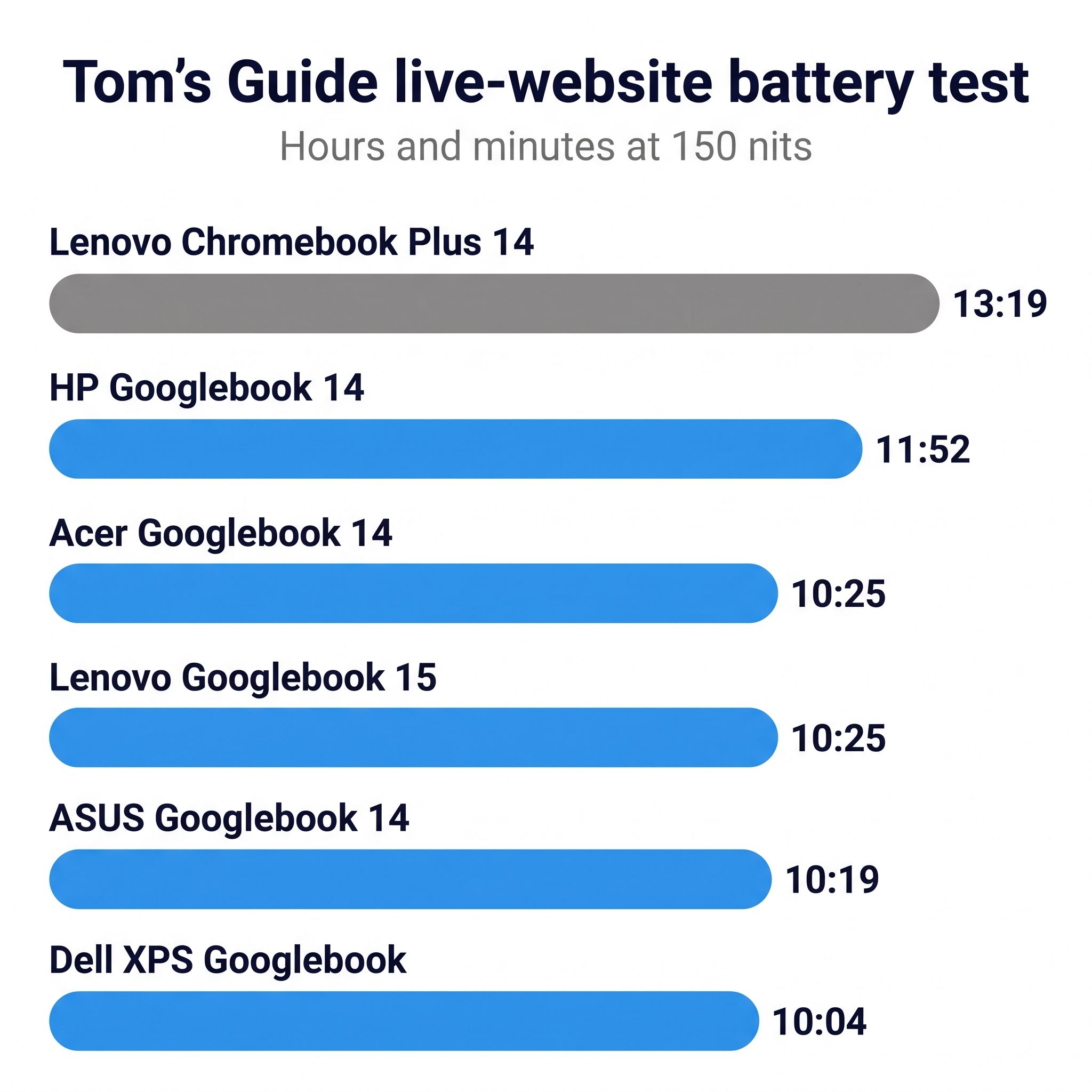
Prices below are list prices, and current prices are on each product page. Best Buy carries all five in the US. The battery column is Tom’s Guide’s web test, which cycles through live websites at 150 nits and 120Hz. Use those numbers to compare these five; they sit well under the makers’ ratings.
| Model | List price | Form | Screen | Weight | Chip | Ports | Web battery |
|---|---|---|---|---|---|---|---|
| Acer Googlebook 14 | $899 | 2-in-1 | 14-inch OLED | 2.5 lb | Core Ultra 5 325 | 3 USB-C (1 Thunderbolt 4) | 10:25 |
| Dell XPS Googlebook | $999 | Clamshell | 13.4-inch matte LCD | 2.2 lb | Snapdragon X Elite | 2 USB-C, no headphone jack | 10:04 |
| Lenovo Googlebook 15 | From $1,099 | Clamshell | 15.3-inch OLED | 2.8 lb | Core Ultra 5 325 | 2 Thunderbolt 4, HDMI, USB-A | 10:25 |
| HP Googlebook 14 | From $1,199 | Clamshell | 14-inch OLED | 2.7 lb | Snapdragon X Elite | 2 USB-C | 11:52 |
| ASUS Googlebook 14 | $1,299 | Clamshell | 14-inch matte OLED | 2.2 lb | Core Ultra 5 325 | 2 Thunderbolt 4, HDMI, 2 USB-A | 10:19 |
Every model has 16GB of memory at these prices, a touchscreen, a 120Hz panel, and a fingerprint reader. Google also includes 12 months of Google AI Pro with 5TB of cloud storage, three months of YouTube Premium, and a year of GeForce Now with each one.
A Windows Dell XPS 13 ran 14 hours 57 minutes and a MacBook Air ran 15 hours 37 minutes in Tom’s Guide’s in-house Windows and macOS battery test, which is a different test from the live-website run above, so the gap of about three hours over the best Googlebook is a rough comparison. Google’s ratings come from a test at 100 nits with Battery Saver on, which explains why they run well above these results. Dropping the screen to 60Hz added nearly two hours on the Dell and HP, the two Googlebooks Tom’s Guide retested that way.
Acer Googlebook 14, for the lowest price and tablet use
The Acer is our pick because $899 still buys a 14-inch OLED screen, Thunderbolt 4, and the only 360-degree hinge in the group. It also takes USI 2.0 pens, sold separately. If you want to draw, read in tablet mode, or stream games with the screen in tent position, no other launch Googlebook folds that way. ITPro called it “a great way to trial Googlebooks without investing too much.”
Android Digest ranked its build below the rest of the line, saying “It’s not as good as the other Googlebooks,” and SlashGear, Tech Spurt, and Ceejaybrand all had trouble with the fingerprint reader. It has a mechanical touchpad where the ASUS, HP, and Lenovo use haptic ones, and its only data ports are USB-C, with no USB-A or HDMI. Ceejaybrand’s first unit stuck on a loading screen after a restart, and SlashGear could not recommend it as it stood. Check the store’s return window before you buy.
Dell XPS Googlebook, for a small laptop and the faster chip
Someone who carries a laptop all day will notice the Dell’s size first: about 2.2 pounds with a 13.4-inch screen, for $100 more than the Acer. In Tom’s Guide’s benchmarks, its Snapdragon X Elite scored 14,724 in Geekbench 6 multi-core against 9,960 for the Acer, and it ran 3DMark Wild Life Extreme at 40 frames per second against about 25. Android apps are built for Arm chips and run on it with no translation. Android Digest, which bought an Acer, named the Dell as its own pick.
It is also the only LCD in the lineup, measured at about 408 nits by Tom’s Guide with no HDR. The two USB-C ports are its only ports, and wired headphones need an adapter. The touchpad clicks mechanically, and the 52Wh battery is the smallest here. Brady Snyder at Android Authority faulted its build and touchpad after two weeks, though he told a Reddit commenter “I still think it’s one of the better models.” The 32GB versions list from $1,599, which is a lot to spend on this software.
Lenovo Googlebook 15, for the biggest screen and full-size ports
In one Reddit thread, steelbreeze9, who came from 13-inch laptops, wrote “I returned mine, it’s simply too big for me.” Another owner replied that “small screens and aging eyes are not a good match,” which made the Lenovo his pick. Handle one in a store first if you are used to 13 inches.
For that size you get a 15.3-inch OLED panel in a body under 3 pounds, along with HDMI, USB-A, and a Thunderbolt 4 port on each side. It logs in by face or fingerprint, and it has a haptic touchpad and a replaceable M.2 SSD.
Readers of Android Authority’s poll on October 30 picked it first at 19%, ahead of the Dell at 16% and the Acer at 14.1%. How-To Geek hit frozen touch input and standby drain and called it “a great laptop that you probably shouldn’t buy.” LinuxBTW could not get either of his Thunderbolt docks to work with it.
HP Googlebook 14, for the Snapdragon chip with an OLED screen
With 512GB at Best Buy, the HP lists at $1,299, or $300 more than the Dell with the same chip and storage. HP’s own store sells a 256GB version at $1,199. The extra money buys a 14-inch OLED panel, a haptic touchpad, and the longest result in Tom’s Guide’s test, at 11 hours 52 minutes. An owner named pmek99, who had display trouble with an Acer, switched to the HP and preferred its display, speed, app behavior, and touchpad.
You still get only two 10Gbps USB-C ports, no HDMI or USB-A, and a glossy panel with PWM dimming and no HDR in NotebookCheck’s tests. 9to5Google’s Ben Schoon wrote that “HP did a great job” but did not recommend spending that much on a Googlebook when a Windows laptop or a MacBook costs the same. We would take the Dell unless the OLED screen or the extra battery life is worth that $300 to you.
ASUS Googlebook 14, for the lightest 14-inch laptop
How-To Geek wrote that “the hardware is essentially perfect” and still scored the ASUS 5 out of 10 because of the software. It weighs about 2.2 pounds, has a matte OLED panel that cuts reflections, and has the widest port selection here, with two Thunderbolt 4, two 10Gbps USB-A, and HDMI 2.1. Marques Brownlee said it has the best speakers of the Googlebooks.
It costs $400 more than the Acer with the same chip, and Tom’s Guide’s Geekbench and battery results for the two are close. Brownlee’s reaction to the price was “That’s MacBook Air money, literally.” ASUS lists the 256GB and 512GB models at the same $1,299, and the 512GB model is the one Best Buy sells. This is the Googlebook for someone who travels often, wants HDMI and USB-A without a hub, and accepts that price for the hardware.
Googlebook OS limits on apps, phones, Linux, and work accounts
Googlebook OS runs Chrome and Android apps. It does not run Windows or Mac programs, which rules out Premiere Pro, Final Cut Pro, DaVinci Resolve, and the full version of Photoshop. Brownlee described “a desert of desktop-class apps”: the Play Store labels each app from “made for desktop” down to “built for mobile,” and he found that most are not built for Googlebook OS. Snyder wrote that he has not found “a single app that lives up to the ‘made for desktop’ badge.” A phone app stretched across a 14-inch screen is often what you get, so look up your must-have apps first. Our guide to Android apps on Googlebook covers how they run.
A few complex Android apps run worse on the Intel models. Google told 9to5Google that “a small handful of complex apps or games need some developer tuning to run their best on Intel-based platforms,” and it has not named them. Brownlee did not find the Arm advantage made a large difference in his own use, and we would treat it as a tiebreaker unless you depend on a demanding Android app. Some titles, such as Fortnite and Call of Duty: Mobile, were unavailable even on the Snapdragon HP.
Continue On picks up a task you started on the phone, app casting streams a phone app into a window on the laptop, and phone file access puts the phone’s files and photos in the laptop’s Files app. All three need a phone on Android 17, and Samsung phones were not supported at first, according to 9to5Google. Drag-and-drop transfer stopped at files under 200MB in Brownlee’s use. The features also rely on Wi-Fi, which Snyder calls their biggest limit. iPhones get a companion app with file transfer and recent messages, not the full set. Without a recent Android phone, a large part of the reason to choose a Googlebook over a Chromebook goes away.
Linux apps now run in a terminal window, which Lon.TV calls “a step backwards” from ChromeOS. Google says the 2026 models do “not yet support domain enrollment or centralized fleet management,” with management tools starting in the second half of 2027, and Tom’s Guide could not sign in to a company Google account.
Snapdragon models may lose updates first
Google’s launch post says “regular feature drops and updates for up to 10 years,” and no model has a published end date. Tom’s Hardware reports that the count “starts from the launch of the CPU inside the system.” If that holds, the Snapdragon X Elite, which Qualcomm launched in 2024, would run out about two years before the 2026 Intel chip in the Acer, ASUS, and Lenovo. That is our reading, not a Google date, and it matters less for a laptop you plan to keep for five or six years.
When a Chromebook Plus is the better buy
Earlier this year we told buyers to take a top Chromebook Plus instead of waiting. The launched lineup changes that advice only for someone with an Android 17 phone who wants those phone features and Gemini tools such as Magic Pointer, which offers suggestions about whatever the cursor points at, and Rambler, which turns dictation into organized notes. Brownlee’s advice for school-age students was “Just get a Chromebook,” and Engadget calls price “the main reason to consider a Chromebook over a Googlebook.”
The Lenovo Chromebook Plus 14 is the closest match for the Acer’s screen. It has a 14-inch OLED panel, 16GB of memory, and a fanless design, and it ran 13 hours 19 minutes in the same Tom’s Guide test where the Googlebooks ran 10 to 12 hours. Google’s list gives it updates into June 2035, and Google says it will support moving qualifying devices past mid-2034 to Googlebook OS. The panel is 1920x1200, a lower resolution than any Googlebook’s, and its USB-C ports run at 5Gbps. It lists at $749, but stores have been selling the 16GB model well above that, at times for more than the Acer Googlebook. It suits someone who wants longer battery life and no fan, and it is not always the cheaper laptop.
Lenovo Chromebook Plus 14" OLED
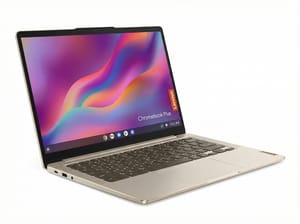
- ✓14-inch OLED touchscreen
- ✓Silent fanless design
- ✓Updates into June 2035
- ✗1920x1200 resolution
- ✗5Gbps USB-C ports
- ✗Arm chip can limit some Linux apps
The Acer Chromebook Plus Spin 714 covers the tablet side of the Acer Googlebook. It is also a convertible and takes USI pens, it lists at $699, and its updates run through June 2034. It has 8GB of memory and an IPS screen, and at about 3.2 pounds it is heavier than every Googlebook.
Acer Chromebook Plus Spin 714
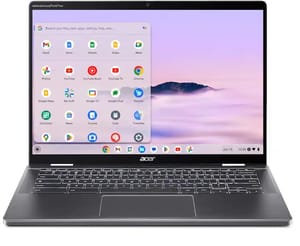
- ✓360-degree hinge with USI pen support
- ✓Two Thunderbolt 4 ports plus HDMI and USB-A
- ✓Updates through June 2034
- ✗8GB of soldered memory
- ✗About 3.2 pounds
- ✗No fingerprint reader on the US model
Our advice before you buy
Start with your phone and your apps. If you carry a phone on Android 17 and your work fits in Chrome and Google’s apps, the Acer gets you into Googlebook OS for the least money, and it is our choice unless its build bothers you. The Dell is about 0.3 pounds lighter than the Acer, and the Lenovo’s screen and full-size ports suit a desk. If the HP or ASUS falls close to the Dell’s price in a sale, the HP’s battery result and the ASUS’s weight and ports become easy to justify. Compare current prices on the product pages or in the Chromebook comparison chart on the day you buy.
If you are not sure about the software, there is no rush. Lenovo has not announced the Googlebook Duet m that leaks describe, and it has no price or date. Google has said only that cheaper models will come over time. Our Googlebook explainer and guide to which Chromebooks can move to Googlebook OS cover what happens to the Chromebook you may already own.


