
FL Studio is Image-Line’s music production app, made for Windows and macOS. There is no Linux version, and Image-Line does not support FL Studio on Linux. This guide runs the Windows version on Omarchy through Wine, a free layer that lets Windows programs run on Linux. If you rely on FL Studio and want to leave Windows, you can try it on your own machine with the free trial before you decide anything.
By the end you will have the FL Studio 2026 trial installed, a command that starts it full screen, and fixes for the problems we hit along the way. The trial’s save limit and the audio latency FL Studio reported are here too, because both decide whether this setup suits the way you work.
We followed these steps in November 2026 on Omarchy 4.5.0-3, with FL Studio 26.1.7 and Wine 11.21. The machine was a GMKtec NucBox G2, a small PC with an Intel N100 and 12 GB of memory, connected to a 4K screen.
Why FL Studio needs Wine 11.21
FL Studio 26.1.4 and later stop at startup under older Wine with “The validity of the program could not be verified.” The cause was a Wine bug in how it checks signed program files, WineHQ bug 60273, and the fix shipped in Wine 11.21. In November 2026, omarchy pkg add wine still installed Wine 11.20, one version too old.
So this guide uses two Wines. Omarchy’s package still goes in first, because it pulls in the libraries any Wine needs. Next to it, a portable build of Wine 11.21 from Kron4ek’s Wine-Builds runs FL Studio. That build lives in one folder in your home folder, so it changes nothing else on the system, and deleting the folder removes it. Kron4ek’s README asks you to install the distribution’s Wine package for those libraries, and the amd64-wow64 build needs no 32-bit libraries.
To see which Wine Omarchy offers today, run pacman -Si wine. If it lists 11.21 or newer, that package should include the fix, and you could skip the portable build and leave its folder out of the PATH lines below. We didn’t test that route.
What you need
You need Omarchy on an Intel or AMD 64-bit machine, your password for the one sudo step, and about 6 GB of free disk. The portable Wine unpacks to about 900 MB, the installer is about 1.1 GB, and the finished Windows folder with FL Studio in it came to 3.6 GB. Image-Line’s download page lists 4 GB of memory and an Intel or AMD processor; ARM is not supported.
No Image-Line account is needed for the trial. Omarchy uses the Super key for its shortcuts, which is the Windows key on a PC keyboard. Our list of Omarchy shortcuts to learn first covers the terminal and the menus.
Install Wine and the portable Wine 11.21
Open a terminal with super enter and add Omarchy’s Wine package. It asks for your password once.
omarchy pkg add wineThen download Wine 11.21 and its checksum file into a folder called ~/opt:
mkdir -p ~/opt && cd ~/opt
curl -LO https://github.com/Kron4ek/Wine-Builds/releases/download/11.21/wine-11.21-amd64-wow64.tar.xz
curl -LO https://github.com/Kron4ek/Wine-Builds/releases/download/11.21/sha256sums.txt
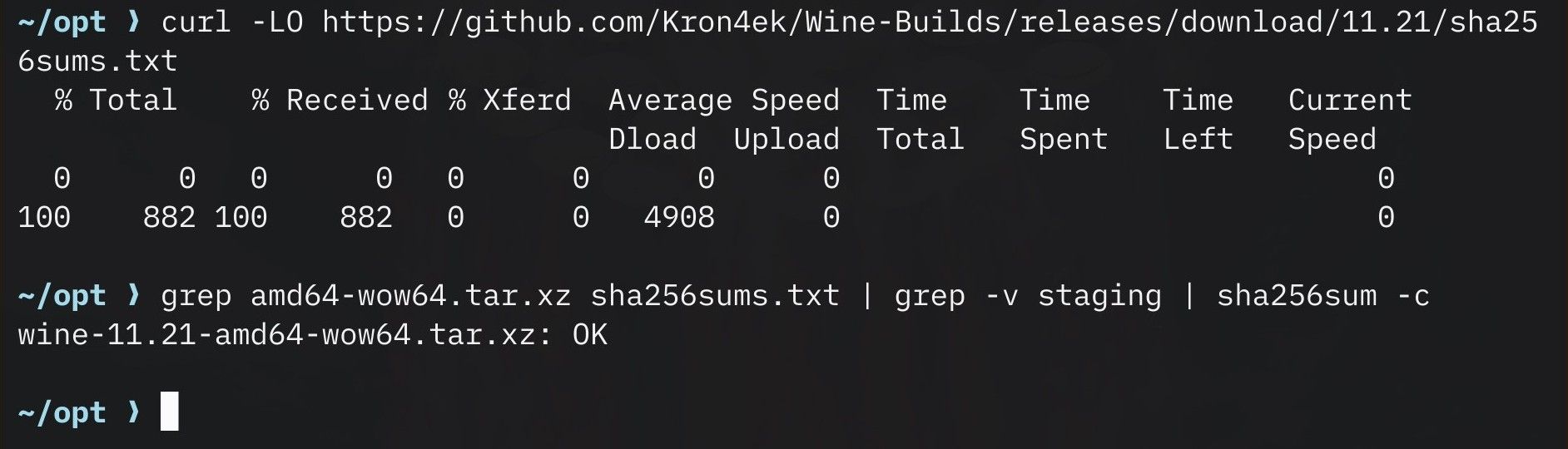
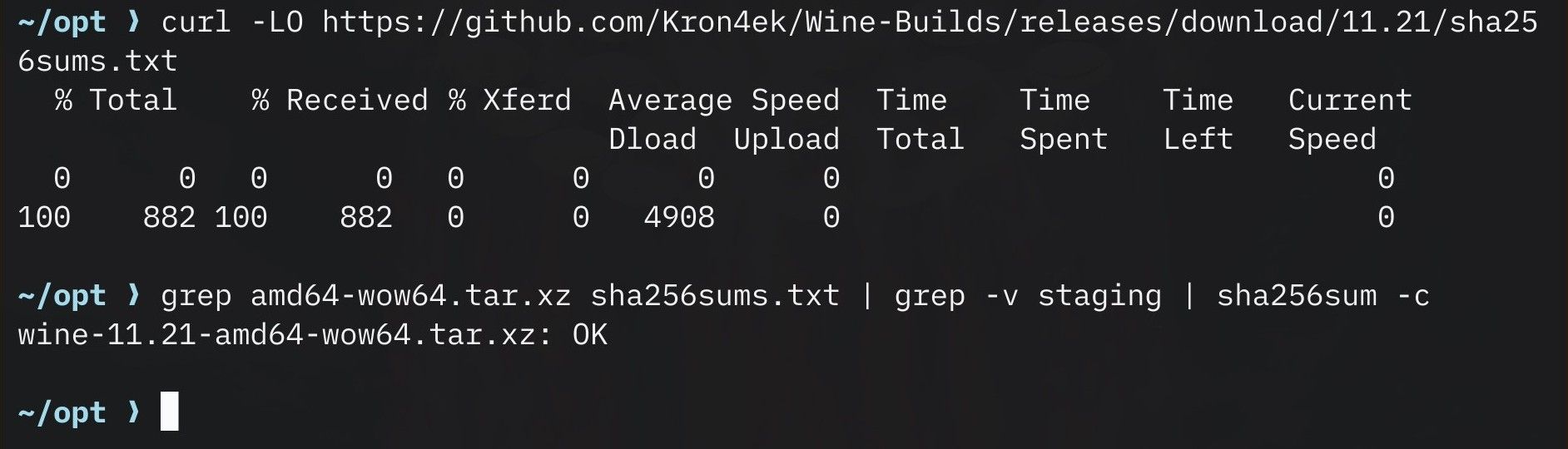
Before you unpack anything, check the download against the published checksum. The sums file lists every build in the release, including staging builds with similar names, so the line below picks the one for this file and hands it to sha256sum:
grep amd64-wow64.tar.xz sha256sums.txt | grep -v staging | sha256sum -cThe only line it should print is wine-11.21-amd64-wow64.tar.xz: OK. If it prints FAILED, delete the file and download it again. For the record, the hash we got was 33f3c5b56b1deb8f6725539ea006f27b5d781b3b4ae6a8a1f492d8af4fb9dc83.
Unpacking creates the folder wine-11.21-amd64-wow64:
tar xf wine-11.21-amd64-wow64.tar.xzSet up a Windows folder for FL Studio
Wine keeps each Windows setup in a folder called a prefix. These lines point the terminal at the new Wine, pick a prefix for FL Studio alone, and turn off Wine’s debug messages. They only apply to this terminal window, so run the rest of the install in the same window.
export PATH=~/opt/wine-11.21-amd64-wow64/bin:$PATH WINEPREFIX=~/.wine-fl WINEDEBUG=-all
wine --version
The second line should print wine-11.21. Without WINEDEBUG=-all, the next step prints about 40 lines of err: and fixme: messages, which are harmless but hard to read past.
Now create the prefix. The mscoree= part skips the Wine Mono installer, which FL Studio doesn’t need; without it, a small dialog asks to install Mono.
WINEDLLOVERRIDES="mscoree=" wineboot -iIt takes a few seconds and prints one line. Wine draws Windows programs at 96 DPI unless told otherwise, which is tiny on a 4K screen. This setting doubles that, so FL Studio looks the way it does on a 1080p screen. Set it before you run the installer, so the installer draws at the larger size too.
wine reg add "HKCU\Control Panel\Desktop" /v LogPixels /t REG_DWORD /d 192 /fIt answers The operation completed successfully. We used 192 on a 4K screen and tried no other value for FL Studio. On a 1080p screen, leave this line out and Wine stays at its default.
Run the FL Studio installer
The installer is the same trial installer Windows users download. Image-Line’s redirect link always points at the newest version, and -J saves it under its real file name.
mkdir -p ~/win && cd ~/win
curl -LJO https://support.image-line.com/redirect/flstudio_win_installer
wine flstudio_win64_*.exe
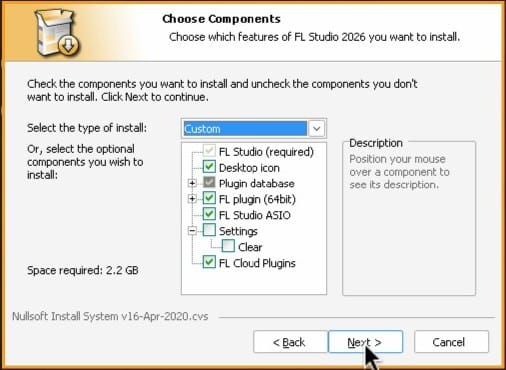
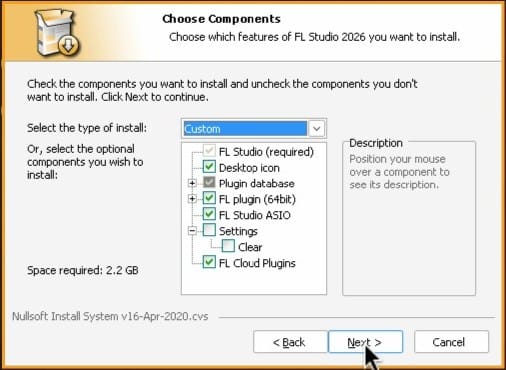
Ours was flstudio_win64_26.1.7.5654.exe, about 1.1 GB. The installer window took mouse clicks normally, so click through its eleven pages: Welcome, then the terms of use (click I Agree), then User information (All users is fine), Choose Components, the install folder, the folder for VST plugins, and Ready to install. Keep the defaults on each page. On Choose Components, “FL plugin (64bit)” and “FL Cloud Plugins” are already ticked.
Copying the files took about five and a half minutes here, and part of that is a Microsoft WebView2 runtime the installer adds without asking. Two more pages follow: one with links to Image-Line’s account pages and one for FL Studio Mobile. Click through them and Finish. The terminal may show a red mark after the installer closes, which means it returned a non-zero exit code. FL Studio started fine anyway.
The installer adds nothing to Omarchy’s app launcher, so you start FL Studio with a command of your own.
Start FL Studio in a Wine desktop
Under Hyprland, the window manager in Omarchy, FL Studio in a normal window takes the first mouse click and then ignores the mouse. The keyboard still works, but menus, tabs, and buttons don’t respond. We tried Wine’s UseXInput2 setting, the FL64 (scaled).exe that comes with FL Studio, and Wine’s Wayland driver, and none of them fixed it.
A Wine desktop fixes it. That is one window that holds a whole Windows screen, with FL Studio inside it. Inside that window, every click, hover, and menu worked. The command also sets DISPLAY, so Wine uses its X11 driver through XWayland. When we started it with no DISPLAY set, Wine picked its Wayland driver, and the Wine desktop crashed at startup.
Save the launch command as a small script in ~/.local/bin, which Omarchy puts on your PATH:
mkdir -p ~/.local/bin
cat > ~/.local/bin/fl-studio <<'EOF'
#!/bin/bash
export DISPLAY="${DISPLAY:-:0}"
export PATH="$HOME/opt/wine-11.21-amd64-wow64/bin:$PATH"
export WINEPREFIX="$HOME/.wine-fl" WINEDEBUG=-all
setsid nohup wine explorer /desktop=FL,3840x2160 "C:\Program Files\Image-Line\FL Studio 2026\FL64.exe" >/dev/null 2>&1 &
EOF
chmod +x ~/.local/bin/fl-studio
The 3840x2160 is the size of the Wine desktop, set to our 4K screen. Change it to your screen’s resolution, which hyprctl monitors shows on the line under each monitor’s name. If you skipped the DPI step on a 1080p screen, use 1920x1080. We ran FL Studio only at 3840x2160 on the 4K screen.
Run fl-studio from any terminal. We ran the same lines from a script with DISPLAY set to :0, not this exact file. The “FL - Wine Desktop” window opened tiled next to the terminal within a couple of seconds. Press super f while it has focus, and it fills the whole display and covers the Omarchy bar. FL Studio appears about 15 seconds later. The first start asks whether to send usage data to Image-Line, and then the Welcome screen shows FL Studio 2026 in trial mode.
To leave full screen, press super f again. The Omarchy bar stays hidden while the Wine desktop is full screen, so switch workspaces with the usual keys when you need something else.
To add FL Studio to the app launcher too, write a menu entry that runs the same script. We started FL Studio from the terminal for the video and didn’t test this entry.
mkdir -p ~/.local/share/applications
cat > ~/.local/share/applications/fl-studio.desktop <<EOF
[Desktop Entry]
Type=Application
Name=FL Studio
Comment=FL Studio 2026 in a Wine desktop
Exec=$HOME/.local/bin/fl-studio
Categories=AudioVideo;Audio;
Terminal=false
EOF
Play a demo song and make something new
FL Studio’s Welcome screen offers demo songs under “Load a demo project.” If a dialog about missing plugins or a MIDI error appears first, see the troubleshooting section below. We opened Time, and space played it at 170 BPM, with the playlist scrolling and the sound coming through Omarchy’s normal audio output. FL Studio shows up in PipeWire as a client called “FL Studio,” so the sound goes wherever your other apps’ sound goes.
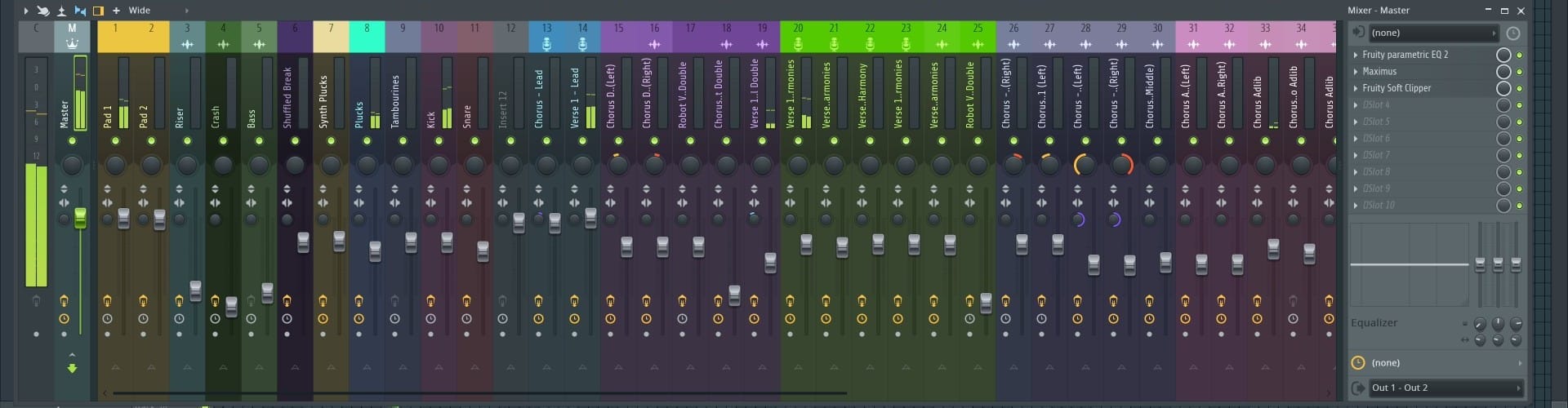
f9 opens the mixer while the song plays. Each insert track has a meter that moves with its part of the song, and the Master meter shows the full mix.
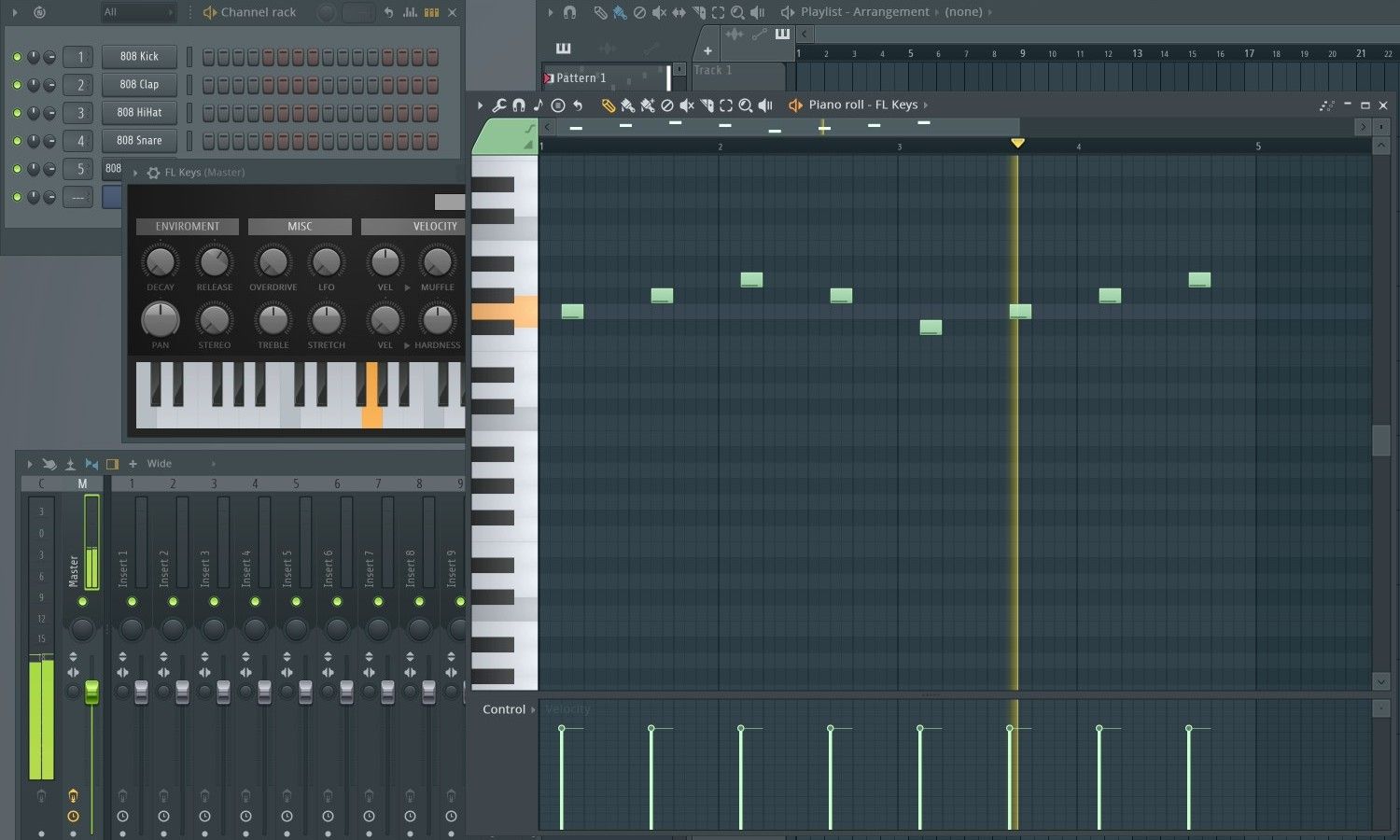
To start something new, close the Welcome screen, which opens FL Studio’s starter project with 808 drums in the channel rack. The ADD menu lists the instruments, and FL Keys, a piano instrument, opened at once. f7 opens the piano roll for the selected instrument. The pencil is the default tool, so each click in the grid draws a note. space played our eight notes on FL Keys with no crackle we could hear.
We used only the instruments and effects that come with FL Studio, with no third-party VST plugins.
Audio settings and latency
Open OPTIONS, then Audio settings. The output device was FL Studio ASIO, the audio driver that comes with FL Studio, at 44,100 Hz. The fresh install started at a buffer of 512 samples. We set it to 256 samples with the Show ASIO panel button, which FL Studio lists as 6 ms, and the starter project played with no underruns.
Even so, FL Studio reported a total latency of 62 ms at that setting. With the larger Time demo loaded, the same setting read 71 ms. The buffer is only a small part of that total. The sound passes through Wine’s PulseAudio layer on its way to PipeWire, and we didn’t measure how much each step adds.
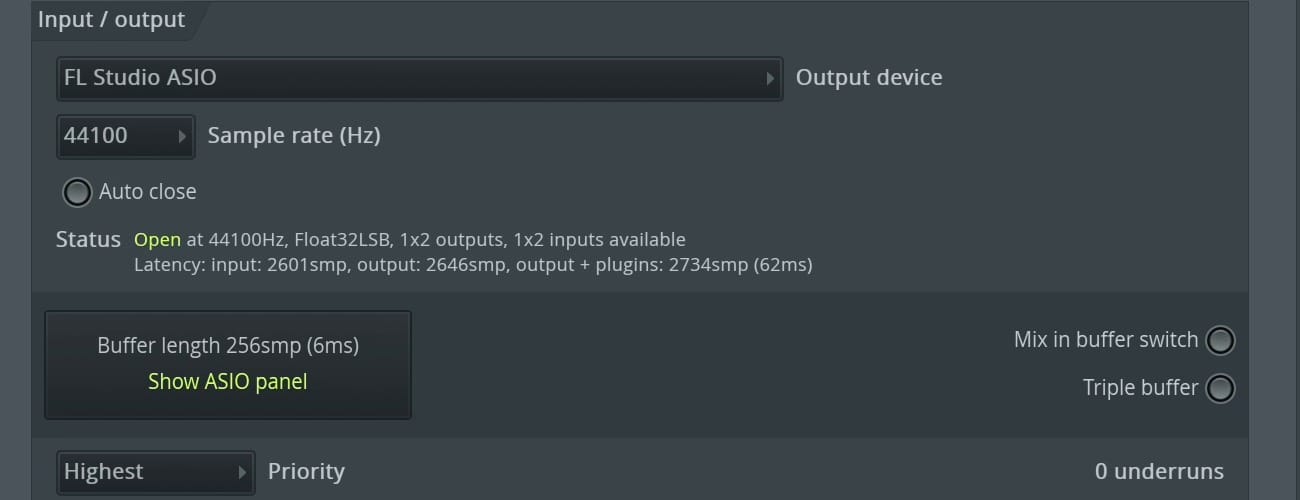
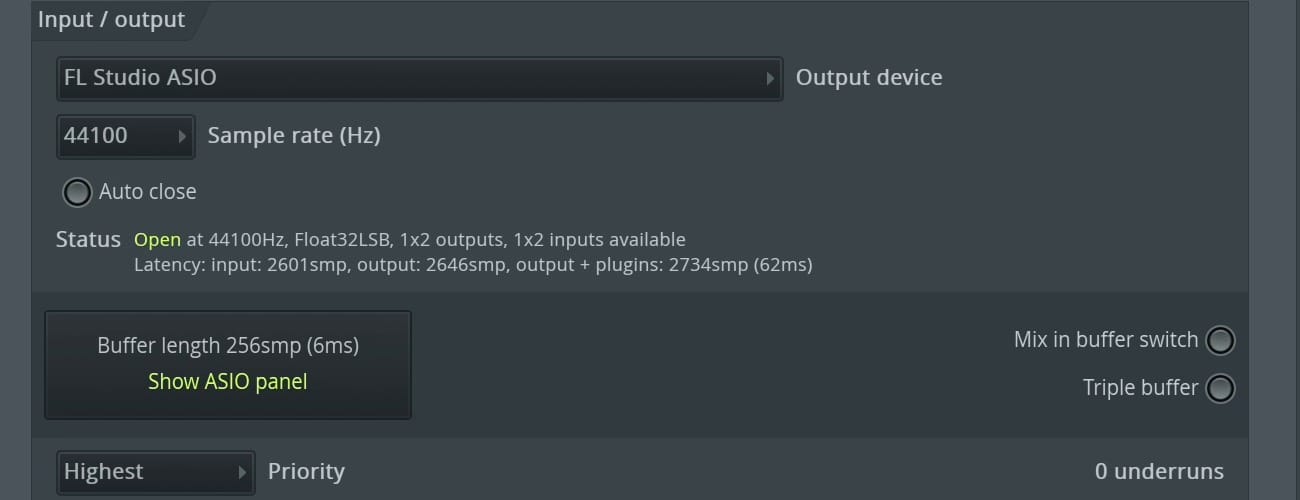
A delay around 60 to 70 ms is fine for arranging, drawing notes, and mixing, because you hear the result after you place it. It is too long for playing a MIDI keyboard or recording yourself in time with the beat. Image-Line’s audio settings page suggests about 10 ms as a target. WineASIO and PipeASIO are two projects that send ASIO audio from Wine straight to PipeWire, which may cut that delay. We didn’t test either with this setup.
What the trial lets you do
Image-Line’s trial never runs out and includes its instruments and effects; we tried FL Keys and the mixer. ctrl s opens FL Studio’s Save as window, and the project saves to ~/Documents/Image-Line/FL Studio/Projects/, because Wine maps the Windows Documents folder to yours. After each save, the trial opens a Buy FL Studio window. Under Wine that window stays blank, so close it with its x.
The trial can’t reopen saved projects. When we opened the saved project from the FILE menu’s recent list, the blank Buy window came back and the project didn’t load. Image-Line’s download page puts it as “saved projects can’t be reopened” in the trial. The same page says the trial can still export audio, so a finished song isn’t stuck in the project file. To reopen your own projects, you need a license, which you unlock with an Image-Line account; we stayed on the trial and tried neither an export nor an unlock.
Troubleshooting
FL Studio ignores the mouse after the first click. This is the windowed mouse problem described above. Start FL Studio with the fl-studio script, so it runs inside the Wine desktop, not with a plain wine FL64.exe. If the Wine desktop crashes at startup, check that DISPLAY is set in the script.
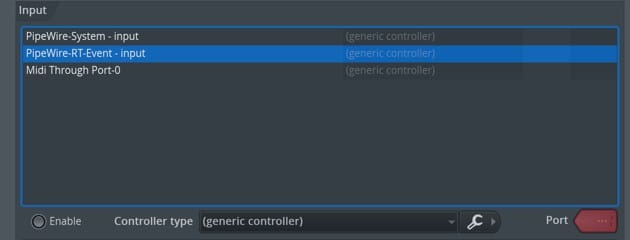
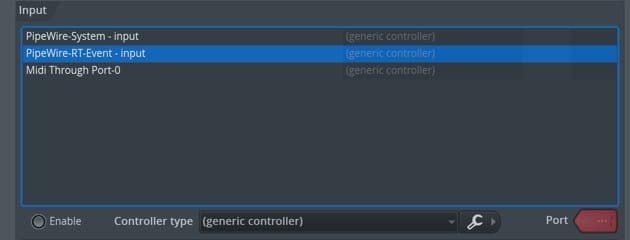
“The MIDI input device is already allocated.” After a project loads, this error can pop up several times and block playback until you close each one. FL Studio tries to open two PipeWire MIDI inputs that something else already holds. Press f10 for MIDI settings, click PipeWire-System in the Input list and turn off Enable, then do the same for PipeWire-RT-Event. The setting only stuck for us after a clean exit with FILE, Exit; closing FL Studio with wineserver -k lost it. In the trial, that exit opens Image-Line’s sale page in your web browser, which you can close. If you use a USB MIDI keyboard, test it in the same list; we didn’t have one connected.
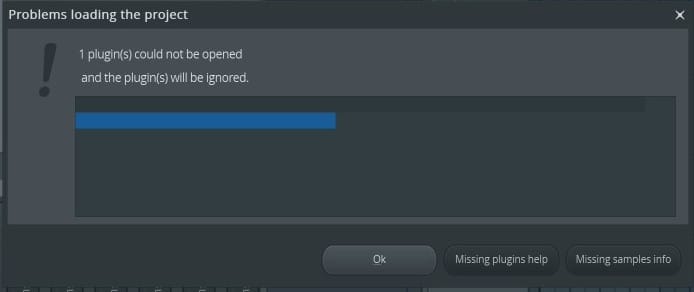
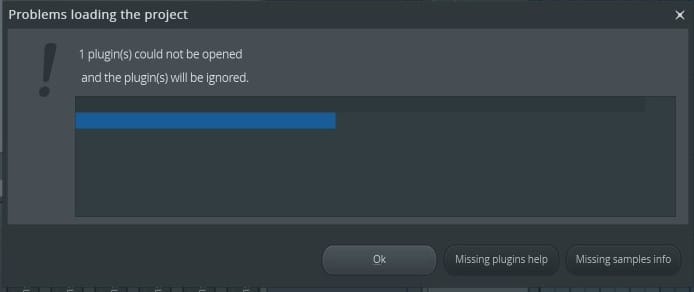
“Problems loading the project: 1 plugin(s) could not be opened.” This dialog appeared on every project load, including the starter project and the demo songs, and the plugin names in its list drew blank. Installing with “FL plugin (64bit)” and “FL Cloud Plugins” ticked didn’t make it go away. Click Ok, and the project loads and plays without the missing plugin.
The Browser panel on the left is black. It drew black in every session. alt f8 hides it.
FL Studio hangs or won’t close. This line stops FL Studio and everything else in its prefix, and any unsaved work goes with it:
PATH=~/opt/wine-11.21-amd64-wow64/bin:$PATH WINEPREFIX=~/.wine-fl wineserver -kRemove it
These lines remove FL Studio, its Windows folder, the portable Wine, the installer, and the launcher. The last line removes Omarchy’s Wine package, so skip it if another Wine app uses it. Your saved projects in ~/Documents/Image-Line stay until you delete them.
rm -rf ~/.wine-fl ~/opt/wine-11.21-amd64-wow64* ~/opt/sha256sums.txt ~/win
rm -f ~/.local/bin/fl-studio ~/.local/share/applications/fl-studio.desktop
omarchy pkg drop wine
Other ways to run Windows apps
Wine is one of several routes. Our overview of how Wine, Proton, Bottles, WinBoat and Raven run Windows programs on Linux compares them, and Omarchy’s built-in Windows VM can run FL Studio inside Windows itself, at the cost of running a second system. If you have a Chromebook too, the same FL Studio installer runs under Wine in our Chromebook guide, and our list of mini PCs for music production covers machines with more headroom than an N100.
The built-in instruments, the piano roll, and the mixer all worked for us on Omarchy. Start with the trial, try a project in your own style, and check the latency against how you record before you pay for a license.


