

For a home studio we would buy the Beelink SER8 with 32GB of memory. Notebookcheck measured it under 35 dB(A) at load, it has two memory slots and two SSD slots, and three of four owners we found in r/MiniPCs threads are happy with it, though the fourth could not get rid of audio spikes.
How the studio candidates compare
Single-thread figures are from PassMark’s chart, updated November 4, 2026. Load noise is Notebookcheck’s load average and load maximum as it prints them, so the maximum can sit a little under the average. Every Notebookcheck noise figure in the table was taken 15 cm from the box with the same microphone.
| Box | Chip | PassMark single-thread | Memory | USB ports | Load noise at 15 cm |
|---|---|---|---|---|---|
| Beelink SER8 | Ryzen 7 8745HS | 3,718 | 32GB, two SODIMM slots, 64GB maximum | 2 USB 2.0, 2 USB 3, 1 USB4 | 34.6 / 34.5 dB(A), tested with the 8845HS |
| Beelink SER10 Max | Ryzen AI 9 HX 470 | 4,143 | 32GB or 64GB, two SODIMM slots | 2 USB 2.0, 2 USB 3, 2 USB-C (1 USB4) | Not measured by Notebookcheck |
| Mac mini M6 | Apple M6 | 6,426 | 24GB soldered, fixed at purchase | 2 USB-C, 3 Thunderbolt 4, no USB-A | 25.9 / 41.7 dB(A) |
| BOSGAME P4 Ultra | Ryzen 7 7730U | 2,905 | 16GB DDR4, two SODIMM slots, 64GB maximum | 2 USB 2.0, 2 USB 3, 1 USB-C | No published figure |
| Beelink SER9 PRO+ | Ryzen 7 H 255 | 3,670 | 32GB soldered | 2 USB 2.0, 2 USB 3, 2 USB-C (1 USB4) | 33.7 / 35.2 dB(A) |
| Geekom A8 Max | Ryzen 9 8945HS | 3,796 | 32GB, two SODIMM slots, 64GB maximum | 1 USB 2.0, 5 USB 3, 2 USB4 | 42.7 / 42.6 dB(A), tested with the 8845HS |
Our picks by studio
Beelink SER8 for most home studios
The SER8 pairs a low load figure with two memory slots, two M.2 slots, and a USB4 port. Notebookcheck’s review also found slower, more gradual fan speed changes, so you hear fewer sudden steps in a quiet room. The 8745HS version on sale is not the 8845HS that Notebookcheck measured, though PassMark puts the two within a point of each other for single-thread speed and both use the same chassis.
u/artlee17 wrote of the 8745HS model in a February 2025 r/MiniPCs thread, “I can’t hear the fan at all”, and added that with a CPU-hungry guitar plugin “I still have to set my buffer to 256. Anything lower and I get dropouts.” u/airshot_fiend moved from an M1 Pro MacBook and wrote, “I can’t tell the difference, both run audio flawlessly.” u/Clean-Ad7194, posting in a September 2026 thread, runs 64GB under both Windows and Linux with a Focusrite interface and calls it “near inaudible for most of the time” after a BIOS fan tweak.
u/Unfair-Run-1983, also in the September thread, reports “dsp spikes on both windows and linux” on an 8745HS SER8 that was not close to maxing its CPU or memory, and suspects the USB configuration. Four owners are too few to give a failure rate, but one bad report is enough reason to buy from a seller with easy returns. The chip is a Zen 4 part from 2024, and the newer Zen 5 chips below it in this guide have faster cores.
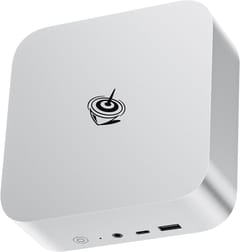
Beelink SER10 Max for heavier Windows sessions
The SER10 Max has the fastest single-thread figure of the Windows boxes we would pick, and it has two SODIMM slots where the SER9 before it soldered its memory. Robtech’s review calls it “one of the quietest minis on the market with this type of wattage” and says Beelink tuned it quieter than the SER9, which runs the chip hotter. There is no Notebookcheck measurement to place beside the SER8’s, so we cannot put the two on the same scale.
Only four of the HX 470’s 12 cores are full Zen 5 cores; the other eight are compact Zen 5c. Ableton’s documentation covers Intel and Apple hybrid chips but does not say how Live treats AMD’s compact cores. It also costs far more than the SER8, which makes it worth buying only when your sessions already strain a Zen 4 chip.
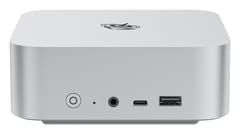
Beelink SER10 MAX
Best PerformanceMac mini M6 for macOS and a silent idle
Notebookcheck’s Mac mini M6 review measured 24.8 dB(A) at idle in a room that also measured 24.8 dB(A), so the box added nothing it could detect. It describes the machine as “usually inaudible”, with the fan often off. Under high CPU load it reached 41.7 dB(A), which is louder than the SER8 at its worst, so a long bounce can still be heard. Its single-thread score is well clear of everything else in the table, and macOS is the only way to run Logic Pro.
The M6 has two super cores, four performance cores, and six efficiency cores, and Ableton says Live processes audio on performance cores only when they are available, so the efficiency cores sit out of real-time audio there. The bigger drawback is that memory is fixed at purchase and the M6 tops out at 32GB. There is also no USB-A, so an older interface needs an adapter. The card below shows the 24GB model, and a sample-heavy composer should order 32GB from Apple to reach our memory target. The Mac mini also came up often when a Reaper user asked r/MiniPCs for a music box in February 2026: five of the seven top-level replies named it (the M4 at the time), and the poster settled on one.

BOSGAME P4 Ultra on a tight budget
The P4 Ultra costs the least here and still has two SODIMM slots and two M.2 slots. Its single-thread figure sits about 22 percent below the SER8’s, and TechRadar’s review points out that the 7730U is “architecturally identical to the 5825U from 2021”. It ships with one 16GB DDR4 stick, and reaching the slots means removing a fan bracket with a ribbon cable attached.
Noise is the weak point of this recommendation, because no decibel figure has been published. TechRadar accepted BOSGAME’s quiet claim at 15W but warned that “sustained loads will prompt audible fan activity”. Its sample arrived on the noisier 35W profile, so check that BIOS setting first. We would limit this box to MIDI sketching and small sessions, and it is the one we would replace first.
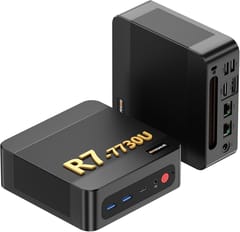
BOSGAME P4 Ultra
Budget PickBoxes we left out and why
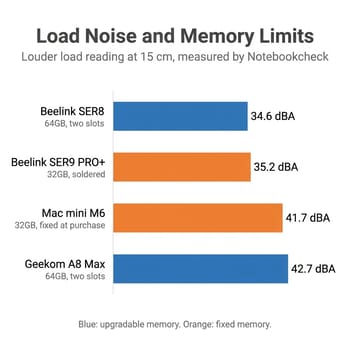
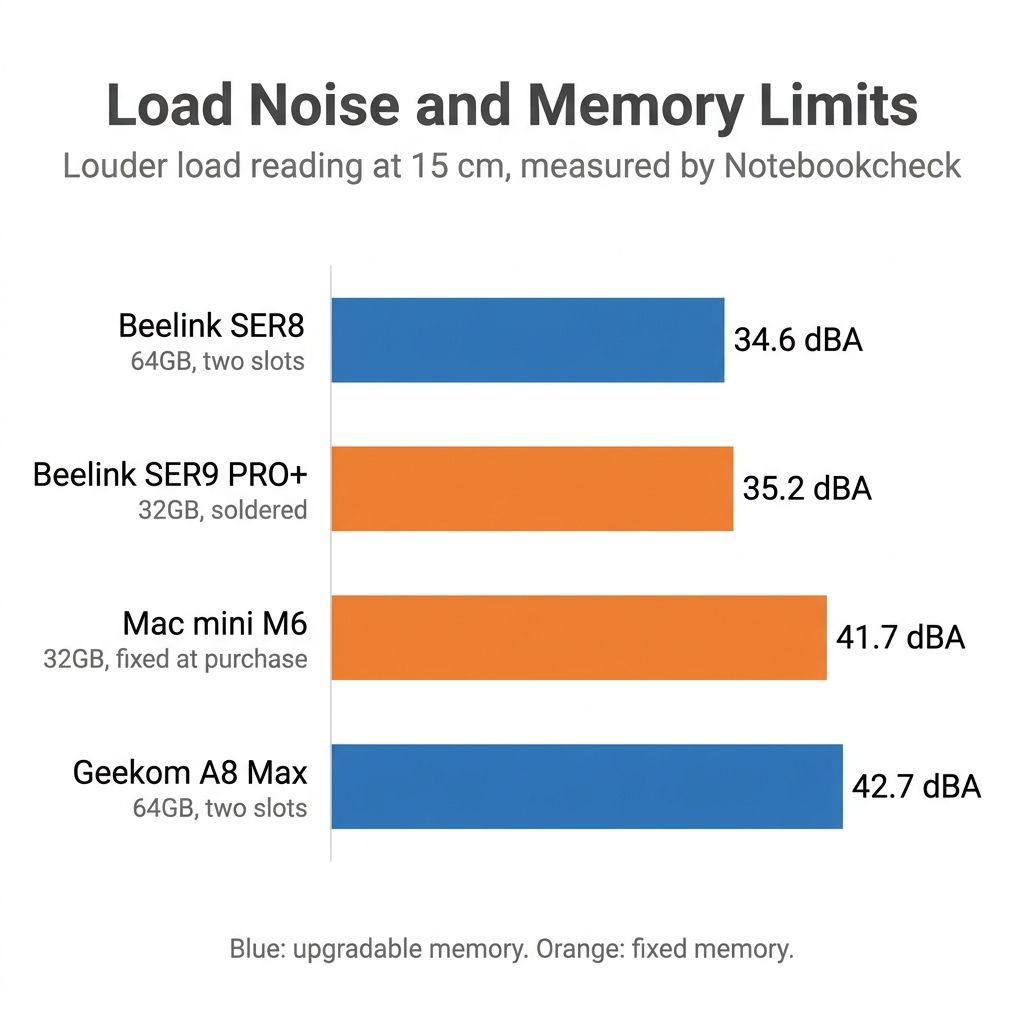
Notebookcheck measured the Beelink SER9 PRO+ at 33.7 and 35.2 dB(A) under load, about the same as the SER8, and PassMark rates its single-thread speed slightly lower. Its 32GB is soldered, so we would only take it if you are certain 32GB will do. In the September thread, u/fxnoob-2171 advised testing soldered memory thoroughly, because a fault cannot be fixed by swapping a stick.
Noise rules out the next two. Notebookcheck measured the Geekom A8 Max 8 dB louder than the SER8 on the same 8845HS. The ASUS NUC 15 Pro with the Core Ultra 7 255H scores 4,309 for single-thread speed, yet Digital Citizen reported about 45 decibels under video conversion at no stated distance and up to 105C under sustained load.
Fanless boxes make no fan noise at all. The ones on sale in our comparison chart use Intel N-series or Celeron chips, and the N150 and N300 score about half the SER8’s single-thread figure in PassMark. Neither is the Core i5 or Ryzen class Ableton lists as its floor. Our fanless versus active cooling guide covers that choice. Readers shopping at Chromebook prices can check what runs on a Chromebook for music production.
What the DAW makers ask for
Every pick above clears these published minimums, which are low.
| DAW | Windows version | CPU | RAM | Disk |
|---|---|---|---|---|
| Ableton Live 12 | Windows 10 22H2 or 11 | 5th-gen Core i5 or Ryzen with AVX2 | 8GB | About 6GB, up to 76GB more for sounds |
| FL Studio | Windows 10 or 11 | Intel and AMD | 4GB | 4GB |
| Reaper | XP through 11 | No published minimum | No published minimum | Installer around 20MB |
Ableton’s specification guide recommends a 6- to 12-core Core i7 or i9, Ryzen 7 or 9, or Apple M-series chip; 16GB “for typical music production”; and 32GB or more “for large projects with extensive sample libraries”. We use 32GB as the buying target because memory is the upgrade you cannot always make later on a mini PC. Our guide to soldered RAM on mini PCs shows how to check a model before you buy it.
Ableton also says “Single-core performance (clock speed) is just as important as the number of hardware cores”, because audio on one signal path has to be processed in order, and a slow chain can miss its deadline while the rest of the chip sits idle. It adds that faster CPUs allow lower buffer sizes. Owners disagree on the emphasis: in the threads above, u/artlee17 says single-core performance “matters most for DAWs”, while u/Virus-X- says it “isn’t really a thing in audio”. Ableton notes that other DAWs can be designed differently, so read its advice as applying to Live first.
Reading the noise numbers for a room with a microphone
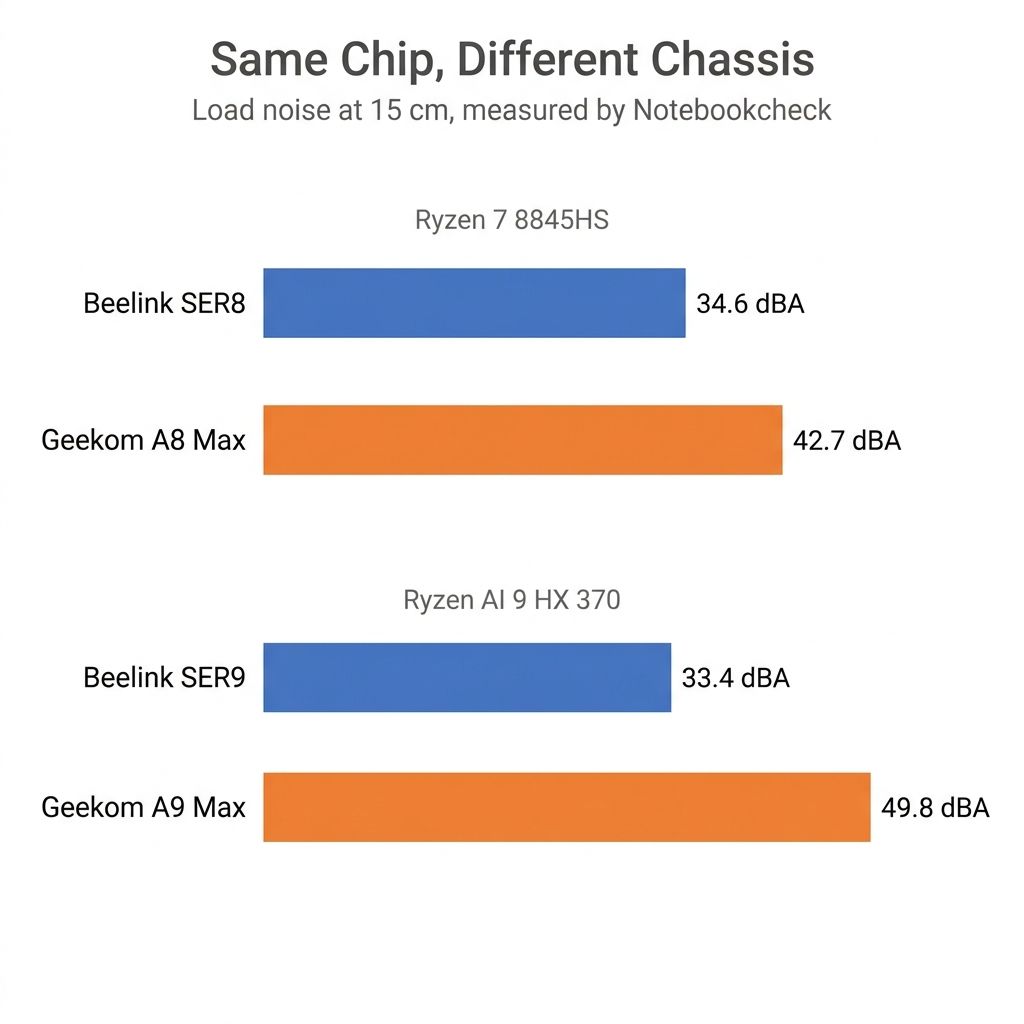
The chip does not decide how loud a mini PC gets. Our quiet mini PC guide lines up Notebookcheck’s measurements and shows two boxes with the same processor 16 decibels apart, so a chip recommendation with no chassis attached tells you little about your room. Those figures come from a microphone 15 cm away. Sound falls about 6 dB per doubling of distance in free air, so a box on the far side of a desk will read well below its table figure, though a real room’s reflections blur that estimate.
With a microphone open, idle noise counts too. Notebookcheck read the SER8 at 28.8 to 30.5 dB(A) at idle in a 23.6 dB(A) room, and it wrote of the SER9 Pro that “Fan noise is always present”. The Mac mini matched its room at idle, and the Geekom A8 Max came within half a decibel of its own at 24 dB(A). That makes the SER8 louder than the A8 Max when nothing is running, about 5 to 7 dB over its room. We still prefer it because the A8 Max climbs 8 dB higher when a session works the chip, but someone who records with the machine idle and bounces later could reasonably choose the Geekom. A SER8 or similar box belongs as far from the microphone as your cables allow, and a BIOS fan tweak like the one u/Clean-Ad7194 describes is worth trying before you decide it is too loud. These readings are from single review units, and the SER8’s dates from 2024, so firmware may have changed its behavior since.
Storage and the audio interface
Ableton recommends an NVMe or fast SSD of 500GB to 2TB, external storage for recordings and sample libraries if you want it, and at least 10 percent free on the system drive. Every Windows pick here has a second M.2 slot for that. Our SSD endurance guide covers how much writing a drive can take, and the SSD price worksheet helps you decide whether to pay for more capacity now.
An interface on USB 2.0 or higher meets Ableton’s recommendation, so every box above can connect one. Ableton also asks for dedicated manufacturer drivers rather than generic ones, with ASIO on Windows, and credits optimized drivers for part of what allows lower buffer sizes. On the SER9 PRO+, Notebookcheck warned that “The USB ports are not created equal with no labels to tell them apart”, so check the manual to see which port you are using. If you hit crackles, start with Ableton’s latency guide before blaming the hardware.
Which one to buy
The SER8 with 32GB is where we would start, because you can add memory later if your sample libraries grow. If you already work in Logic Pro or want a machine that adds no sound at idle, the Mac mini M6 is the better buy. The SER10 Max earns its price only once your own sessions have shown you need faster cores. Whichever you choose, load your largest project and connect your own interface during the return window, then lower the buffer until it fails.


