

If you shoot on camera cards, pull clips off a dashcam, empty a drone’s storage or move games around on a handheld console, a built-in card reader is the difference between dropping the card into the laptop and hunting for an adapter. On most Chromebooks the reader is still there. At the Chromebook Plus tier it has become a spec worth checking rather than assuming, and a $749 machine can arrive without one while a cheaper model from the same brand has it.
The current Chromebooks that ship a microSD reader are listed below, split into the Chromebook Plus tier and the mainstream models under it, along with the current Plus machines that leave the slot out. A model outside those lists takes about a minute to check on the maker’s spec page.
Chromebook Plus models with a card reader
List prices are for reference; current prices are on each product page.
| Model | Screen | Reader | List price |
|---|---|---|---|
| HP Chromebook Plus 15a | 15.6 inch | microSD | $549 |
| Samsung Galaxy Chromebook Plus | 15.6 inch | microSD | $774.99 |
| ASUS ExpertBook CX54 Chromebook Plus | 14 inch | microSD | $699.99 |
| Lenovo Chromebook Plus 2-in-1 14 | 14 inch | microSD | $579 |
The Acer Chromebook Plus 514 puts a microSD slot on its CB514-4HT board, and that board is no longer sold new. If the 514 appeals, it is a machine to look for used.
HP Chromebook Plus 15a
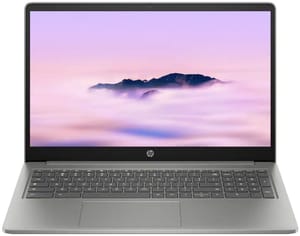
- ✓microSD reader
- ✓15.6-inch screen
- ✓Intel Core i3-N305
- ✓updates through June 2033
- ✗No HDMI output
- ✗1920x1080 panel on a large screen
- ✗plastic chassis
Chromebook Plus models without one
Rule these out if the slot is a requirement.
| Model | Screen | Chip |
|---|---|---|
| Lenovo Chromebook Plus 14 OLED | 14 inch | MediaTek Kompanio Ultra 910 |
| ASUS Chromebook Plus CX34 | 14 inch | Intel Core i3-1215U |
| Acer Chromebook Plus Spin 714 | 14 inch | Intel Core Ultra 5 115U |
Lenovo’s own specification sheet for the Plus 14 OLED prints “No card reader” against the removable storage row, on a machine that lists at $749, and the port list is one USB-A, two USB-C and a combo audio jack. Acer’s data sheet answers “Memory Card Reader: No” across the Spin 714 line, and PCWorld’s port list for the Core Ultra model reads “2x Thunderbolt 4 / USB Type-C, 1x USB Type-A (USB 3.2 Gen 1), 1x HDMI 2.0, 1x combo audio jack”. Google’s Chromebook Plus requirements set floors for the processor, memory, storage, display and webcam, and say nothing about ports, so a machine can clear every line of the certification and still leave the slot out.
Mainstream Chromebooks with a card reader
Below the Plus tier the reader is close to standard. These six current models all carry a microSD slot and all get ChromeOS updates through June 2033 or later, which is long enough that the software support is not the thing that retires them.
| Model | Screen | Chip | Updates through |
|---|---|---|---|
| Acer Chromebook 315 | 15.6 inch | Intel Processor N100 | June 2033 |
| Acer Chromebook 314 | 14 inch | Intel Processor N100 | June 2033 |
| ASUS Chromebook CM14 | 14 inch | MediaTek Kompanio 520 | June 2033 |
| ASUS Chromebook CM14 Flip | 14 inch | MediaTek Kompanio 520 | June 2033 |
| Lenovo IdeaPad Slim 3 Chromebook | 14 inch | MediaTek Kompanio 520 | June 2033 |
| Acer Chromebook 311 C723 | 11.6 inch | MediaTek Kompanio 528 | June 2033 |
All six run N-series Intel or Kompanio MediaTek silicon rather than Core or Core Ultra parts, and none of them meets the Chromebook Plus hardware floor. In practice that means fewer browser tabs before things get sticky, slower work in the Android and Linux environments, and none of the on-device AI features that ride on the Plus certification. The panels are cheaper too. The ASUS CM14 pair sit around 230 to 250 nits, which is hard work in a bright room, and the 11.6-inch Acer 311 is a 1366x768 screen.
For a card reader, though, they do the job the expensive machines skip. If the laptop’s main task is emptying cards, editing photos lightly and getting the files onto a drive or into Drive, an N100 machine with a slot is a better fit than a Core Ultra machine with a dongle hanging off it. The 15.6-inch Acer 315 is the pick if the machine mostly sits on a desk; the ASUS CM14 Flip earns its place if you want the touchscreen and the fold-back hinge.
How to check any other model
The ports line on the maker’s own specification page for the exact model is the check that settles it. Look for a row labelled memory card reader, card reader, or media card reader, and read the value rather than the presence of the row. A blank or missing row usually means nobody filled the field in, so treat it as unknown rather than as a no. When the maker’s page is ambiguous, a review that publishes a full enumerated port list is the best second source, because the reviewer had the machine in front of them. Every Starry Hope product page lists the card reader in its specs, and adding models to the Chromebook comparison chart shows a card reader row for each one side by side.
One product name can also cover several different machines. The Acer Chromebook Plus 514 is sold under one name across three versions, and only the Intel Core i3-N305 one (CB514-4HT) has a microSD reader, so on a listing like that check the ports for the exact part number in the listing’s specifications panel, not just the name in the headline.
A 15.3-inch Lenovo Chromebook Plus listing on Amazon advertises “256GB Storage (128GB UFS + 128GB SD Card)”, which adds a memory card bundled in the box to the soldered internal storage and presents the total as one number. A shopper scanning for a storage figure reads 256GB and buys a 128GB machine. Seller-written listing titles are the last thing to believe on any spec question, ports included.
What ChromeOS does with a card
Google’s documentation on file types and external devices lists “SD & microSD cards” among supported external storage, and names the filesystems ChromeOS can mount: “FAT (FAT16, FAT32, exFAT), HFS+ (read-only on journaled HFS+), ISO9660 (read-only), MTP, NTFS, UDF (read-only)”. That covers essentially everything a camera, dashcam or console is likely to hand you, and the card shows up in the Files app for reading and writing like any other volume.
A card does not extend the system storage. When Google explains how to free up space on a full Chromebook, the advice is to delete files, clear browsing data, uninstall apps and move files to Drive. Adding a card is not on that list, because a card is not where Android apps, the Linux environment or the system itself live. A 128GB machine that has run out of room stays out of room with a card in the slot, which is the argument for buying enough internal storage up front that our piece on why 64GB leaves too little usable space makes at length, and it puts the difference between eMMC, UFS and NVMe storage ahead of the port on the list of things to check.
The SD Association’s bus specification caps UHS-I at 104MB/s in its fastest SDR104 mode, well below the internal drive in any recent Chromebook. Most makers do not publish the bus class of the reader they fitted, so assume the card is slower than the drive it supplements: park photos and video on it, keep working files on the machine itself.
If your pick has no slot
A USB-C card reader dongle is the cheaper and smaller way to close the gap on a machine without the slot, and it costs you a port while it is plugged in. The Lenovo Chromebook Plus 14 OLED carries two USB-C ports and one USB-A, so a USB-C reader takes one of the two USB-C ports and leaves the other for charging, which works until a second peripheral turns up. On that machine, and on any other that still has a USB-A port, a USB-A reader is the better buy, because it occupies the port you were least likely to need.
A USB-C hub with a built-in reader adds ports back instead of consuming one. Check whether it passes power through and at what wattage, so the machine keeps charging while the hub is attached. Hubs without power delivery pass-through turn a two-port laptop into a one-port laptop the moment you plug them in, and a hub rated below the laptop’s own charger will charge slowly or not at all under load. Either way you are carrying an accessory that has to be in the bag on the day you need it.
If a card comes out a few times a year, buy the machine you want and keep a dongle in the bag. If it comes out most weeks, treat the built-in reader as a requirement and check the ports line before you order.


