

The graphics chip decides what a gaming mini PC can play, and it usually cannot be changed later. The table below sorts current models by that chip, lightest games first. List prices are rough, and current prices are on each product page.
Current gaming mini PCs, sorted by graphics chip
| Graphics | Models | What to expect | List price |
|---|---|---|---|
| Radeon 780M | MINISFORUM AI X1-255, Beelink SER8, GMKtec K12 | Esports and older games; new games at 1080p low | About $600 to $950 |
| Radeon 890M | BOSGAME VTA-439, GMKtec EVO-X1, Beelink SER10 MAX | A small step above the 780M | About $1,150 to $1,700 |
| Arc B390 | MINISFORUM M2 Pro | New games at 1080p, some at 1440p with upscaling | About $1,450 |
| Radeon 8060S | GMKtec EVO-X2, BOSGAME M5, GMKtec EVO-X3 | New games at 1440p, often with upscaling | About $2,200 to $4,000 |
| Laptop RTX 4060 | TOPGRO T2-Pro | New games at 1080p | About $1,500 |
| Low-profile desktop card | MINISFORUM 139D7, MINISFORUM 895D7, MINISFORUM AtomMan G1 Pro | RX 9060 XT (139D7; 895D7 version sold out): new games at 1440p, without upscaling in many titles. RTX 5060 (G1 Pro): new games at 1080p, with upscaling or lower detail at 1440p | About $1,600 to $1,760 |
| High-end laptop or desktop card | ASUS ROG NUC 2025, ASUS ROG NUC 16, ASUS ROG GR70, GMKtec NEO-X1 Pro | High frame rates at 1440p; 4K with upscaling. The ROG NUC 16 with an RTX 5060 sits a step lower | About $2,500 and up with an RTX 5070 or faster; about $2,400 for the ROG NUC 16 with an RTX 5060 |
To look beyond these models, the comparison chart has filters for a dedicated GPU and for OCuLink.
One game test shows how far apart the chips are
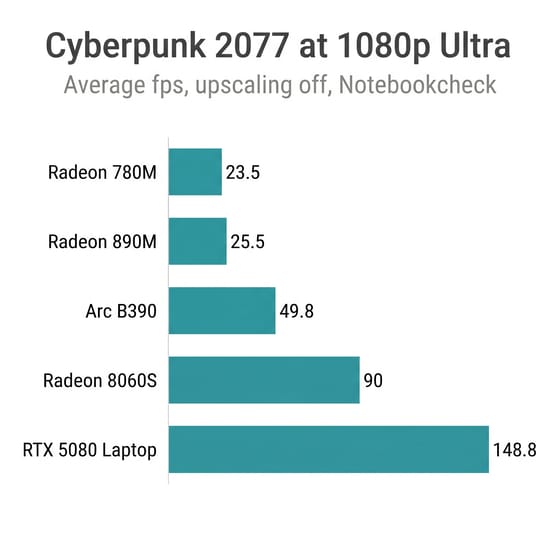
We did not test any of these machines. The picks here rest on specs and on the reviewers named beside each number. Most of the integrated-graphics figures come from Notebookcheck, because it runs the same Cyberpunk 2077 test on every machine with upscaling off. Reviews from different months used different drivers, so treat small gaps as ties.
| Graphics | Machine tested | 1080p Low | 1080p Ultra | 3DMark Time Spy |
|---|---|---|---|---|
| Radeon 780M | MINISFORUM UM890 Pro | 42 fps | 23.5 fps | 3,295 |
| Radeon 890M | MINISFORUM AI X1 Pro | 48.1 fps | 25.5 fps | 3,518 |
| Arc B390 | MINISFORUM M2 Pro | 84.1 fps | 49.8 fps | 7,109 |
| Radeon 8060S | BOSGAME M5 | 149 fps | 90 fps | 11,182 |
| Laptop RTX 5080 | ASUS ROG NUC 2025 | 181 fps | 148.8 fps | 20,521 |
Each machine’s numbers come from its own Notebookcheck review: UM890 Pro, AI X1 Pro, M2 Pro, and ROG NUC 15, the name Notebookcheck uses for the 2025 model.
Radeon 780M and 890M run esports and older games, and the 890M adds little
The 780M runs new games only at low settings and runs older or lighter games well. In the Notebookcheck UM890 Pro review, Cyberpunk 2077 reached 42 fps at 1080p Low and F1 24 reached 82.8 fps, while F1 24 at Ultra fell to 10.3 fps. Baldur’s Gate 3 managed 39.2 fps at Low. Esports titles are the comfortable fit here: Robtech saw Call of Duty Black Ops 6 average close to 60 fps at 1080p on the basic preset on the AI X1-255. Classic consoles are lighter still, and the emulation guide covers those.
Moving up to the 890M buys about two extra frames at 1080p Ultra and six at Low in that same test. A newer Ryzen AI 9 HX 470 does not change the picture: Notebookcheck measured a Geekom A9 Max with that chip at 51.8 fps at Low. Those boxes list for several hundred dollars more than a 780M box, so buy one for its CPU or its ports.
The memory layout can cost more speed than the chip gains. An integrated GPU shares system memory, so a machine with one memory stick starves it of bandwidth. Notebookcheck tested the AI X1 Pro-470 with a single 32GB stick and measured 15.6 fps at 1080p Ultra and 27.1 fps at Low, well under the older 780M machine. ETA PRIME said he has been seeing single-stick builds quite a bit with RAM prices where they are. Check the memory line on the product page for two sticks, and budget for a second stick when a build ships with one.
MINISFORUM AI X1-255
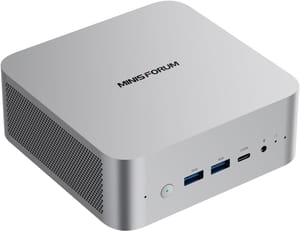
- +Radeon 780M at a lower list price than any 890M box here
- +two SO-DIMM slots
- +OCuLink for adding a graphics card later
- -New games need low settings at 1080p
- -the OCuLink adapter occupies one of the two M.2 slots
- -and the CPU is a rebadged 2024 part
Arc B390 is the integrated chip to buy for new games at 1080p
Intel’s Arc B390 roughly doubles the 890M in the Notebookcheck numbers. The M2 Pro averaged 46 fps over a 30-minute Cyberpunk 2077 run at 1080p Ultra, against 23.8 fps for the HX 370 machine in the same test. Lowering the settings gets a game like that past 60 fps at 1080p, and it does so without much noise: Notebookcheck recorded a maximum of 34.4 dB(A) under load.
The 32GB of memory is soldered, so you cannot add more. There is no OCuLink port, and the case is wider than most mini PCs at about 7.7 inches square. Baldur’s Gate 3 at Ultra sits at 43.3 fps, so a demanding game at 1080p is still a matter of adjusting settings. It is the one integrated-graphics box here that can stretch to new games at a modest price.
MINISFORUM M2 Pro
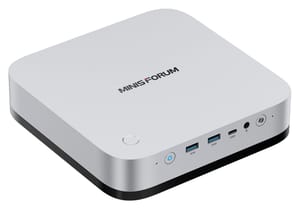
- +Arc B390 about twice as fast as the Radeon 890M in Notebookcheck's test
- +very quiet under load
- +10GbE and three drive slots
- -Memory is fixed at 32GB
- -no OCuLink
- -large footprint for a mini PC
- -slow SD card reader
Radeon 8060S reaches 1440p but costs more than a small discrete-GPU desktop
The Radeon 8060S in AMD’s Ryzen AI Max+ 395 is the fastest integrated chip in this list. Notebookcheck says it performs like a laptop RTX 4070, and its 30-minute Cyberpunk 2077 run averaged 80.7 fps at 1080p Ultra on the BOSGAME M5 against 78.1 fps for an RTX 4070 machine. Notebookcheck’s separate game benchmark table lists 54.6 fps at 1440p and 22.3 fps at 4K, so native 4K is out of reach in demanding games.
ETA PRIME got good results from the same chip in a GMKtec EVO-X3 running SteamOS: Spider-Man 2 in the high 80s at 1440p very high with FSR on quality, Forza Horizon 6 around 78 fps at 1440p ultra with no upscaling. Shared memory is much slower than the dedicated graphics memory on a card, and in his words it is “still really hard to compete with like a dedicated GPU.”
Price is the larger problem for a buyer who only games. A 64GB EVO-X2 lists at about $2,200 while the 139D7 with an RX 9060 XT lists at about $1,600. ETA PRIME measured that card in the 895D7 at 14,501 in Time Spy and 68 fps in native 1440p Cyberpunk 2077 at ultra, both ahead of the 8060S figures here. The 8060S earns its price when the same machine also runs large local AI models, since the chip has a 256-bit memory bus and up to 48GB of a 64GB build or 96GB of a 128GB build can act as graphics memory. For that buyer, the Strix Halo guide goes further.
GMKtec EVO-X2
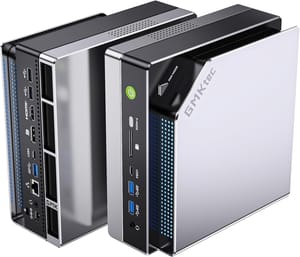
- +Radeon 8060S matches a laptop RTX 4070 in Notebookcheck's Strix Halo testing
- +256-bit memory bus and a large shared memory pool for local AI
- +no graphics card to fit
- -Memory is soldered
- -costs more than a faster discrete-GPU desktop
- -about 50 dB in performance mode
- -no OCuLink
Discrete GPUs come in laptop and desktop versions, and the difference is large
Daniel Owen compared a mobile RTX 5070 with a desktop RTX 5070 and described about a 50 percent performance difference in many cases, with the mobile part held back by 8GB of graphics memory. Check whether a listing says “Laptop” before you compare two machines.
The MINISFORUM 139D7 is our pick for new games. It pairs a 16GB Radeon RX 9060 XT with a 24-core Core i9-13900HX from 2023, in a case of about 8.5 liters with a 400W supply inside, and it lists at about $1,600. The 139D7 itself has no test this guide can cite, so the numbers here come from the MINISFORUM 895D7, which uses the same case style and the same 16GB card with a Ryzen 9 8945HX, and results on the 139D7 may differ. ETA PRIME’s Windows tests on an 895D7 with one 16GB stick averaged 92 fps at 1080p, 68 at 1440p, and 34 at 4K in Cyberpunk 2077 at ultra with no upscaling, and 84 fps at 1440p in Horizon Zero Dawn Remastered. Forza Horizon 6 at 1440p extreme passed 12GB of graphics memory, and he says that is what holds back a card like the RTX 5060. The tradeoffs are a much larger box than a palm-sized mini PC and no USB4 or Thunderbolt. The RX 9060 XT version of the 895D7 is sold out at Minisforum and is not sold on Amazon right now, so it is not our pick despite those results.
The AtomMan G1 Pro goes smaller, at 3.8 liters, with a low-profile RTX 5060 and its 8GB of graphics memory. ETA PRIME measured 12,985 in Time Spy, about 10 percent behind the RX 9060 XT in the 895D7. At 1440p he averaged about 71 fps in Cyberpunk 2077 at ultra with DLSS on quality, held 60 fps in Mortal Kombat 1 at high with no DLSS, and saw Borderlands 4 at high in the high 40s to low 50s without frame generation. Robtech, testing without upscalers, puts it at 1080p for AAA games with good frame rates, and above that he says it takes DLSS or lower detail settings. He also says the RTX 5060 beats the 8060S, and he calls the 8GB of graphics memory the card’s biggest weakness, since a few new games warn that it is not enough for 1080p at high detail. The G1 Pro ships with a single memory stick, which matters far less here because the discrete card has its own memory. It lists at about $1,760, about $160 above the 139D7, for a case less than half the size and reviewer tests of its own.
The TOPGRO T2-Pro is a slim alternative with a laptop RTX 4060 for 1080p play. Its evidence comes from owners, not lab reviews, and those owners report a unit that died after a few months and machines that shipped with a different CPU than the listing named.
For more power, the ASUS ROG NUC 2025 puts a laptop RTX 5080 in roughly 3 liters. Notebookcheck measured 148.8 fps at 1080p Ultra, 103.2 at 1440p, and 45.9 at 4K in Cyberpunk 2077. It costs well over $3,000 at list, and its graphics chip is soldered. ASUS’s own benchmarks put the ROG NUC 16 about 2.3 percent ahead in Time Spy on the same GPU, so the older model gives up little. The ROG GR70 offers an AMD X3D processor with a laptop RTX 5070 in the same size of case. Robtech found 1440p at high detail works well in most games, but the 8GB card made Space Marine 2 warn him down to medium, and the top power mode was “far too loud” at over 50 dBA.
The GMKtec NEO-X1 Pro fits a full-size desktop RTX 5070 in a 14.6-liter case. Owen ran it beside his desktop with a Ryzen 7 9800X3D and an RTX 5070, and Forza Horizon 6 at 1440p extreme averaged 102 fps on both. ETA PRIME scored 20,755 in Time Spy, close to the RTX 5080 laptop part in the ROG NUC. You can replace the card later, though GMKtec warns that removing the factory GPU voids the warranty. This is close to the size of a small tower, so the mini PC vs desktop comparison and the NZXT H2 small gaming PC guide are worth reading first.
MINISFORUM 139D7
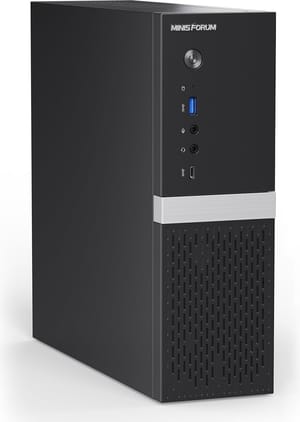
- +16GB RX 9060 XT for new games at 1440p
- +24-core Core i9-13900HX
- +swappable low-profile card
- +memory and storage you can replace
- +internal power supply
- -About 8.5 liters
- -no USB4 or Thunderbolt
- -only low-profile cards fit
- -the processor dates from 2023
- -one 2.5GbE port
ASUS ROG NUC 2025
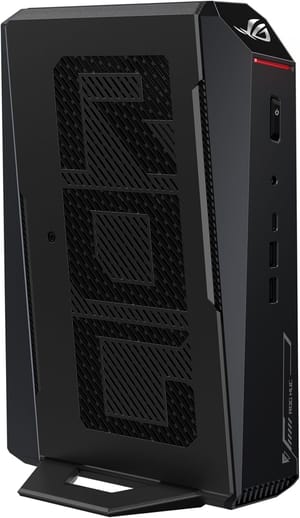
- +Laptop RTX 5080 delivered 103.2 fps at 1440p Ultra in Notebookcheck's Cyberpunk 2077 test
- +roughly 3 liters
- +Thunderbolt
- +up to five 4K displays
- -High price
- -large external power brick
- -the graphics chip cannot be replaced
- -audible under gaming load
OCuLink adds a desktop graphics card, at the cost of a second box
An OCuLink port links a mini PC to a desktop graphics card in an external dock over a PCIe 4.0 x4 connection. Notebookcheck tested a UM890 Pro with an RTX 4090 this way, and 1080p Ultra in Cyberpunk 2077 went from 23.5 fps on the 780M to 146.9 fps. At 4K it reached 72.3 fps, ahead of the ROG NUC’s laptop RTX 5080.
A test reported by Tom’s Hardware found an RTX 4090 lost 17 percent in Time Spy on an external display and nothing in the heavier Time Spy Extreme, though that test used a 28W laptop chip and an undisclosed desktop for comparison. USB4 is the weaker path: Hostbor measured Call of Duty Black Ops 6 at 87 fps over USB4 and 126 fps over OCuLink with an RTX 4070 Super on the AI X1-255.
An external card also means more to buy and keep on the desk: the dock, a cable, a full power supply, and the card. On the UM890 Pro and the AI X1-255, using OCuLink gives up a storage slot, and the EVO-X3 needs to be powered off before you connect a card. OCuLink makes the most sense for someone who already owns a card, or who wants a small box now and a larger upgrade later. The eGPU connector guide lists the current models and compares the ports in detail.
RAM prices favor buying a complete build with enough memory now
Memory is still expensive in late 2026. Digital Citizen reported that a 32GB DDR5 kit that commonly sold for $100 to $200 in October 2025 now often costs $350 to $480. TrendForce, a memory-market research firm, expected contract prices to rise again in the fourth quarter, by 10 to 15 percent in one account of its forecast and about 20 percent in another. Notebookcheck described the analyst consensus in June as no meaningful relief before late 2027. Our DRAM price coverage has the background.
A barebones unit saves less than its price suggests. The 895D7 with an RTX 5060 lists about $560 lower without memory, an SSD, or Windows, and a retail memory kit alone can take most of that gap. A barebones unit makes sense when you already own DDR5 laptop memory and a drive. For the 8060S machines, extra memory is the expensive part and games will not use most of it, so a 64GB build is enough for a machine bought to play.
Cooling and noise depend on how much power fits in the case
Small gaming boxes get loud when they run hard. In Notebookcheck’s measurements, taken with the microphone about 6 inches from the case, the M2 Pro peaked at 34.4 dB(A), the ROG NUC 2025 at 45.1 dB(A), and the BOSGAME M5 at about 49 dB(A). You would hear less from a normal seat, but the numbers rank the machines against each other. The HP Z2 Mini G1a is the outlier, with the same 8060S chip reaching up to 70 dB under sustained load.
Other reviewers use other distances, so compare their figures only loosely. Robtech recorded 47 dBA on the AtomMan G1 Pro out of the box, which he called similar to other gaming mini PCs with discrete GPUs, and 50 dBA at its maximum power limit. ETA PRIME saw no thermal throttling on the 895D7, with the GPU peaking at 72C and the CPU at 83C, and said he expected it to be louder than it was. MINISFORUM rates the 139D7 at 44.1 dB at full load in its balanced mode, measured at about 20 inches in its own test room, and that is the maker’s figure, not a review measurement. A lower power mode helps if you sit close to the machine: the M5 drops to 44 dB(A) in its quiet mode, with some loss of speed.
Linux and SteamOS work best on AMD graphics
Valve’s stance changed in June, when it told The Verge that people can install SteamOS on desktop PCs, as SteamDeckHQ reported. Nvidia support is still being worked on and may not arrive this year, and the installer is not designed for dual-booting yet. That rules out SteamOS on the RTX-based machines in this guide for now, while the 139D7, the 895D7 with an RX 9060 XT (sold out right now), and the 8060S boxes have AMD graphics, so they qualify.
ETA PRIME installed it on the 895D7 from Valve’s recovery image. He had to turn off Secure Boot and disable the integrated graphics in the BIOS, since some games otherwise picked the weak chip, and power settings stay in the BIOS. Cyberpunk 2077 at ultra with no upscaling averaged 106, 65, and 28 fps at 1080p, 1440p, and 4K, though he saw some games, such as Crimson Desert, run noticeably slower in SteamOS than in Windows. That install ran on the 895D7’s AMD processor, and the 139D7 has an Intel one. Bazzite is another option on these machines, and its Nvidia images ship with Nvidia drivers pre-installed, which suits an RTX box.
Many multiplayer games with kernel-level anti-cheat do not run on Linux. If Valorant or Call of Duty is in your rotation, keep Windows. Our earlier look at SteamOS and anti-cheat explains the problem and how to check a specific game.
Valve’s own Steam Machine launched in June at $1,050 for 512GB and $1,350 for 2TB, and Gamers Nexus found its graphics closest to an RX 6600, Intel B570, or RTX 3060. Valve said in July that everyone in its reservation queue should be able to buy by the end of the year. Against it, ETA PRIME measured the 895D7 about 55 percent faster on average across three games, with the Steam Machine limited to 8GB of graphics memory. The Steam Machine is smaller and made for the living room, and the 895D7 is a general-purpose PC that needs some setup.
Match the box to the games you play this year
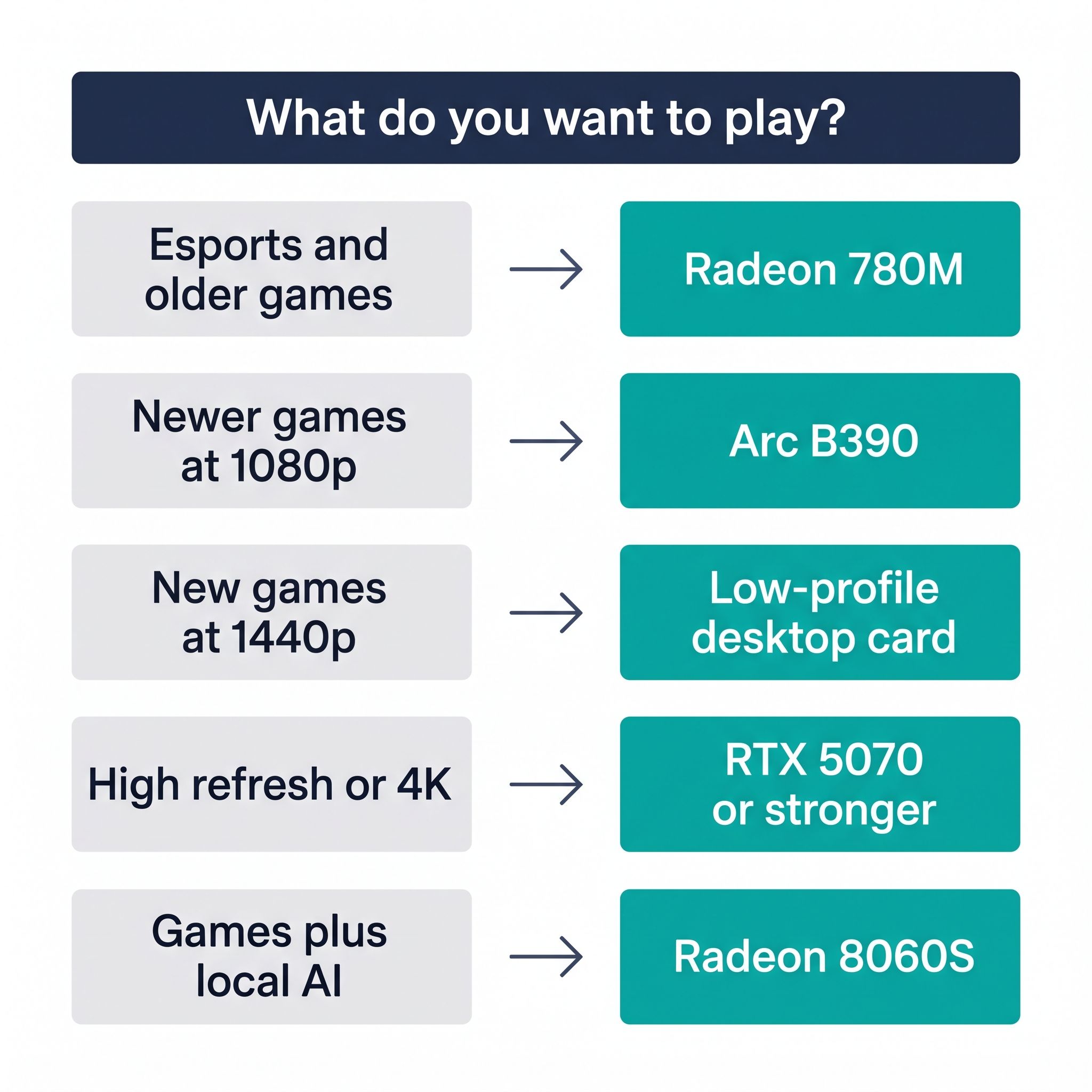
Start with the newest game you want to play and the resolution of your monitor, since those two facts decide the tier. Esports and older games run well on a Radeon 780M box at about $600 to $950, and the 890M adds little over it for games. New games at 1080p point to the Arc B390 in the MINISFORUM M2 Pro at about $1,450. New games at 1440p point to the MINISFORUM 139D7 with an RX 9060 XT at about $1,600, less than any Radeon 8060S machine here, and the same card in the 895D7 outscored the 8060S. High frame rates and 4K start at about $2,500.
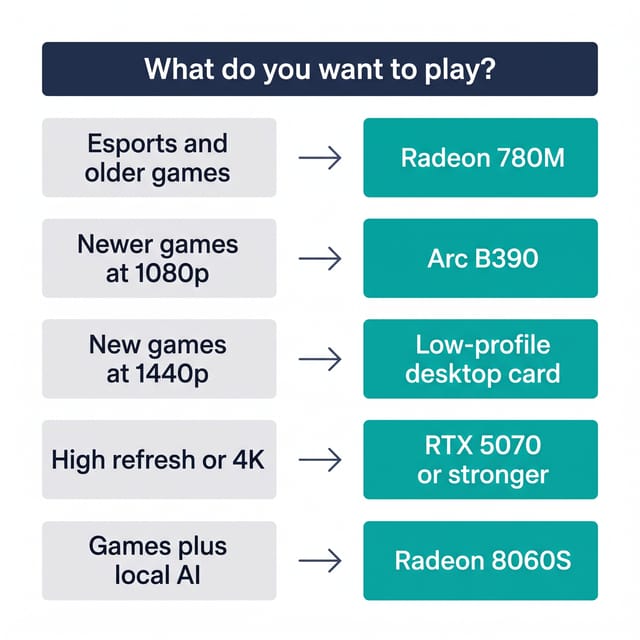
An integrated graphics chip cannot be upgraded later, so without an OCuLink port, buy for the games you expect to play a few years from now. Get the memory you need in the box, because a 32GB DDR5 kit bought separately now often costs $350 to $480. If Valorant or Call of Duty is in your rotation, plan on Windows whichever box you choose. Our Black Friday mini PC guide has gaming picks and shows how to check the chip and RAM lines on a sale listing.


