
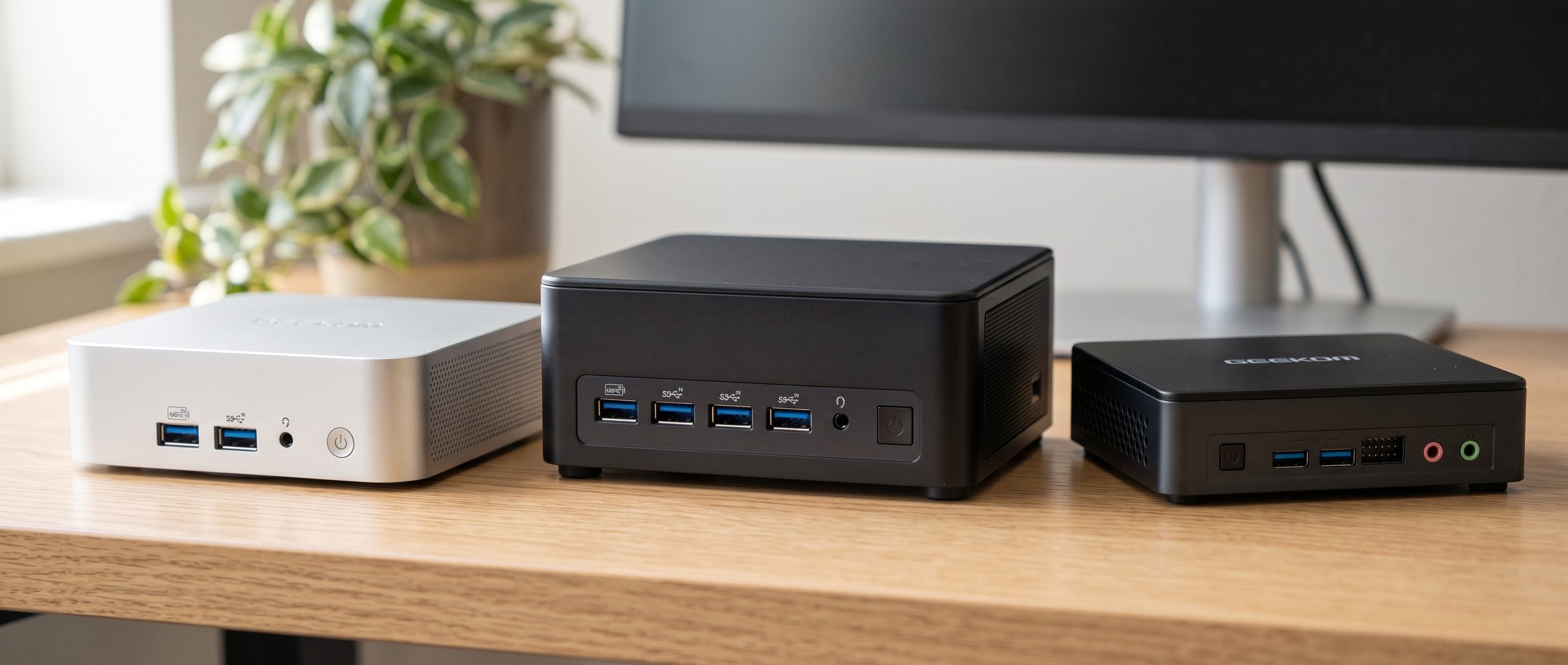
GEEKOM sells about two dozen mini PCs at once, and the names do not tell you much. The A7 2026 Edition is slower than the A7 it replaced, the A5 2027 Edition went on sale in 2026, and an IT13 Max and an IT13 2026 Edition are different machines with different chips.
Current GEEKOM models at a glance
Each row shows one main configuration; most models come in several. Prices are list prices, and current prices are on each product page.
| Line | Model | Chip | RAM and storage | List price |
|---|---|---|---|---|
| A | A5 2027 Edition | Ryzen 7 7730U | 16GB / 256GB | $549 |
| A | A5 Pro | Ryzen 5 7530U | 16GB / 1TB | $559 |
| A | A6 | Ryzen 7 6800H | 16GB / 1TB | $599 |
| A | A7 2026 Edition | Ryzen 5 7545U | 16GB / 500GB | $699 |
| A | A8 | Ryzen 7 8745HS | 16GB / 1TB | $739 |
| A | A8 Max | Ryzen 7 8745HS | 16GB / 1TB | $899 |
| A | A9 Max | Ryzen AI 9 HX 470 | 32GB / 2TB | $1,599 |
| A | A9 Mega | Ryzen AI Max+ 395 | 128GB / 2TB | $3,799 |
| AX | AX8 Max | Ryzen 7 8745HS | 16GB / 1TB | $649 |
| IT | Mini IT11 | Core i5-1155G7 | 16GB / 512GB | $400 |
| IT | Mini IT12 | Core i3-12300HE | 16GB / 256GB | $519 |
| IT | IT12 Max | Core Ultra 5 125U | 16GB / 500GB | $650 |
| IT | IT13 Max | Core Ultra 9 185H | 16GB / 1TB | $719 |
| IT | IT15 | Core Ultra 9 285H | 32GB / 1TB | $1,199 |
| GT | GT1 Mega | Core Ultra 9 185H | 32GB / 2TB | $1,179 |
| GT | GT15 Max AI | Core Ultra 9 285H | 32GB / 1TB | $1,049 |
| Mini Air | Mini Air12 Lite | Intel N100 | 8GB / 256GB | $199 |
| Mini Air | Mini Air12 | Pentium Gold 7505 | 8GB / 256GB | $319 |
To sort every GEEKOM configuration by price, performance, or ports, the comparison chart opens filtered to GEEKOM mini PCs. Its other filters stack on top, so you can narrow the list to GEEKOM boxes with Wi-Fi 7 or with memory you can upgrade.
How the GEEKOM lines differ
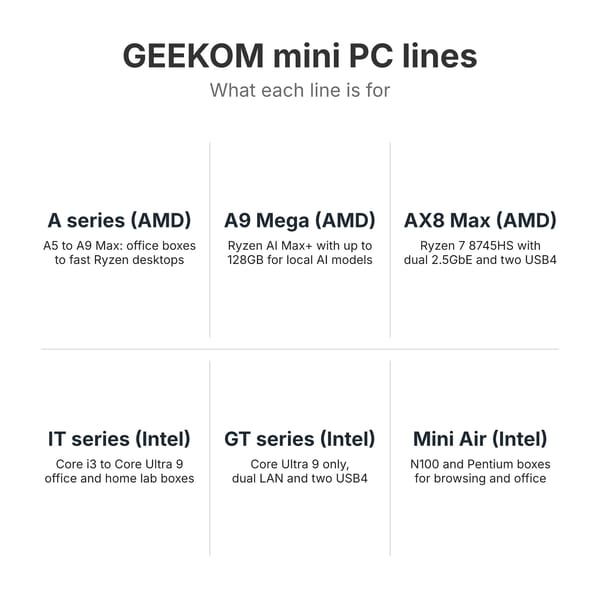
GEEKOM’s US store splits its mini PCs into an Intel menu (IT, GT, XT, and Air series) and an AMD menu (A, AE, and AX series). As of November 2026 the XT and AE menus list no products, so in practice the choice is between the A series on AMD and the IT and GT series on Intel, with Mini Air at the bottom. The number in a name tracks the chip generation inside one line, not a ranking across lines: an A6 is not newer than an IT12 in any useful sense.
GEEKOM does not publish a definition for its suffixes. A Max model usually has two 2.5GbE ports and two USB4 ports where the plain model has one of each, as with the A8 and A8 Max. Mega means a larger case, and Lite marks the cheaper Mini Air12. “Pro” is not consistent: on the old XT13 Pro and AX8 Pro it meant the Core i9 or Ryzen 9 build, while the A5 Pro is a budget Ryzen 5 box.
A series on AMD, from office boxes to the A9 Max
The A series covers most of GEEKOM’s range. At the bottom, the A5 2027 Edition and A5 Pro use 15-watt Ryzen U chips with Radeon Vega graphics and no USB4. The A5 keeps the older NUC-style case with room for a 2.5-inch drive, while the A5 Pro moves to an aluminum shell. NotebookCheck found the A5 2027 Edition silent at idle, where the fan often stops, and measured 31.5 dB(A) at most under its stress test.
The middle of the line adds newer graphics and a USB4 port. The A6 runs a Ryzen 7 6800H with Radeon 680M graphics; ETA Prime found its memory capped at 4,800 MT/s even with 5,600 sticks installed. The A7 2026 Edition uses a Ryzen 5 7545U or 7535HS in the same half-liter aluminum case as the 2024 A7. The A8 carries a Ryzen 7 8745HS, 8845HS, or Ryzen 9 8945HS with Radeon 780M graphics in a 4.4-inch square, and the A8 Max puts the same chips in a slightly larger case with two 2.5GbE ports and two USB4 ports.
The A9 Max tops the regular A series with the 12-core Ryzen AI 9 HX 370 or HX 470, Radeon 890M graphics, Wi-Fi 7, two DDR5 slots, and four USB-A ports on the front. NotebookCheck wrote that it “delivers more performance than Geekom has ever delivered in its mini PCs before” and found the fan “clearly audible at partial and full load.” The A9 Mega is a 2-liter box with a Ryzen AI Max+ 388 or 395, 64GB or 128GB of soldered LPDDR5X, and a 330-watt power adapter, built to run large language models locally.
AX and AE, the smaller AMD side lines
The AX8 Max is the one AX model GEEKOM still sells. It pairs the Ryzen 7 8745HS with two 2.5GbE ports and two USB4 ports, so on paper it overlaps the A8 Max. Alastair Jennings at TechRadar wrote that its metal chassis means “it’s equally at home in a static office setup, used in a van, or taken between locations.” Its sibling, the AX8 Pro, is sold out and no longer in GEEKOM’s AX menu, and the AE line, which held the AE7 with a Ryzen 9 7940HS, has no products listed.
IT series on Intel for offices and home labs
The IT series is GEEKOM’s mainstream Intel line, and it spans four chip generations at once. The Mini IT11 with 11th-generation Core chips is still sold as limited stock, and the Mini IT12 now ships with a Core i3-12300HE or Core Ultra 5 125U. The IT12 Max puts the 15-watt Core Ultra 5 125U in a larger case with two 2.5GbE ports and two USB4 ports, but its LPDDR5 memory is soldered and cannot be upgraded.
The IT13 Max runs the 16-core Core Ultra 9 185H with two 2.5GbE ports, two USB4 ports, Wi-Fi 7, and RS232 and RS485 headers inside. GEEKOM’s IT13 Max page lists two memory builds: 16GB of DDR5 in slots, or 24GB of soldered LPDDR5. The IT15 moves up to the Core Ultra 9 285H, with one 2.5GbE port and a second M.2 slot for a 2242 SATA drive, but no 2.5-inch bay. NotebookCheck’s IT15 review gave it 77% and called it “a worthy successor to the Mini IT13.”
GT series for Intel Core Ultra 9 desktops
The GT1 Mega uses the 185H with eight USB ports, two USB4, two 2.5GbE ports, and Wi-Fi 7, and GEEKOM also sells the same machine with 16GB of memory as the GT13 Max. The GT15 Max AI, sold on GEEKOM’s store as the GT15 Max, carries the Core Ultra 9 285H with DDR5 slots that take up to 128GB. It shares its chip with the IT15, and Liliputing’s IT15 review found that on the IT15 “throttling kicks in immediately, right from the start of the workload.”
Mini Air for browsing and office work
The Mini Air12 Lite uses an Intel N100 (GEEKOM’s store now headlines an N95 build) with a single DDR4 slot, Gigabit Ethernet, Wi-Fi 5, and no USB-C. The Mini Air12 adds two USB-C ports, a mini DisplayPort, and an SD card reader, and comes as an N100 or N150 build or as the Air12 2026 Edition with a two-core Pentium Gold 7505. Either one handles browsing, documents, and video, and neither is for photo or video editing. Our N100 vs N150 comparison covers the gap between those two chips.
How GEEKOM’s edition names work
GEEKOM keeps a model name for years and adds a year to it when the parts change. The year marks the refresh, not a faster chip, and GEEKOM does not publish a general rule for its editions. Some editions get a faster chip and some get a slower one.
The A5 started in 2023 with an eight-core Ryzen 7 5800H. The A5 2025 Edition swapped it for a six-core, 15-watt Ryzen 5 7430U that is quieter but slower, and the A5 2027 Edition, announced in September 2026, moved to an eight-core Ryzen 7 7730U. Mark Pickavance at TechRadar called the 2027 Edition “a refresh rather than a generational leap,” and NotebookCheck’s Cinebench R23 multi-core run put it at 8,790 points against 10,819 for the 5800H model, about 19% lower. GEEKOM’s A5 page still lists a 5800H configuration in its menu, so check which chip the listing names.
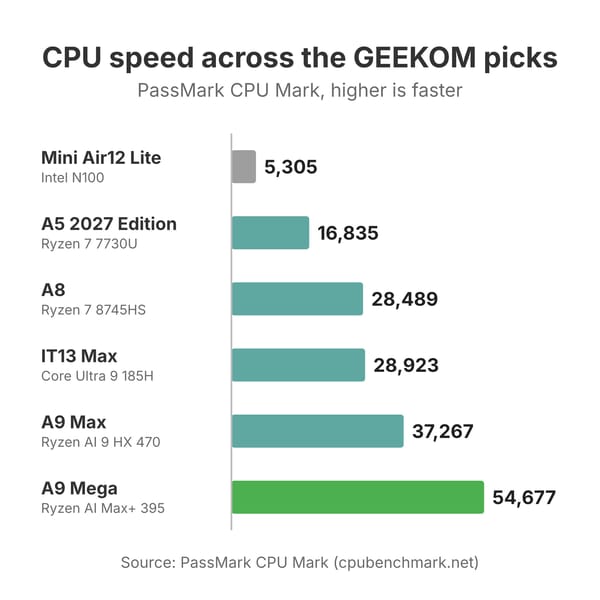
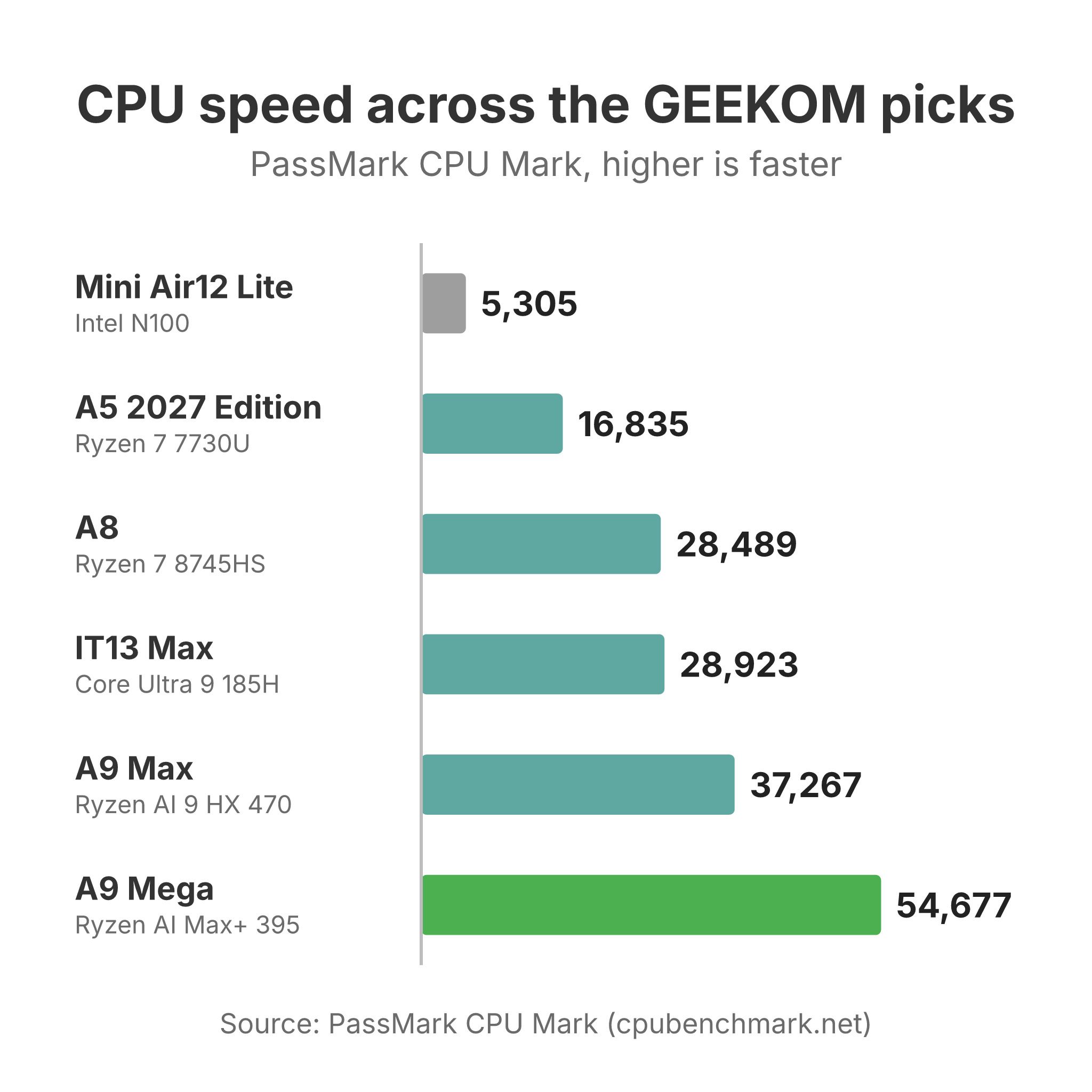
The A7 went the other way. The 2024 A7 had a Ryzen 9 7940HS; the A7 2026 Edition keeps the case and the ports but moves to a six-core Ryzen 5 7545U or 7535HS, or an eight-core Ryzen 7 7730U. CNX Software noted that “What has not changed at all are the ports.” The PassMark CPU Mark falls from about 29,700 for the 7940HS to about 19,900 for the 7545U. GEEKOM moved its old A7 web address to the 2026 Edition, so a link to “the A7” in an older review now opens a page built around the slower chips, though its configuration menu still lists a 7940HS build. The Mini Air12 followed the same path, from an Intel N100 to the Air12 2026 Edition’s Pentium Gold 7505. The A5 Pro 2026 Edition changed even less: NotebookCheck reported that it launched “with no upgrades over last version.”
Some refreshes do move forward. The A9 Max 2026 Edition added the Ryzen AI 9 HX 470 next to the HX 370, though KitGuru found its single memory stick made it slower than the two-stick 2025 model. The IT13 2026 Edition offers a Core Ultra 7 356H next to the older Core i9-13900HK. GEEKOM also moved the original IT13 to a new address as the IT13 2026 Edition and gave its old address to the IT13 Max.
A8 or A9 Max
The A8 and A9 Max sit about $860 apart at list price. The A8 has an eight-core Ryzen 8000 chip, Radeon 780M graphics, one USB4 port, one 2.5GbE port, and a single M.2 slot in a 4.4-inch square case. The A9 Max has a 12-core Ryzen AI 9, the faster Radeon 890M, two USB4 ports, dual 2.5GbE, Wi-Fi 7, two M.2 slots, and DDR5 slots that GEEKOM rates to 128GB, in a larger 5.3-inch case.
The PassMark CPU Mark puts the A9 Max’s HX 470 at about 37,200 against about 28,500 for the A8’s 8745HS, about 31% more, and the A9 Max has four more CPU cores for video exports, code builds, and virtual machines. For office work, browsing, and 1080p games with upscaling, the A8 is already fast; ETA Prime ran Spider-Man Remastered and Shadow of the Tomb Raider smoothly at 1080p with FSR on it. Both fans are audible under load. ETA Prime found the A8 held to roughly 54 to 60 watts with no BIOS control to raise it, and NotebookCheck wished for better fan control on the A9 Max. The A9 Max earns its higher price with heavy CPU work, a second SSD, or a second network port, and the A8 handles the same daily work for less.
A6 or A8
The A6 and A8 use the same size of aluminum case and similar ports, with one USB4 port, two HDMI ports, an SD reader, and 2.5GbE. The A6’s Ryzen 7 6800H is a Zen 3+ chip from 2022 with Radeon 680M graphics, and its memory runs at 4,800 MT/s. The A8’s Ryzen 7 8745HS is two generations newer, with Radeon 780M graphics, and PassMark scores it at about 28,500 against about 22,600 for the 6800H.
The A6 also has a second M.2 slot, limited to 2242 SATA drives, which the A8 lacks. At list price the A6 costs $140 less in its 16GB and 1TB build. In mid-November 2026 Amazon had no new A6 for sale, so price both before you decide. If the gap is small, the A8’s newer chip and graphics are worth it.
Older GEEKOM models
Several older GEEKOM models have left GEEKOM’s store or been replaced under the same name. The original A5 with a Ryzen 7 5800H and the A5 2025 Edition with a Ryzen 5 7430U have been replaced by the A5 2027 Edition. The 2024 A7 with a Ryzen 9 7940HS has been replaced by the 2026 Edition, whose standard builds use slower Ryzen 5 and Ryzen 7 7730U chips, and the A7 Max, with the same chip and dual 2.5GbE, is listed as sold out. The AE7 and AX8 Pro have left the AMD menus.
On the Intel side, the Mini IT13 with 13th-generation Core i5, i7, and i9 chips lives on in GEEKOM’s store as the Core i9-13900HK build of the IT13 2026 Edition. The XT line is empty: the XT12 Pro and XT13 Pro still have pages marked sold out, and the XT1 Mega has no page on GEEKOM’s US store. The GT13 Pro with 13th-generation Core chips and the IT1 Mega with Core Ultra chips are no longer listed on GEEKOM’s US store. A used A7 or GT13 Pro still makes a capable desktop or home server, but at a new-box price the current A8 and IT13 Max offer newer graphics and faster ports.
Which GEEKOM to buy for each job
A low-cost office or family PC
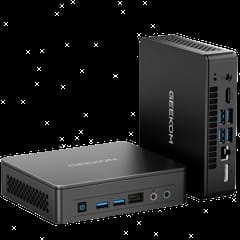
Our budget pick is the Mini Air12 Lite, an N100 box with a list price under $200. Technically Unsure measured about 11 watts at idle and 26.4 watts at peak, heard “Absolutely no noise whatsoever,” and fitted a 4TB SSD despite GEEKOM’s 1TB limit. He also noted that the stock memory and SSD come from lesser-known brands and that the Ethernet driver needs a manual install under Linux. It ships with 8GB on one DDR4 stick, has no USB-C, and tops out at 16GB, so it suits browsing, documents, and video rather than heavy multitasking. Play Retro ran GameCube games on it at twice native resolution.
GEEKOM Mini Air12 Lite
Budget PickA quiet everyday desktop
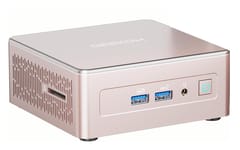
The A5 2027 Edition gives up speed to stay quiet. NotebookCheck scored it 73% and closed by calling it “A whisper-quiet, mature, and extremely reliable workhorse for everyday modern office use.” It has room for three drives: an NVMe slot, a 2242 SATA slot, and a 2.5-inch bay. Its Radeon Vega 8 graphics are locked to 512MB of memory, and Robtech found a recent racing game would not run. There is no USB4, so there is no route to an external graphics card. Review units came with two 8GB sticks, though one owner on r/MiniPCs reported a single stick, so check the listing before you buy.
GEEKOM A5 (2027 Edition)
Best ValueMost home and office desks
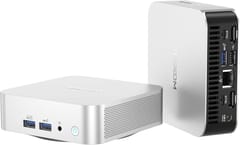
The A8 is our pick for most desks. It fits a Ryzen 7 8745HS, Radeon 780M graphics, USB4, an SD reader, and DDR5 slots up to 64GB into a 4.4-inch aluminum square that mounts behind a monitor. Juan Bagnell of SomeGadgetGuy called it “a crazy powerful little home PC.” Tech Notice measured a 92C peak under stress without throttling, and found the pads for a second M.2 slot with no connector fitted. Elevated Systems measured its Radeon 780M running 16 to 25% behind the same graphics in a Framework laptop. GEEKOM does not say whether the 16GB build uses one stick or two. If you game and yours has one, add a matching second stick, since the graphics share system memory.
An Intel box for a home lab
A home server or a developer desk that wants Intel fits the IT13 Max. It has two 2.5GbE ports for splitting networks or link aggregation, two USB4 ports, Wi-Fi 7, eight USB ports, and a second M.2 slot for SATA storage. Buy the 16GB build with DDR5 slots, which take up to 96GB; the 24GB build has soldered memory. Robtech found it loud: “fan noise under load is also high with this being the loudest mini PC out of the box from this selection of units,” with throttling at about 103C. The Core Ultra 9 185H is also two Intel generations old, and the IT15 carries the newer 285H.
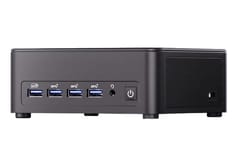
GEEKOM IT13 MAX
VersatileVideo editing, code, and virtual machines
The A9 Max is the fastest GEEKOM with memory you can upgrade. Christoph Hoffmann at PCWorld gave it an Editors’ Choice and wrote that “GEEKOM hasn’t been stingy with ports and leaves nothing to be desired.” Anthony Spadafora at Tom’s Guide counted “the most front ports I’ve seen on any PC yet.” Toasty Bros found their HX 470 sample shipped with one 32GB stick, and moving to two sticks lifted CS2 at 1080p low from 125 to 193.5 FPS. Budget for a matching second stick if your unit arrives with one. TechTablets wished for an OCuLink port for an external graphics card, and the fan is audible under load.
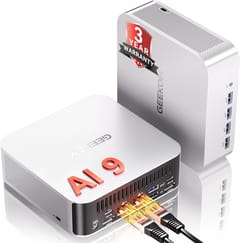
GEEKOM A9 Max
Best PerformanceLocal AI models
GEEKOM built the A9 Mega for large language models. The 128GB Ryzen AI Max+ 395 build shares its memory between the CPU and the Radeon 8060S graphics, and GEEKOM says it runs “selected quantized models up to 180B parameters.” Sven Scharpe at GameStar measured strong graphics but 40.3 decibels with the machine idle and 54 under load, and found the BIOS fan profiles changed nothing on his unit. Its memory is soldered, so buy the size you need on day one. Our local LLM mini PC guide compares it with other Ryzen AI Max+ 395 machines.
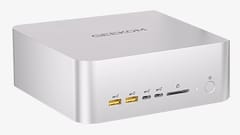
GEEKOM A9 Mega
AI CapableWarranty, support, and whether GEEKOM is a good brand
GEEKOM is registered in Shenzhen, China, and says on its About page that it runs a research team in Taiwan and a technical team in Shenzhen. Its US mini PCs carry a three-year warranty. GEEKOM’s A8 Max page describes it as one year of free replacement, two years of free maintenance, and a three-year quality guarantee, with 30-day returns. Robtech called that warranty “more than most vendors offer” in his A6 review.
Reviewers flagged fan noise on the A9 Max, IT13 Max, and A9 Mega, and Robtech rated the 8745HS A8 as “above the norm” for noise. PC Gamer’s AX8 Pro review said “the price tag is punishing”. GEEKOM’s BIOS options are also thin on several models: no TDP control on the A8, fixed graphics memory on the A5, and fan profiles that did nothing on GameStar’s A9 Mega.
Owners on r/MiniPCs report mixed support. In a May 2026 thread titled “Is Geekom a reliable brand?”, u/RabbitNo6341, who owns four GEEKOM units, wrote that after a network port failed, “they ultimately replaced the whole unit under warranty.” In the same thread, u/Cultural-Advantage97 reported an A8 that died after four months and wrote that support was offering “an A5 with half the cpu specs” in its place. A November 2026 thread from an AX8 Max owner, u/Afraid-Prior-3697, described the same pattern: with the model out of stock, GEEKOM offered a refund or an AX8 Pro with half the storage. Expect a three-year warranty that GEEKOM honors, but possibly not with the same model.
Several current configurations ship their memory as one stick, which runs it in single channel and slows the graphics. KitGuru tested the A9 Max 2026 Edition with one 32GB stick against the 2025 model’s two 16GB sticks and found the older model faster in Geekbench 6 multi-core and in games until a second stick went in, and GEEKOM told the reviewer that later units would move to two modules.
In August 2026 GEEKOM apologized after a LAN driver on an old support page for the A7, A8, AE7, AX8 Pro and other AMD models was found to carry malware. GEEKOM says no PC shipped with it installed. PCWorld advised anyone who used the download to do a clean install of Windows, and GEEKOM now points owners to its current support page or Windows Update for drivers.
Choosing a GEEKOM
For most desks the A8 gives the most for its price, with the A5 2027 Edition as the quieter and slower office box and the Mini Air12 Lite as the cheapest way into the brand. The A9 Max earns its higher price with heavy CPU work, a second SSD, or a second network port, and the IT13 Max makes sense when you want Intel and two network ports. The A9 Mega is a specialist machine for large AI models. Before you buy, read the chip name on the exact configuration, because GEEKOM reuses names across chips that are years apart. For Beelink’s range sorted the same way, see our Beelink lineup guide.


