

Minisforum sells close to 30 mini PCs at once, from a palm-sized Intel office box to a rack-mountable AI workstation, and its model names follow several schemes at the same time. An MS-01 and an MS-A2 look alike but use different chips and ports, the UM870 Slim shares one product page with the UM680 and UM760 Slim, and the 895D7 and AtomMan G1 Pro share a processor but not a case.
Current Minisforum models at a glance
Each row shows one configuration; most models come in several, and many come as a barebone with no memory, storage, or operating system. Prices are list prices, and current prices are on each product page.
| Line | Model | Chip | Build | List price |
|---|---|---|---|---|
| UM | UM890 Pro | Ryzen 9 8945HS | Barebone | $463 |
| UM | UM880 Plus | Ryzen 7 8845HS | Barebone | $351 |
| UM | UM790 Pro | Ryzen 9 7940HS | 32GB / 1TB | $780 |
| UM Slim | UM760 and UM870 Slim | Ryzen 5 7640HS or Ryzen 7 8745H | 16GB / 1TB (8745H) | $559 |
| UM | UM750 Neo | Ryzen Z1 | 16GB / 500GB | $463 |
| AI X1 | AI X1 Pro-470 | Ryzen AI 9 HX 470 | 32GB / 1TB | $1,327 |
| AI X1 | AI X1 Pro | Ryzen AI 9 HX 370 | 32GB / 1TB | $1,060 |
| AI X1 | AI X1-255 | Ryzen 7 H 255 | 16GB / 512GB | $695 |
| AI X1 | X1 Lite-255 | Ryzen 7 H 255 | Barebone | $449 |
| M | M1 Lite | Core Ultra 5 125U | 16GB / 512GB | $607 |
| M | M1 Pro | Core Ultra 5 125H or Ultra 9 285H | Barebone (125H) | $367 |
| M | M1-1390 | Core i9-13900HX | 32GB / 1TB | $767 |
| M | M2 Air-304 | Core 3 304 | Barebone | $263 |
| M | M2-356H | Core Ultra 7 356H | Barebone | $679 |
| M | M2 Pro | Core Ultra X7 358H | 32GB / 1TB | $1,439 |
| NAB | NAB5R | Core i5-13500H | 16GB / 512GB | $540 |
| NAB | NAB6 Lite | Core i5-12600H | 16GB / 512GB | $416 |
| NAB | NAB9S | Core i9-13900HK | Barebone | $399 |
| MS | MS-01 SE | Core i5-12600H | Barebone | $375 |
| MS | MS-01 | Core i9-13900H | Barebone | $679 |
| MS | MS-03 | Core Ultra 5 336H or Ultra 9 386H | Barebone (336H) | $949 |
| MS | MS-A1 | AM5 socket, Ryzen 9 9950X build | Barebone with CPU | $880 |
| MS | MS-A2 | Ryzen 9 9955HX | Barebone | $799 |
| MS | MS-02 Ultra | Core Ultra 9 285HX | Barebone | $1,159 |
| MS | MS-S1 MAX | Ryzen AI Max+ 395 | 128GB / 2TB | $3,799 |
| AtomMan | AtomMan G1 Pro | Ryzen 9 8945HX, GeForce RTX 5060 | 32GB / 1TB | $1,759 |
| D7 tower | 895D7 | Ryzen 9 8945HX | Barebone, no graphics card | $495 |
| D7 tower | 139D7 | Core i9-13900HX | Barebone, no graphics card | $495 |
To sort every Minisforum configuration by price, performance, or ports, the comparison chart opens filtered to Minisforum mini PCs. Its other filters stack on top, so you can narrow the list to Minisforum boxes with 10GbE, OCuLink, or memory you can upgrade.
How the Minisforum lines differ
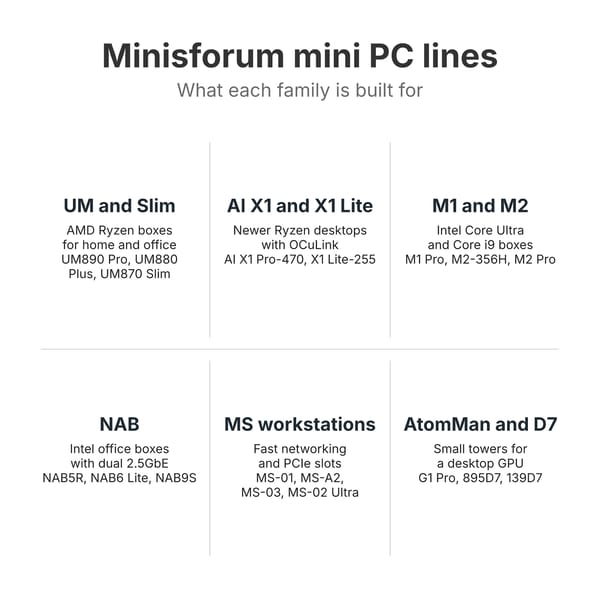
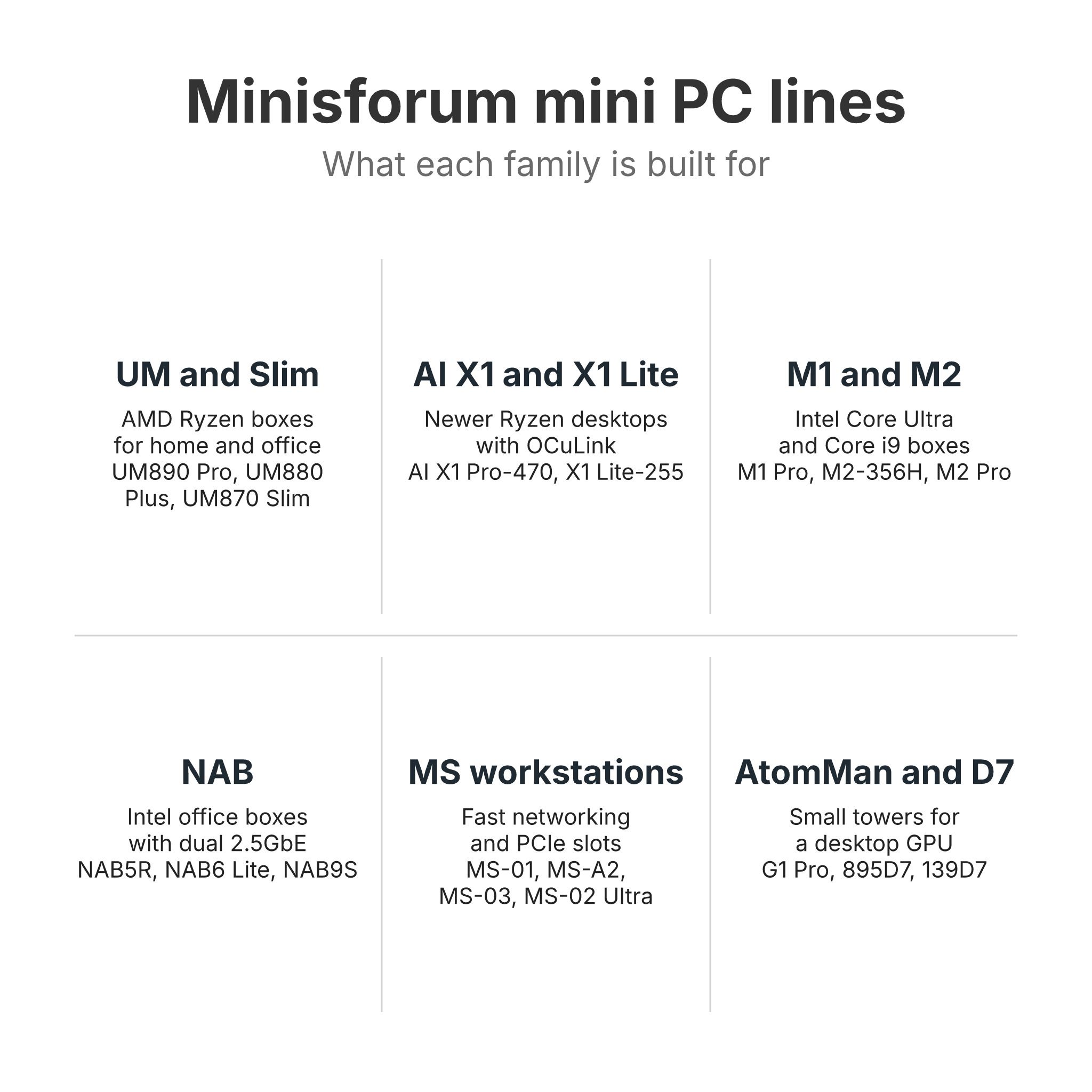
Minisforum’s US store groups its range under a “Mini Workstation Series” and plain “Mini PCs” menu, with NAS boxes and motherboards in their own menus. The model names inside those menus follow older family schemes. Names starting with UM are AMD Ryzen desktops, the AI X1 boxes are newer Ryzen desktops with more ports, M1 and M2 are Intel boxes, and NAB is an older Intel family. Names that start with MS are workstations built for home servers and expansion, while AtomMan and the D7 towers are small desktops that take a desktop graphics card.
UM and Slim boxes for home and office desks
The UM boxes are Minisforum’s mainstream AMD desktops: small square cases, an external power brick, Radeon integrated graphics, and DDR5 slots on most models. The UM890 Pro runs a Ryzen 9 8945HS with Radeon 780M graphics, two 2.5GbE ports, and memory up to 96GB. It also has an OCuLink port on the back for an external graphics card, which works once you fit the included adapter board in one of the two M.2 slots. The UM880 Plus is a 5-inch cube with a Ryzen 7 8845HS, one Ethernet port, and the same adapter arrangement. The older UM790 Pro with a Ryzen 9 7940HS is still on sale; its chip is a generation older, with the same Radeon 780M graphics.
The Slim boxes cost less. The UM760 and UM870 Slim share a plastic chassis with USB4, Wi-Fi 6E, two M.2 slots, and DDR5 to 96GB, and the current builds carry a Ryzen 5 7640HS or a Ryzen 7 8745H. The UM750 Neo uses AMD’s Ryzen Z1 handheld chip with 16GB of soldered memory that cannot be upgraded.
These boxes suit a family desktop, a home office, Linux, and light gaming on the Radeon graphics. They have one or two 2.5GbE ports and no expansion slot, so they are not the right base for a server that needs fast networking.
AI X1 and X1 Lite boxes for a newer Ryzen desktop
The AI X1 boxes carry AMD’s newer Ryzen AI and Ryzen 200 chips. The AI X1 Pro-470 and the older AI X1 Pro are tall brushed-metal boxes with a 135W power supply inside, three M.2 slots, dual 2.5GbE, and a native OCuLink port, with the Ryzen AI 9 HX 470 or HX 370 inside. The AI X1-255 and the smaller X1 Lite-255 use the Ryzen 7 H 255, which has Radeon 780M graphics and no NPU (the chip block that runs AI features in Windows). The X1 Lite-255 is about 5 inches square, takes up to 128GB of DDR5, and can be powered over its USB4 port. In an r/MINISFORUM thread, u/Barachiel80, who owns an X1 and an AI X1 Pro, explained that on the X1 “one of the 2 is occupied by the oculink adapter,” while the Pro has three NVMe slots plus “a separate connection for the oculink port.” The same owner called the graphics gap between the Radeon 780M and 890M “negligible” in most uses, because memory bandwidth holds both back. ETA Prime said the X1 Lite-255 “could turn out to be the best budget mini PC of 2026 given the specs that this thing’s rocking, price, and overall IO,” and Family Pop TV found its plastic chassis “doesn’t feel premium.”
M1, M2, and NAB boxes on Intel chips
Minisforum’s Intel desktops sit in two families. The M series is the newer one. The M1 Lite is a quiet Core Ultra 5 125U box, the M1 Pro comes with a Core Ultra 5 125H or Core Ultra 9 285H plus OCuLink and two USB4 ports, and the M1-1390 puts a 24-core Core i9-13900HX into a 7.7-inch aluminum case with no USB4 or Thunderbolt. The M2 boxes use Intel’s 2026 chips. The M2 Air-304 is a small Core 3 304 box with USB4 and two 2.5GbE ports, the M2-356H has a Core Ultra 7 356H with DDR5 slots, and the M2 Pro pairs a Core Ultra X7 358H and its Arc B390 graphics with a 10GbE port. NotebookCheck scored the M2 Pro at 88 percent and praised its “surprisingly quiet operation,” but its 32GB of memory is soldered.
The NAB boxes are older Intel desktops with a lid that opens without tools, DDR4 slots, and two 2.5GbE ports. The NAB6 Lite has a Core i5-12600H, the NAB5R a Core i5-13500H, and the NAB9S a 14-core Core i9-13900HK. Carey Holzman described the NAB9S lid: “You just push on the top like a cabinet door and you have full access to your RAM and storage.” The NAB boxes fit an office desk, a small Proxmox host, or a router build, at a lower price than the MS boxes, but their chips date from 2022 and 2023.
MS workstations for home servers
Most MS boxes have more networking than a desktop needs and an expansion slot inside the case. The MS-01 and MS-A2 have two 10G SFP+ ports (they take a fiber or copper module rather than a plain network cable), two 2.5GbE ports, three M.2 slots with U.2 support for enterprise SSDs, and a PCIe x16 slot wired at x8 for a half-height card. The MS-01 SE is a cheaper cut of the MS-01 with a Core i5-12600H, DDR4 memory, and two 2.5GbE ports in place of the SFP+ pair. The MS-03 puts Intel’s 2026 Core Ultra chips in the MS-01 case and adds a third 10GbE port.
The MS-A1 has an AM5 socket that takes a desktop Ryzen chip, limited to 100W, with four M.2 slots, OCuLink, and two 2.5GbE ports; it has no 10GbE. The MS-02 Ultra is a 4.8-liter box with a Core Ultra 9 285HX, two 25GbE SFP28 ports in its top build, and a PCIe 5.0 x16 slot. ServeTheHome said it is “really built for expandability and customization to a degree that we really have never seen in the mini PC space.” The MS-S1 MAX carries AMD’s Ryzen AI Max+ 395 with 128GB of soldered memory, dual 10GbE, and a power supply inside, in a case that fits a 2U rack.
The MS boxes draw more power and make more noise than a desktop. ServeTheHome measured the MS-01 at 25 to 29 watts at the wall at idle, and it measured the MS-A2 at about 25 watts, well above a UM desktop. Both get audible under load. An SFP+ to RJ45 adapter in those ports runs hot. u/Roltec, an MS-A2 owner, replaced the adapter with a DAC cable because “that SFP was so hot the adapter could barely be touched,” and u/Silverjerk, who ran three MS-01s in a Proxmox cluster, gave the same advice. A DAC (direct attach copper) cable or a fiber module runs far cooler than an RJ45 adapter.
AtomMan and the D7 towers for gaming
The AtomMan G1 Pro is a 3.8-liter vertical tower with a 16-core Ryzen 9 8945HX, a 350W power supply inside, and a low-profile desktop GeForce RTX 5060 or Radeon RX 9060 XT. Robtech called it “the best-looking device Minisforum has released. Period.” The 895D7 and 139D7 are larger 8.5-liter upright desktops with a PCIe 5.0 x16 slot and a 400W supply, sold barebone, with a low-profile graphics card, or with onboard graphics only. The 895D7 uses the same Ryzen 9 8945HX as the G1 Pro, and the 139D7 uses Intel’s Core i9-13900HX.
MS-01 or MS-A2
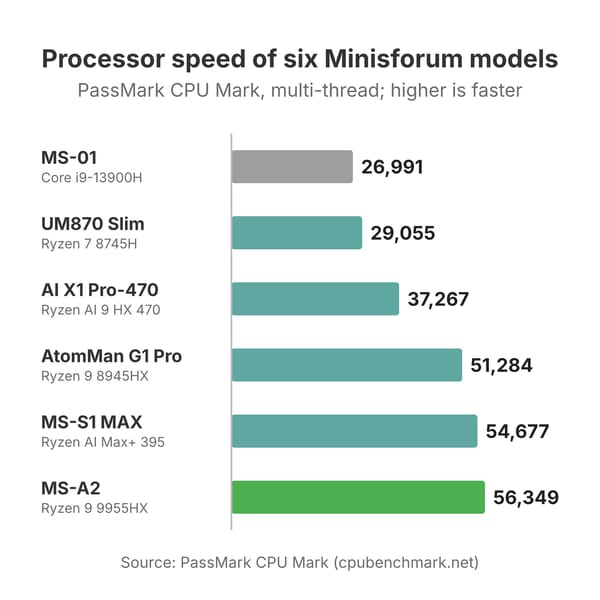
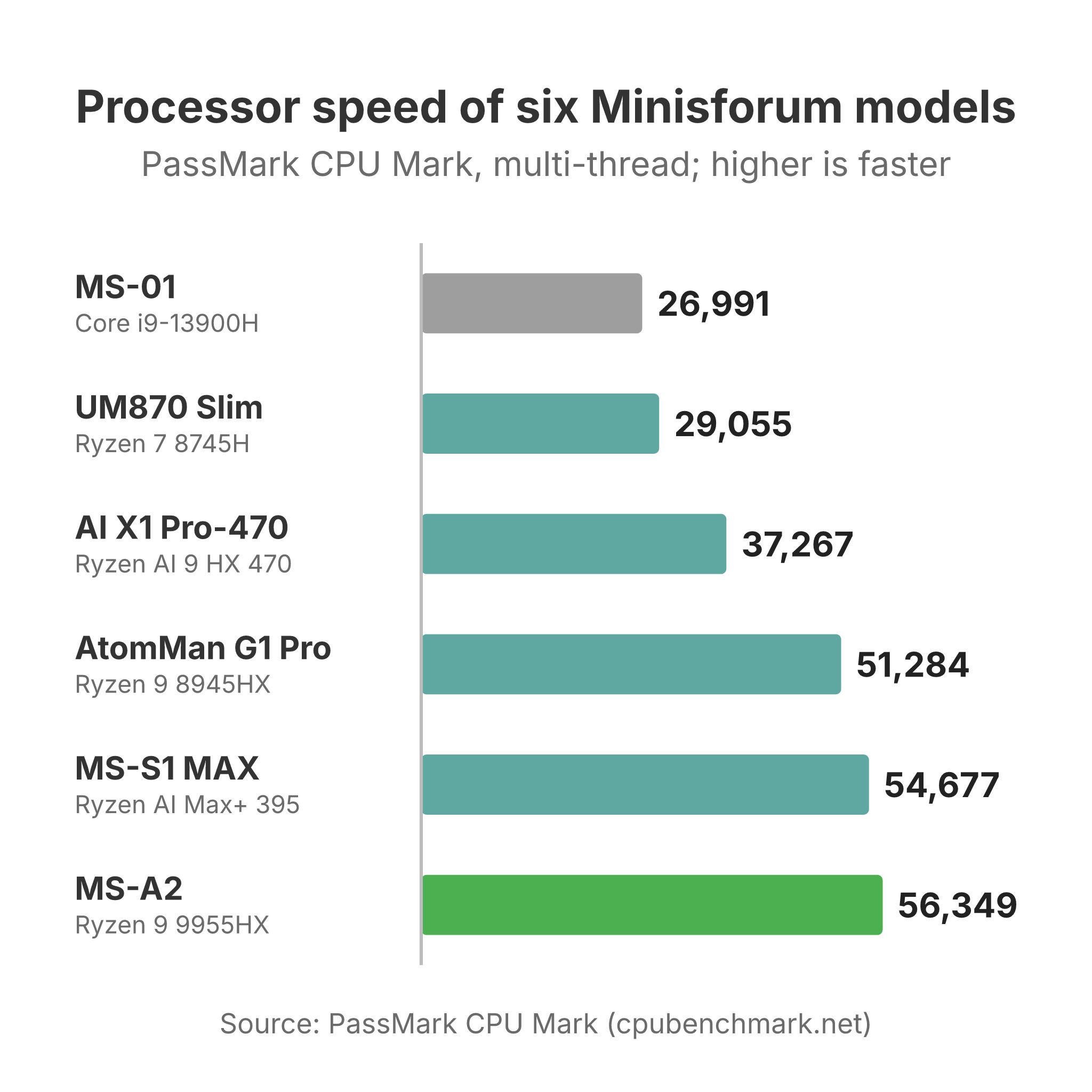
The MS-01 and MS-A2 share a chassis, the same network ports, and the same half-height PCIe slot, so the choice comes down to the chip. The MS-A2’s 16-core Ryzen 9 9955HX scores about 56,400 in PassMark’s CPU Mark against about 27,000 for the MS-01’s Core i9-13900H, and Craft Computing measured nearly 2.5 times the MS-01’s multi-core Cinebench R23 score. The MS-A2 also takes 96GB of DDR5 officially, and Level1Techs ran 128GB. For a cluster of virtual machines, the AMD box does more work per node. It also runs warmer: one owner, u/grkstyla, found the MS-A2’s BIOS limiting an M.2 slot to PCIe 3.0 with a warning that 4.0 risks overheating, and u/throwaway0204055 chose the 8945HX build for a storage-focused MS-A2, expecting the faster chip to draw more power and run hotter.
The MS-01 has two USB4 ports, and the MS-A2 has none. The MS-01’s Intel graphics support SR-IOV under Proxmox, which Wendell at Level1Techs used to share hardware video transcoding between virtual machines for Plex; the MS-A2’s Radeon 610M is weak, and NotebookCheck’s review told workstation buyers to plan on a graphics card. In an r/MiniPCs thread asking which to buy, u/MiniPCGuru wrote: “Mostly direct play? Take the MS-A2. Transcoding remote streams or 4K to 1080p? The MS-01’s Quick Sync matters more than extra cores.” An MS-01 owner in the same question on r/MINISFORUM, u/UnderSlepT-CZ-, runs “Jellyfin, Plex, Immich and Emby, all with working quick sync acceleration without the need to add another GPU.” One of the MS-01’s 2.5GbE ports uses Intel’s i226-LM, which carries vPro remote management.
The MS-03 keeps the MS-01’s Intel design but moves to Core Ultra chips and adds a 10GbE port, and Brandon Lee of VirtualizationHowto, who runs five MS-01 nodes, called it “THE evolution of the MS-01.” Robtech’s MS-03 and MS-01 comparison found the newer box better at idle power but louder under load out of the box, and its prebuilt unit shipped with a single 32GB stick that held it back until he added a second. So the MS-A2 is the box for raw CPU and 10GbE, while the MS-03 and the cheaper, older MS-01 cover Quick Sync transcoding, USB4, and vPro; the MS-01 SE drops the 10G ports to cut the price further.
UM or MS
A UM box and an MS box can cost about the same in barebone form. A UM890 Pro or UM870 Slim is a desktop: a smaller case, lower idle power, one or two 2.5GbE ports, and Radeon 780M graphics good enough for 1080p games at modest settings. An MS box is a server or workstation: 10GbE, an expansion slot, room for more drives, and a fan that runs louder.
A UM or AI X1 box suits a desk you sit at. An MS box makes sense for virtual machines or storage that run around the clock in a closet or rack. A homelab that needs only 2.5GbE can save money and power with a UM890 Pro or NAB9S instead of an MS-01.
Older Minisforum models
Minisforum used family names on earlier boxes. The Venus Series covered many of its desktops: NotebookCheck reviewed the Venus Series UM560 XT and the Venus Series NAB6 under that name. The Neptune Series held gaming boxes with a discrete laptop GPU, such as the Neptune HX99G with a Radeon RX 6600M. AtomMan began as a sub-brand, PC Games Hardware reported, and Mercury was the name on the tiny EM780.
The models below are earlier generations. On the AMD side are the UM560 XT with a Ryzen 5 5600H, the UM690S and UM690L Slim with a Ryzen 9 6900HX, the UM750L with a Ryzen 5 7545U, and the Mercury Series EM780 with a Ryzen 7 7840U. The Intel side has the UN1250, the UN1290, the Venus UN1265, the NAD9 with two 2.5-inch drive bays, the M1-1295, and the Venus Series NPB5, which Minisforum discontinued in 2025. The AtomMan X7 Ti has a small status screen, and the 795S7 is a 7-liter desktop with a Ryzen 9 7945HX and a slot for a low-profile graphics card. A used Ryzen 6000 or Intel 12th-generation box still makes a capable second PC or server, but new UM and M boxes cost about the same and bring DDR5, USB4, and newer graphics.
Which Minisforum to buy for each job
A budget desktop for office work and light games
The UM870 Slim is our budget pick, in its Ryzen 7 8745H build with 16GB and 1TB. ETA Prime found it very quiet under load, in line with Minisforum’s 35 dB rating, and got smooth frame rates in Overwatch 2 and Forza Horizon 5 at 1080p. Robtech rated its CPU and graphics strong for the price and noted that it saves a good amount over the UM790 Pro. The case is plastic, the rubber feet are glued on and the panels are tight, and Robtech found the fan loud in performance mode. Both memory slots take standard DDR5, so a 16GB build can grow later. The UM760 Slim build with a Ryzen 5 7640HS covers the same work for a little less.
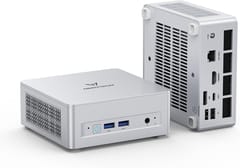
MINISFORUM UM680/UM760/UM870 Slim
Budget PickA main desktop with room to grow
For a main desk PC, we pick the AI X1 Pro-470. It has a 12-core Ryzen AI 9 HX 470, Radeon 890M graphics, three M.2 slots, two 2.5GbE ports, an OCuLink port, and the power supply inside its metal case. Alastair Jennings at TechRadar rated it 4.5 out of 5 and wrote that it “handles everything from Office to Premiere Pro and mid-weight gaming without issue.” The configured 32GB builds ship with one memory stick, and NotebookCheck found that “this single-channel configuration noticeably slows down numerous applications.” Plan on a second matching stick. Joe Rice-Jones at XDA called the HX 470 “a rehash of last generation’s HX 370,” so the older AI X1 Pro does much the same work when it costs less. For a smaller box at a lower price, the X1 Lite-255 gives up the internal power supply and some speed.
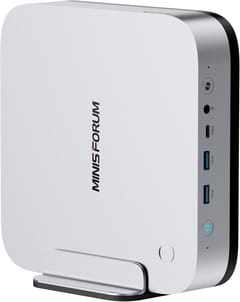
MINISFORUM AI X1 Pro-470
Editor's ChoiceA homelab or Proxmox node
Our homelab pick is the barebone Ryzen 9 9955HX build of the MS-A2. ServeTheHome called it “the absolute perfect home lab node” for many buyers and praised the tray that slides out when you push a tab. It has two 10G SFP+ ports, two 2.5GbE ports, a U.2-capable M.2 slot, and a PCIe slot for a half-height card. ServeTheHome’s written review noted that the mixed Intel and Realtek network controllers need three different drivers. Its high idle draw comes mostly from the older Intel X710 network chip. NotebookCheck scored it 65 percent for its weak graphics and throttling under long loads, and the fans are audible under heavy work. Budget for DDR5 and SSDs on top of the barebone price.
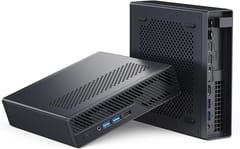
MINISFORUM MS-A2
VersatileFor more on network storage on boxes like this, see our guide to a 10GbE mini PC for a home NAS.
Gaming in a small case
The AtomMan G1 Pro is the Minisforum to buy for games at 1440p. It pairs a 16-core Ryzen 9 8945HX with a low-profile desktop GeForce RTX 5060 in a 3.8-liter tower with the power supply inside. ETA Prime measured the graphics card at 65 to 70 Celsius in 1440p games and called the performance “really great,” and Britec09 called it “probably the best mini PC that I’ve reviewed on this channel.” The configured builds ship with one 32GB memory stick, the RAM sits under the CPU cooler, and Robtech measured 47 to 50 dBA under load, so it is louder than a UM box. An owner, u/Cold-Sandwich-6213, reported “about 70ish fps on Doom Dark Ages dlss balanced, High settings” at 1440p, along with “jet engine fan speeds,” and recommended undervolting with Afterburner. The graphics card is a standard low-profile desktop card, so it can be replaced later. A Radeon RX 9060 XT build lists at the same price. Our gaming mini PC guide covers other options.
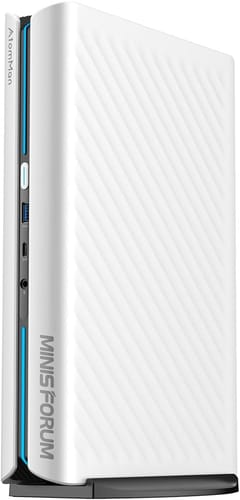
Minisforum AtomMan G1 Pro
Best PerformanceLocal AI models
The MS-S1 MAX is the Minisforum built for large language models: a Ryzen AI Max+ 395 with 128GB of soldered LPDDR5X, Radeon 8060S graphics that can use most of that memory, dual 10GbE, and USB4 V2 ports. Patrick Kennedy at ServeTheHome said it “certainly takes my top spot for my favorite AMD Ryzen AI Max Plus 395 system,” and NotebookCheck rated it 84 percent. ServeTheHome measured 9 to 12 watts at idle and about 42 to 43 dBA under load, and noted that the slot marketed as x16 is wired as PCIe 4.0 x4. TechRadar flagged the high price and audible fans under load. Cheaper Ryzen AI Max+ 395 boxes skip some of its 10GbE ports, slot, and USB4 V2 ports, so pay for this one only if you will use them. At a $3,799 list price, it only makes sense for running models locally. Our local LLM mini PC guide compares it with other Ryzen AI Max+ 395 machines, and our Beelink vs Minisforum comparison sets it beside Beelink’s GTR9 Pro.
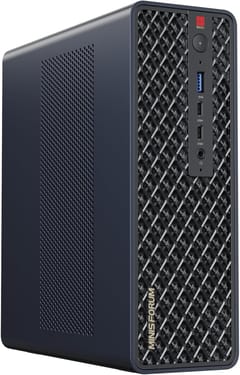
MINISFORUM MS-S1 MAX
AI CapableMemory, prices, and support
Many Minisforum models sell as a barebone with no memory or storage, which lets you reuse DDR5 you already own or buy it where it costs least. Several configured builds ship with a single memory stick: reviewers found one stick in the AI X1 Pro-470, AtomMan G1 Pro, and MS-03 (32GB) and the 895D7 (16GB). Owners report the same on the AI X1-255 and the UM890 Pro. u/Prod_Meteor found one stick in an X1-255, and u/PugBurger12 wrote of buying a 32GB UM890 and falling “into the single memory module performance trap.” A single stick halves memory bandwidth, which hurts the integrated Radeon and Arc graphics most, so add a matching second stick on day one. Our article on the DRAM price spike covers the wider market.
A few current models have soldered memory that cannot be upgraded: the MS-S1 MAX, the M2 Pro, and the UM750 Neo. Buy those with the memory you will need for years. The other current models in the table use memory slots.
Minisforum’s US policy covers orders from its own store and excludes products bought through Amazon and other marketplaces, which go back to the seller. One owner, u/evolvingwax, wrote that Minisforum “didn’t repair my MS-01 they just gave me purchase credit for an Ms-02.” Our Beelink vs Minisforum comparison covers the warranty terms, BIOS updates, and owner repair reports in detail.
Choosing a Minisforum
For a desk, start with the UM870 Slim if price matters most and the AI X1 Pro-470 if you want a faster box with an internal power supply and room for three SSDs. For a server, the MS-A2 gives the most CPU and 10GbE per node, the MS-03 is the newer Intel choice with USB4, and the NAB9S or UM890 Pro is enough when 2.5GbE will do. Step up to the AtomMan G1 Pro only for a desktop graphics card and to the MS-S1 MAX only for large AI models. Whichever you pick, check whether the build ships with one memory stick or two, and buy from Minisforum’s own store if the full warranty matters to you.


