
GMKtec sells more than 30 mini PC models at once, and its names follow a loose pattern at best. A G10 and a G11 Plus share a 2019 Ryzen chip, the K17 is slower than the K12, and the EVO line runs from a 4-inch box to a $6,799 workstation. GMKtec’s own five series are the better way to sort them.
Current GMKtec models at a glance
Each row shows one main configuration; most models come in several. Prices are list prices, and current prices are on each product page. The M3 Pro S sells through Amazon rather than GMKtec’s own store.
| Line | Model | Chip | RAM and storage | List price |
|---|---|---|---|---|
| G | NucBox G3 | Intel N100 | 8GB / 256GB | $179.99 |
| G | NucBox G3 Plus | Intel N150 | 16GB / 512GB | $329.99 |
| G | NucBox G3S | Intel N95 | 8GB / 256GB | $249.99 |
| G | NucBox G3 Ultra | Pentium Gold 7505 | 16GB / 512GB | $299.99 |
| G | NucBox G3 Pro | Core i3-10110U | 16GB / 512GB | $289.99 |
| G | G5S (NucBox 5) | Celeron N5095 | 8GB / 128GB | $229.99 |
| G | G10 | Ryzen 5 3500U | 16GB / 512GB | $329.99 |
| G | G11 | Ryzen Embedded R2514 | 16GB / 512GB | $399.99 |
| G | G11 Plus | Ryzen 5 3500U | 16GB / 512GB | $399.99 |
| M | NucBox M2 Pro S | Core i7-1185G7 | 16GB / 512GB | $459.99 |
| M | NucBox M3 | Core i5-12450H | 16GB / 512GB | $399.99 |
| M | NucBox M3 Pro | Core i5-13500H | 32GB / 1TB | $679.99 |
| M | M3 Pro S | Core i5-13420H | 16GB / 512GB | $460.00 |
| M | NucBox M5S | Ryzen 3 5400U | 16GB / 512GB | $379.99 |
| M | NucBox M5 Ultra | Ryzen 7 7730U | 16GB / 512GB | $449.99 |
| M | M6 Ultra | Ryzen 5 7640HS | 16GB / 512GB | $499.99 |
| M | M7 Ultra | Ryzen 7 PRO 6850U | 16GB / 512GB | $559.99 |
| M | M8 | Ryzen 5 PRO 6650H | 16GB / 512GB | $389.99 |
| K | NucBox K7 Plus | Core i7-13620H | 32GB / 1TB | $629.98 |
| K | K10 | Core i9-13900HK | 32GB / 1TB | $599.99 |
| K | NucBox K8 Plus | Ryzen 7 8845HS | 32GB / 1TB | $919.99 |
| K | NucBox K11 | Ryzen 9 8945HS | 32GB / 1TB | $999.99 |
| K | K12 | Ryzen 7 H 255 | 32GB / 1TB | $919.99 |
| K | NucBox K13 | Core Ultra 7 256V | 16GB / 1TB | $739.99 |
| K | NucBox K15 | Core Ultra 5 125U | 32GB / 1TB | $719.99 |
| K | NucBox K16 | Ryzen 7 7735HS | 32GB / 512GB | $619.99 |
| K | NucBox K17 and K17 Plus | Core Ultra 5 226V or Ultra 7 258V | 16GB / 512GB | $599.99 |
| EVO | EVO-X1 | Ryzen AI 9 HX 370 | 32GB / 1TB | $1,149.99 |
| EVO | EVO-X1 Pro | Ryzen AI 9 HX 470 | 64GB / 1TB | $1,599.99 |
| EVO | EVO-X2 | Ryzen AI Max+ 395 | 128GB / 2TB | $3,649.99 |
| EVO | EVO-X3 | Ryzen AI Max+ 395 | 128GB / 2TB | $3,799.99 |
| EVO | EVO-X5 Pro | Ryzen AI Max+ PRO 495 | 192GB / 2TB | $6,799.00 |
| EVO | EVO-T1 | Core Ultra 9 285H | 64GB / 1TB | $949.99 |
| EVO | EVO-T2 | Core Ultra X7 358H | 64GB / 1TB | $2,399.99 |
| NEO | NEO-X1 Pro | Ryzen 9 9955HX3D and RTX 5070 | 64GB / 2TB | $3,199.99 |
To sort every GMKtec configuration by price, performance, or ports, the comparison chart opens filtered to GMKtec mini PCs. Its other filters stack on top, so you can narrow the list to GMKtec boxes with OCuLink or with memory you can upgrade. GMKtec’s store also sells the K9 (Core Ultra 5 125H), the M3S (Core 3 304), and the M10 (Ryzen 5 6600H).
How the GMKtec lines differ
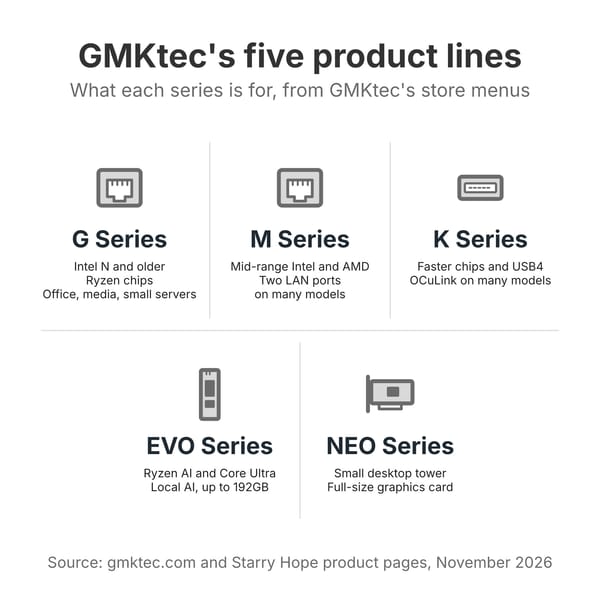
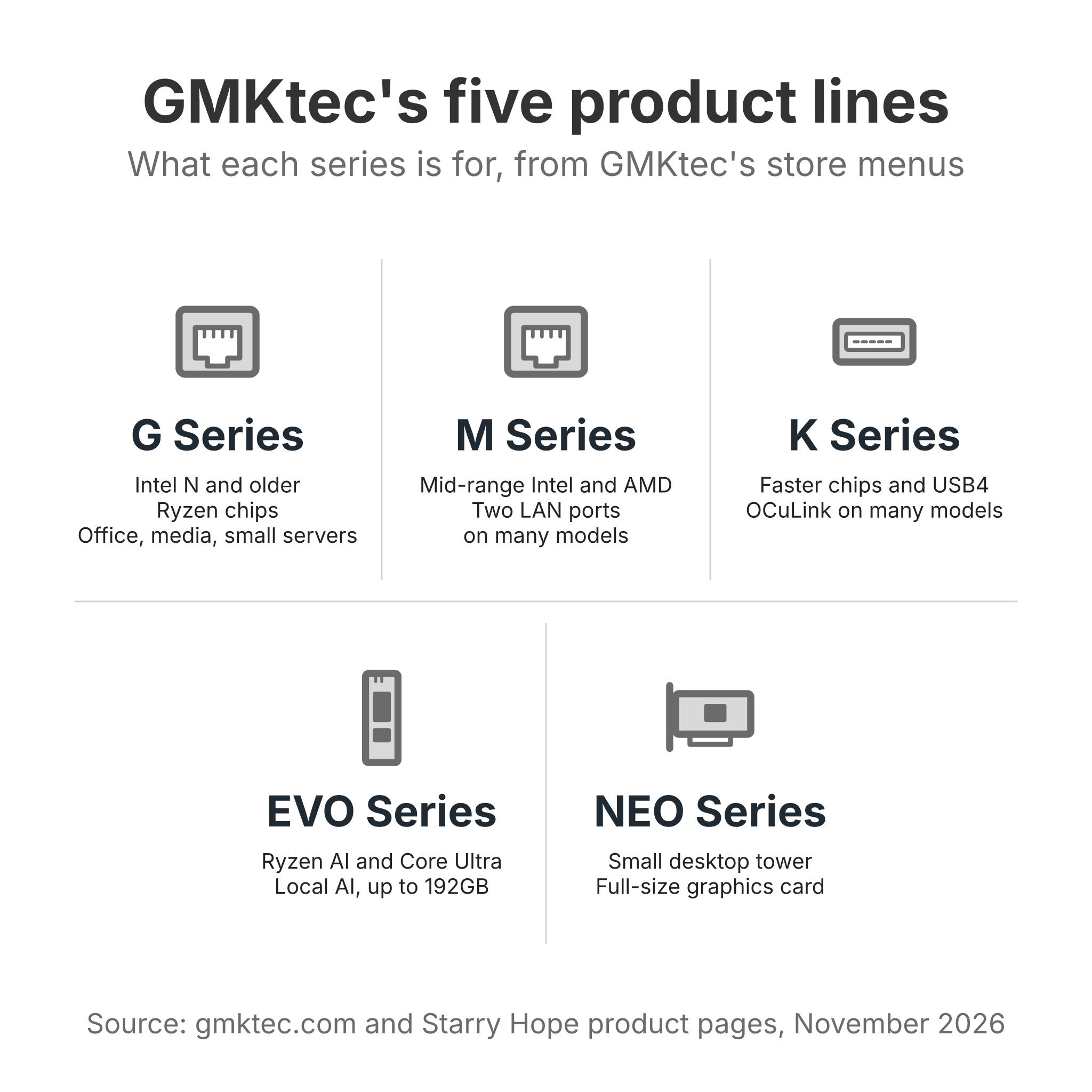
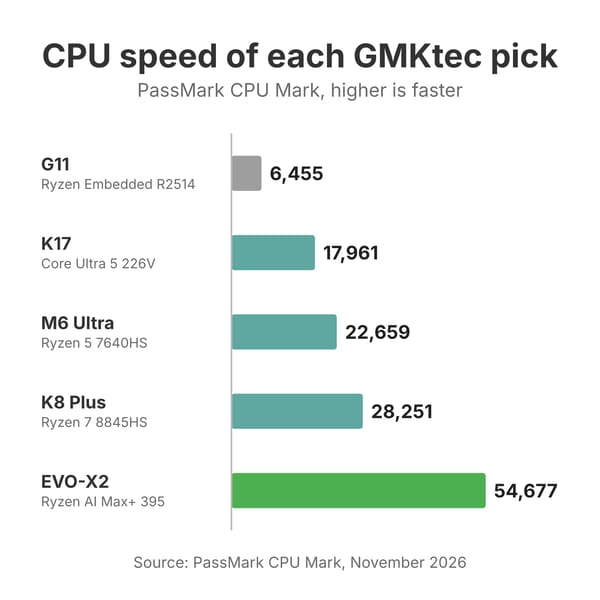
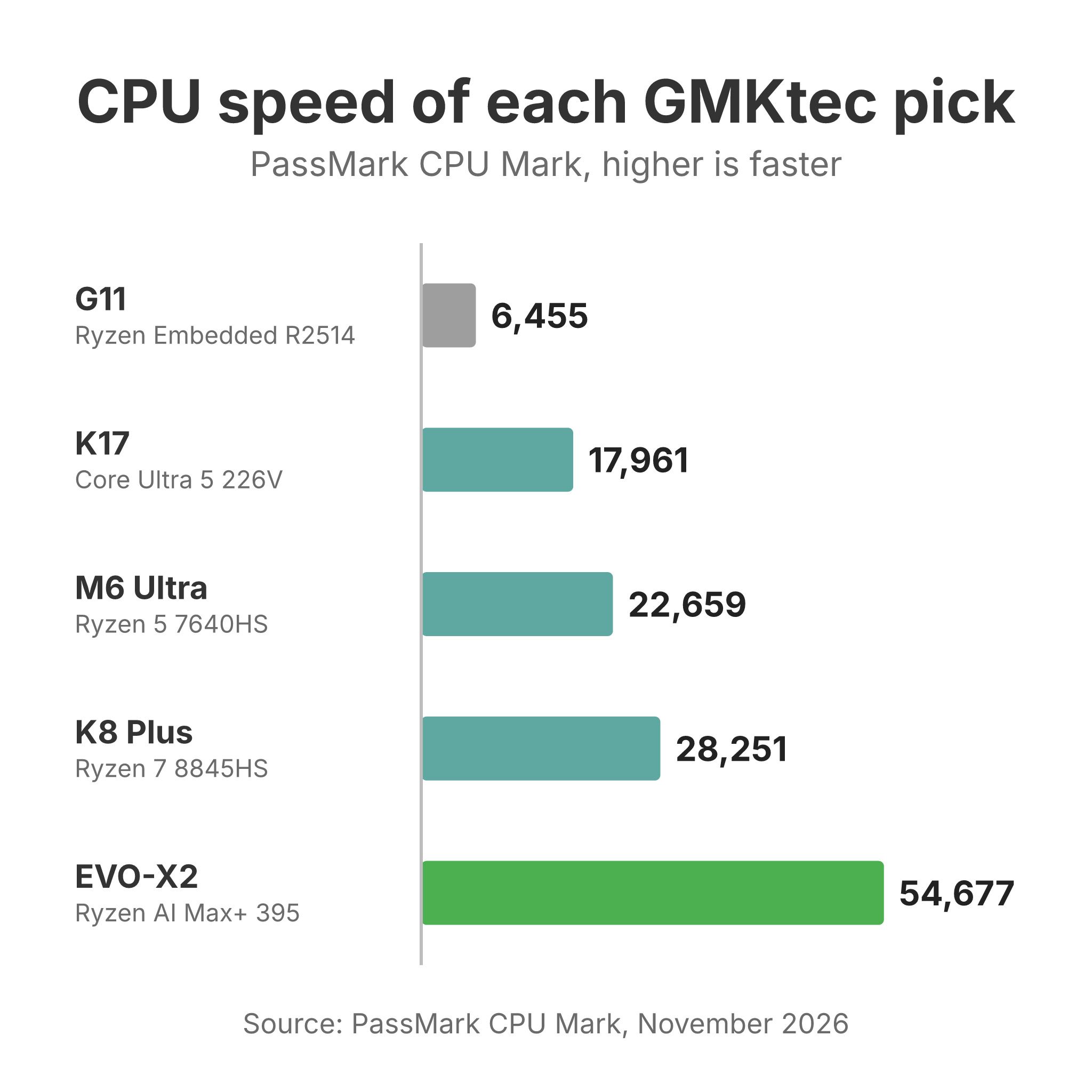
GMKtec’s store sorts its PCs into five menus: the G Series, M Series, K Series, EVO Series, and NEO Series. The letter is the useful part of the name. A higher number does not mean a faster machine. The M8 uses an older chip than the M6 Ultra, and the K17’s Core Ultra 5 226V scores below the K12’s chip in PassMark’s CPU Mark. Suffixes are loose too. “Plus,” “Pro,” “Ultra,” and “S” can mean a faster chip, a slower one, or a different case, so read the chip column, not the name.
G boxes for office work, media, and small servers
The G series holds GMKtec’s cheapest machines. The NucBox G3 runs an Intel N100 and the G3 Plus an N150, both with 2.5GbE and a second M.2 slot. The G3S drops to an N95 with Gigabit Ethernet and Wi-Fi 5, and the G5S is the palm-sized NucBox 5 case with a Celeron N5095. The G3 Ultra uses a two-core Pentium Gold 7505 with soldered memory, which scores close to the N100 and N150 in PassMark’s CPU Mark. The G3 Pro puts a 2019 Core i3-10110U in the G3 case and takes up to 64GB of memory.
The AMD side of the line uses older Ryzen chips. The G10 and G11 Plus carry the Ryzen 5 3500U, a 2019 laptop chip, and the G11 uses the Ryzen Embedded R2514, a chip from the same family that AMD rates for round-the-clock use. Both G11 models add two 2.5GbE ports, which suits a router or a small storage server. The G10 ships with the BIOS in a balanced mode that holds the chip to 15 watts. Robtech found that “The G10 is only worth using in performance mode at all times,” and in that mode it became “one of the loudest budget minis under load.”
Browsing, office documents, video, and an always-on home server are the work these boxes do. None of them is a gaming machine, and the Intel N boxes have a single memory slot or soldered memory.
M boxes for everyday desks and home labs
Mid-range M boxes use faster laptop chips, and most have two M.2 slots; the AMD models add two 2.5GbE ports. The M6 Ultra has the fastest chip in the line, a six-core Ryzen 5 7640HS with Radeon 760M graphics and two DDR5 slots. The M5 Ultra (Ryzen 7 7730U) and M5S (Ryzen 3 5400U) share one case with two memory slots and two Ethernet ports, and they cost less. The M7 Ultra and M8 take Ryzen 6000 chips and add USB4 and an OCuLink port, a direct PCIe link for an external graphics card; the M8 has soldered memory.
The Intel M boxes are single-Ethernet machines for office desks. The M3 uses a 12th-generation Core i5-12450H, the M3 Pro a Core i5-13500H with DDR4 slots, and the M2 Pro S an 11th-generation Core i7-1185G7. The M3 Pro S has three M.2 slots, but its 16GB of memory is soldered.
On the AMD M boxes, two Ethernet ports, memory slots, and a second SSD slot make them a fit for a home lab as well as a desk. The M6 Ultra’s case is plastic, and Elevated Systems measured its fan at 49.6 dBA in performance mode.
K boxes for gaming, external GPUs, and quiet Intel desks
The K series holds GMKtec’s faster machines, and it splits into two groups. The AMD group is the gaming and expansion half. The K8 Plus (Ryzen 7 8845HS) and K11 (Ryzen 9 8945HS) share one case with two USB4 ports, two 2.5GbE ports, a front OCuLink port, and memory slots up to 96GB. The K12 is a bigger box with a Ryzen 7 H 255, three M.2 slots, and the OCuLink port on the back, and the K16 puts an older Ryzen 7 7735HS with 32GB of soldered memory and OCuLink in a smaller aluminum case.
The Intel group leans toward quiet, low-power desks. The K17 and K17 Plus use Intel’s Lunar Lake chips, the Core Ultra 5 226V and Core Ultra 7 258V, with the memory built onto the processor package. NotebookCheck’s Sebastian Bade measured 27.4 to 28.6 dB(A) under load in a room at 25.1 dB(A). The K13 is a long, flat Lunar Lake box with 5GbE, and the K15 pairs a Core Ultra 5 125U with OCuLink, three M.2 slots, and memory slots. The K7 Plus is a 13th-generation Core i7-13620H box with USB4 and two 2.5GbE ports, and the K10 is a larger Core i9-13900HK box with a COM port.
EVO boxes for local AI and heavy work
Most EVO models target large language models run at home. The EVO-X2 and EVO-X3 use AMD’s Ryzen AI Max+ 395 with up to 128GB of soldered memory that the Radeon 8060S graphics can share. The X2 is an upright box with one 2.5GbE port; the X3 is a tall, thin metal case that adds OCuLink. The EVO-X5 Pro moves to the Ryzen AI Max+ PRO 495 with 192GB of memory, up to 160GB of it assignable to the graphics, four USB4 ports, and two 10GbE ports.
The rest of the EVO line is smaller. The EVO-X1 (Ryzen AI 9 HX 370) and EVO-X1 Pro (Ryzen AI 9 HX 470) are boxes about 4 inches square with soldered memory and OCuLink. On the Intel side, the EVO-T1 pairs a Core Ultra 9 285H with memory slots up to 128GB, three M.2 slots, and OCuLink, and the EVO-T2 uses a Panther Lake Core Ultra X7 358H with 64GB of soldered memory, one 10GbE port, and one 2.5GbE port.
The NEO gaming tower
The NEO-X1 Pro is a 14.6-liter desktop that pairs a liquid-cooled Ryzen 9 9955HX3D laptop chip with a full-size desktop RTX 5070, with a power supply inside and standard memory, SSDs, and graphics card that you can swap. A NEO-X1 build with a Ryzen 9 9955HX and an RTX 5060 Ti lists for less. Buy it as a small gaming desktop; at its size it shares little with the rest of GMKtec’s line.
GMKtec K8 Plus vs K11 vs K12
The K8 Plus and K11 share a case and almost every port. The K11’s Ryzen 9 8945HS boosts higher than the K8 Plus’s Ryzen 7 8845HS, but PassMark puts them about 3% apart (29,126 against 28,251), and the K11’s top fan has an RGB light that Robtech found “can’t be turned off.” The K12’s Ryzen 7 H 255 scores 28,290, level with the K8 Plus, though it lacks the 8845HS’s NPU, the AI accelerator that some Windows features use.
| K8 Plus | K11 | K12 | |
|---|---|---|---|
| Chip | Ryzen 7 8845HS | Ryzen 9 8945HS | Ryzen 7 H 255 |
| PassMark CPU Mark | 28,251 | 29,126 | 28,290 |
| USB4 ports | 2 | 2 | 1 |
| OCuLink | Front | Front | Back |
| M.2 slots | 2 | 2 | 3 (two at x2 speed) |
| Size | 5.2 x 5 x 2.3 in | 5.2 x 5 x 2.3 in | 6.1 x 5.9 x 3.1 in |
| List price, 32GB / 1TB | $919.99 | $999.99 | $919.99 |
In an r/MiniPCs thread comparing the K12 and K8 Plus, u/felixfurtak wrote that “the K12 is physically much bulkier, but runs quieter,” with a third SSD slot and the OCuLink port on the back, which is “better position if you want to run an EGPU,” while the K8 Plus “has Intel NICs which are slightly better in terms of software support than the realtec NICs on the K12.” Another owner of both, u/Retrosceptic, found them “very similar” in games, with the K8 Plus getting “a few more FPS.” Robtech’s review found the opposite at idle, where he called the K12’s fan noise “louder than most minis.”
On the K11, u/Retired_Hillbilly336, who owns a K8 Plus and has helped set up many K11s, wrote that the 8945HS “runs higher processor and integrated graphics boost clocks which can generate a little extra heat even at the same TDP power curve,” and that the RGB case fans “don’t seem to hold up as well” as the plain fan in the K8 Plus. At list price the K8 Plus is the better buy of that pair, and the K11 makes sense only when a sale brings it level. The K12 suits a desk with room for a larger box, where a third SSD and a rear OCuLink port for a graphics dock matter more than size. Our Beelink vs GMKtec guide sets the K8 Plus and K12 against Beelink’s SER8 and SER9 Pro+.
Older GMKtec models
These models no longer appear in GMKtec’s store menus, though some still sell through Amazon and other retailers. The G side has the NucBox G2 (Intel N100) and G2 Plus (N150), two tiny boxes with 12GB of soldered memory and two Gigabit Ethernet ports; the palm-sized NucBox G5 with an N97; and the NucBox KB7 with a Pentium Silver N6005. The original NucBox 5 with a Celeron N5105 shares a page with the G5S.
The older M boxes are the NucBox M2 (Core i7-11390H), the M3 Ultra (Core i7-12700H), the NucBox M4, a flat 11th-generation Core i9-11900H box with a 2.5-inch drive bay, the NucBox M5 Plus (Ryzen 7 5825U), the NucBox M6 (Ryzen 5 6600H), and the NucBox M7 and M7 Pro, Ryzen 6000 boxes with OCuLink. The older K boxes are the K1 (Ryzen 7 6800H), NucBox K2 (Ryzen 7 7735HS), NucBox K3 Pro (Core i7-12650H with soldered memory), and NucBox K6 (Ryzen 7 7840HS). The NucBox K4 with a Ryzen 9 7940HS is no longer sold.
The K4 and K6 carry the same Radeon 780M graphics as the K8 Plus and still make good used buys. The older Intel and Ryzen 5000 boxes are better kept as second PCs or small servers, since the M6 Ultra’s Radeon 760M graphics outclass theirs at a similar list price.
Which GMKtec to buy for each job
A small home server or router
The G11 is our budget pick for an always-on box. It has two 2.5GbE ports, two M.2 slots, and two DDR4 memory slots, and Lon Seidman of Lon.TV measured about 11 to 12 watts at idle. In his video review he said it would suit a small Docker container server and “performs well for the price point,” but it dropped frames in 4K 60fps YouTube video, and its graphics are too weak for current games. His blog post names two preinstalled AI apps, one of them a local AI client entirely in Chinese, and advises “a fresh installation of Windows or a move to a Linux distribution upon receiving the device.” The memory tops out at 32GB, and the M.2 slots run at PCIe 3.0. For a desk instead of a closet, Lon Seidman found the N150 G3 Plus “practically silent even when the system is under load.”
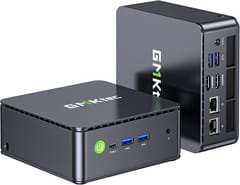
GMKtec G11
Budget PickAn everyday desktop or first Linux PC
The M6 Ultra is our pick for most desks. It has a six-core Ryzen 5 7640HS, Radeon 760M graphics, two DDR5 slots, two Gen 4 M.2 slots, USB4, and two 2.5GbE ports, so the build you buy is not the one you are stuck with. Elevated Systems called it “the real sweet spot,” and NotebookCheck gave it 77%. Elevated Systems measured 49.6 dBA under load in the 50-watt performance mode, and 36.1 dBA in the 35-watt quiet mode, where its Office benchmark score came out slightly higher. Set the quiet mode in the BIOS on day one. The case is plastic, it has no OCuLink port, and Lon.TV advised against it for a Plex server that has to transcode, since Plex favors Intel chips for that work, though he said it serves media inside the home well. Our Linux mini PC guide covers other boxes that run Linux well.
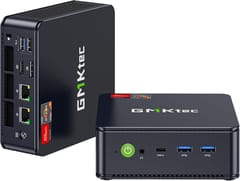
GMKtec M6 Ultra
Editor's ChoiceA quiet office desk
The K17 is the GMKtec to buy when silence matters more than raw speed. Lon Seidman said, “This is by far one of the quietest mini PCs with a fan that I’ve ever heard,” and NotebookCheck’s review concluded that it “impresses with its efficiency and low noise level,” with 4.7 to 9.6 watts at idle. It has a metal case, full-function USB4, 2.5GbE, and a spare M.2 slot wired for PCIe 5.0. Its 16GB of memory is built onto the Core Ultra 5 226V and can never change, and its eight threads trail the AMD boxes in heavy multi-core work. Robtech found the bundled SSD throttling under sustained load. The K17 Plus doubles the memory to 32GB with a Core Ultra 7 258V.
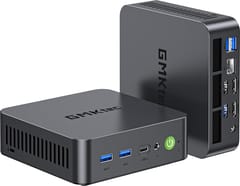
GMKtec NucBox K17
Most CompactLight gaming, an external GPU, or a home lab
The K8 Plus has the most to plug into. It pairs a Ryzen 7 8845HS and Radeon 780M graphics with two USB4 ports, two 2.5GbE ports, an OCuLink port for a graphics dock, and memory slots up to 96GB. Lon Seidman confirmed both 2.5GbE ports ran near full speed. Robtech found that its performance mode “adds a lot of extra fan noise for not a whole lot of extra performance,” and its Wi-Fi range was weak in his test, so plan on Ethernet if the router is far away. The K8 Plus costs more than the M6 Ultra at list, and the extra money buys the second USB4 port, OCuLink, and a faster chip. Our OCuLink and USB4 guide explains the graphics dock options, and our gaming mini PC guide covers other gaming boxes.
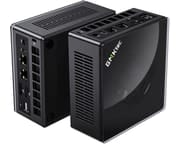
GMKtec Nucbox K8 PLUS
Best PerformanceLocal AI models
The EVO-X2 is the lower-priced way into GMKtec’s Ryzen AI Max+ 395 machines. NotebookCheck’s review headline called it “one of the best mini PCs of 2025,” and GMKtec’s drivers and FAQ page explains how to set the graphics memory split in the BIOS, up to 96GB on 128GB units. Robtech warned that “it’s not a quiet mini PC at all,” and it has one 2.5GbE port where some rivals have 10GbE. The memory is soldered, so buy the 128GB build if large models are the goal. The EVO-X3 adds OCuLink in a thinner case for $150 more at list, and the EVO-X5 Pro is the step up to 192GB. Our local LLM mini PC guide and Strix Halo guide compare it with other machines on the same chip.
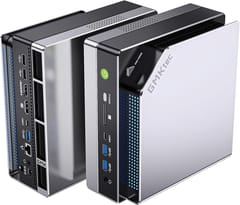
GMKtec EVO-X2
AI CapableIs GMKtec a good brand?
GMKtec’s whole-unit warranty runs one year, with two more years on components such as memory and the SSD, and buyers pay to ship a unit in for repair; our Beelink vs GMKtec guide covers the terms in detail.
Owners on r/MiniPCs have posted about the factory thermal paste. In a repaste thread, one K12 owner, u/Infinite_Ouroboros, described “sub par paste and spread from factory.” In the K11 thread, u/Retired_Hillbilly336 called GMKtec’s stock paste “meh,” especially in performance mode. Not every owner sees it: u/Quadgie wrote in the same thread that they had not run into heat problems “with 10+ GMKtec machines.” The bundled SSD can also vary. u/joshuamarius, who sets up mini PCs for clients, posted benchmarks of an M8 drive they called “the lowest quality and speed that I have seen so far,” and said of recent orders, “It’s unpredictable what you will get.”
On returns, the reports are mixed. In a thread about a refund from GMKtec’s German store, the poster got the money back only after a PayPal appeal. In the same thread, u/LBTRS1911, who buys computers for a company, wrote, “I’ve purchased probably 20 GMKtec mini pc’s and have not had a return yet,” and u/Retired_Hillbilly336 said returns and real defects among the GMKtec owners they help “have been lite compared to other Chinese NUC brands.” Buying through a retailer with a simple return window, such as Amazon, avoids most of that friction.
Choosing a GMKtec
The M6 Ultra in its quiet mode suits most desks, and the K17 trades memory for near silence. The G11 fits a low-power server in a closet. The K8 Plus earns its higher price with OCuLink, a second USB4 port, and a faster chip, and an EVO makes sense only for large AI models. Check the memory type on the product page before you buy, because the K13, K16, K17, M3 Pro S, M8, G3 Ultra, G5S, and every EVO except the T1 have soldered memory. On any GMKtec, put the BIOS power mode where you want it, check the temperatures in the first week, and keep the box inside its return window until you are sure.


